Freedom251 › Network Configuration Management Software
Unimus
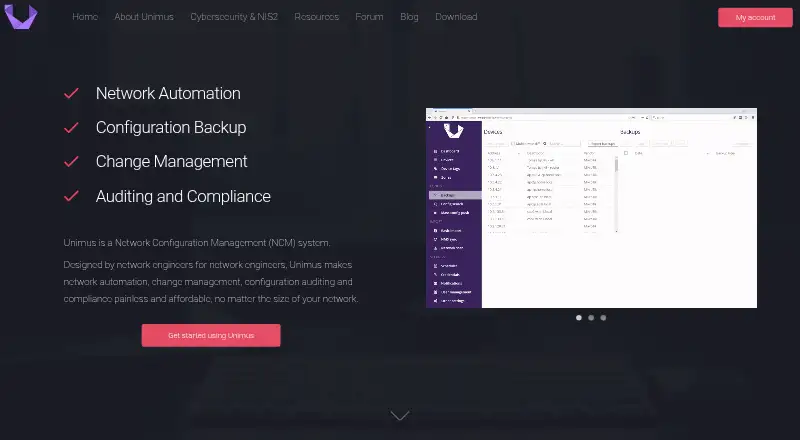
What Unimus is
Unimus is an on-premises network configuration tool for backups, change management, auditing, compliance, and automation. It automatically backs up device configurations and retains versioned history; graphical comparisons help show configuration changes. Teams can schedule network-wide deployments and set configuration or runtime-data pulls to run on a schedule or trigger. Change notifications can go through email, Pushover, or Slack, and a REST API supports integrations with other tools and workflows. Unimus says it supports more than 400 device types from over 150 vendors, and it can synchronize inventory with monitoring systems such as LibreNMS, Nautobot, NetBox, NetXMS, Observium, PRTG, and Zabbix. The product is deployed on-premises, with configuration data staying in the customer’s network. Listed access controls include role-based permissions, LDAP and RADIUS, multi-factor authentication, and system access history. The Free plan costs nothing for 10 devices, with no time limit and Community support; it includes all features except Compliance and SAML/OIDC. Offline Mode is available on Unlimited licenses, not Per-Device licenses.
Who it suits
Unimus suits teams managing network-device configurations that want local deployment, versioned backups, change tracking, or scheduled automation. The free plan is limited to 10 devices and excludes Compliance and SAML/OIDC.
What it does well
- Backs up configurations and keeps versioned history.
- Graphical diffs show configuration changes.
- Supports more than 400 device types.
- Offers scheduled network-wide configuration deployment.
- Free plan has no time limit.
What to know first
- Free plan covers 10 devices.
- Free plan excludes Compliance and SAML/OIDC.
- Offline Mode is unavailable on Per-Device licenses.
Limits
The Free plan is limited to 10 device licences and excludes Compliance and SAML/OIDC. Offline Mode is not supported for Per-Device licenses; it is available on the Unlimited license tier.
Plans
| Plan | Billed and limits | Price |
|---|---|---|
| Free | Free for 10 devices; no time limitations · 10 device licences · Community support · All features except Compliance and SAML/OIDC | Free |
| Advanced | Billed yearly; per device · Up to 1,000 devices · 8/5 phone support · Includes Compliance and SAML/OpenID/OIDC | On request |
| Unlimited Advanced | Annual pricing; unlimited devices · Unlimited devices · 24/7 phone support · Compliance · SAML/OpenID/OIDC · Enterprise Contract | On request |
| Standard | Billed yearly; per device · Up to 1,000 devices · Email support · All features except Compliance and SAML/OIDC | On request |
| Unlimited Standard | Annual pricing; unlimited devices · Unlimited devices · 8/5 phone support · Offline Mode · Excludes Compliance and SAML/OIDC | On request |
As unimus.net lists them, read 30 Sept 2026. The maker's own page has the final word.
Getting started
- Open the Unimus website.
- Choose the Free plan for up to 10 devices, or review the listed paid tiers.
- Deploy Unimus on-premises.
- Connect supported network devices and, if needed, a listed monitoring system.
Unimus is network configuration management software for teams that need to back up devices, review changes, and automate configuration work. It suits organizations that want those controls on their own infrastructure, especially across mixed-vendor networks. The trade-off is that some important capabilities, including air-gapped operation, sit behind higher-tier licensing.
Overview
Unimus brings configuration backup, change management, auditing, compliance, and automation together in an on-premises deployment. Its stated support for more than 400 device types from over 150 vendors makes it a credible option for networks that span multiple manufacturers. Keeping configuration data inside the customer’s network is a practical advantage for teams that need local control over that data, though it also means choosing and operating an on-premises system rather than a cloud service.
Security controls include application-layer encryption for sensitive database data; device credentials and API tokens use AES-128-CBC with a user-defined key. Unimus also lists role-based access control, LDAP and RADIUS support, multi-factor authentication, and system access history. Its stated coverage includes ISO 9001:2015, ISO 22301:2019, ISO/IEC 27001:2022, and PCI DSS Merchant Compliance.
Key features
- Backups and configuration history: Automatic backups and versioned history give administrators a record of prior configurations, useful for reviewing changes or restoring an earlier state.
- Change visibility and integrations: Graphical diffs make configuration changes easier to inspect, while a REST API supports integration with other tools and workflows. Inventory synchronization and integrations with systems including LibreNMS, Nautobot, NetBox, NetXMS, Observium, PRTG, and Zabbix can help connect configuration management to existing monitoring and inventory processes.
- Notifications: Change alerts through email, Pushover, or Slack give teams several ways to surface configuration activity.
- Automation: Scheduled, zero-touch network-wide deployments can reduce repeated manual work. Scheduled or triggered pulls of configuration and runtime data extend automation beyond backups.
- Compliance: Compliance auditing is part of the product, but it is excluded from the Free and Standard plans. Teams that need it must choose an eligible higher tier.
Pricing
Unimus uses a freemium model. Paid-plan prices are custom pricing; the published billing terms and caps still help distinguish which tier is likely to fit.
- Free — free: Free for 10 devices, with no time limit, community support, and all features except Compliance and SAML/OIDC. It is a useful way to manage a small network, but the fixed device cap and community-only support make it a limited choice for larger or support-dependent deployments.
- Standard — custom pricing: Billed yearly per device, up to 1,000 devices, with email support. It includes all features except Compliance and SAML/OIDC. This suits teams that need paid deployment scale and email support but do not need those excluded capabilities.
- Advanced — custom pricing: Billed yearly per device, up to 1,000 devices, with 8/5 phone support, Compliance, and SAML/OpenID/OIDC. It is the per-device option for organizations that need compliance features or those identity protocols, with phone support during stated business coverage.
- Unlimited Standard — custom pricing: Annual pricing for unlimited devices, 8/5 phone support, and Offline Mode; Compliance and SAML/OIDC are excluded. It addresses scale and air-gapped operation, but is not the fit for teams that require the excluded features.
- Unlimited Advanced — custom pricing: Annual pricing for unlimited devices, 24/7 phone support, Compliance, SAML/OpenID/OIDC, and an Enterprise Contract. It is the broadest stated tier for organizations that need unrestricted device scale and round-the-clock phone support.
Offline Mode is available only on Unlimited licenses and is not supported for Per-Device licenses. That makes the choice consequential for air-gapped environments: the Free and per-device plans are not suitable if offline operation is a requirement.
Platforms
Unimus is available for Linux, Windows, web, and API use, with self-hosted deployment. Its on-premises model keeps configuration data within the customer’s network; it is not presented as a cloud-hosted deployment.
Who it's for
Unimus is a strong fit for network teams managing many device types that want scheduled backups, change visibility, and deployment automation under local control. Monitoring integrations and a REST API make it more useful when configuration workflows need to connect with existing systems. Smaller teams can start with the 10-device free plan, while compliance, SAML/OIDC, higher support coverage, or air-gapped operation call for the relevant paid tiers.
It is a weaker fit for organizations seeking a cloud-first service, or for air-gapped teams unwilling to license an Unlimited tier. The Free plan also offers no paid-tier phone support and stops at 10 devices.
Pros and cons
- Pro: Support for more than 400 device types across over 150 vendors is a meaningful advantage for mixed-vendor networks.
- Pro: Versioned backups, graphical diffs, notifications, and scheduled deployment cover several linked configuration-management tasks in one on-premises product.
- Pro: The permanent 10-device free plan lets small environments use all features except Compliance and SAML/OIDC without a time limit.
- Con: Air-gapped operation requires an Unlimited license, putting Offline Mode beyond the Free and per-device tiers.
- Con: The Free tier is capped at 10 devices and provides community support only, which limits its role as a growing deployment’s long-term plan.
- Con: Compliance and SAML/OIDC are withheld from both Free and Standard, so teams needing either must move to an Advanced tier.
Alternatives
ManageEngine Network Configuration Manager is worth comparing if mobile platform support or a separate free edition matters: it supports Android and iOS as well as Linux, self-hosted, web, and Windows, and its Free Edition covers two devices.
Netpicker may suit a team looking for a free option with unlimited network devices: its Foundation plan is free for life, limited to a single user, and provides professional features for 10 devices.
Oxidized is a free, Apache-2.0 licensed, self-hosted alternative for teams that want software they can run themselves without a paid plan.
rConfig offers a no-device-limit Core plan that is MIT-licensed and runs on the customer’s hardware, making it a candidate for teams prioritizing those terms.
Arista NG Firewall is a freemium web-based product with a free plan for basic security and connectivity features.
NetKeep is another free, self-hosted Linux option, licensed under AGPL-3.0 for amd64 or arm64 servers.
Infoblox Cloud Network Automation uses token-based licensing, with tokens purchased as an allowance over an agreement term and pricing available by contacting Infoblox.
Motadata ObserveOps Log Monitoring is a paid alternative with annual subscription and perpetual licensing options.
For more options, browse Network Configuration Management Software.
Verdict
Choose Unimus if you need on-premises configuration backups, clear change records, and network-wide automation across a varied device estate. Its mix of version history, integrations, access controls, and a permanent 10-device free tier gives teams room to assess the product at small scale. Look elsewhere if you require air-gapped operation without an Unlimited license, or if a cloud-first deployment is essential.
Verdict
Unimus brings configuration backup, change visibility, and automation to an on-premises deployment. Its free plan covers 10 devices, while Offline Mode requires an Unlimited license.
Questions
Is Unimus free?
Yes. The Free plan costs nothing and covers 10 devices with no time limitation.
What does the Free plan include?
It includes Community support and all features except Compliance and SAML/OIDC.
Where does Unimus run?
It is deployed on-premises. Listed platforms are API, Linux, self-hosted, web, and Windows.
Can Unimus integrate with monitoring systems?
Yes. Listed integrations include LibreNMS, Nautobot, NetBox, NetXMS, Observium, PRTG, and Zabbix.
What support do paid plans list?
Standard lists email support. Advanced per-device and Unlimited Standard list 8/5 phone support, while Unlimited Advanced lists 24/7 phone support.
Which plan includes Offline Mode?
Unlimited Standard lists Offline Mode. Offline Mode is not supported for Per-Device licenses.
Facts from Unimus's own pages
- Access controls
- Unimus lists role-based access control, LDAP and RADIUS support, multi-factor authentication, and system access history. · unimus.net, 30 Sept 2026
- Automation
- It supports scheduled, zero-touch network-wide configuration deployment and scheduled or triggered configuration and runtime data pulls. · unimus.net, 30 Sept 2026
- Backups
- It automatically backs up network device configurations and keeps versioned configuration history. · unimus.net, 30 Sept 2026
- Certifications
- The security page states coverage under ISO 9001:2015, ISO 22301:2019, ISO/IEC 27001:2022, and PCI DSS Merchant Compliance. · unimus.net, 30 Sept 2026
- Change tracking
- It tracks configuration changes, displays graphical diffs, and provides a REST API for integration with other tools and workflows. · unimus.net, 30 Sept 2026
- Deployment
- Unimus is deployed on-premises, and its product page says configuration data stays in the customer’s network. · unimus.net, 30 Sept 2026
- Device support
- Unimus says it supports over 400 device types from more than 150 vendors. · unimus.net, 30 Sept 2026
- Headquarters
- Slovakia · unimus.net, 23 Sept 2026
- NMS integrations
- The product page describes inventory synchronization with monitoring systems, and the documentation lists integrations including LibreNMS, Nautobot, NetBox, NetXMS, Observium, PRTG, and Zabbix. · wiki.unimus.net, 30 Sept 2026
- Notable limit
- Offline Mode for air-gapped deployments is available on the Unlimited license tier and is not supported for Per-Device licenses. · unimus.net, 30 Sept 2026
- Notifications
- Configuration change notifications can be sent through email, Pushover, or Slack. · unimus.net, 30 Sept 2026
- Platforms
- The site says Unimus can be deployed on Windows, Linux, or Unix, and describes a web GUI; its download page offers multiple distributions for different operating systems and platforms. · unimus.net, 30 Sept 2026
- Product
- Unimus provides network configuration backup, change management, auditing, compliance, and automation. · unimus.net, 30 Sept 2026
- Security
- The security page says sensitive database data is encrypted at the application layer and device credentials and API tokens use AES-128-CBC with a user-defined key. · unimus.net, 30 Sept 2026
- Support
- The listed paid tiers offer email support, with phone support listed as 8/5 for Advanced per-device and Unlimited Standard and 24/7 for Unlimited Advanced. · unimus.net, 30 Sept 2026