Freedom251 › Network Configuration Management Software
Oxidized
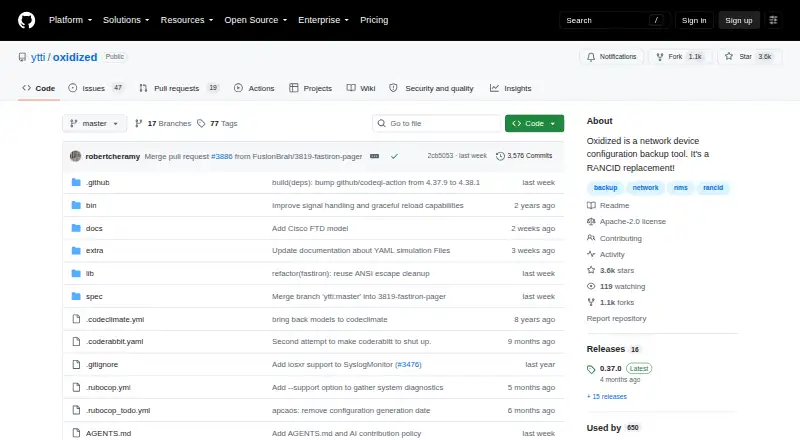
What Oxidized is
Oxidized is a free, self-hosted tool for backing up network device configurations and is described as a RANCID replacement. It supports over 130 operating system types, with SSH and Telnet among its documented input methods. Node data can come from CSV, SQLite, MySQL or HTTP sources. Backup outputs include files, Git, Git-Crypt and HTTP; Git records a commit for each configuration change, while Git-Crypt encrypts configuration pushes using git-crypt. Oxidized adjusts its threads to meet a configured retrieval interval. Its REST API can list nodes, fetch configurations, display versions and differences, reload nodes or move a node to the front of the queue. Syslog examples can trigger a fetch after a configuration change. The web interface and API are provided by the optional oxidized-web gem, disabled by default and configured for port 8888 by default. A remove_secret option strips sensitive data before storage. The software uses Apache License 2.0, and the project says it is maintained by very few people and invites more participation.
Who it suits
Oxidized suits network administrators who need scheduled or event-triggered configuration backups and can run self-hosted software. Its API and optional web interface may also suit teams that need to inspect nodes, versions and differences.
What it does well
- Supports over 130 operating system types.
- Git output records a commit for each configuration change.
- REST API can fetch configurations and show differences.
- Syslog examples can trigger configuration fetches.
- Git-Crypt output encrypts configuration pushes.
What to know first
- The web interface and API are disabled by default.
- The web interface requires the optional oxidized-web gem.
- The project says it is maintained by very few people.
Limits
The optional oxidized-web gem is disabled by default. The project says it is currently maintained by very few people.
Plans
| Plan | Billed and limits | Price |
|---|---|---|
| Oxidized | Apache-2.0 licensed software · self-hosted | Free |
As github.com lists them, read 2 Oct 2026. The maker's own page has the final word.
Getting started
- Open the Oxidized GitHub project.
- Choose an installation route: Debian or Ubuntu, Rocky Linux or RHEL, FreeBSD, Docker, or Podman.
- Configure node data using CSV, SQLite, MySQL, or HTTP.
- Set up an input method such as SSH or Telnet and choose a backup output.
- Install and configure the optional oxidized-web gem if you need its web interface and API.
Oxidized is a self-hosted network-device configuration backup tool for teams that want to manage collection and storage on their own infrastructure. The trade-off is that the web interface is optional and the project is maintained by a very small group.
Overview
Oxidized backs up and compares device configurations, with support for more than 130 operating system types. The project describes it as light and extensible, and its Apache 2.0 license permits no-charge use subject to its terms. That combination suits organizations seeking control over deployment without a software license fee, provided they can handle the work of running and configuring it themselves.
SSH and Telnet are documented input methods. Oxidized adjusts its worker threads to meet the configured retrieval interval, a useful way to align collection capacity with the schedule. For event-driven collection, a syslog UDP or file example can catch IOS or JunOS changes and trigger a fetch; the REST API can also move a node to the front of the queue.
Key features
Flexible inventory and storage
Node sources include CSV, SQLite, MySQL, and HTTP, so teams can use a straightforward file, a database, or an external source. Output choices include File, Git, Git-Crypt, and HTTP. Git commits each configuration change, giving teams a usable history for comparisons without a separate change-recording step. Git-Crypt encrypts configuration pushes using git-crypt, while the remove_secret option strips sensitive data before storage. These controls help, but they do not replace careful decisions about credentials, access, and where backups are kept.
API and optional web interface
The REST API can list nodes, reload them, fetch configurations, show versions and diffs, and move a node to the head of the queue. That makes Oxidized useful for workflows that need to inspect or prompt collection programmatically. The REST API and web interface come through the optional oxidized-web gem, which is disabled by default and uses port 8888 by default. Teams wanting a ready-to-use web console should account for configuring and enabling this component.
Integrations and deployment
Hooks support GitHub repository pushes and notifications through AWS SNS, Slack, Cisco Spark, and XMPP. Installation guidance covers Debian or Ubuntu, Rocky Linux or RHEL, and FreeBSD, as well as Docker and Podman. This range gives infrastructure teams deployment flexibility, though the project’s small maintainer group is a meaningful consideration for organizations that depend on ongoing upstream support.
Pricing
Oxidized is free: the Oxidized plan costs nothing and is Apache-2.0 licensed software for self-hosted deployment. It includes configuration backup, comparison, and scheduled backups. There is no paid tier or trial to weigh; the practical cost is in operating and maintaining the software and its deployment.
Platforms
Oxidized is available for Linux and self-hosted deployment, with an API and optional web interface. Documented installation options include several Linux distributions, FreeBSD, Docker, and Podman. It is an on-premises tool rather than a hosted service.
Who it's for
Oxidized is best for network teams comfortable managing their own software who need scheduled backups, configuration comparisons, and a choice of inventory and storage backends. Its API and event-triggered collection are especially useful where backup actions need to fit into existing operational workflows. Teams that need a supported managed service or a polished web interface enabled out of the box should consider other options.
Pros and cons
- Pros: Supports more than 130 operating system types, giving mixed-device environments broad stated coverage.
- Pros: CSV, database, and HTTP sources plus four output types let teams shape inventory and backup storage around their environment.
- Pros: Git change commits, configuration comparisons, and API actions provide practical tools for reviewing and responding to changes.
- Pros: Free, self-hosted use and Apache 2.0 licensing avoid a software license charge.
- Cons: The web component is optional and disabled by default, so teams must enable and configure it if they want that interface.
- Cons: The project says it is maintained by very few people, a concern for teams relying on a small upstream maintainer group.
- Cons: Self-hosting puts deployment and ongoing operation on the adopting team.
Alternatives
Choose ManageEngine Network Configuration Manager if you want a freemium option with a free trial and support across Android, iOS, Linux, self-hosted, web, and Windows; its free edition is limited to two devices. Unimus may fit better if you need a free option capped at 10 devices with community support and all features except Compliance and SAML/OIDC. Netpicker is worth comparing for its free Foundation plan, which covers unlimited network devices with a single user and professional features for 10 devices. RANCID is the direct alternative for teams considering another free network-configuration backup tool. rConfig offers a free Core plan with no device limit, MIT licensing, and hardware-based deployment. Arista NG Firewall is a different option focused on basic security and connectivity features. NetKeep is another free self-hosted option for Linux servers. Gluware may suit teams seeking a free community edition with a one-year renewable term and a 20-device limit.
For a broader set of options, see Network Configuration Management Software.
Verdict
Oxidized is a strong choice for technically capable network teams that want free, self-hosted configuration backups with flexible sources, Git-based history, and API-driven collection. Its breadth and control are the main reasons to choose it; the optional web component and very small maintainer group are the clearest reasons to look elsewhere.
Verdict
Oxidized provides multiple node sources and backup outputs, with API actions for inspecting configurations and versions. Its web interface is optional, and the project notes that its current maintainer group is small.
Questions
How much does Oxidized cost?
The Oxidized plan is free.
Is Oxidized open source?
Yes. It is licensed under Apache License 2.0, which grants worldwide no-charge copyright and patent licenses subject to its terms.
Where can I install or run it?
The README documents Debian or Ubuntu, Rocky Linux or RHEL, FreeBSD, Docker, and Podman. Oxidized is self-hosted.
What devices and inputs does it support?
The project says it supports over 130 operating system types. SSH and Telnet are documented input methods.
Where can backups be stored?
Supported outputs are File, Git, Git-Crypt, and HTTP. Git commits each configuration change, and Git-Crypt encrypts configuration pushes using git-crypt.
Is a web interface included?
The optional oxidized-web gem provides the REST API and web interface. It is disabled by default and configured for port 8888 by default.
Facts from Oxidized's own pages
- Backup outputs
- Supported output backends include File, Git, Git-Crypt, and HTTP; Git creates a commit when a configuration changes. · github.com, 2 Oct 2026
- Change-triggered backups
- The REST API can move a node to the head of the queue to schedule a configuration fetch after an event such as a syslog message. · github.com, 2 Oct 2026
- Change triggers
- A syslog UDP and file example can catch IOS or JunOS configuration changes and trigger a configuration fetch. · github.com, 1 Oct 2026
- Data sources
- Supported source backends are CSV, SQLite, MySQL and HTTP. · github.com, 1 Oct 2026
- Device support
- The project says it supports over 130 operating system types. · github.com, 2 Oct 2026
- Encrypted output
- The Git-Crypt output backend encrypts configuration pushes using the git-crypt tool. · github.com, 2 Oct 2026
- Input methods
- Documented input methods include SSH and Telnet. · github.com, 2 Oct 2026
- Installation
- The README documents installation on Debian or Ubuntu, Rocky Linux or RHEL, and FreeBSD, as well as running with Docker or Podman. · github.com, 2 Oct 2026
- Integrations
- Hooks support GitHub repository pushes, AWS SNS, Slack, Cisco Spark and XMPP notifications. · raw.githubusercontent.com, 1 Oct 2026
- License
- The repository identifies Oxidized as licensed under Apache License 2.0. · github.com, 2 Oct 2026
- Maintenance
- The README says Oxidized is maintained by very few people and asks users and companies to contribute. · github.com, 2 Oct 2026
- Node sources
- Supported source backends include CSV, SQLite, MySQL, and HTTP. · github.com, 2 Oct 2026
- Purpose
- Oxidized is a network device configuration backup tool and a RANCID replacement. · github.com, 2 Oct 2026
- REST API
- The optional oxidized-web extension provides a REST API for listing nodes, fetching configurations, reloading the node list, and viewing versions and diffs. · github.com, 2 Oct 2026
- Scale
- The project describes Oxidized as light and extensible and says it supports over 130 operating system types. · github.com, 1 Oct 2026
- Scheduling
- Oxidized automatically adjusts its worker threads to meet the configured retrieval interval. · github.com, 2 Oct 2026
- Secret handling
- A remove_secret option runs model filters to strip configured sensitive values, such as SNMP community strings, before storing configurations. · github.com, 2 Oct 2026
- Storage outputs
- Supported outputs are File, GIT, GIT-Crypt and HTTP; GIT creates a commit for each configuration change. · github.com, 1 Oct 2026
- Support
- The project points users to Gitter, GitHub, and the LibreNMS community forum for help and support. · github.com, 2 Oct 2026
- Web interface
- The RESTful API and web interface are provided by the optional oxidized-web gem, disabled by default and configured on port 8888 by default. · raw.githubusercontent.com, 1 Oct 2026