Freedom251 › AI DevOps Assistants
UniDeploy
What UniDeploy is
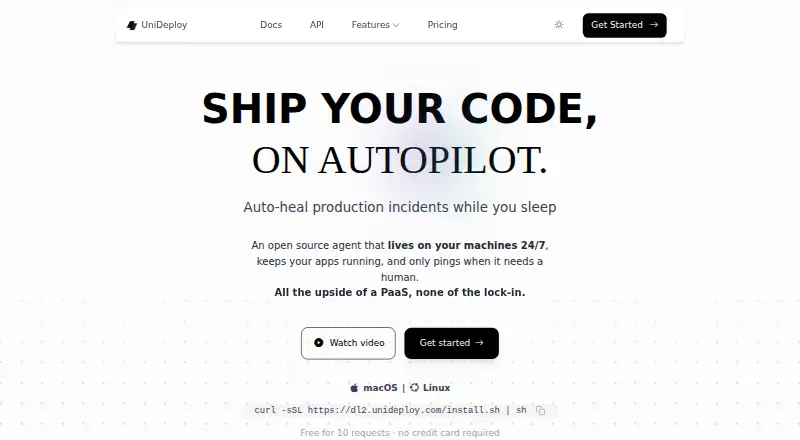
UniDeploy is an AI-powered DevOps CLI that runs on a user’s machine and manages cloud infrastructure through natural-language commands. A single CLI supports AWS, Azure, and GCP, with tools for EC2 instances, Lambda functions, S3 storage, CloudWatch logs and metrics, and RDS databases. Its cost optimizer identifies unused Elastic IPs, unattached volumes, and idle resources. The security scanner checks security groups for vulnerabilities and open ports and offers recommendations. UniDeploy can run commands on EC2 through AWS Systems Manager without SSH access. The site names ServiceNow and Jira for incident management, and lists compatibility with models including Bedrock, Anthropic, OpenAI, Gemini, and Ollama. An MCP server lets compatible clients such as Claude Desktop call its DevOps tools. The CLI supports Linux, macOS, and Windows WSL. The Free plan includes 10 AI requests; Most Popular costs $15 a month and lists unlimited AI requests and 24/7 infrastructure monitoring. Users bring their own model and pay its provider directly for usage.
Who it suits
It suits DevOps teams managing resources across AWS, Azure, or GCP through a command line. It may also suit users who want to connect incident tools or MCP-compatible clients to DevOps operations.
What it does well
- One CLI supports AWS, Azure, and GCP
- Can run EC2 commands without SSH access
- Scans security groups and finds idle resources
- MCP server supports compatible clients
- Free plan includes full CLI access
What to know first
- Free plan includes 10 AI requests
- Users bring their own model and pay its provider
- Windows support is listed for WSL
Limits
The free plan includes 10 AI requests and community support. The $15 a month plan lists unlimited AI requests, 24/7 infrastructure monitoring, and email support; model usage is paid to the model provider separately.
Plans
| Plan | Billed and limits | Price |
|---|---|---|
| Free /forever | 10 free AI requests · bring your own model · full CLI access · community support · no credit card required | Free |
| Most Popular | $15 /month · Unlimited AI requests · bring your own model · full CLI with 30+ DevOps tools · 24/7 infrastructure monitoring · email support · cancel anytime | $15 a month |
As unideploy.com lists them, read 30 Sept 2026. The maker's own page has the final word.
Getting started
- Visit the UniDeploy website.
- Choose the Free plan or the $15 a month plan.
- Install and run the CLI on Linux, macOS, or Windows WSL.
- Use your own supported AI model; pay its provider directly for usage.
- Connect compatible MCP clients if you want them to call UniDeploy DevOps tools.
Overview
UniDeploy is an AI-powered DevOps CLI that lets operators manage cloud infrastructure with natural-language commands from their own machine. It suits teams working across AWS, Azure, and GCP that want operational, security, and cost tools in one interface. The breadth is useful, but the free tier’s 10 AI requests make it a short runway for regular work.
Key features
One CLI covers EC2 instances, Lambda functions, S3 storage, CloudWatch logs and metrics, and RDS databases across the three named cloud providers. That makes UniDeploy a fit for teams juggling providers; operators committed to one cloud may have less reason to adopt a cross-provider layer.
Its cost optimizer looks for unused Elastic IPs, unattached volumes, and idle resources. The security scanner checks security groups for vulnerabilities and open ports and offers recommendations. These checks can help surface cleanup and exposure risks, but the described scanner recommends rather than applies fixes.
For incident work, UniDeploy can execute commands on EC2 instances through AWS Systems Manager without SSH access. It also supports incident response, infrastructure troubleshooting, Kubernetes, and runbook automation. The paid plan adds 24/7 infrastructure monitoring, and the agent is described as able to auto-heal incidents. ServiceNow and Jira are named for incident management.
UniDeploy runs locally, is built in Rust, uses mTLS encryption, and keeps secrets in the user’s environment. It can use Bedrock, Anthropic, OpenAI, Gemini, or Ollama models, but users bring their own model and pay its provider directly for usage. Its MCP server also lets compatible clients such as Claude Desktop call its DevOps tools. This offers flexibility in model choice, while model costs sit outside the subscription.
Pricing
The Free /forever plan costs nothing and includes 10 free AI requests, full CLI access, community support, and no credit card requirement. Users bring their own model, so provider usage is paid separately. This is a practical way to try the tools, but the request cap makes it a poor fit for ongoing operation.
The Most Popular plan costs $15 a month, billed $15 /month. It includes unlimited AI requests, full CLI access with 30+ DevOps tools, 24/7 infrastructure monitoring, email support, and cancellation anytime. It is the more suitable plan for regular use or monitoring, though the model-provider bill remains separate.
Platforms
The CLI supports Linux, macOS, and Windows WSL. The product also identifies API support; its MCP server enables compatible clients to invoke DevOps tools. Windows users should note the stated environment is WSL, not a native Windows CLI.
Who it's for
UniDeploy is best suited to cloud operators and teams that value a single natural-language interface across AWS, Azure, and GCP, especially when they need cost checks, security review, incident tooling, and monitoring. It is less compelling for users who want a generous free quota or do not want to manage a separate model-provider bill.
Pros and cons
- Pros: Cross-cloud coverage combines several named AWS services with Azure and GCP support in one CLI.
- Pros: Cost and security checks target concrete issues, including idle resources and exposed security-group ports.
- Pros: Systems Manager commands avoid requiring SSH access to EC2 instances.
- Cons: The free plan’s 10 AI requests limit its usefulness beyond evaluation.
- Cons: Model usage is billed by the provider separately, even on the unlimited-usage paid plan.
- Cons: Windows support is through WSL, and security scanning is described as recommendations rather than automatic remediation.
Alternatives
AI DevOps Assistants is a useful category to browse if you want to compare tools beyond UniDeploy.
Choose Hermes Agent instead if you want an assistant available on Android or the web; its free plan uses free models with standard rate limits, while Plus costs $20 a month.
incident.io is the more focused choice for Slack or Microsoft Teams-native incident response, with a free Basic plan that includes single-team on-call, a status page, and essential incident automation.
Pick Plural if you want a platform with a 14-day Sandbox trial; its Pro plan is priced at 450.
TalkOps is an alternative with a free and open-source plan and no license or seat fees.
K8sGPT is a free, Apache 2.0 option to consider.
Aerol may fit readers seeking web-based monitoring, with a free plan for up to 50 monitors and checks every five minutes.
Akmatori is another free, Apache 2.0 option, with self-hosted deployment.
FireHydrant offers a free plan for up to 10 responders, two runbooks, Slack and Teams chatbot, one public status page, and three integrations.
Verdict
Choose UniDeploy if you want a locally run, multi-cloud DevOps CLI that combines infrastructure commands with cost and security checks, and you expect to use its paid monitoring. Look elsewhere if a small free quota or separate model-provider charges are deal-breakers; the $15 monthly subscription does not cover model usage.
Verdict
UniDeploy brings cloud operations, security checks, and cost optimization into a machine-run CLI. The free plan is limited to 10 AI requests, while the $15 a month plan lists unlimited usage and monitoring.
Questions
Is UniDeploy free?
Yes. Its Free plan costs nothing and includes 10 AI requests, full CLI access, and community support.
What does the paid plan cost?
The Most Popular plan costs $15 a month, billed at $15 per month. It lists unlimited AI requests, full CLI access with 30+ DevOps tools, 24/7 monitoring, and email support.
Which cloud providers does UniDeploy support?
It supports AWS, Azure, and GCP through one CLI.
Which operating systems does it support?
The CLI works on Linux, macOS, and Windows WSL.
Do I need to pay for AI model usage?
You bring your own model and pay its provider directly for usage.
Which integrations are named?
The site names ServiceNow and Jira for incident management. It also lists compatibility with AI models including Bedrock, Anthropic, OpenAI, Gemini, and Ollama.
Facts from UniDeploy's own pages
- Autopilot
- The paid plan includes 24/7 infrastructure monitoring, and the site describes the agent as able to auto-heal incidents. · unideploy.com, 30 Sept 2026
- Cloud operations
- The listed tools manage EC2 instances, Lambda functions, S3 storage, CloudWatch logs and metrics, and RDS databases. · unideploy.com, 30 Sept 2026
- Cloud providers
- It supports AWS, Azure, and GCP through one CLI. · unideploy.com, 30 Sept 2026
- Cost optimization
- Its cost optimizer finds unused Elastic IPs, unattached volumes, and idle resources. · unideploy.com, 30 Sept 2026
- Integrations
- The site names ServiceNow and Jira for incident management and says it works with AI models including Bedrock, Anthropic, OpenAI, Gemini, and Ollama. · unideploy.com, 30 Sept 2026
- MCP integration
- The documentation says UniDeploy runs an MCP server that lets MCP-compatible clients, including Claude Desktop, call its DevOps tools. · unideploy.com, 30 Sept 2026
- Payment for model usage
- The site says users bring their own model and pay the model provider directly for usage. · unideploy.com, 30 Sept 2026
- Product
- UniDeploy describes itself as an AI-powered DevOps agent CLI that runs on your machine and manages cloud infrastructure through natural-language commands. · unideploy.com, 30 Sept 2026
- Remote commands
- It can execute commands on EC2 instances through AWS Systems Manager without SSH access. · unideploy.com, 30 Sept 2026
- Security
- The site says UniDeploy is built in Rust, uses mTLS encryption, runs on users’ machines, and keeps secrets in the user’s environment. · unideploy.com, 30 Sept 2026
- Security scanning
- Its security scanner checks security groups for vulnerabilities and open ports and provides recommendations. · unideploy.com, 30 Sept 2026
- Support
- The free plan lists community support and the paid plan lists email support. · unideploy.com, 30 Sept 2026
- Supported environments
- The site says the CLI works on Linux, macOS, and Windows WSL. · unideploy.com, 30 Sept 2026
- Usage limits
- The free plan includes 10 AI requests; the paid plan is listed with unlimited usage. · unideploy.com, 30 Sept 2026
Where UniDeploy stands on Freedom251
- AI DevOps Assistants#14 of 26