Freedom251 › AI DevOps Assistants
K8sGPT
What K8sGPT is
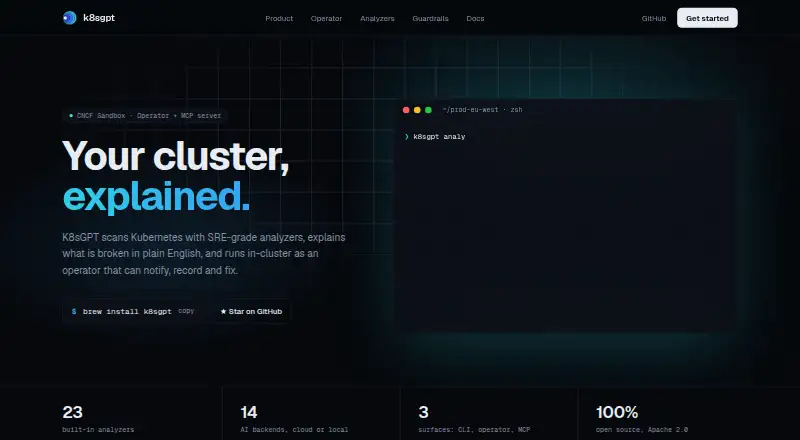
K8sGPT analyzes Kubernetes clusters and explains detected problems in plain English. It offers three ways to work: a CLI, an in-cluster operator, and an MCP interface for AI assistants. The project lists 23 built-in analyzers, with custom analyzers available over gRPC, and 14 cloud or local AI backends. Named options include OpenAI, Azure OpenAI, Amazon Bedrock, Google Vertex AI, Ollama, and LocalAI. Documented integrations include Prometheus, Trivy, Kyverno, KEDA, and AWS. Cluster analysis without the `--explain` option does not need an AI backend; explanations do. For local or air-gapped use, it can connect to Ollama, LocalAI, or a custom REST backend. The `--anonymize` option masks names and identifiers before sending a prompt and restores them in the answer. Operator auto-remediation is optional and subject to a configurable risk threshold. K8sGPT is free under Apache 2.0. CLI, Docker, and operator installation paths need a reachable Kubernetes cluster and kubeconfig; the operator path also requires Helm 3.
Who it suits
K8sGPT suits teams diagnosing Kubernetes infrastructure issues or responding to incidents. It may also suit teams that want local or air-gapped operation, or an opt-in remediation path.
What it does well
- Offers CLI, in-cluster operator, and MCP interface.
- Lists 23 built-in analyzers and custom gRPC analyzers.
- Supports 14 cloud or local AI backends.
- Anonymization masks names and identifiers before prompts.
- Free under Apache 2.0.
What to know first
- Installation paths require a reachable cluster and kubeconfig.
- Explanations require an AI backend.
- Operator installation requires Helm 3.
Limits
The free plan is listed as free. Analysis without `--explain` works without an AI backend, while explanations require one. The operator installation path requires Helm 3 and a reachable Kubernetes cluster with kubeconfig.
Plans
| Plan | Billed and limits | Price |
|---|---|---|
| K8sGPT | Open source · Apache 2.0 | Free |
As k8sgpt.ai lists them, read 7 Oct 2026. The maker's own page has the final word.
Getting started
- Open https://k8sgpt.ai/ and choose an installation path.
- Use the listed Windows binary, macOS or Linux Homebrew support, or Linux package format for a local installation.
- Make a Kubernetes cluster reachable and provide kubeconfig for the CLI, Docker, or operator path.
- For the in-cluster operator, install with Helm 3.
- Connect an AI backend when you want explanations; analysis without `--explain` can run without one.
Overview
K8sGPT is a Kubernetes troubleshooting utility that scans clusters with SRE-oriented analyzers and turns findings into plain-language explanations. It suits platform and reliability teams that already operate Kubernetes and want diagnosis in command-line, in-cluster, or AI-assistant workflows. The main trade-off is that it is a cluster tool, not a managed incident-response service, and explanatory output depends on an AI backend.
Key features
Twenty-three built-in analyzers give teams broad initial coverage, while custom analyzers over gRPC provide an extension path when a company’s checks do not fit the defaults. Integrations with Prometheus, Trivy, Kyverno, KEDA, and AWS make it more useful alongside established monitoring, security, policy, autoscaling, and cloud tooling. These capabilities are aimed at operators who want Kubernetes-specific signals rather than a generic chatbot.
K8sGPT presents the same analysis through a CLI, an in-cluster operator, and an MCP interface for AI assistants. The CLI and Docker paths, as well as operator use, require a reachable Kubernetes cluster and kubeconfig, so it is not a standalone desktop diagnostic. The operator is installed with Helm 3, which fits teams already managing cluster applications through Helm but adds that deployment prerequisite.
Fourteen cloud or local AI backends are supported, including OpenAI, Azure OpenAI, Amazon Bedrock, Google Vertex AI, Ollama, and LocalAI. Running analysis without --explain avoids an AI backend altogether; requesting explanations requires one. Ollama, LocalAI, or a custom REST backend can keep processing local or support air-gapped environments. The --anonymize option masks names and identifiers before a prompt is sent and restores them in the returned answer, helping reduce exposure when an external service is used.
Automatic remediation is available through the operator, but it is opt-in and constrained by a configurable risk threshold. That makes it more appropriate for teams willing to define guardrails than for organizations seeking completely unattended changes.
Pricing
K8sGPT is free and open source under the Apache 2.0 license. Its only listed plan, K8sGPT, costs free. There are no published seat charges, usage quotas, or trial expiry terms for the software itself. Teams should still account for any separate AI-service, cloud, or infrastructure costs associated with the backend they choose; local backends can avoid sending prompts to a hosted provider but require operating that infrastructure.
Platforms
The software is offered for API, Linux, macOS, self-hosted environments, and Windows. Installation documentation lists Windows binaries, macOS and Linux Homebrew support, and Linux packages in .deb, .rpm, and .apk formats. Self-hosting and local AI options make it a practical fit for controlled or disconnected environments, provided a Kubernetes cluster is reachable for the chosen workflow.
Who it's for
K8sGPT is best for Kubernetes platform engineers, SREs, and infrastructure teams that want repeatable analyzer-based troubleshooting with optional natural-language context. It is also a good fit for organizations standardizing on an AI assistant through MCP or needing local and air-gapped analysis. Teams without a Kubernetes cluster, kubeconfig access, or appetite for selecting and operating an AI backend should look elsewhere. Community office hours and Slack provide the documented support route.
Pros and cons
Pros
- Broad analyzer base: 23 built-in analyzers cover common Kubernetes checks, with gRPC extensibility for organization-specific rules.
- Flexible delivery: CLI, operator, and MCP interfaces let teams place analysis in existing operational workflows.
- Backend choice: Fourteen cloud or local backends, including Ollama and LocalAI, support both hosted and air-gapped approaches.
- Controlled automation: Opt-in remediation and a configurable risk threshold reduce the chance of unreviewed changes.
- No software license fee: Apache 2.0 distribution removes plan and seat charges for the tool.
Cons
- Cluster dependency: The main installation paths require a reachable Kubernetes cluster and kubeconfig, limiting use as a general-purpose diagnostic.
- Explanations need an AI service: Analyzer-only operation works without a backend, but plain-language explanations do not.
- Operational overhead remains: Teams choosing local or custom backends must run and maintain that service, while hosted backends can add provider costs.
Alternatives
For a broader directory of tools in this category, see AI DevOps Assistants.
- Hermes Agent is the better choice when you want a freemium assistant across Android, Linux, macOS, web, and Windows, with a free tier limited to free models, standard rate limits, and no monthly credits.
- incident.io fits teams prioritizing incident response through Slack or Microsoft Teams, on-call, status pages, and incident automation rather than Kubernetes analysis.
- Plural is worth considering when you want a broader self-hosted or web platform with a 14-day Sandbox trial and paid platform tiers.
- TalkOps is a free, open-source option with no license, seat, or feature gates, while LLM tokens and cloud infrastructure remain your responsibility.
- UniDeploy suits teams wanting a freemium deployment tool with 10 free AI requests, bring-your-own-model support, and full CLI access.
- Aerol is a web monitoring service with a free plan for up to 50 monitors and five-minute checks.
- Akmatori provides an Apache 2.0, self-hosted automation option when that deployment model matters more than Kubernetes-specific analyzers.
- FireHydrant is aimed at managed incident response, with a free tier covering up to 10 responders, two runbooks, chatbots, one public status page, and three integrations.
Verdict
Choose K8sGPT if your team runs Kubernetes and wants free, extensible analysis that can plug into CLI, operator, or AI-assistant workflows, including local and air-gapped setups. Its combination of analyzers, backend choice, and guarded remediation is the reason to prefer it. Look elsewhere if you need a managed incident-response product, do not have cluster and kubeconfig access, or want explanations without operating or paying for an AI backend.
Verdict
K8sGPT combines Kubernetes analysis with explanations through several interfaces and a range of AI backends. Teams should account for the cluster and kubeconfig requirement, and for an AI backend if they need explanations.
Questions
How much does K8sGPT cost?
The listed K8sGPT plan is free. It is open source under Apache 2.0.
Does K8sGPT need an AI backend?
Analysis without the `--explain` option works without one. Explanations require an AI backend.
Can K8sGPT run locally or in an air-gapped environment?
It can use Ollama, LocalAI, or a custom REST backend for local or air-gapped operation.
Which interfaces does K8sGPT offer?
It offers a CLI, an in-cluster operator, and an MCP interface for AI assistants.
What is required to install the operator?
The operator path uses Helm 3 and requires a reachable Kubernetes cluster and kubeconfig.
How can users get support?
The site points users to community office hours and Slack.
Facts from K8sGPT's own pages
- AI backends
- The site lists 14 cloud or local AI backends, including OpenAI, Azure OpenAI, Amazon Bedrock, Google Vertex AI, Ollama, and LocalAI. · k8sgpt.ai, 7 Oct 2026
- Analyzers
- The site lists 23 built-in analyzers and says users can add custom analyzers over gRPC. · k8sgpt.ai, 7 Oct 2026
- Backend requirement
- Analysis without the --explain option works without an AI backend; explanations require an AI backend. · k8sgpt.ai, 7 Oct 2026
- Cluster access
- The installation guide requires a reachable Kubernetes cluster and kubeconfig for CLI, Docker, and operator paths. · k8sgpt.ai, 7 Oct 2026
- Integrations
- Documented integrations include Prometheus, Trivy, Kyverno, KEDA, and AWS. · k8sgpt.ai, 7 Oct 2026
- Interfaces
- K8sGPT offers a CLI, an in-cluster operator, and an MCP interface for AI assistants. · k8sgpt.ai, 7 Oct 2026
- Local operation
- K8sGPT can use Ollama, LocalAI, or a custom REST backend for local or air-gapped operation. · k8sgpt.ai, 7 Oct 2026
- Operating systems
- The installation guide lists Windows binaries, macOS and Linux Homebrew support, and Linux packages in .deb, .rpm, and .apk formats. · k8sgpt.ai, 7 Oct 2026
- Operator installation
- The guide lists Helm as the installation method for the in-cluster operator and requires Helm 3 for that path. · k8sgpt.ai, 7 Oct 2026
- Privacy
- With the --anonymize option, names and identifiers are masked before a prompt is sent and restored in the answer. · k8sgpt.ai, 7 Oct 2026
- Purpose
- K8sGPT scans Kubernetes clusters with SRE-grade analyzers and explains problems in plain English. · k8sgpt.ai, 7 Oct 2026
- Remediation
- Operator auto-remediation is opt-in and gated by a configurable risk threshold. · k8sgpt.ai, 7 Oct 2026
- Support
- The site points users to community office hours and Slack. · k8sgpt.ai, 7 Oct 2026
Where K8sGPT stands on Freedom251
- AI DevOps Assistants#7 of 26