Freedom251 › Animation Software
Umamo
What Umamo is
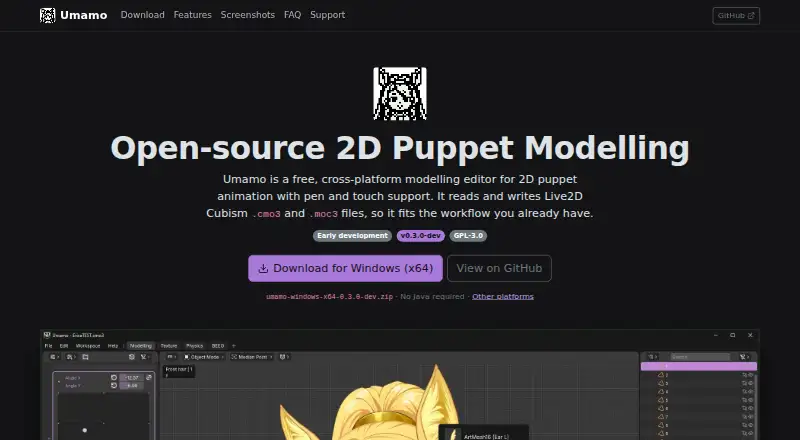
Umamo is a desktop editor for modeling 2D puppet artwork, with support for pen and touch input. It runs on Windows, macOS, and Linux and is free and open source under GPL-3.0. The editor reads and writes Live2D Cubism .cmo3 and .moc3 files, with compatibility up to Cubism 5.4, and exports .uma, .cmo3, and .moc3 formats. It can import layered artwork from Krita (.kra), Photoshop (.psd), and Clip Studio Paint (.clip); Clip Studio Paint import is partial and can have blending issues.
Editing tools include a resolution-independent interface, customizable key bindings, and a command registry. Although the listed capabilities include 2D animation tools and character rigging, animation itself is not supported yet; the maker describes it as a long-term goal. Umamo is alpha-level software, and users are advised to keep backups of project files. Its stated minimum requirements are 16 GB of memory and a 4-core CPU. Desktop downloads are available for all three supported systems, while Android tablet builds remain in progress. Umamo is an independent community project and is not affiliated with Live2D Inc.
Who it suits
Umamo suits artists building 2D puppet artwork who need a free desktop editor and work with Live2D Cubism, Krita, Photoshop, or Clip Studio Paint files. It may also fit users who want pen or touch input and can accommodate alpha-level software and the stated system requirements.
What it does well
- Free and open source under GPL-3.0.
- Runs on Windows, macOS, and Linux.
- Reads and writes Cubism .cmo3 and .moc3 files.
- Imports layered Krita and Photoshop artwork.
- Offers pen and touch input.
What to know first
- Animation is not supported yet.
- Clip Studio Paint import is partial and can have blending issues.
- The maker advises backing up files because the software is alpha-level.
- Minimum requirements include 16 GB memory and a 4-core CPU.
Limits
The free plan is the only listed plan. Animation is not supported yet, and Clip Studio Paint import is partial with known blending issues.
Plans
| Plan | Billed and limits | Price |
|---|---|---|
| Free | Free and open source · GPL-3.0 | Free |
As umamo.org lists them, read 11 Oct 2026. The maker's own page has the final word.
Getting started
- Visit https://www.umamo.org/.
- Choose the desktop build for Windows, macOS, or Linux.
- Install and open the editor on a system meeting the listed minimum requirements.
- Import layered artwork from Krita, Photoshop, or Clip Studio Paint, or open compatible Cubism files.
- Back up project files while working with the alpha-level software.
Verdict
Choose Umamo if you want a free, open-source editor for 2D puppet modeling with Cubism file compatibility and desktop support across Windows, macOS, and Linux. Look elsewhere if you need animation now or depend on reliable Clip Studio Paint imports.
Questions
Is Umamo free?
Yes. Its Free plan costs nothing and the software is open source under GPL-3.0.
Which platforms does Umamo support?
Desktop builds are available for Windows, macOS, and Linux. Android tablet builds are in progress.
Which file formats can Umamo use?
It reads and writes Live2D Cubism .cmo3 and .moc3 files and exports .uma, .cmo3, and .moc3. It imports layered Krita, Photoshop, and Clip Studio Paint files.
Does Umamo support animation?
Animation is not supported yet; the maker describes it as a long-term goal.
What are Umamo's system requirements?
The listed minimums are 16 GB of memory and a 4-core CPU.
Is Umamo affiliated with Live2D?
No. The maker describes Umamo as an independent, community-developed project that is not affiliated with or endorsed by Live2D Inc.
Facts from Umamo's own pages
- Animation
- Umamo does not support animation yet; the maker describes it as a long-term goal. · umamo.org, 11 Oct 2026
- Artwork imports
- It imports layered Krita (.kra), Photoshop (.psd), and Clip Studio Paint (.clip) files; Clip Studio Paint support is partial and has known blending issues. · umamo.org, 11 Oct 2026
- Character rigging
- Yes · umamo.org, 22 Sept 2026
- Cubism compatibility
- It reads and writes Live2D Cubism .cmo3 and .moc3 files, with support up to Cubism 5.4. · umamo.org, 11 Oct 2026
- Download platforms
- Desktop builds are available for Windows, macOS, and Linux; Android tablet builds are in progress. · umamo.org, 11 Oct 2026
- Download verification
- The Apple Silicon app is signed and notarized by Apple, Linux RPM and checksum files are signed with the Umamo release key, and Windows builds are not signed yet. · umamo.org, 11 Oct 2026
- Editing features
- The editor has a resolution-independent interface, customizable key bindings, a command registry, and pen and touch input. · umamo.org, 11 Oct 2026
- Export formats
- .uma,.cmo3,.moc3 · umamo.org, 22 Sept 2026
- Free plan
- Yes · umamo.org, 22 Sept 2026
- Integrations
- Umamo supports file interchange with Live2D Cubism Editor and imports artwork from Krita, Photoshop, and Clip Studio Paint. · umamo.org, 11 Oct 2026
- Supported platforms
- Windows,macOS,Linux · umamo.org, 22 Sept 2026
- Project independence
- The maker says Umamo is an independent, community-developed project and is not affiliated with or endorsed by Live2D Inc. · umamo.org, 11 Oct 2026
- Project status
- The maker describes Umamo as alpha-level software available for testing and advises users to back up project files. · umamo.org, 11 Oct 2026
- Purpose
- Umamo is a cross-platform editor for modeling 2D puppet animations, with pen and touch support. · umamo.org, 11 Oct 2026
- Support
- Users can report format problems through GitHub issues; the maker also accepts recurring Patreon contributions and one-time Ko-fi donations. · umamo.org, 11 Oct 2026
- System requirements
- The listed minimum memory is 16 GB, and the listed CPU minimum is 4 cores. · umamo.org, 11 Oct 2026
- 2D animation tools
- Yes · umamo.org, 22 Sept 2026
Where Umamo stands on Freedom251
- Animation Software#40 of 106
- 2D Character Animation Software#23 of 48