Freedom251 › Tutoring Scheduling Software
TutorTab
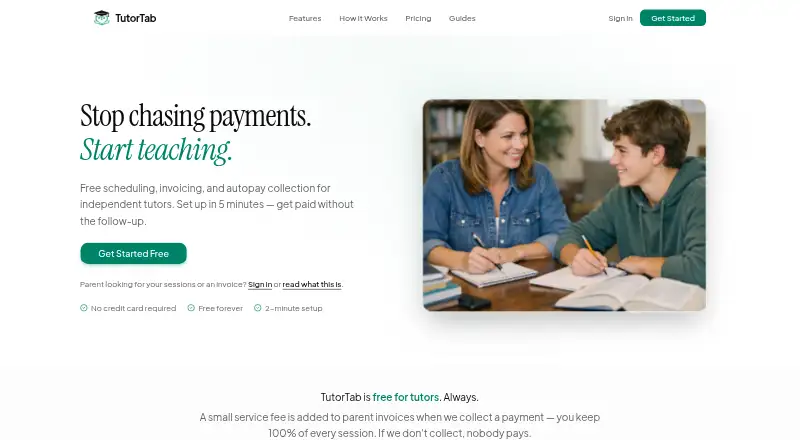
What TutorTab is
TutorTab is web-based scheduling and billing software for independent tutors. Tutors can share a booking page where parents see real-time availability, services, and rates before requesting sessions. After a tutor confirms a session, the service can send a one-click invoice and reminders before the appointment. Parents can save a card or bank account for automatic payment after confirmation. Scheduling, reminders, and invoicing are free for tutors; when TutorTab collects payment, parents pay $1 per paid invoice plus 2.9% + 30¢ processing. Payments and tutor payouts run through Stripe Connect, with card or bank payment options. TutorTab syncs with Google Calendar to show availability and add or remove sessions it creates. The company says card and bank details go directly to Stripe rather than being stored on TutorTab servers. Account data is stored on servers in the United States, with HTTPS encryption in transit. Its privacy policy says it does not sell or rent personal information to advertisers or data brokers and does not use advertising or tracking cookies. Disconnecting Google Calendar results in account deactivation after seven days.
Who it suits
TutorTab suits independent tutors who want parents to request sessions through a booking page and need scheduling, invoicing, and reminders together. It also fits tutors who want automatic collection after confirming sessions, provided they are comfortable keeping Google Calendar connected.
What it does well
- Booking pages show real-time availability, services, and rates.
- Scheduling, reminders, and invoicing are free for tutors.
- Google Calendar sync reflects availability and created sessions.
- Card and bank details go directly to Stripe.
What to know first
- Parents pay $1 per paid invoice when payments are collected.
- Payment processing adds 2.9% + 30¢.
- Disconnecting Google Calendar deactivates the account after seven days.
Limits
The free plan costs tutors free. Scheduling, reminders, and invoicing are free; when TutorTab collects payment, parents pay $1 per paid invoice plus 2.9% + 30¢ processing.
Plans
| Plan | Billed and limits | Price |
|---|---|---|
| Free | $0 cost to tutors; parents pay $1 per paid invoice plus 2.9% + 30¢ processing when TutorTab collects payment · Scheduling, reminders, and invoicing are free · payment fees apply only when collected through TutorTab | Free |
As tutortab.net lists them, read 9 Oct 2026. The maker's own page has the final word.
Getting started
- Open tutortab.net in a web browser
- Create an account for the free plan
- Connect Google Calendar to sync availability and TutorTab-created sessions
- Share your booking page so parents can request sessions
- Confirm sessions and send invoices or collect payment through TutorTab
Overview
TutorTab is a web service for independent tutors who need one place for lesson requests, scheduling, reminders, invoices, and payment collection. It suits solo operators who want parents to self-book from a live availability page and who are comfortable making Google Calendar part of their workflow. The zero-cost tutor plan is unusually broad for scheduling and billing, but payment charges and the calendar dependency deserve close attention.
Key features
Parent booking and self-service
A shareable booking page displays real-time availability, services, and rates, allowing parents to request sessions without a long message exchange. The tutor still confirms each request, so this is assisted self-booking rather than an automatic open calendar. For a solo tutor, that approval step preserves control over the timetable while reducing administrative back-and-forth.
Invoices, autopay, and payouts
Once a session is confirmed, TutorTab can send a one-click invoice. Parents may save a card or bank account so payment is collected automatically after confirmation, which is useful for recurring lessons and reduces the need to chase each invoice. Stripe Connect handles payment processing and tutor payouts, with card and bank payment options for parents. The convenience is less compelling when a tutor mainly wants to avoid transaction costs.
Reminders and Google Calendar
Parents receive reminders before sessions, while Google Calendar synchronization shows availability and adds or removes sessions created in TutorTab. That combination can prevent double-booking and keep parents informed. It is also TutorTab's most consequential constraint: disconnecting Google Calendar leads to account deactivation after seven days. Tutors who cannot keep that connection in place should choose another system.
Privacy and account protection
TutorTab says card numbers and bank details go directly to Stripe rather than being stored on its own servers. It says account data is held on servers in the United States and protected with HTTPS encryption in transit. Its privacy policy says it does not sell or rent personal information to advertisers or data brokers and does not use advertising or tracking cookies. Support is provided through a contact form, with replies promised as soon as possible.
Pricing
| Plan | Price and terms | What you get |
|---|---|---|
| Free | free, billed at $0 cost to tutors | Scheduling, reminders, and invoicing are free. Student self-booking and online payments are included; payment fees apply only when TutorTab collects payment. |
Parents pay $1 per paid invoice plus 2.9% + 30¢ processing when TutorTab collects payment. That makes the plan a strong fit for tutors who use the free scheduling and invoicing tools but can accept the per-invoice and percentage charges, or who arrange payment outside the service. There are no published seat quotas, booking caps, trial terms, or renewal charges for this plan.
Platforms
TutorTab runs on the web. Its Google Calendar connection is central to availability and session management, so a tutor's practical setup also depends on maintaining that external calendar link.
Who it's for
TutorTab is best for independent tutors and small solo practices that want a public booking page, parent reminders, simple invoicing, and optional automatic collection without a monthly subscription. It is less suitable for tutors who need to operate without Google Calendar or who process enough payments for the $1 invoice charge and 2.9% + 30¢ fee to outweigh the convenience.
Pros and cons
Pros
- No tutor subscription: Scheduling, reminders, and invoicing cost $0, lowering the barrier for a solo tutor.
- Parent-led requests: A live page with services and rates cuts down on manual scheduling messages while leaving confirmation with the tutor.
- Flexible collection: Saved cards or bank accounts enable autopay, and Stripe Connect supports both parent payments and tutor payouts.
- Limited data use: TutorTab says it does not sell personal information or use advertising and tracking cookies, and payment credentials go directly to Stripe.
Cons
- Payment costs: Parents pay $1 per paid invoice plus 2.9% + 30¢ when TutorTab collects, which can add up for frequent or high-volume billing.
- Calendar lock-in: Disconnecting Google Calendar deactivates the account after seven days.
- Web-only access: There are no listed native mobile platforms, which may matter to tutors who manage lessons primarily from a phone.
Alternatives
- SchedulingKit is a better choice for teams needing Android, iOS, API, and web access; its free tier allows one team member, one event type, and 50 bookings per month.
- Penji suits institutions wanting up to five tutors or staff on a free plan, with custom pricing for broader needs.
- Tutorbase is worth considering if you prefer no monthly subscription and all features without feature restrictions, paying a 1% fee when invoicing through it.
- Tutoressa is another freemium option for tutors seeking Android, iOS, and web support.
- GetSetTime fits a solo scheduler needing a free public booking page and 50 bookings per month, with an extra-seat option.
- Pynath Booking is aimed at service booking with three active services, ten attendees per slot, and 0% platform commission on its free plan.
- Twizzlo offers web scheduling with up to 150 bookings per month on its free tier and includes online payments and tips.
- TutorKit by Agilix is an alternative web platform with custom pricing.
For a broader comparison, see Tutoring Scheduling Software.
Verdict
Choose TutorTab if you are an independent tutor who wants free scheduling, reminders, and invoicing with a parent-facing booking page and optional autopay. Its main advantage is combining those essentials without a tutor subscription. Look elsewhere if payment fees are unacceptable, you need mobile apps, or you cannot keep Google Calendar connected, because that disconnection can end the account within seven days.
Verdict
TutorTab brings session requests, calendar sync, invoicing, reminders, and payment collection into a web service for independent tutors. The main constraints to weigh are payment fees for parents and the account deactivation rule if Google Calendar is disconnected.
Questions
Is TutorTab free?
Yes. The Free plan costs tutors free, and scheduling, reminders, and invoicing are free.
What do parents pay for payments collected through TutorTab?
Parents pay $1 per paid invoice plus 2.9% + 30¢ processing.
Which platform does TutorTab support?
TutorTab is available on the web.
Can parents book sessions themselves?
Yes. Tutors can share a booking page where parents view availability, services, and rates and request sessions.
What calendar and payment services does it use?
TutorTab syncs with Google Calendar. Payments and tutor payouts are handled through Stripe Connect.
What happens if I disconnect Google Calendar?
TutorTab says the account will be deactivated after seven days.
Facts from TutorTab's own pages
- Autopay
- Parents can save a card or bank account so payment is collected automatically after a tutor confirms a session. · tutortab.net, 9 Oct 2026
- Booking page
- Tutors can share a booking page showing real-time availability, services, and rates for parents to request sessions. · tutortab.net, 9 Oct 2026
- Calendar integration
- TutorTab syncs with Google Calendar to show availability and add or remove sessions it creates. · tutortab.net, 9 Oct 2026
- Data handling
- TutorTab says account data is stored on servers in the United States and uses HTTPS encryption for data in transit. · tutortab.net, 9 Oct 2026
- Invoices and reminders
- TutorTab sends one-click invoices after session confirmation and reminders to parents before sessions. · tutortab.net, 9 Oct 2026
- Notable limit
- TutorTab says disconnecting Google Calendar will result in account deactivation after seven days. · tutortab.net, 9 Oct 2026
- Payment integration
- Payments and tutor payouts are handled through Stripe Connect, with card or bank payment options for parents. · tutortab.net, 9 Oct 2026
- Privacy
- The privacy policy says TutorTab does not sell or rent personal information to advertisers or data brokers and does not use advertising or tracking cookies. · tutortab.net, 9 Oct 2026
- Purpose
- TutorTab provides scheduling and billing software for independent tutors. · tutortab.net, 9 Oct 2026
- Security
- TutorTab says card numbers and bank details go directly to Stripe and are not stored on TutorTab servers. · tutortab.net, 9 Oct 2026
- Support
- The contact page invites users to send a message for help and says the team will respond as soon as it can. · tutortab.net, 9 Oct 2026
Where TutorTab stands on Freedom251
- Tutoring Scheduling Software#9 of 25