Freedom251 › Tutoring Center Software
Tutitor
What Tutitor is
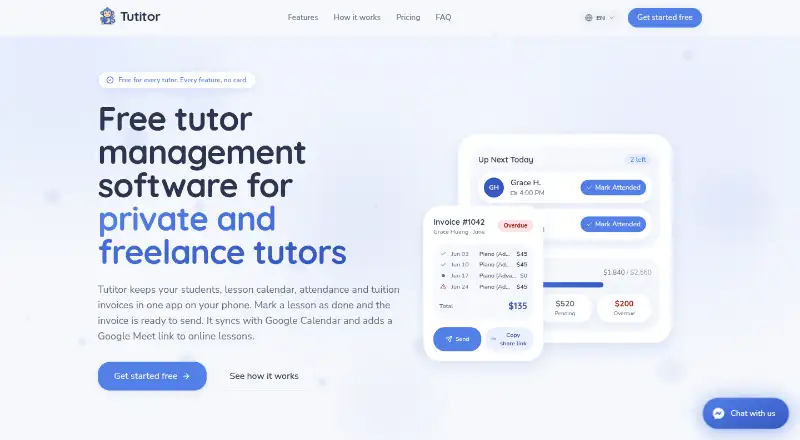
Tutitor is a web app for private and freelance tutors that combines student records, lesson scheduling, attendance, and tuition invoices. Tutors can keep student and parent contact details, notes, tags, and pricing, with rates set by subject, student, or monthly plan. Its calendar supports recurring and one-off lessons, group classes, and in-person or online sessions. Invoices are generated from attendance after each lesson or on weekly or monthly schedules; Tutitor says lessons are not billed twice. Lessons can sync with Google Calendar, online classes can get Google Meet links, and a private calendar feed is available for Apple Calendar and Outlook. Invoices can display payment links, bank details, QR images, or written instructions, but Tutitor does not process card payments. The app and invoices support 21 languages and billing in 42 currencies, without currency conversion. Each tutor gets a 15 GB library for files, videos, links, and notes, and can share folders with students. The free plan is listed as free, billed forever, with unlimited students, lessons, and invoices. The maker says the product is not built for schools or agencies with many teachers.
Who it suits
Tutitor suits private and freelance tutors, and small tutoring centers where one person handles scheduling and billing. It is not designed for schools or agencies with many teachers.
What it does well
- Free forever plan with unlimited students and lessons
- Calendar supports group and recurring lessons
- Attendance can generate invoices on several schedules
- Calendar integrations include Google Calendar and Apple Calendar
- 15 GB library can share folders with students
What to know first
- Does not process card payments
- Does not convert currencies
- Not built for schools or agencies with many teachers
Limits
The free plan includes a 15 GB file library per tutor. Tutitor does not process card payments or convert currencies.
Plans
| Plan | Billed and limits | Price |
|---|---|---|
| Free | forever · Unlimited students, lessons and invoices · No usage limits · 15 GB library | Free |
As tutitor.com lists them, read 2 Oct 2026. The maker's own page has the final word.
Getting started
- Open Tutitor on the web or use its Android or iOS app.
- Create student records with contact details, notes, tags, and pricing.
- Add recurring or one-off lessons to the calendar.
- Sync lessons with Google Calendar or set up a private feed for Apple Calendar or Outlook.
- Record attendance and generate invoices after lessons, weekly, or monthly.
- Use the 15 GB library to store materials and share folders with students.
Tutitor is a tutoring admin app for private and freelance tutors, combining student records, lesson calendars, attendance and invoicing. It is best suited to solo tutors and small tutoring centers where one person manages scheduling and billing; its free plan covers substantial day-to-day work, but payment collection happens elsewhere.
Overview
Tutitor brings the operational recordkeeping of tutoring into one place. Student and parent contacts, lesson schedules, attendance and invoices form a connected workflow rather than separate lists to reconcile. That is a useful fit for tutors managing their own teaching, especially when rates differ by subject, student or monthly arrangement.
The scope is deliberately modest: Tutitor is intended for private and freelance tutors and small centers with one person handling the administration, not schools or agencies coordinating many teachers. Its free plan has no usage limits on students, lessons or invoices, so volume alone does not force a move to a paid tier. The trade-off is that Tutitor does not process card payments and does not convert currencies.
Key features
Records, calendar and attendance
Student records hold contact details for students and parents alongside notes, tags and pricing. Rates can be set per subject, student or monthly plan, giving tutors room for different fee arrangements without maintaining a separate pricing ledger.
The calendar supports recurring and one-off lessons, group classes, and in-person or online sessions. Attendance then feeds invoice generation, which can happen after each lesson or on a weekly or monthly schedule. Tutitor says a lesson is never billed twice; that connection can reduce the reconciliation burden for tutors billing against completed sessions, though it is not a substitute for payment processing.
Calendar links and teaching materials
Lessons sync with Google Calendar, and Tutitor can create Google Meet links for online sessions. A private calendar feed connects with Apple Calendar and Outlook. These links are useful for fitting tutoring into calendars families or tutors already use, while keeping lesson scheduling at the center of the workflow.
Each tutor gets a 15 GB teaching library for files, YouTube videos, links and notes. Folders can be shared with students, which keeps class materials close to lesson administration. The fixed storage allowance is the main constraint for tutors who expect to maintain a large media collection.
Invoices, payments and access
Invoices can show VietQR, QR images, bank details, payment links or written payment instructions. This lets tutors direct families to a payment method, but Tutitor does not handle card transactions; tutors must collect money through another service or channel. Billing is supported in 42 currencies, but currency conversion is outside Tutitor, so tutors working across currencies need to manage exchange rates elsewhere.
The app and invoices are available in 21 languages, a practical advantage for tutors serving families in different language communities. Parents do not need accounts: they can open private shared links in a browser, and tutors can revoke those links. Tutitor says data is protected in transit with TLS 1.3 and at rest with AES-256, with each tutor's data kept separate. Support is offered through Messenger, with replies typically within an hour and responses in Vietnamese and English.
Pricing
| Plan | Price | What it includes |
|---|---|---|
| Free | free (billed forever) | Unlimited students, lessons and invoices; no usage limits; 15 GB library |
There is no free trial because the free plan is ongoing, not a time-limited preview. It includes the core work of scheduling, attendance, lesson records and billing, with no student, lesson or invoice cap. That makes it a strong fit for an independent tutor who wants to keep recurring costs at zero, while the 15 GB library is the stated storage allowance. No paid Tutitor tier is presented, so tutors needing more capacity or payment processing will need another arrangement rather than an upgrade within the plan shown.
Platforms
Tutitor is available on the web, Android and iOS. Its web-app workflow and mobile platforms suit tutors who need to manage lessons across devices; calendar integrations also connect scheduled work to Google, Apple and Outlook calendars.
Who it's for
Choose Tutitor if you are a private or freelance tutor, or a small tutoring center where one person owns the schedule and billing. The unlimited student, lesson and invoice allowances remove common volume constraints, while attendance-linked invoicing and flexible pricing records address the administrative work that grows with a busy teaching calendar.
Look elsewhere if the organization needs coordinated administration for many teachers, or if card collection and currency conversion must happen inside the same system. Those are meaningful boundaries for agencies and cross-border businesses, not minor omissions for teams whose workflow depends on them.
Pros and cons
- Pro: Unlimited students, lessons and invoices on a forever-free plan make it viable for ongoing use rather than only a small trial workload.
- Pro: Attendance can drive invoices on lesson, weekly or monthly cycles, with Tutitor saying it prevents duplicate billing.
- Pro: Per-subject, per-student or monthly pricing accommodates varied tutoring arrangements.
- Pro: Parents can access private shared links without creating accounts, and tutors can revoke those links.
- Con: Tutitor does not process card payments, so tutors must arrange collection through another channel.
- Con: It does not convert currencies, which leaves exchange-rate handling to the tutor.
- Con: The product is not built for schools or agencies with many teachers, limiting its fit for larger organizations.
- Con: The teaching library is capped at 15 GB per tutor, which may constrain extensive resource collections.
Alternatives
For a wider shortlist, see Tutoring Center Software.
- TuitionDesk is worth considering if a tutor needs a free plan capped at 10 students but wants its listed batches, fees, EMI, attendance, sessions and teacher login features.
- TutorHive may suit someone willing to trade Tutitor's unlimited student capacity for a free tier capped at two students, with a basic calendar, homework tracker, global holidays and one invoice each month; it also offers a $14 a month Pro plan.
- TutorOne is another option, with a free plan listed as free for one tutor, 15 students and unlimited sessions.
- Tutorbase may fit tutors who prefer a free core plan with all features included and no feature restrictions, in exchange for a 1% fee when invoicing through the system.
- Tutr Desk is an alternative with a free plan capped at 10 students and listing attendance tracking, fee management, scheduling and sessions, plus WhatsApp reminders.
- GuruDesk offers a web-based free plan for solo teachers with up to 30 students, which may be a better fit when that student cap is sufficient.
- OneBookPlus is an alternative for a different kind of invoicing and booking workflow, with its free plan listing 10 invoices per month and five quotes per month alongside GST and ABN features.
- Spoteca may suit a web-only tutoring operation with up to 10 billable enrollments on its free plan, which includes all features and requires no credit card.
Verdict
Tutitor is a strong choice for the independent tutor who wants an ongoing, no-cost system for records, lesson scheduling, attendance and invoicing without student or invoice quotas. Its most compelling advantage is that those tasks are linked in one workflow on a free plan; its decisive limits are the lack of card processing and currency conversion, and its narrow fit for small operations. Choose it for solo practice, but look elsewhere if a larger teaching team or built-in payment collection is central to the job.
Verdict
Tutitor brings tutoring records, scheduling, attendance, and invoicing together in a free plan with no listed usage limits. Its fit is narrower for larger organizations, and tutors need to handle payment processing and currency conversion elsewhere.
Questions
How much does Tutitor cost?
The Free plan costs nothing and is billed forever. It includes unlimited students, lessons, and invoices.
Which platforms does Tutitor support?
Tutitor is available on web, Android, and iOS.
Does Tutitor have a free trial?
No. The listed free trial option is no; Tutitor offers a free plan.
Can Tutitor process card payments?
No. It can display payment details or instructions on invoices, but it does not process card payments.
Which calendar services does it work with?
Tutitor syncs lessons with Google Calendar, creates Google Meet links for online lessons, and offers a private calendar feed for Apple Calendar and Outlook.
Is Tutitor intended for schools with many teachers?
No. It is intended for private and freelance tutors and small tutoring centers where one person handles scheduling and billing; it is not built for schools or agencies with many teachers.
Facts from Tutitor's own pages
- Integrations
- Tutitor syncs lessons with Google Calendar, creates Google Meet links for online lessons, and offers a private calendar feed for Apple Calendar and Outlook. · tutitor.com, 2 Oct 2026
- Intended users and limits
- Tutitor is intended for private and freelance tutors and small tutoring centers where one person handles scheduling and billing; the site says it is not built for schools or agencies with many teachers. · tutitor.com, 2 Oct 2026
- Invoices
- Invoices are generated from lesson attendance and can be produced after each lesson, weekly or monthly; the site says a lesson is never billed twice. · tutitor.com, 2 Oct 2026
- Languages and currencies
- The app and invoices are available in 21 languages, and tutors can bill in 42 currencies; the site says Tutitor does not convert currencies. · tutitor.com, 2 Oct 2026
- Parent access
- Parents do not need an account; they can open private shared links in a browser, and tutors can revoke those links. · tutitor.com, 2 Oct 2026
- Payments
- Tutitor displays VietQR, QR images, bank details, payment links or written payment instructions on invoices, and says it does not process card payments. · tutitor.com, 2 Oct 2026
- Platforms
- Tutitor runs in modern browsers on phones and computers and can be installed to the home screen on iPhone and Android without an app store. · tutitor.com, 2 Oct 2026
- Product
- Tutitor is a web app for private and freelance tutors that brings student records, lesson calendars, attendance and tuition invoices together. · tutitor.com, 2 Oct 2026
- Scheduling
- The calendar supports recurring and one-off lessons, group classes, and in-person or online lessons. · tutitor.com, 2 Oct 2026
- Security
- The site says data is encrypted in transit with TLS 1.3 and at rest with AES-256, and each tutor's data is kept separate. · tutitor.com, 2 Oct 2026
- Student records
- Tutors can store student and parent contact details, notes, tags and pricing, with prices set per subject, student or monthly plan. · tutitor.com, 2 Oct 2026
- Support
- Tutitor says it replies on Messenger, typically within an hour, and supports Vietnamese and English replies. · tutitor.com, 2 Oct 2026
- Teaching library
- Each tutor gets a 15 GB file library that supports files, YouTube videos, links and notes, with folders that can be shared with students. · tutitor.com, 2 Oct 2026
Where Tutitor stands on Freedom251
- Tutoring Center Software#5 of 33