Freedom251 › Web Debugging Proxies
Tucano Proxy
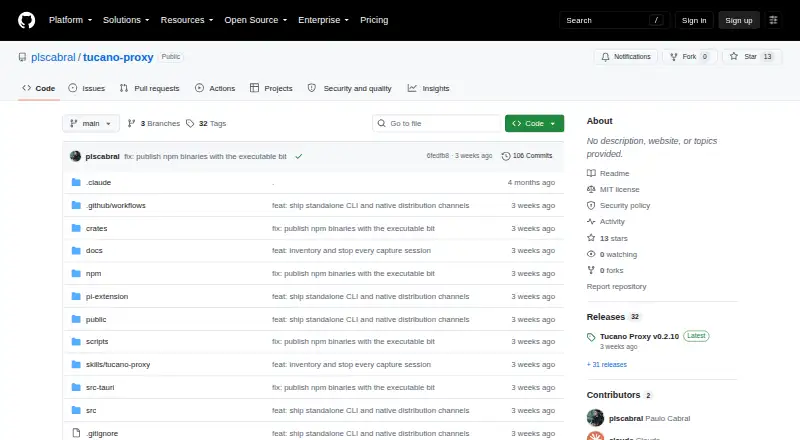
What Tucano Proxy is
Tucano Proxy is a free, MIT-licensed HTTP/HTTPS debugging proxy with a native CLI, terminal inspector, local web UI, and desktop app. It captures HTTP, HTTPS, and WebSocket traffic through a configurable local MITM proxy. Its inspector presents headers, timing, and request or response bodies, with viewers for JSON, XML, HTML, text, hex, images, and forms. Debugging tools include filtering, searching, comparing captures, notes, color marks, editable request replay, and exports such as cURL, HAR, and Python requests. The CLI, terminal UI, and web UI use persistent named sessions, and the CLI can run without a graphical session. The standalone service stays on loopback and requires authentication for inspection and changes. Desktop installers are listed for macOS and Windows, while CLI releases cover macOS, Linux, and Windows. Certificate trust and system proxy changes are explicit rather than automatic. Interception may not work with certificate pinning, application-specific trust stores, or clients that ignore proxy settings.
Who it suits
It suits developers who need to inspect and replay web traffic through a CLI, terminal, web, or desktop interface. Linux users should check the listed targets: prebuilt CLI binaries cover ARM64 and x64 with glibc, not Alpine/musl.
What it does well
- Captures HTTP, HTTPS, and WebSocket traffic.
- Offers editable request replay and capture comparison.
- Exports to cURL, HAR, and Python requests.
- CLI works without a graphical session.
- Free and licensed under MIT.
What to know first
- No breakpoint rules are listed.
- No response mocking is listed.
- Alpine/musl is not a listed prebuilt target.
- Certificate pinning can prevent interception.
Limits
The MIT-licensed plan is free. Interception can fail for apps using certificate pinning or application-specific trust stores, and for clients that ignore proxy settings; built-in redaction does not guarantee anonymity, especially for opaque binary bodies.
Plans
| Plan | Billed and limits | Price |
|---|---|---|
| MIT License | Open-source software under MIT license | Free |
As github.com lists them, read 9 Oct 2026. The maker's own page has the final word.
Getting started
- Open the Tucano Proxy GitHub project and choose an installer or CLI release for your platform.
- Install the desktop app for macOS or Windows, or use a standalone CLI release for macOS, Linux, or Windows.
- Start the proxy; system proxy settings and certificate installation are explicit steps.
- If needed, create a root CA and choose whether to install it in the OS trust store.
- Inspect traffic through the CLI, terminal UI, or local web UI.
Tucano Proxy is a free, MIT-licensed HTTP/HTTPS debugging proxy for developers who want to inspect traffic from a terminal, browser-based local interface, or desktop app. It is a strong fit for flexible capture and replay workflows; users who rely on breakpoints, response mocking, or interception of proxy-resistant clients should look elsewhere.
Overview
The project brings several interfaces to one configurable local proxy: a native CLI, terminal inspector, local web UI, and desktop app. The CLI, terminal UI, and web interface share persistent named sessions, and the CLI can run without a graphical session. That makes it practical to switch between terminal and desktop workflows without giving up session continuity.
Captures cover HTTP, HTTPS, and WebSocket traffic. The inspector combines request and response headers, timing, and bodies, with viewers for JSON, XML, HTML, raw text, hex, images, and forms. This breadth helps when debugging involves varied payloads, not just API responses.
Key features
Filtering, search, comparison, notes, and color marks help organize captures. Requests can be edited and replayed, then exported as cURL, HAR, or Python requests. These tools support reproducing a problem or carrying a request into another workflow. WebSocket inspection is supported, but breakpoint rules and response mocking are not; workflows that depend on pausing live traffic or simulating server replies will need another tool.
The project documents MCP integration and an installable coding-agent skill. From the CLI, users can open the web inspector in Maestri, Orca, or a system browser. These connections may suit developers incorporating traffic inspection into coding-agent workflows, while the core proxy remains useful without them.
Interception has practical limits: certificate pinning, application-specific trust stores, and clients that ignore proxy settings can prevent the proxy from seeing traffic. Tucano can create a root CA and offer OS trust-store installation, but ordinary startup does not install certificates or change system proxy settings. That explicit setup avoids silent network changes, though it means users must handle trust and proxy configuration deliberately.
The standalone service binds to loopback and requires authentication for inspection and mutations; its browser-facing API also validates Host and Origin. Documentation supports private capture and no-log compose, but built-in redaction does not reliably sanitize opaque binary bodies or guarantee anonymity. Users handling sensitive captures should not treat redaction as a substitute for checking payloads, and should not expose the service through a tunnel, reverse proxy, or public bind address.
Pricing
MIT License — free. The software is open source under the MIT license, with no paid tier or free trial. There are no paid-plan seat, quota, or renewal trade-offs to weigh. The project credits Paulo Cabral as creator and maintainer; no dedicated support terms are stated.
Platforms
Desktop installers are provided for macOS on Apple Silicon and Intel, and for Windows. Standalone CLI releases include macOS, Linux, and Windows targets; prebuilt Linux binaries target ARM64 and x64 with glibc. Alpine and other musl-based Linux systems are not among the prebuilt targets, so those users should verify a suitable route before adopting it. The CLI runs without a graphical session, while the web inspector is local.
Native CLI archives include SHA-256 checksums, and documented installers verify them before replacing the executable. The security guide notes that checksums are not independent publisher signatures, so they provide an integrity check rather than signed provenance.
Who it's for
Tucano suits developers who want a free, self-hostable proxy with terminal and desktop options, broad body viewers, replay, and export tools. It is especially appropriate when named sessions and a headless CLI matter. It is a weaker fit for teams that require breakpoints or response mocking, users on unsupported Linux binary targets, and debugging cases where the target app bypasses proxy settings or enforces certificate pinning.
Pros and cons
- Pros: HTTP, HTTPS, and WebSocket capture across CLI, terminal, web, and desktop interfaces gives developers several ways to work with the same sessions.
- Pros: Replay, comparison, notes, search, and exports to cURL, HAR, and Python requests support investigation as well as handoff.
- Pros: Loopback binding, authentication, and explicit certificate and proxy changes make local operation more deliberate.
- Cons: No breakpoint rules or response mocking leaves interactive interception and simulated replies to other tools.
- Cons: Certificate pinning, app-specific trust stores, and clients that ignore proxies can block capture.
- Cons: Prebuilt Linux CLI targets use glibc, not musl, and built-in redaction does not guarantee anonymity for opaque binary bodies.
Alternatives
Web Debugging Proxies is the broader category directory for comparing tools. Consider HTTP Toolkit if its free Hobbyist plan's manual request and response breakpoints and built-in HTTP client tools better match your workflow. Fluxzy is another option if you want a free Community Edition with all features included for personal use. Choose Moni Proxy if its free plan's mock, rewrite, and breakpoint rules or DNS overrides are more important than Tucano's cross-interface session workflow. Reqable may suit users who prefer a community plan with a stated one-device allowance and 100MB storage. mitmproxy is a free, open-source interactive HTTPS proxy to consider as another option. NetworkSpy, Probe, and Proxyfor are also alternatives to compare.
Verdict
Choose Tucano Proxy for a free, open-source debugging workflow that pairs varied capture viewers with replay, export, and terminal-to-desktop flexibility. Its local security posture and explicit setup suit developers who want control over proxy changes. Look elsewhere if breakpoints or response mocking are essential, or if your target client cannot be intercepted through a local proxy.
Verdict
Tucano Proxy combines traffic inspection, replay, and export tools across several interfaces. Its interception limits and Linux prebuilt targets are worth checking before adopting it.
Questions
How much does Tucano Proxy cost?
The listed MIT License plan costs nothing.
Which platforms have downloads?
Desktop installers are listed for macOS Apple Silicon and Intel, and Windows. Standalone CLI releases include macOS, Linux, and Windows targets.
Can it inspect WebSocket traffic?
Yes. It captures HTTP, HTTPS, and WebSocket traffic through a configurable local MITM proxy.
Does it install certificates or change proxy settings automatically?
No. Ordinary proxy startup does not silently change system proxy settings or install a certificate. Certificate trust and system proxy changes are explicit.
What can block interception?
Certificate pinning, application-specific trust stores, and clients that ignore proxy settings can prevent interception.
Who maintains the project, and what is its license?
The repository credits Paulo Cabral as creator and maintainer and identifies the project as MIT-licensed.
Facts from Tucano Proxy's own pages
- Certificate handling
- The app can create a root CA and offer OS trust-store installation, while CLI setup treats trust installation as opt-in and ordinary proxy startup does not install a certificate. · github.com, 9 Oct 2026
- Data handling
- Private capture and no-log compose are documented; the security guide cautions that built-in redaction does not reliably sanitize opaque binary bodies or guarantee anonymity. · github.com, 9 Oct 2026
- Desktop platforms
- Desktop installers are listed for macOS Apple Silicon and Intel, and Windows; Linux is listed for standalone CLI binaries. · github.com, 9 Oct 2026
- Distribution
- Native CLI archives include SHA-256 checksums, and documented installers verify checksums before replacing the executable; the security guide says checksums are not independent publisher signatures. · github.com, 9 Oct 2026
- Downloads
- Desktop installers are listed for macOS Apple Silicon and Intel and Windows, while standalone CLI releases include macOS, Linux, and Windows targets. · github.com, 9 Oct 2026
- Inspection
- The inspector displays request and response headers, timing, and bodies, with viewers for JSON, XML, HTML, raw text, hex, images, and forms. · github.com, 9 Oct 2026
- Integrations
- The project documents MCP integration and an installable coding-agent skill; its CLI can open the web inspector in Maestri, Orca, or a system browser. · github.com, 9 Oct 2026
- Interfaces
- CLI, terminal UI, and local web UI share persistent named sessions, and the CLI runs without a graphical session. · github.com, 9 Oct 2026
- License
- The repository identifies the project as MIT-licensed and credits Paulo Cabral. · github.com, 9 Oct 2026
- Limitations
- The security documentation says certificate pinning, application-specific trust stores, and clients that ignore proxy settings can prevent interception. · github.com, 9 Oct 2026
- Linux support
- Prebuilt CLI targets include Linux ARM64 and x64 using glibc; Alpine/musl is not listed as a supported prebuilt target. · github.com, 9 Oct 2026
- Local security
- The standalone service listens on loopback and requires authentication for inspection and mutations; the security guide says not to expose it through a tunnel, reverse proxy, or public bind address. · github.com, 9 Oct 2026
- Maker location
- The maker's GitHub profile lists Rio de Janeiro. · github.com, 9 Oct 2026
- Network changes
- Starting the ordinary proxy does not silently change system proxy settings or install a certificate; certificate trust and system proxy changes are explicit. · github.com, 9 Oct 2026
- Privacy controls
- The product supports private capture and no-log compose; its documentation says built-in redaction does not guarantee anonymity, particularly for opaque binary bodies. · github.com, 9 Oct 2026
- Product
- Tucano Proxy is an open source HTTP/HTTPS debugging proxy with a native CLI, terminal inspector, local web UI, and desktop app. · github.com, 9 Oct 2026
- Purpose
- Tucano Proxy is an open-source HTTP/HTTPS debugging proxy with a native CLI, terminal inspector, local web UI, and desktop app. · github.com, 9 Oct 2026
- Security
- The standalone service listens on loopback and requires authentication for inspection and mutations, with Host and Origin validation for its browser-facing API. · github.com, 9 Oct 2026
- Support and license
- The repository identifies Paulo Cabral as creator and maintainer and licenses the project under MIT; no dedicated support terms are stated on the repository page. · github.com, 9 Oct 2026
- Support and reporting
- For sensitive issues, the project asks users to provide a minimal sanitized reproduction, affected version and platform, observed behavior, and relevant capture IDs through an appropriate private reporting channel. · github.com, 9 Oct 2026
- Traffic capture
- It captures HTTP, HTTPS, and WebSocket traffic through a configurable local MITM proxy. · github.com, 9 Oct 2026
- Workflow
- Features include filtering, capture comparison, search, notes, color marks, editable request replay, and exports including cURL, HAR, and Python requests. · github.com, 9 Oct 2026
Where Tucano Proxy stands on Freedom251
- Web Debugging Proxies#15 of 27