Freedom251 › Web Debugging Proxies

mitmproxy
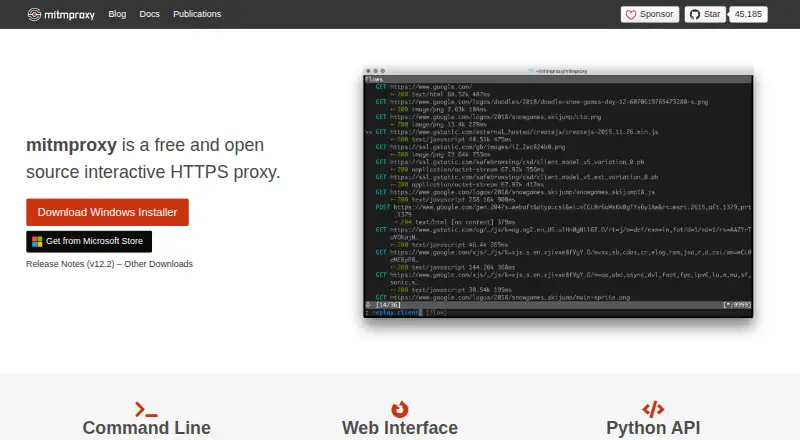
What mitmproxy is
mitmproxy is a free set of tools for intercepting HTTP/1, HTTP/2, WebSocket, and SSL/TLS traffic through a proxy. It can pause HTTP and HTTPS requests or responses for editing, save conversations for later analysis, and replay client requests or recorded server responses. The project provides three interfaces: mitmproxy, an interactive console; mitmweb, a browser-based GUI; and mitmdump, which produces non-interactive terminal output. Proxy modes include regular, local capture, WireGuard, reverse, transparent, TUN, upstream, SOCKS5, and DNS. Python addons can respond to events to change proxy behavior and provide commands. WireGuard mode can capture traffic from external devices or individual Android apps, and a built-in certificate authority creates interception certificates when needed. Installation is documented for Windows, macOS, and Linux, with PyPI and official Docker images also available. The project says it does not phone home or check for updates. Its documentation notes that HTTP/3 client replay is currently broken and that dependencies in precompiled binaries and Docker images cannot be updated in place.
Who it suits
mitmproxy suits developers and others who need to intercept, edit, record, or replay web traffic through a proxy. Its console, browser-based, and terminal interfaces offer different ways to work with traffic.
What it does well
- Free and open source.
- Can edit requests and responses in transit.
- Offers console, browser-based, and terminal interfaces.
- Supports several proxy modes, including WireGuard and SOCKS5.
- Python addons can change behavior and expose commands.
What to know first
- HTTP/3 client replay is currently broken.
- Bundled dependencies in binaries and Docker images cannot be updated in place.
- Project directs usage questions and bug reports to GitHub.
Limits
The free plan costs nothing. HTTP/3 client replay is currently broken, and dependencies in precompiled binaries and Docker images are frozen at release and cannot be updated in place.
Plans
| Plan | Billed and limits | Price |
|---|---|---|
| mitmproxy | Free and open source interactive HTTPS proxy | Free |
| Free | Open-source software · no paid tier stated | Free |
As mitmproxy.org lists them, read 30 Sept 2026. The maker's own page has the final word.
Getting started
- Visit the mitmproxy website.
- Choose the console, browser-based, or terminal interface.
- Install for Windows, macOS, or Linux, or use PyPI or an official Docker image.
- Configure a proxy mode for the traffic you need to capture.
- Use the included certificate authority to generate interception certificates as needed.
mitmproxy is a free toolkit for examining and changing web traffic, best suited to developers and other technically confident users who need control over HTTP conversations. Its combination of editing, recording, replay, and multiple proxy modes makes it a strong fit for debugging; HTTP/3 replay and frozen dependencies in packaged releases are meaningful caveats.
Overview
mitmproxy handles HTTP/1, HTTP/2, and WebSocket traffic, including SSL/TLS traffic. It can intercept requests and responses as they pass through a proxy, making it possible to inspect or modify exchanges rather than treating them as opaque network activity. A certificate authority implementation generates interception certificates on the fly.
Three interfaces address different working styles: mitmproxy is an interactive console, mitmweb provides a browser-based GUI, and mitmdump produces non-interactive terminal output. That choice makes the toolkit adaptable, though users still need to understand proxy setup and certificate interception to make effective use of it.
Readers comparing tools can browse Web Debugging Proxies, Forward Proxy Software, or the broader Proxy Software category.
Key features
Inspect, edit, and replay
Requests and responses can be modified in transit, with breakpoint rules for selective interception. mitmproxy can save HTTP conversations for later analysis and replay client requests or previously recorded server responses. Response mocking and WebSocket inspection extend its usefulness for debugging workflows that need to examine more than a single live exchange. These capabilities provide substantial control, but they are geared toward traffic analysis rather than a simple set-and-forget proxy.
Many ways to route traffic
Modes include regular, local capture, WireGuard, reverse, transparent, TUN, upstream, SOCKS5, and DNS. This range gives technical users options for different network arrangements. WireGuard can capture traffic from external devices or individual Android apps, which is useful when the target traffic originates beyond the machine running the proxy.
Python customization
Python addons can respond to events, change proxy behavior, and expose commands for users to invoke. This is a practical advantage for workflows that need repeatable or tailored handling; it also makes the tool a better fit for users comfortable working with Python than for those seeking configuration-free inspection.
Protocol and update caveats
The documentation says HTTP/3 client replay is currently broken, and HTTP/3 support has been extensively tested only with cURL. Teams relying on HTTP/3 replay should look elsewhere or account for that limitation. The project also says it does not phone home or check for updates, but dependencies bundled in precompiled binaries and Docker images are frozen at release and cannot be updated in place. Regularly updating those releases matters for users who depend on bundled components.
Pricing
mitmproxy is free and open source. The mitmproxy plan costs nothing and includes request and response editing, breakpoint rules, traffic replay, response mocking, WebSocket inspection, and proxy chaining. There are no paid tiers or seat and quota limits described for this plan, making it accessible for individual use as well as technical teams that can manage their own deployment.
Platforms
mitmproxy supports Linux, macOS, Windows, self-hosted use, and web access through mitmweb. Installation is documented for Windows, macOS, and Linux; PyPI installation and official Docker images are also offered. The project’s no-update-check behavior may suit users who prefer not to have software check in, while the frozen dependencies in packaged binaries and Docker images call for a deliberate update routine.
Who it's for
mitmproxy is a good choice for developers, security and network practitioners, and other technical users who need to inspect, edit, record, or replay HTTP traffic. The range of proxy modes, browser and console interfaces, and Python addons make it particularly useful when one workflow must accommodate different traffic sources or custom behavior. It is less suitable for users who want a managed service, minimal configuration, or dependable HTTP/3 client replay.
Usage questions, contributions, and bug reports are directed to GitHub. The project names Aldo Cortesi as founder and lists Maximilian Hils and Thomas Kriechbaumer among its developers.
Pros and cons
- Pros: Free and open source, with request and response editing, replay, mocking, WebSocket inspection, and proxy chaining included.
- Pros: Three interfaces and a broad set of proxy modes suit varied traffic-inspection workflows.
- Pros: Python addons allow custom event handling and user-invoked commands.
- Cons: HTTP/3 client replay is currently broken, limiting workflows that depend on it.
- Cons: Dependencies in precompiled binaries and Docker images cannot be updated in place, so users must keep releases current.
- Cons: The broad configuration and certificate-interception capabilities are aimed at technically confident users, not people seeking a turnkey proxy.
Alternatives
Cloudflare Gateway is worth considering for readers seeking a freemium service with a free plan for 50 users and standard log retention of up to 24 hours, rather than mitmproxy’s free, open-source inspection toolkit.
3proxy, Privoxy, and Squid are free proxy alternatives; choose among them when you want to evaluate another open-source or self-hosted option.
Skyhigh Private Access is a paid alternative. WinGate is a freemium Windows option whose Standard plan is priced by concurrent users, with a 6-user plan at $109.95 a month. SafeSquid Secure Web Gateway is a paid option with an annual subscription that stops working if not renewed. Zscaler Private Access is a paid alternative with no free plan.
Verdict
Choose mitmproxy if you need a free, flexible toolkit for inspecting and changing HTTP traffic, with replay, multiple interfaces, and extensive proxy modes.
Verdict
mitmproxy provides multiple interfaces and proxy modes for inspecting, editing, recording, and replaying traffic. Readers should note the documented HTTP/3 replay issue and the update constraint for bundled dependencies.
Questions
How much does mitmproxy cost?
The listed plan is free, and the pricing model is free.
Which platforms does mitmproxy support?
The listed platforms are Linux, macOS, self-hosted, web, and Windows. Installation is documented for Windows, macOS, and Linux, with PyPI and official Docker images also available.
Can mitmproxy edit and replay traffic?
Yes. It can modify intercepted HTTP and HTTPS requests and responses, save conversations, and replay client requests or recorded server responses.
Does mitmproxy support WebSockets?
Yes. It supports WebSocket inspection and can intercept WebSocket traffic.
Can it capture traffic from mobile devices?
WireGuard mode can capture traffic from external devices or individual Android apps.
Who develops mitmproxy?
The project about page names Aldo Cortesi as founder and lists Maximilian Hils and Thomas Kriechbaumer among the developers.
Facts from mitmproxy's own pages
- Addon options
- Third-party addons can define typed options that work through the shared configuration file and interactive editors. · docs.mitmproxy.org, 15 Oct 2026
- Authentication replay limit
- Sticky authentication supports HTTP Basic replay, while HTTP Digest replay is not supported. · docs.mitmproxy.org, 15 Oct 2026
- Binary maintenance risk
- Bundled binary dependencies are frozen per release and are not updated in place, so users are told to update regularly. · docs.mitmproxy.org, 15 Oct 2026
- Binary security limit
- Dependencies in precompiled binaries and Docker images are frozen at release and cannot be updated in place; the documentation recommends updating regularly. · docs.mitmproxy.org, 30 Sept 2026
- Certificate handling
- Mitmproxy includes a certificate authority implementation that generates interception certificates on the fly. · docs.mitmproxy.org, 30 Sept 2026
- Company founders
- The project identifies Aldo Cortesi as founder and lists Maximilian Hils and Thomas Kriechbaumer among core developers. · mitmproxy.org, 15 Oct 2026
- Customization
- Python addons can respond to events to change proxy behavior, and can expose commands for users to invoke. · docs.mitmproxy.org, 30 Sept 2026
- Documentation
- The documentation includes tutorials, concepts, installation guidance, feature references, options and addon examples. · docs.mitmproxy.org, 15 Oct 2026
- Ecosystem
- The official site highlights community addons, mitmproxy2swagger for OpenAPI conversion and kubetap for Kubernetes service proxying. · mitmproxy.org, 15 Oct 2026
- Independent review availability
- A 2026 HTTP debugging comparison reports no comparable mainstream product-review sample for mitmproxy and therefore adds no review-based satisfaction claim. · proxidize-new-landingpage-production.up.railway.app, 15 Oct 2026
- Independent review score
- Legit.Show reports a public-surface production-readiness score of 68 out of 100 measured on 2026-10-08. · legit.show, 15 Oct 2026
- Installation
- Official installation paths cover macOS Homebrew, Linux binaries, Windows installers, PyPI, WSL and Docker images. · docs.mitmproxy.org, 15 Oct 2026
- Interfaces
- The project provides a terminal interface called mitmproxy, a headless command-line tool called mitmdump and a browser interface called mitmweb. · mitmproxy.org, 15 Oct 2026
- Licence
- The repository code is released under the permissive MIT licence. · github.com, 15 Oct 2026
- Limit: certificate pinning
- Independent reviews report that applications using certificate pinning reject the proxy certificate and require separate bypass work such as instrumentation or repackaging. · hysenlabs.com, 15 Oct 2026
- Limit: large bodies
- Official documentation warns that enabling streaming removes body visibility and prevents body modifications. · docs.mitmproxy.org, 15 Oct 2026
- Limit: mobile trust changes
- An independent review notes that modern Android and iOS apps may ignore user-installed CAs, requiring debugging changes, instrumentation or rooted/jailbroken devices. · appsecsanta.com, 15 Oct 2026
- Limit: setup learning curve
- An independent review says the README omits invocation and certificate setup examples, leaving newcomers to consult the deeper documentation. · hysenlabs.com, 15 Oct 2026
- Mobile traffic
- WireGuard mode can capture traffic from external devices or individual Android apps. · docs.mitmproxy.org, 30 Sept 2026
- Praise: programmability
- An independent review highlights the Python addon API for rewriting requests, logging traffic and automating security tests. · appsecsanta.com, 15 Oct 2026
- Praise: protocol coverage
- An independent review credits mitmproxy with HTTP/1, HTTP/2, HTTP/3, WebSocket and TLS interception support. · appsecsanta.com, 15 Oct 2026
- Praise: three front ends
- An independent technical review praises the combination of console, command-line and web interfaces for serving interactive, automated and graphical workflows. · hysenlabs.com, 15 Oct 2026
- Project origin
- The project publication citation dates mitmproxy to 2010 onward. · mitmproxy.org, 15 Oct 2026
- Project team
- The about page names Aldo Cortesi as project founder and lists Maximilian Hils and Thomas Kriechbaumer among the developers. · mitmproxy.org, 30 Sept 2026
Where mitmproxy stands on Freedom251
- Web Debugging Proxies#2 of 27
- Proxy Software#4 of 35
- Forward Proxy Software#3 of 25