Freedom251 › Web Debugging Proxies

Fluxzy
What Fluxzy is
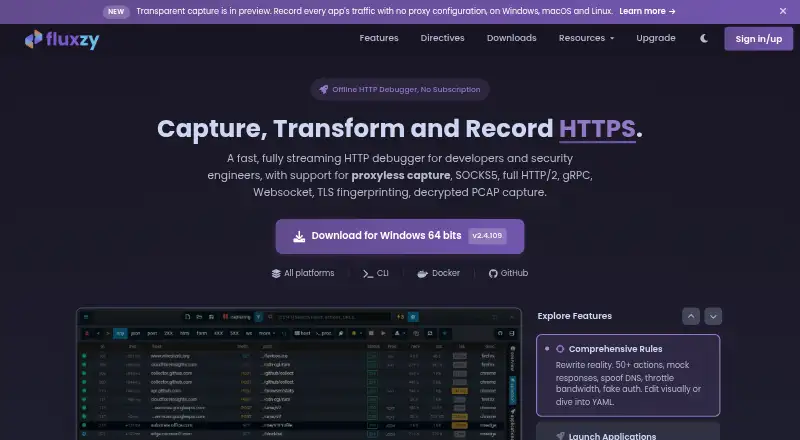
Fluxzy is an HTTP proxy for recording, analyzing, debugging, and changing HTTP/1.1, HTTP/2, and WebSocket traffic across plain and secure channels. Its proxyless capture can record application traffic without proxy configuration, including apps that ignore system proxy settings. Rules can change request and response headers, add authentication, simulate slow networks, forward requests, spoof DNS, change TLS fingerprints, and force HTTP versions. Fluxzy decodes gRPC and Protobuf traffic, using schema-less decoding or field names from .proto files. It can also inspect OpenAI, Anthropic, and Google Gemini API requests and responses, including streaming responses and tool calls. Captures can be exported in formats including HAR, Fiddler SAZ, PCAPNG, cURL commands, .http files, and native .fxzy files. Fluxzy works offline without an account or cloud sync, and its site says it has no telemetry. The free Community edition includes all features but is for personal use and adds an x-fluxzy-community header. Pro costs €49, paid once for one developer; Enterprise costs €59, paid once with a three-seat minimum.
Who it suits
Fluxzy suits developers and security engineers debugging or inspecting HTTP, WebSocket, gRPC, Protobuf, and supported LLM API traffic. The free Community edition is for personal use; paid licenses remove that restriction.
What it does well
- Captures traffic without proxy configuration.
- Can edit requests and responses and mock responses.
- Inspects streaming LLM API traffic and tool calls.
- Works offline without an account or cloud sync.
- Exports to HAR, PCAPNG, cURL, and other formats.
What to know first
- Free Community edition is limited to personal use.
- Free edition adds an x-fluxzy-community header.
- Enterprise requires a minimum of three seats.
- No free trial is listed.
Limits
The free Community edition is for personal use and adds an x-fluxzy-community header. Pro costs €49.00 once for one developer; Enterprise costs €59.00 per seat once for 1–9 seats and requires at least three seats.
Plans
| Plan | Billed and limits | Price |
|---|---|---|
| Enterprise (Perpetual) — 1–9 seats | Minimum 3 seats · 1–9 seats · Minimum 3 seats | €59, paid once |
| Enterprise (Perpetual) — 10–49 seats | Minimum 3 seats · 10–49 seats · Minimum 3 seats | €49, paid once |
| Enterprise (Perpetual) — 50+ seats | Minimum 3 seats · 50+ seats · Minimum 3 seats | €39, paid once |
| Community Edition | all features · personal use · adds x-fluxzy-community header · no telemetry | Free |
| Pro (Perpetual) | one-time payment · all Community features · commercial use · removes community header · one developer | €49, paid once |
| Enterprise (Perpetual) | one-time payment · minimum 3 seats · 59 EUR for 1–9 seats · 49 EUR for 10–49 · 39 EUR for 50+ · centralized seat management | €59, paid once |
As fluxzy.io lists them, read 20 Sept 2026. The maker's own page has the final word.
Getting started
- Visit the Fluxzy website.
- Choose the Community edition for personal use, Pro for one developer, or Enterprise for a team.
- Download Fluxzy for Windows, macOS, or Linux.
- For Android capture, use Fluxzy Connect; route iOS app traffic to the proxy.
- Use the NuGet packages to access the engine from supported .NET applications.
Fluxzy is a traffic-debugging proxy for developers and security engineers who need to inspect and alter HTTP traffic across desktop, mobile, and API clients. Its strongest fit is work that ordinary proxy setup cannot capture; the free edition, despite including all features, is restricted to personal use.
Overview
Fluxzy records, analyzes, and modifies HTTP/1.1, HTTP/2, and WebSocket traffic over plain or secure channels. Proxyless capture can collect HTTP and HTTPS traffic without proxy configuration, including from apps that ignore system proxy settings. That is a meaningful advantage when a client resists conventional interception. Android capture uses Fluxzy Connect through a local VPN, while iOS apps are routed to the proxy.
The tool works offline without an account or cloud sync, and Fluxzy states that it has no telemetry. Fluxzy.Core is open source under GPLv3, but the Desktop application is not, so Fluxzy is not an all-open-source desktop stack. Downloads have additional integrity signals: desktop checksums use SHA-256, CLI checksums use SHA-512, Windows binaries are Authenticode-signed, and macOS builds are signed and notarized.
Key features
Rules can edit request and response headers, inject authentication, simulate slow networks, forward requests, spoof DNS, change TLS fingerprints, and force HTTP versions. Breakpoints, traffic replay, response mocking, and proxy chaining extend the workflow beyond passive inspection, making Fluxzy useful for reproducing failures and checking how clients respond to controlled changes.
For API work, Fluxzy decodes gRPC and Protobuf traffic either without a schema or with real field names from .proto files. It can also inspect OpenAI, Anthropic, and Google Gemini requests and responses, including streaming responses and tool calls. That breadth is useful for teams debugging modern API clients, though the value depends on needing that protocol-level visibility.
Captures can be exported as HAR, Fiddler SAZ, PCAPNG for Wireshark, cURL commands, .http files, or native .fxzy files. This gives engineers options to move from inspection into other analysis and reproduction workflows. Official NuGet packages expose the Fluxzy engine to .NET Standard 2.1, .NET 6, and .NET 8 applications.
Pricing
| Plan | Price | Best fit |
|---|---|---|
| Community Edition | free | Personal use; all features included, with an x-fluxzy-community header. |
| Pro (Perpetual) | €49, paid once | One developer who needs commercial use on Windows, macOS, or Linux; removes the personal-use restriction and header. |
| Enterprise (Perpetual) | €59, paid once | Teams needing at least 3 seats; €59/seat for 1–9, €49/seat for 10–49, and €39/seat for 50+. |
Community is unusually broad in feature access, but its personal-use-only terms and identifying header rule it out for work. Pro is the straightforward paid option for an individual developer. Enterprise has a three-seat minimum, so it is less suitable for a small team that needs only one or two licenses. Both paid plans are perpetual one-time purchases, not recurring subscriptions. There is no free trial; Fluxzy offers a full refund if contacted within 14 days of purchase.
Platforms
Fluxzy supports Android, iOS, Linux, macOS, Windows, API workflows, and self-hosted use. Mobile capture is not identical across platforms: Android uses a local VPN through Fluxzy Connect, while iOS apps are routed to the proxy.
Who it's for
Fluxzy suits developers and security engineers who need to inspect difficult-to-capture app traffic, manipulate requests and responses, or debug gRPC and LLM API exchanges. Its export formats and .NET packages also help teams that need to carry captures into other tools or embed the engine in .NET applications. It is a weaker fit for professional users unwilling to pay, or for those requiring an open-source desktop application.
Pros and cons
- Pros: Proxyless capture handles applications that ignore system proxy settings, reducing setup friction for otherwise elusive traffic.
- Pros: gRPC/Protobuf decoding, LLM API inspection, traffic replay, and response mocking support investigation as well as reproduction.
- Pros: Multiple export formats and .NET engine packages make captures useful beyond the desktop application.
- Pros: Offline operation, no account requirement, and stated absence of telemetry suit workflows where cloud sync is unwelcome.
- Cons: The free edition is personal-use only and adds an x-fluxzy-community header, so business users must buy a license.
- Cons: Fluxzy Desktop is proprietary even though Fluxzy.Core is GPLv3, which limits the appeal for users seeking a fully open-source desktop tool.
- Cons: Enterprise starts at three seats, which can be excessive for smaller teams needing multi-user licensing.
Alternatives
Browse Web Debugging Proxies for more options. HTTP Toolkit is a freemium alternative with Android, iOS, Linux, macOS, web, and Windows support; its free Hobbyist plan includes basic interception and inspection, manual breakpoints, and built-in HTTP client tools. Reqable has a free Community plan limited to one device, 100MB of storage, and three rules in each of its rewrite, script, breakpoint, gateway, and mirror categories, so it may suit a tightly capped workflow; its Premium plan is $49.90 a year.
mitmproxy is a free, open-source interactive HTTPS proxy for readers who prioritize an open-source option. NetworkSpy has a free plan with limited LLM token-stream analysis, breakpoints, resource mapping, custom viewer building, and scripting. Mediator is a free, Apache-2.0-licensed cross-platform GUI gRPC debugging proxy, a focused alternative for gRPC work. Whistle is another free option. HTTPeep offers a Professional plan for $59, paid once as a single purchase with no subscription. Moni Proxy is a freemium option for macOS, Windows, iOS, Android, and Linux.
Verdict
Choose Fluxzy if you need deep traffic inspection and modification, especially proxyless capture, gRPC decoding, or visibility into streaming LLM API calls. Look elsewhere if work use must be free or the desktop application must be open source.
Verdict
Fluxzy offers extensive traffic inspection and modification, including proxyless capture and exports in several formats. The free edition has a personal-use restriction and adds a header; paid licenses start at €49, paid once.
Questions
Is Fluxzy free?
Yes. The Community edition costs nothing and includes all features for personal use. It adds an x-fluxzy-community header.
How much do the paid plans cost?
Pro costs €49, paid once for one developer. Enterprise costs €59, paid once with a three-seat minimum; per-seat pricing is €59 for 1–9 seats, €49 for 10–49, and €39 for 50 or more.
Which platforms does Fluxzy support?
The listed platforms are Android, API, iOS, Linux, macOS, self-hosted, and Windows.
Is Fluxzy open source?
Fluxzy.Core is open source under GPLv3. The Fluxzy Desktop application is not open source.
Can Fluxzy capture mobile traffic?
Fluxzy Connect captures Android app traffic through a local VPN. iOS apps can be routed to the proxy for inspection.
Does Fluxzy offer a free trial or refunds?
There is no free trial. Fluxzy offers a full refund when contacted within 14 days of purchase.
Facts from Fluxzy's own pages
- Android app
- Google Play describes Fluxzy Connect as a companion for Fluxzy Desktop and CLI with SOCKS5 authentication and per-app VPN routing. · play.google.com, 15 Oct 2026
- Android data safety
- Google Play lists no third-party data sharing and no data collection for Fluxzy Connect. · play.google.com, 15 Oct 2026
- API and SDK
- Official NuGet packages Fluxzy.Core and Fluxzy.Core.Pcap expose the engine for .NET Standard 2.1, .NET 6 and .NET 8 applications. · fluxzy.io, 15 Oct 2026
- Audience
- Fluxzy describes itself as a debugging tool for developers and security engineers. · fluxzy.io, 30 Sept 2026
- Binary security
- Desktop downloads publish SHA-256 checksums, CLI downloads publish SHA-512 checksums, Windows binaries are Authenticode-signed, and macOS builds are Apple-signed and notarized. · fluxzy.io, 30 Sept 2026
- Breakpoints
- Live breakpoints can pause traffic at DNS lookup, request and response stages for stepwise editing. · fluxzy.io, 15 Oct 2026
- CLI
- Fluxzy CLI is an open-source command-line tool for capture, certificate management, rule application, archive reading and export. · fluxzy.io, 15 Oct 2026
- Company establishment address
- Google Play identifies the Fluxzy developer address as 8 Rue Moinot, 78510 Triel-sur-Seine, France. · play.google.com, 15 Oct 2026
- Documentation depth
- The .NET documentation includes getting-started material, API reference pages, more than 20 examples and rule-action references. · docs.fluxzy.io, 15 Oct 2026
- Exports
- Fluxzy exports captures or requests to HAR, SAZ, PCAPNG, cURL, .http files and its native archive format. · fluxzy.io, 15 Oct 2026
- gRPC and Protobuf
- gRPC messages can be decoded without a schema or with field names supplied from .proto files. · fluxzy.io, 15 Oct 2026
- gRPC debugging
- Fluxzy decodes gRPC and Protobuf traffic with schema-less decoding or real field names supplied from .proto files. · fluxzy.io, 30 Sept 2026
- Headquarters
- Paris, France · fluxzy.io, 23 Sept 2026
- Independent product classification
- AlternativeTo lists Fluxzy Desktop as proprietary and free for personal use, with perpetual pricing shown between $49 and $96. · alternativeto.net, 15 Oct 2026
- Independent repository activity
- The public GitHub repository shows about 370 stars, 29 forks and more than 2,190 commits. · github.com, 15 Oct 2026
- Integrations
- Official NuGet packages provide Fluxzy engine access for .NET Standard 2.1, .NET 6, and .NET 8 applications. · fluxzy.io, 30 Sept 2026
- JWT decoding
- Fluxzy automatically decodes bearer JWT headers and displays claims such as issuer, subject, audience and expiry. · fluxzy.io, 15 Oct 2026
- License
- Fluxzy.Core is GPLv3; the Desktop application is proprietary, and a separate commercial license is offered for closed-source embedding. · fluxzy.io, 15 Oct 2026
- License limits
- The free Community edition is intended for personal use and adds an x-fluxzy-community header; paid licenses remove that header and the personal-use restriction. · fluxzy.io, 30 Sept 2026
- Limit: browser hooking
- The launch-and-hook browser method cannot attach to an already-running browser and starts a fresh profile without saved passwords, cookies or extensions. · fluxzy.io, 15 Oct 2026
- Limit: HTTPS setup
- HTTPS decryption requires installing and trusting a Fluxzy root certificate on the client device. · fluxzy.io, 15 Oct 2026
- Limit: raw capture dependencies
- Raw packet capture requires an external compatible capture engine such as libpcap, WinPcap or an equivalent library. · fluxzy.io, 15 Oct 2026
- LLM API inspection
- Fluxzy can capture and inspect OpenAI, Anthropic, and Google Gemini API requests and responses, including streaming responses and tool calls. · fluxzy.io, 30 Sept 2026
- LLM debugging
- The debugger can inspect OpenAI, Anthropic and Gemini requests, streaming responses and tool calls. · fluxzy.io, 15 Oct 2026
Where Fluxzy stands on Freedom251
- Web Debugging Proxies#1 of 27