Freedom251 › Web Debugging Proxies
HTTPeep
What HTTPeep is
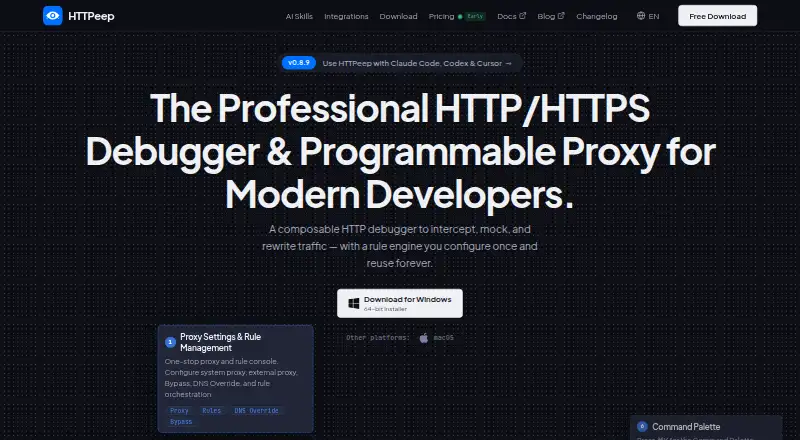
HTTPeep is a cross-platform HTTP/HTTPS debugging proxy for developers and QA engineers. It captures HTTP/1.1, HTTP/2 and HTTPS traffic for inspection, with tools for request and response editing, breakpoints, mock responses, replay and network throttling. Its rules match traffic and run actions through a deterministic pipeline. Reusable rules are stored as YAML files that can be version-controlled and shared. HTTPeep can override DNS at the proxy layer without editing the hosts file. The bundled command-line tool supports traffic capture, session queries, rule management, replay, scripting and CI workflows. A built-in MCP service documents integrations with Codex, Claude, Kimi and OpenCode. The maker says captured traffic and configuration stay stored locally. Supported systems are macOS 10.15+, Windows 10+ and Linux with glibc 2.31+. iOS devices can send traffic to HTTPeep on a Mac configured as a Wi-Fi proxy. The listing includes a free plan and a 7-day trial. Professional is a single purchase of 59.00 USD, with no subscription.
Who it suits
HTTPeep suits developers and QA engineers who need to inspect and manipulate HTTP traffic on Linux, macOS or Windows. Its CLI and CI support also fits scripting workflows.
What it does well
- Captures HTTP/1.1, HTTP/2 and HTTPS traffic
- Supports breakpoints and request editing
- Rules can be version-controlled as YAML files
- Includes a CLI for scripting and CI workflows
What to know first
- Supported systems specify minimum OS versions
- iOS traffic requires configuration through a Mac Wi-Fi proxy
- Professional is a 59.00 USD single purchase
Limits
The listed Professional plan is a single purchase of 59.00 USD, and the listed trial lasts 7 days. The facts do not describe a free-plan quota or feature limit.
Plans
| Plan | Billed and limits | Price |
|---|---|---|
| Professional | Single purchase; no subscription | $59, paid once |
As httpeep.com lists them, read 3 Oct 2026. The maker's own page has the final word.
Getting started
- Visit https://httpeep.com/.
- Choose the free plan or start the 7-day trial.
- Install HTTPeep on macOS 10.15+, Windows 10+, or Linux with glibc 2.31+.
- Configure the traffic you want to inspect through the proxy.
- For iOS traffic, configure an iOS device to use HTTPeep on a Mac as its Wi-Fi proxy.
Verdict
HTTPeep combines desktop traffic inspection with rule management, replay and a command-line tool. It offers a free plan and 7-day trial, while Professional is listed as a one-time purchase.
Questions
Does HTTPeep have a free plan?
Yes. A free plan is listed, along with a 7-day trial.
How much does Professional cost?
Professional is listed at 59.00 USD as a single purchase, with no subscription.
Which platforms does HTTPeep support?
The listed desktop platforms are Linux, macOS, and Windows. Supported systems are macOS 10.15+, Windows 10+, and Linux with glibc 2.31+.
Can HTTPeep inspect iOS traffic?
Yes. An iOS device can send traffic to HTTPeep running on a Mac when configured to use it as a Wi-Fi proxy.
Does HTTPeep offer command-line tools or integrations?
The bundled httpeep-cli supports traffic capture, session queries, rule management, replay, scripting, and CI workflows. The built-in MCP service documents integrations with Codex, Claude, Kimi, and OpenCode.
Where is captured traffic stored?
The maker says captured traffic and configuration are stored locally at ~/.httpeep/ and are not sent to external servers.
Facts from HTTPeep's own pages
- AI integrations
- HTTPeep has a built-in MCP service and documents integrations with Codex, Claude, Kimi, and OpenCode. · httpeep.com, 3 Oct 2026
- CLI and CI
- The bundled httpeep-cli can capture traffic, query sessions, manage rules, replay requests, and support scripting and CI workflows. · docs.httpeep.com, 3 Oct 2026
- Debugging features
- The product supports breakpoints, request and response editing, mock responses, traffic replay, and network throttling. · httpeep.com, 3 Oct 2026
- DNS override
- HTTPeep can override DNS resolution at the proxy layer without editing the hosts file. · httpeep.com, 3 Oct 2026
- Intended users
- The maker describes the product for developers and QA engineers, including frontend, full-stack, DevOps, and CLI users. · docs.httpeep.com, 3 Oct 2026
- Local data
- The maker says captured traffic and configuration are stored locally at ~/.httpeep/ and nothing is sent to external servers. · docs.httpeep.com, 3 Oct 2026
- Mobile debugging
- iOS devices can send traffic to HTTPeep running on a Mac when configured to use it as a Wi-Fi proxy. · httpeep.com, 3 Oct 2026
- Product
- HTTPeep is a cross-platform HTTP/HTTPS debugging proxy built with Rust and Tauri. · docs.httpeep.com, 3 Oct 2026
- Reusable rules
- Rules are stored as YAML files under ~/.httpeep/rules/ and can be version-controlled and shared. · docs.httpeep.com, 3 Oct 2026
- Rule engine
- Rules match traffic and run actions through a deterministic Match → Actions → Resolve → Response pipeline. · docs.httpeep.com, 3 Oct 2026
- Support
- The project lists [email protected] for email support and GitHub issues for bug reports and feature requests. · github.com, 3 Oct 2026
- Supported desktop systems
- The project lists macOS 10.15+, Windows 10+, and Linux with glibc 2.31+ as supported. · github.com, 3 Oct 2026
- Traffic inspection
- It captures HTTP/1.1, HTTP/2, and HTTPS traffic for inspection. · github.com, 3 Oct 2026
Where HTTPeep stands on Freedom251
- Web Debugging Proxies#5 of 27