Freedom251 › Web Debugging Proxies
Proxyfor
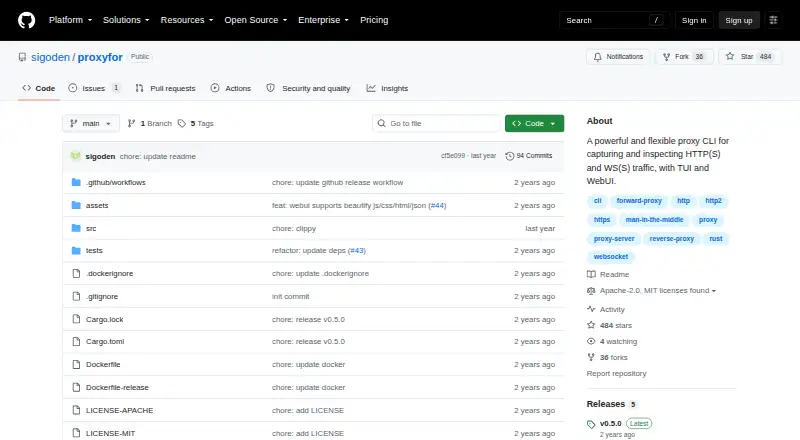
What Proxyfor is
Proxyfor is a free, open-source proxy command-line tool for capturing and inspecting HTTP, HTTPS, WebSocket and secure WebSocket traffic. It supports forward and reverse proxy modes, with both a terminal user interface and a web user interface. Requests and responses are captured as a stream without blocking traffic. Users can filter and search captures, then export them as Markdown, cURL or HAR files. The CLI can filter HTTP(S) traffic using a regular expression that matches the method and URI, or by content type. Proxyfor also supports WebSocket inspection. To inspect HTTPS traffic, the target device needs Proxyfor’s CA certificate installed; the project describes a built-in certificate installation app. The project offers installation through Cargo or Docker, as well as downloadable binaries for macOS, Linux and Windows. Its README documents a Docker setup that mounts a configuration directory and exposes port 8080. Proxyfor is available for Linux, macOS, self-hosted use, web and Windows. Its source is available under either the MIT License or Apache License 2.0, at the user’s option.
Who it suits
Proxyfor suits developers and other technical users who need to capture and inspect HTTP(S) or WebSocket traffic through a proxy. It is a fit for users who want terminal or web interfaces, searchable captures and export options, and can install a CA certificate on a target device when inspecting HTTPS.
What it does well
- Supports forward and reverse proxy modes.
- Offers both terminal and web interfaces.
- Captures requests and responses in a non-blocking stream.
- Searches and filters captured traffic.
- Exports captures as Markdown, cURL or HAR.
- Available under MIT or Apache License 2.0.
What to know first
- HTTPS inspection requires installing Proxyfor’s CA certificate on the target device.
- CLI HTTP(S) filtering is limited to method-and-URI regular expressions or content type.
- Docker setup requires mounting a configuration directory and exposing port 8080.
Limits
Inspecting HTTPS requires installing Proxyfor’s CA certificate on the target device. The CLI filters HTTP(S) traffic by a regular expression matching method and URI, or by content type.
Plans
| Plan | Billed and limits | Price |
|---|---|---|
| Proxyfor | MIT or Apache License 2.0 | Free |
As github.com lists them, read 10 Oct 2026. The maker's own page has the final word.
Getting started
- Choose an installation route: Cargo, Docker or a downloadable binary for macOS, Linux or Windows.
- For Docker, follow the documented setup with a mounted configuration directory and port 8080 exposed.
- Run Proxyfor in the desired forward or reverse proxy mode.
- Use the terminal or web interface to capture traffic, then filter, search or export it.
- For HTTPS inspection, install Proxyfor’s CA certificate on the target device using the described certificate installation app.
Verdict
Choose Proxyfor if you need an open-source proxy for inspecting HTTP(S) and WebSocket traffic, with terminal and web interfaces and several export formats. HTTPS inspection requires installing its CA certificate on each target device, so account for that setup when planning to inspect encrypted traffic.
Questions
Is Proxyfor free?
Yes. Proxyfor is free and open source.
Which platforms are supported?
The listed platforms are Linux, macOS, self-hosted, web and Windows. Downloadable binaries are offered for macOS, Linux and Windows.
What traffic can Proxyfor inspect?
It handles HTTP, HTTPS, WebSocket and secure WebSocket traffic, including WebSocket inspection.
What is required to inspect HTTPS traffic?
Proxyfor’s CA certificate must be installed on the target device. The project describes a built-in certificate installation app.
What export formats are available?
Captured traffic can be exported in Markdown, cURL or HAR formats.
Which license does Proxyfor use?
It is available under either the MIT License or Apache License 2.0, at the user’s option.
Facts from Proxyfor's own pages
- Capture behavior
- It captures requests and responses in a non-blocking, streaming way. · github.com, 10 Oct 2026
- Deployment
- The README documents running Proxyfor in Docker with a mounted configuration directory and port 8080 exposed. · github.com, 4 Oct 2026
- Distribution
- The project offers installation through Cargo, Docker, or downloadable binaries for macOS, Linux, and Windows. · github.com, 4 Oct 2026
- Exports
- It can export traffic in Markdown, cURL, or HAR formats. · github.com, 10 Oct 2026
- Filtering limits
- The CLI can filter HTTP(S) traffic by a regular expression matching method and URI, or by content type. · github.com, 4 Oct 2026
- HTTPS inspection
- Decrypting HTTPS traffic requires installing Proxyfor’s CA certificate on the target device. · github.com, 10 Oct 2026
- Installation
- The maker documents installation with Cargo, Docker, or downloadable binaries. · github.com, 10 Oct 2026
- Interfaces
- It provides a terminal user interface and a web user interface. · github.com, 10 Oct 2026
- License
- Proxyfor is available under either the MIT License or Apache License 2.0. · github.com, 10 Oct 2026
- Portable binaries
- The maker describes the executable as a single-file portable binary for Windows, macOS, and Linux. · github.com, 10 Oct 2026
- Protocols
- It handles HTTP, HTTPS, WebSocket, and secure WebSocket traffic. · github.com, 4 Oct 2026
- Proxy modes
- It supports forward and reverse proxy modes. · github.com, 10 Oct 2026
- Purpose
- Proxyfor is a proxy CLI for capturing and inspecting HTTP(S) and WS(S) traffic. · github.com, 10 Oct 2026
- Release
- The GitHub Releases page lists v0.5.0 as the latest release. · github.com, 10 Oct 2026
- Traffic filters
- It can filter traffic by a regular expression matching the method and URI or by MIME type. · github.com, 10 Oct 2026
- Traffic tools
- It supports filtering and searching captured traffic and can export in Markdown, cURL, or HAR formats. · github.com, 4 Oct 2026
Where Proxyfor stands on Freedom251
- Web Debugging Proxies#10 of 27