Freedom251 › Restaurant Self-Ordering Kiosk Software
TRAY Self-Service Kiosk
What TRAY Self-Service Kiosk is
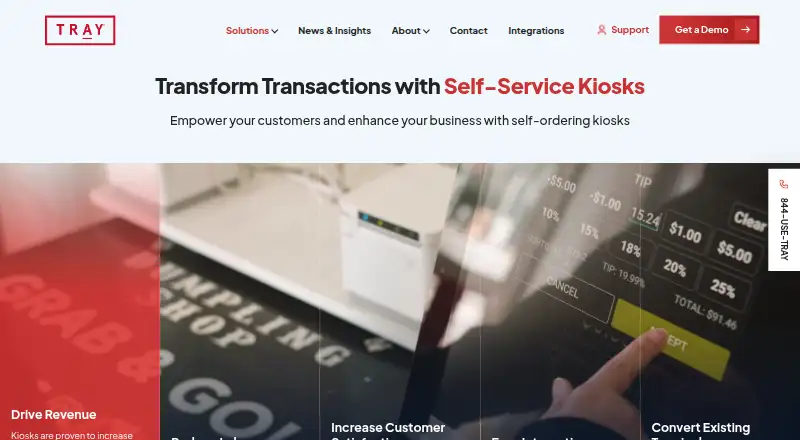
TRAY Self-Service Kiosk gives restaurant guests a self-ordering option and is built into TRAY POS. Kiosk items, menus, and prices sync automatically from TRAY HQ Enterprise Cloud, while operators can choose which items appear and manage them in TRAY HQ Enterprise Menu Management. A cashier POS terminal can be switched to kiosk mode; TRAY says countertop terminals can be converted in less than 30 seconds. The Android-based software runs on screens from 10 inches to over 40 inches, in portrait or landscape, with countertop, wall, or floor mounting. Guests can pay by card or electronic wallet, including through an “Order Here, Pay There” option. TRAY says the kiosk can keep operating offline and sending transactions to the kitchen. It also reports average revenue gains of 18–22% from selective upsells and menu management. The system is aimed at enterprise restaurant brands and multi-store operations. Pricing is available on request.
Who it suits
It suits enterprise restaurant brands and multi-store operators that want self-ordering alongside TRAY POS. The configurable screen sizes and mounting options suit different kiosk setups.
What it does well
- Built into TRAY POS with automatic menu and price updates
- Cashier terminals can switch to kiosk mode
- Supports card and electronic wallet payments
- Can operate offline and send transactions to the kitchen
- Runs on screens from 10 inches to over 40 inches
What to know first
- Pricing is available only on request
- Android-based kiosk software
Getting started
- Visit the TRAY Self-Service Kiosk website.
- Schedule a demo or request a quote.
- Use an Android-based screen or convert a cashier POS terminal to kiosk mode.
- Choose which menu items appear on the kiosk through TRAY HQ Enterprise Menu Management.
- Configure kiosk payments and kitchen connections.
TRAY Self-Service Kiosk adds self-ordering to TRAY POS, giving restaurant guests another way to place orders. It is best suited to enterprise brands and multi-store operators already using TRAY; its POS connection, flexible hardware and offline operation make it a practical fit, though pricing requires a quote.
Overview
The kiosk is built into TRAY POS rather than presented as a separate ordering system. Menus, items and prices update through TRAY HQ Enterprise Cloud, while operators can choose which items appear on kiosk and other sales channels. That shared setup can simplify menu upkeep for multi-store teams, but it makes the most sense for restaurants invested in TRAY’s ecosystem.
Operators can also switch an existing cashier terminal into kiosk mode in under 30 seconds, according to TRAY. Reusing a terminal may reduce the friction of adding self-service, while dedicated screens can range from 10 inches to over 40 inches and mount on a counter, wall or floor in portrait or landscape orientation.
Key features
Ordering, payments and kitchen flow
Guests can browse menu items, select modifiers and pay by card or electronic wallet. The “Order Here, Pay There” option supports non-cash kiosk orders that are paid elsewhere, which can suit workflows where payment is handled away from the ordering screen. Orders can continue to reach the kitchen when the kiosk is offline, an important safeguard for restaurants where connectivity is unreliable.
Menu controls and upselling
TRAY HQ Enterprise Menu Management lets operators control which items appear on kiosks, online and other channels. Selective upsells and menu management are designed to promote beverages, larger sizes and add-ons. TRAY reports average revenue gains of 18–22% from upselling on its kiosk platform; that is the company’s stated result, not a guarantee for every restaurant.
Integrations and payment security
TRAY’s restaurant integration ecosystem includes 7shifts, Dayforce, MarketMan and Magensa/Magtek. Its integration listing describes Magensa/Magtek encrypted card readers and tokenization as tools to protect payment data and support PCI compliance. The kiosk supports card and electronic wallet transactions.
Pricing
TRAY uses paid, custom pricing for the kiosk. Prospective customers can schedule a demo or request a quote; the cost is not a published figure, so operators will need to discuss their locations and setup with TRAY before comparing budgets.
That quote-based approach is more natural for enterprise and multi-store deployments than for a small restaurant seeking a self-serve plan with a clear monthly price. There are no published kiosk plan tiers, seat limits, quotas, trial terms or renewal terms to weigh.
Platforms
The kiosk software runs on Android, and TRAY lists Android and Windows among its platforms. Its Android-based kiosk can be deployed on screens from 10 inches to over 40 inches, with countertop, wall and floor mounting options and either screen orientation. TRAY also supports converting an existing cashier POS terminal to kiosk mode.
Who it's for
TRAY is best suited to enterprise restaurant brands and operators managing multiple stores, particularly those already running TRAY POS and TRAY HQ. Automatic menu and price updates, channel controls and the option to repurpose a terminal are most useful when consistency across locations matters. A smaller restaurant that needs a transparent price before engaging a vendor may prefer a product with a published plan.
Pros and cons
- Pros: Kiosk ordering is built into TRAY POS, and menu items and prices update through TRAY HQ, reducing the need to manage a separate menu for self-service.
- Pros: Existing cashier terminals can be switched into kiosk mode, while a broad range of screen sizes and mounting styles supports different restaurant layouts.
- Pros: Offline ordering can keep transactions moving to the kitchen during connectivity interruptions.
- Pros: Operators can control which items appear across sales channels and use selective upsells; TRAY reports average revenue gains of 18–22% on its platform.
- Cons: Custom pricing means operators cannot assess the kiosk’s cost from a published rate.
- Cons: The strongest fit is for TRAY POS users and larger restaurant operations, making it a less obvious choice for a small business seeking a standalone, clearly priced kiosk.
Alternatives
Restaurant Self-Ordering Kiosk Software is a useful starting point for comparing kiosk products across the category. Consider OnePe Kiosk System if you want a freemium option: its Free Plan costs nothing with 10 menu items, and its Starter Plan costs ₹199 a month for 100 menu items and 100 orders per day; it also offers a free trial.
SelfX may suit operators looking for a freemium alternative with Android, iOS, web, Windows and API platforms. Its Smart Growth Plan costs ₹4,999 a month for up to three POS terminals plus KDS; its Pro Power Plan is ₹12,999 a month. MyKiosk is another paid option for web and Windows.
Applova Self Ordering Kiosk is worth considering if you want an Android-based paid alternative with custom quoting and separately quoted hardware. Bite is a paid web option, while DineEngine Kiosk Ordering is a paid iOS and web option; both invite prospective customers to request a demo for pricing details.
PalmNet Self-Service Kiosk offers paid custom-quote setups configured around store space, traffic and payment methods. Clover Kiosk may be preferable if you want a stated device price: its kiosk costs $3,499, paid once, plus a $34.95/mo per device software fee.
Verdict
TRAY Self-Service Kiosk is a strong choice for enterprise restaurant brands and multi-store operators already using TRAY POS. Its integrated menu controls, flexible hardware and ability to keep orders flowing offline address practical needs across locations. The main reason to look elsewhere is the quote-based price: restaurants that need a clear upfront cost or a standalone kiosk outside TRAY’s ecosystem should compare alternatives first.
Verdict
TRAY combines self-service ordering with existing TRAY POS workflows, configurable kiosk hardware, and offline operation. Operators should request a quote to learn the price.
Questions
How much does TRAY Self-Service Kiosk cost?
Pricing is available on request. The kiosk page invites prospective customers to request a quote or schedule a demo.
Which platforms does it support?
The software is Android-based. It can run on screens from 10 inches to over 40 inches in portrait or landscape orientation.
Can it accept payments?
Yes. It supports card and electronic wallet transactions, including an “Order Here, Pay There” option for non-cash kiosk payments.
Can the kiosk keep working offline?
TRAY says the kiosk software can operate offline and continue sending transactions to the kitchen.
Which restaurant integrations are named?
TRAY names 7shifts, Dayforce, MarketMan, and Magensa/Magtek among its restaurant integrations and partners.
Who is the kiosk intended for?
TRAY says it serves enterprise restaurant brands and multi-store operations.
Facts from TRAY Self-Service Kiosk's own pages
- Company history
- TRAY says it was founded over a decade ago, initially serving Family Entertainment Centers before pivoting to restaurants. · tray.com, 4 Oct 2026
- Existing terminals
- Operators can turn a cashier POS terminal into kiosk mode in seconds; TRAY says countertop terminals can be converted in less than 30 seconds. · tray.com, 4 Oct 2026
- Hardware
- The Android-based software can run on screens from 10 inches to over 40 inches in portrait or landscape orientation, with countertop, wall, or floor mounting. · tray.com, 4 Oct 2026
- Headquarters
- Miami, United States · tray.com, 28 Sept 2026
- Integrations
- TRAY describes an ecosystem of restaurant integrations and partners, including 7shifts, Dayforce, MarketMan, and Magensa/Magtek. · tray.com, 4 Oct 2026
- Intended customers
- TRAY says it serves enterprise restaurant brands and multi-store operations. · tray.com, 4 Oct 2026
- Menu control
- Operators can choose which items appear on kiosk, online, or other sales channels and manage changes through TRAY HQ Enterprise Menu Management. · tray.com, 4 Oct 2026
- Menu controls
- Operators can choose which items are available at the kiosk and manage those choices through TRAY HQ Enterprise Menu Management. · tray.com, 4 Oct 2026
- Offline operation
- TRAY says kiosk software can operate offline and continue sending transactions to the kitchen. · tray.com, 4 Oct 2026
- Payments
- The kiosk supports card and electronic wallet transactions and offers an “Order Here, Pay There” feature for non-cash kiosk payments. · tray.com, 4 Oct 2026
- POS integration
- Self-service is built into TRAY POS, and kiosk items, menus, and prices update automatically from TRAY HQ Enterprise Cloud. · tray.com, 4 Oct 2026
- Pricing availability
- The kiosk page invites prospective customers to schedule a demo or request a quote; it does not state a price. · tray.com, 4 Oct 2026
- Purpose
- TRAY offers self-ordering kiosks for restaurants to reduce labor and give guests another way to order. · tray.com, 4 Oct 2026
- Sales claim
- TRAY says selective upsells have driven average revenue increases of 18–22% on its self-service kiosk platform. · tray.com, 4 Oct 2026
- Security and compliance
- TRAY’s integration listing describes Magensa/Magtek as providing encrypted card readers and tokenization to help protect payment data and maintain PCI compliance. · tray.com, 4 Oct 2026
- Support
- TRAY lists support at [email protected] and provides the phone number 844-USE-TRAY. · tray.com, 4 Oct 2026
- Upselling
- TRAY says selective upsells and menu management have increased beverage incidence, upsizing, and add-on sales, with average revenue gains of 18–22%. · tray.com, 4 Oct 2026