Freedom251 › Restaurant Self-Ordering Kiosk Software

DineEngine Kiosk Ordering
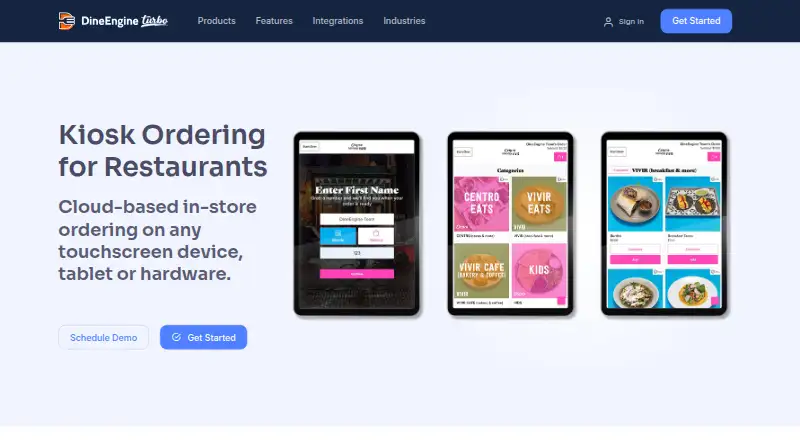
What DineEngine Kiosk Ordering is
DineEngine Kiosk Ordering is cloud-based in-store ordering software for restaurants and other venues. It runs on touchscreen devices, tablets, and other hardware that can open a modern web browser in kiosk mode, including older POS touchscreens and iPads. The kiosk menu syncs with DineEngine’s back-end menu management system in real time. Operators can configure it for dine-in or take-out, and set menu imagery and branding in the back end; updates take effect in real time.
Orders pass through the DineEngine ordering platform to the POS, where they are marked as dine-in or take-out. The product supports integrated payments, but currently works only with Heartland-enabled credit card readers. Receipt printers can be added, and receipts can also be sent by email. The product page states that the kiosk is PCI compliant and uses DataCap TranCloud secure VPN connectivity to encrypt in-store transactions. DineEngine’s integrations page names Paytronix and Spendgo as loyalty providers and describes pre-built third-party connectors. DineEngine lists use in fine dining, fast casual, quick-service restaurants, food halls, healthcare, schools, and other industries. Pricing is on request.
Who it suits
DineEngine Kiosk Ordering suits restaurants and other venues that want customers to order on touchscreen hardware and send orders to a POS as dine-in or take-out. Its listed use cases include fine dining, fast casual, quick-service restaurants, food halls, healthcare, and schools.
What it does well
- Menu and branding changes take effect in real time.
- Orders reach the POS with dine-in or take-out status.
- Works with modern browser-based kiosk hardware, including older POS touchscreens and iPads.
- Receipts can be printed or sent by email.
- The product page states PCI compliance and encrypted in-store transactions.
What to know first
- Payments currently require Heartland-enabled credit card readers.
- Pricing is available on request.
- A receipt printer is an add-on.
Limits
The listed plan has no stated price; pricing is on request. Payments currently work only with Heartland-enabled credit card readers.
Plans
| Plan | Billed and limits | Price |
|---|---|---|
| DineEngine Kiosk Ordering | Pricing not stated; schedule a demo | On request |
As turbo.dineengine.com lists them, read 8 Oct 2026. The maker's own page has the final word.
Getting started
- Visit the DineEngine Kiosk Ordering website.
- Schedule a demo to discuss the plan and pricing.
- Use a touchscreen device or other hardware that runs a modern web browser in kiosk mode.
- Configure menu imagery, branding, and dine-in or take-out options in the DineEngine back end.
- Connect the ordering platform to the POS and use a Heartland-enabled credit card reader for payments.
DineEngine Kiosk Ordering is a cloud-based ordering system for restaurant touchscreens, tablets, and other browser-capable hardware. It suits operators that want kiosk orders routed into an existing POS while keeping menus synchronized centrally. Its broad hardware support is useful, but the Heartland-only payment requirement narrows the best-fit audience.
Overview
DineEngine positions Kiosk Ordering for restaurants and other food-service environments, including fine dining, fast casual, quick-service restaurants, food halls, healthcare, and schools. Customers use an in-store touchscreen interface to choose dine-in or take-out, and the order travels through the ordering platform to the POS with that service mode attached.
The system is cloud-based and configured from DineEngine’s back end. Menu imagery and branding can be managed there, with changes appearing on kiosks in real time. That central control is practical for operators who need consistent menus across self-service stations without updating each device individually.
Key features
POS and menu synchronization
Real-time synchronization connects kiosk menus to the back-end menu-management system. Restaurants can maintain dine-in and take-out configurations while sending completed orders to the POS, reducing the need for staff to re-enter kiosk tickets.
Hardware flexibility
Any device that runs a modern web browser in kiosk mode can work, including older POS touchscreens and iPads. This makes DineEngine a stronger fit for businesses reusing existing equipment or deploying mixed hardware rather than buying a dedicated terminal fleet.
Payments and receipts
Integrated payments currently work only with Heartland-enabled credit-card readers. That is a material constraint for restaurants committed to another processor, even though DineEngine says it is exploring additional options. Receipt printers can be connected, and customers can receive receipts by email.
Security and integrations
The product page states that the kiosk is PCI compliant and uses DataCap TranCloud secure VPN connectivity to encrypt in-store transactions. DineEngine also describes pre-built third-party connectors; its integrations information names Paytronix and Spendgo as loyalty providers.
Support
DineEngine says its technical support helps keep applications running 24/7, which matters for kiosks operating throughout service hours and outside a conventional office schedule.
Pricing
The DineEngine Kiosk Ordering plan uses custom pricing; a demo is required. The plan includes integrated payments, POS integration, and web-based kiosk support. No seat, order, menu-item, trial, renewal, or free-plan limits are provided, so operators should request a quote that addresses hardware, readers, locations, and support requirements.
Platforms
The kiosk experience runs on the web through a modern browser in kiosk mode. DineEngine specifically identifies iOS support, and its browser approach allows compatible iPads, older POS touchscreens, tablets, and other suitable devices to be used.
Who it's for
DineEngine is best for restaurants and institutional food-service operations that already use, or plan to use, a POS compatible with its ordering flow and want self-service ordering on flexible hardware. It is particularly suitable when a central team needs to update menus, imagery, and branding instantly across kiosks.
It is a weaker choice for operators that require a payment processor other than Heartland-enabled readers or need transparent, published pricing before engaging a vendor.
Pros and cons
Pros
- Broad device compatibility: Modern browser kiosk mode can support existing POS touchscreens, iPads, tablets, and other hardware.
- Real-time menu control: Back-end menu, imagery, and branding changes propagate to kiosks without per-device updates.
- Direct POS delivery: Orders reach the POS with dine-in or take-out status, helping preserve service workflow.
- Flexible receipt options: Operators can add printers or send receipts by email.
- Security and support provisions: PCI compliance, encrypted TranCloud VPN connectivity, and stated 24/7 technical support address operational continuity.
Cons
- Heartland-only readers: Current payment support excludes businesses using other processors.
- Custom pricing: Prospective buyers must schedule a demo to establish cost, making budget comparison harder.
- Web-dependent deployment: The kiosk requires a modern browser and suitable kiosk-mode hardware rather than providing a dedicated device platform.
Alternatives
Restaurant Self-Ordering Kiosk Software is the broader category to browse when you want to compare multiple kiosk products.
OnePe Kiosk System is a better starting point for a freemium option: its free plan allows 10 menu items, while the 199.00 INR-per-month Starter Plan allows 100 menu items and 100 orders per day.
SelfX suits buyers wanting freemium access across Android, iOS, web, Windows, and API environments; its Smart Growth Plan is ₹4,999 a month for up to three POS terminals plus KDS, with a higher Pro Power Plan.
MyKiosk is a paid alternative with web and Windows support.
TRAY Self-Service Kiosk is a paid option for Android and Windows deployments.
Applova Self Ordering Kiosk uses custom quotes, with hardware quoted separately and pricing depending on locations, products, and hardware.
Bite is a paid web-based alternative that requires a demo for pricing details.
PalmNet Self-Service Kiosk offers custom-quoted terminal and system setups configured around store space, traffic, and payment methods.
Clover Kiosk is a paid device-led alternative at 3499.00 USD once, plus a 34.95 USD monthly software fee per device.
Verdict
Choose DineEngine Kiosk Ordering when you need browser-based self-service ordering that synchronizes menus in real time and sends clearly marked dine-in or take-out orders into a POS. Its reuse of compatible touchscreens and iPads can simplify deployment. Look elsewhere if Heartland readers do not fit your payment setup or if you need a published price before starting a sales conversation.
Verdict
Choose DineEngine Kiosk Ordering if you need browser-based kiosk ordering that sends dine-in or take-out orders to a POS and syncs menu changes in real time. Look elsewhere if you need a payment processor other than Heartland-enabled readers or need a listed price before contacting the vendor.
Questions
How much does DineEngine Kiosk Ordering cost?
Pricing is on request. The plan listing says to schedule a demo.
Which platforms and devices does it support?
The listed kiosk platform is web. Any device that runs a modern web browser in kiosk mode can work, including older POS touchscreens and iPads.
Does it integrate with a POS?
Yes. Kiosk orders pass through the DineEngine ordering platform to the POS and are marked as dine-in or take-out.
Which payment readers can it use?
It currently works only with Heartland-enabled credit card readers.
Can customers get receipts?
Yes. Receipt printers can be added, and receipts can also be sent by email.
Who makes DineEngine Kiosk Ordering?
DineEngine says it was founded in 2008 and is headquartered in Worthington, Ohio, United States.
Facts from DineEngine Kiosk Ordering's own pages
- Company history
- DineEngine says it was founded in 2008. · dineengine.com, 8 Oct 2026
- Founded
- 2008 · turbo.dineengine.com, 28 Sept 2026
- Hardware compatibility
- Any device that runs a modern web browser in kiosk mode can work, including older POS touchscreens and iPads. · turbo.dineengine.com, 8 Oct 2026
- Headquarters
- Worthington, Ohio, United States · turbo.dineengine.com, 28 Sept 2026
- Integrations
- DineEngine’s integrations page describes pre-built third-party connectors and names Paytronix and Spendgo as loyalty providers. · turbo.dineengine.com, 8 Oct 2026
- Menu options
- The kiosk menu syncs in real time with the back-end menu management system and can be configured for dine-in or take-out. · turbo.dineengine.com, 8 Oct 2026
- Menus and branding
- Menu imagery and branding are configured in the DineEngine back end, and changes take effect in real time. · turbo.dineengine.com, 8 Oct 2026
- Payments
- The kiosk currently works only with Heartland-enabled credit card readers; the vendor says it is exploring additional processors. · turbo.dineengine.com, 8 Oct 2026
- POS delivery
- Kiosk orders are sent through the ordering platform to the POS and marked as dine-in or take-out. · turbo.dineengine.com, 8 Oct 2026
- Product
- DineEngine describes Kiosk Ordering as cloud-based in-store ordering for touchscreen devices, tablets, and other hardware. · turbo.dineengine.com, 8 Oct 2026
- Receipts
- Receipt printers can be added, and receipts can also be sent by email. · turbo.dineengine.com, 8 Oct 2026
- Security
- The product page states that the kiosk is PCI compliant and uses DataCap TranCloud secure VPN connectivity to encrypt in-store transactions. · turbo.dineengine.com, 8 Oct 2026
- Support
- The company page says its technical support helps keep applications running 24/7. · dineengine.com, 8 Oct 2026
- Who it is for
- The product page presents the kiosk for restaurants and lists use across fine dining, fast casual, QSR, food halls, healthcare, schools, and other industries. · turbo.dineengine.com, 8 Oct 2026