Freedom251 › Restaurant Self-Ordering Kiosk Software

Clover Kiosk
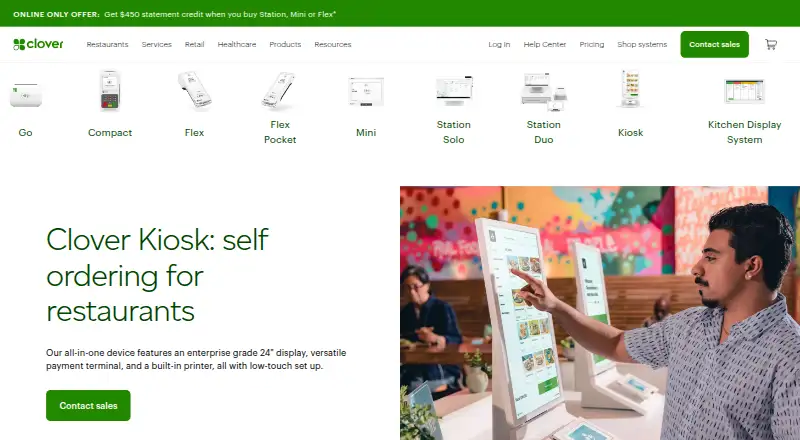
What Clover Kiosk is
Clover Kiosk is a restaurant self-ordering system built around an all-in-one device. Its 24-inch display lets customers browse a menu, customize items, and enter orders themselves; an 8-inch touchscreen handles payment, and the device includes a thermal receipt printer. The kiosk connects to Clover POS and pulls in menu items and prices, keeping them in sync. Orders appear on Clover Kitchen Display System or can print to the kitchen printer.
The device accepts contactless, chip, swipe, and debit PIN payments, and its product page specifies Clover Security end-to-end encryption. It can connect through Wi-Fi, ethernet, or LTE. Restaurants can place it on a countertop, mount it on a wall, or use an optional floor stand; it also supports 100mm VESA mounts. Clover says business consultants can help customers choose a system, with troubleshooting and support available 24/7/365. Clover's app page lists Order Kiosk, which lets customers order and pay directly on a Clover device. The kiosk page does not show its price. Clover's pricing information says monthly software fees and transaction processing rates apply, and fees vary by business type; contact sales to purchase and learn the kiosk's cost.
Who it suits
Clover Kiosk suits restaurants that want customers to place and pay for their own orders at a dedicated device. It fits businesses using Clover POS and a Clover kitchen display system or kitchen printer for order handling.
What it does well
- Customers can browse menus and customize orders
- Menu items and prices sync from Clover POS
- Orders go to a kitchen display system or printer
- Accepts contactless, chip, swipe, and debit PIN payments
- Offers Wi-Fi, ethernet, and LTE connectivity
What to know first
- Kiosk pricing is available on request
- Monthly software fees and transaction processing rates apply
Limits
Monthly software fees and transaction processing rates apply, with fees varying by business type. Clover does not show a Kiosk price on its kiosk page.
Plans
| Plan | Billed and limits | Price |
|---|---|---|
| Clover Kiosk | $3,499 device · $34.95/mo per device software fee | $3,499, paid once |
As clover.com lists them, read 9 Oct 2026. The maker's own page has the final word.
Getting started
- Visit https://www.clover.com/kiosk
- Contact Clover sales to purchase and ask about pricing
- Choose a countertop, wall-mounted, or optional floor-stand placement
- Connect the kiosk using Wi-Fi, ethernet, or LTE
- Connect it to Clover POS so it can pull in menu items and prices
- Route orders to Clover Kitchen Display System or the kitchen printer
Verdict
Choose Clover Kiosk if your restaurant wants an all-in-one self-ordering device that syncs its menu with Clover POS and routes orders to the kitchen. Ask Clover about pricing before choosing it, since monthly software fees and transaction processing rates apply and vary by business type.
Questions
What does Clover Kiosk cost?
The kiosk page does not show a price. Clover says monthly software fees and transaction processing rates apply, with fees varying by business type; contact sales to purchase.
Does Clover Kiosk work with Clover POS?
Yes. It pulls menu items and prices from Clover POS to keep them in sync.
How are kiosk orders sent to the kitchen?
Orders appear on Clover Kitchen Display System or print to the kitchen printer.
What payment methods does the device accept?
It accepts contactless, chip, swipe, and debit PIN payments.
How can the kiosk be installed?
It can sit on a countertop, mount to a wall, or use an optional floor stand. It supports 100mm VESA mounts.
What support does Clover offer?
Clover says business consultants can help customers choose a system, and troubleshooting and support are available 24/7/365.
Facts from Clover Kiosk's own pages
- Accessibility
- The optional floor stand has high and low settings for people who are non-disabled or use wheelchairs. · clover.com, 9 Oct 2026
- Connectivity
- The device supports Wi-Fi, ethernet, and LTE connectivity. · clover.com, 9 Oct 2026
- Hardware
- The all-in-one device has a 24-inch ordering display, an 8-inch payment touchscreen, and a built-in thermal receipt printer. · clover.com, 4 Oct 2026
- Integrations
- Clover’s app page lists Order Kiosk as an app that lets customers order and pay directly on a Clover device. · clover.com, 9 Oct 2026
- Kitchen workflow
- Kiosk orders appear on a Clover Kitchen Display System or print to the kitchen printer as counter orders do. · clover.com, 9 Oct 2026
- Menu sync
- The kiosk pulls its menu from the Clover POS system so items and pricing stay in sync. · clover.com, 9 Oct 2026
- Mounting
- The kiosk can be used on a countertop, with an optional floor stand, or wall mounted using an optional bracket or third-party 100mm VESA mount. · clover.com, 9 Oct 2026
- Ordering
- Customers can browse menus at their own pace, customize orders, and enter orders themselves. · clover.com, 9 Oct 2026
- Payments
- It accepts contactless, chip, swipe, and debit PIN payments. · clover.com, 9 Oct 2026
- Pricing limits
- Clover's pricing page says monthly software fees and transaction processing rates apply, with fees varying by business type; it does not show a Kiosk price. · clover.com, 4 Oct 2026
- Purpose
- Clover Kiosk is an all-in-one self-ordering device for restaurants with a 24-inch display, payment terminal, and built-in printer. · clover.com, 9 Oct 2026
- Security
- The product page specifies Clover Security end-to-end encryption. · clover.com, 9 Oct 2026
- Subscription terms
- Clover says its subscriptions are non-cancelable and ineligible for refunds, with device buyout or upgrade exceptions. · clover.com, 9 Oct 2026
- Support
- Clover says business consultants can help customers get set up and support is available 24/7/365 for troubleshooting. · clover.com, 9 Oct 2026
- Upselling
- The kiosk promotes cross-selling and upselling options to help increase average ticket size. · clover.com, 9 Oct 2026
- Who it serves
- Clover describes Kiosk as a self-ordering product for restaurants. · clover.com, 9 Oct 2026