Freedom251 › Document Management Software

Transkribus
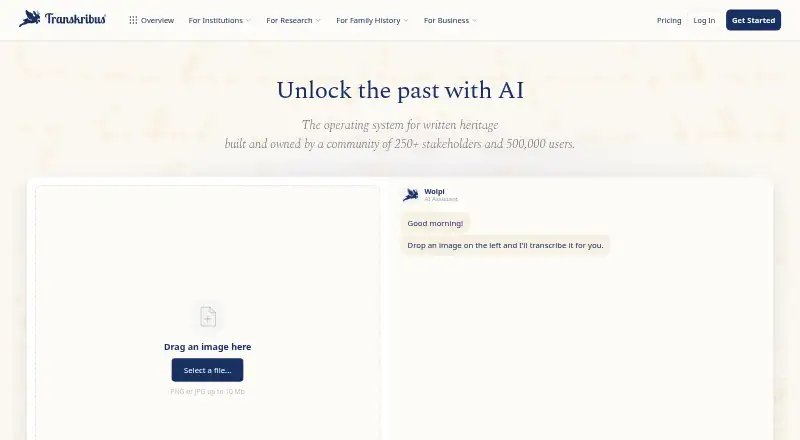
What Transkribus is
Transkribus uses AI to convert handwritten and printed documents into searchable text. Its recognition covers more than 100 languages and historical scripts. Users can select public models for handwriting, print, layout, or tables, or train their own. The editor supports text and layout changes, version history, and real-time collaboration. Layout analysis finds text regions, baselines, tables, and reading order, with exports including PAGE XML, ALTO, and searchable PDF. The Developer Platform API returns structured text in JSON, ZIP, or PAGE XML formats; it is in beta and requires Scholar or above. API results remain available for 24 hours, and submitted JPEG, PNG, or TIFF images can be up to 20 MB. Processing consumes credits: listed recognition tasks use one credit per page, while line detection uses 0.25 credits per page. Free includes 50 credits monthly; Scholar costs €99 per year, and Team costs €449 per year. Transkribus says data is handled on servers in Austria under GDPR-compliant practices, and users retain ownership and may delete their documents and transcriptions. Its older eXpert desktop software is no longer updated.
Who it suits
Transkribus can suit people and teams digitizing handwritten or printed documents, including users who need searchable text, layout analysis, or collaborative editing. The web app supports browser-based work, while API access is available on Scholar or higher.
What it does well
- Recognition supports more than 100 languages and historical scripts.
- Users can train their own models.
- Editor includes version history and real-time collaboration.
- Exports include PAGE XML, ALTO, and searchable PDF.
- Users retain ownership and can delete documents.
What to know first
- Processing documents consumes credits.
- The API is beta and requires Scholar or above.
- Older eXpert desktop software is no longer updated.
- Free provides 50 credits per month.
Plans
| Plan | Billed and limits | Price |
|---|---|---|
| Organisation | Custom user seats · Custom document storage · API access | On request |
| Free | 50 free credits per month · 1 user seat · 1 limited project · 20 GB storage · 5 training runs/month | Free |
| Team | €449/year (€37.42/month), incl. 20% VAT · 1,500 credits per year · 5 user seats · 3 projects · 1 TB storage · 100 training runs/month · distribute credits across team | €449 a year |
| Credit top-up | 250 credits; no subscription required · On-demand credits never expire | €5,950, paid once |
| Scholar | €99/year (€8.25/month), incl. 20% VAT · 900 credits per year · 1 user seat · 1 project · 200 GB storage · 30 training runs/month · priority job processing | €99 a year |
| For Organisations | Get a quote · 15+ user seats · 75,000+ credits per year · dedicated success manager · custom onboarding | On request |
As transkribus.org lists them, read 21 Sept 2026. The maker's own page has the final word.
Overview
Transkribus is a cloud service that turns images of handwritten and printed documents into searchable text. It is best suited to researchers, archives, and organisations working with historical material who need recognition, layout editing, and document management in one workflow. Its free tier is useful for small projects, but processing limits and the paid API threshold matter as work grows.
Made by member-owned European cooperative READ-COOP SCE, Transkribus combines AI recognition with public and trainable models, editing tools, and structured exports. The maker says it supports more than 100 languages and historical scripts. The service processes and stores data on servers in Austria with GDPR-compliant handling; users keep ownership of their documents and transcriptions and can delete them at any time.
Key features
- Handwriting and print recognition: Recognition across more than 100 languages and historical scripts makes the service relevant to mixed and older collections, rather than only clean, modern print. Results still consume credits, so high-volume projects need to budget for usage.
- Public and custom models: Users can browse public models for handwriting, print, layout analysis, and table recognition, or train their own. That flexibility suits collections with specialised material, while the monthly training-run allowance varies by plan.
- Layout analysis and export: The system detects text regions, baselines, tables, and reading order, then exports to PAGE XML, ALTO, searchable PDF, and other formats. This is useful when preserving page structure matters as much as extracting words.
- Editing and collaboration: Text and layout editing, version history, and real-time collaboration keep correction and review alongside recognition. The web app is where new features are available; the older eXpert desktop software for Windows, macOS, and Linux is no longer updated.
- Developer API: The beta API accepts document images and returns structured text as JSON, a ZIP archive, or PAGE XML. It requires Scholar or above, retains results for 24 hours, and accepts JPEG, PNG, or TIFF images up to 20 MB. Those constraints suit short-lived integration workflows better than a permanent result store.
- Credit-based processing: Handwriting recognition, table recognition, and field recognition each use 1 credit per page; line detection uses 0.25 credits per page. The differing rates make the included allowance dependent on the work being run, not just the number of pages.
Pricing
Transkribus is freemium. Prices for Scholar and Team include 20% Austrian VAT, and annual allowances should be weighed against page-based credit consumption.
- Free: free, billed annually, with 50 free credits per month, 1 user seat, 20 GB document storage, and 5 training runs per month. It is a sensible starting point for individual experiments, but the monthly credit cap and single seat constrain sustained projects.
- Scholar: €99 a year, equivalent to €8.25/month, with 900 credits per year, 1 user seat, 200 GB storage, and 30 training runs per month. This is the entry point for API access and a practical upgrade for an individual with regular processing needs.
- Team: €449 a year, equivalent to €37.42/month, with 1,500 credits per year, 5 user seats, 1 TB storage, and 100 training runs per month. It fits collaborative projects that need shared capacity, though its credit pool is not unlimited.
- Organisation: Custom pricing, custom user seats and storage, and API access. Larger organisations can request a configuration rather than work within the fixed seat and storage limits.
- For Organisations: Custom pricing for 15+ user seats and 75,000+ credits per year, with a dedicated success manager and custom onboarding. This is aimed at larger deployments rather than small research groups.
- Credit top-up: €5,950, paid once for 250 credits; no subscription is required, and on-demand credits never expire. This offers a way to extend usage without changing plans, but the listed purchase is a substantial one-off commitment.
Free includes standard support; Scholar and Team include priority support. The fixed plans keep seat, storage, and processing allowances clear, but API users cannot stay on Free and heavier workloads must account for credit use.
Platforms
Transkribus is available on the web and through an API, with Linux, macOS, and Windows support for the older eXpert desktop software. Because that desktop application no longer receives updates, users who want current features should work in the web app. Deployment is cloud-based.
Who it's for
Transkribus is a strong fit for archives, researchers, and teams digitising historical documents, especially when they need handwriting recognition, page-structure analysis, correction tools, and exports together. It is less suitable for an API-first user who needs to start without a paid plan, or for a project whose processing volume does not fit the available credit allowances.
Pros and cons
Pros
- Recognition supports more than 100 languages and historical scripts, according to the maker, broadening its usefulness for archival material.
- Model browsing and training, layout analysis, editing, version history, and collaboration cover more of a document project than recognition alone.
- Users retain ownership of documents and transcriptions and can delete them; the maker says processing and storage are in Austria with GDPR-compliant handling.
- The free plan includes 20 GB storage and 5 training runs monthly, giving individuals room to assess a project before paying.
Cons
- Credits are consumed per page, with different rates by processing type, so the free monthly allocation may not go far for large collections.
- The API is beta and locked to Scholar or higher, limiting no-cost integration work.
- The older desktop application receives no updates, making the web app the practical choice for new features.
- The 24-hour API result retention and 20 MB image limit may not suit workflows that need longer-lived results or larger source images.
Alternatives
Consider Veryfi API instead when an API-focused document workflow with a stated free allowance is a better fit: its Free plan covers up to 100 documents per month across document types, with limited storage and email support.
Base64.ai may suit users looking for OCR in 165+ languages, handwriting support, API access, and unlimited free seats; its listed 1 cent OCR plan is $0.01 a month.
For a stated no-expiration API free tier, Cloudmersive OCR API offers 600 calls per month, a limit of 1 call per second, and a 3.5 MB maximum file size.
Mistral OCR is another API-oriented option, with OCR 4.1 API priced at $4 a month, billed at $4 / 1000 pages.
For enterprise accounts payable automation, consider Hyland AP Automation.
LandingAI Agentic Document Extraction may suit teams seeking an Explore tier with 1 user seat and 1,000 free credits to start, plus a stated Team plan.
Nanonets Accounts Payable Automation is another option for accounts payable automation, with a Starter plan for up to 3 users.
Doxis AI.dp offers €25.00 worth of free credits on a pay-as-you-go basis, with usage billed monthly.
Browse more options in AI OCR Software or Document Management Software.
Verdict
Choose Transkribus for historical-document projects that need handwriting recognition alongside layout analysis, editing, collaboration, and structured export. Its breadth and free entry tier make it a credible starting point, but credit caps and the Scholar minimum for API access are reasons to look elsewhere if the priority is high-volume or no-cost API processing.
Verdict
Transkribus combines document recognition, editing, layout analysis, and export options, with plans ranging from free access to paid annual tiers. Note that its API is still in beta and the older desktop software no longer receives updates.
Facts from Transkribus's own pages
- API
- The Developer Platform API accepts document images and returns structured text as JSON, a ZIP archive, or PAGE XML; it is in beta and requires a Scholar plan or above. · docs.transkribus.org, 30 Sept 2026
- API limit
- API results are retained for 24 hours, and submitted images may be JPEG, PNG, or TIFF up to 20 MB. · docs.transkribus.org, 30 Sept 2026
- Data rights
- Users retain ownership of their documents and transcriptions and can delete them at any time. · help.transkribus.org, 30 Sept 2026
- Desktop status
- The older Transkribus eXpert desktop software supports Windows, macOS, and Linux, but is no longer updated and new features are only available in the web app. · help.transkribus.org, 30 Sept 2026
- Editing
- The document editor supports text and layout editing, version history, and real-time collaboration. · transkribus.org, 30 Sept 2026
- Founded
- 2019 · transkribus.org, 23 Sept 2026
- Headquarters
- Innsbruck, Austria · transkribus.org, 23 Sept 2026
- Layout
- Layout analysis detects text regions, baselines, tables, and reading order, and supports export in PAGE XML, ALTO, searchable PDF, and other formats. · transkribus.org, 30 Sept 2026
- Maker
- READ-COOP SCE is a member-owned European cooperative founded in 2019 in Innsbruck, Austria. · transkribus.org, 30 Sept 2026
- Models
- Users can browse public AI models for handwriting, print, layout analysis, and table recognition or train their own. · transkribus.org, 30 Sept 2026
- Purpose
- Transkribus uses AI to turn handwritten and printed documents into searchable text. · transkribus.org, 30 Sept 2026
- Recognition
- The maker says its text recognition supports more than 100 languages and historical scripts. · transkribus.org, 30 Sept 2026
- Security
- The maker says data are processed and stored on its servers in Austria, with GDPR-compliant handling. · help.transkribus.org, 30 Sept 2026
- Support
- The pricing comparison lists standard support for Free and priority support for Scholar and Team. · transkribus.org, 30 Sept 2026
- Usage limits
- Processing documents consumes credits, with handwriting recognition, table recognition, and field recognition each listed at 1 credit per page and line detection at 0.25 credits per page. · transkribus.org, 30 Sept 2026
Where Transkribus stands on Freedom251
- Document Management Software#13 of 63
- AI OCR Software#9 of 30