Freedom251 › Document Management Software
Paperwork
What Paperwork is
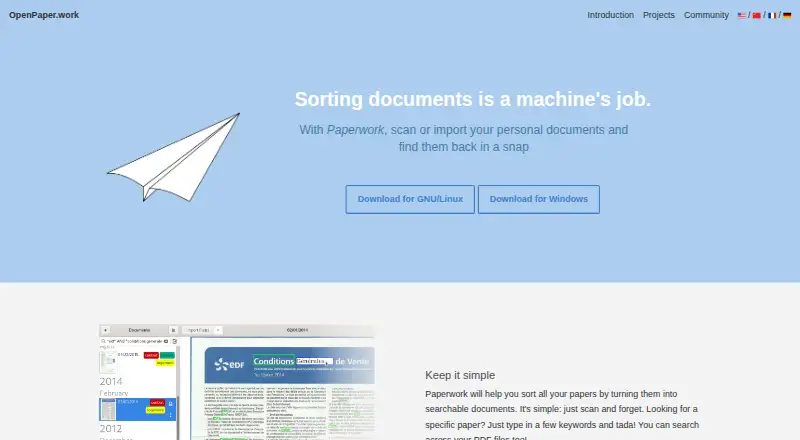
Paperwork is a personal document manager for scanning or importing documents and finding them later with keyword search. It can search across PDF files, detect page orientation automatically, and provides quick page editing. Users can add labels, and Paperwork can learn where those labels belong and apply them to new documents. It uses PyOCR for text recognition and Libinsane to access scanners. Documents are kept in one directory using JPEG, hOCR, and PDF formats; that directory can be synchronized across computers with tools such as Nextcloud, Syncthing, and SparkleShare. Paperwork is Free Software and its plan is free. It supports Linux and Windows. Linux installation choices include distribution packages, Flatpak repositories, AppImage, and source code. The Flatpak versions cannot currently be used with network scanners, and local scanner use may require tweaking. The project welcomes contributions.
Who it suits
Paperwork suits people who want to organize personal scanned or imported documents and retrieve them through keyword or PDF search. It may also suit users who want to synchronize a document directory across computers.
What it does well
- Free Software with a plan at no cost.
- Searches across PDF files.
- Learns label placement and applies labels to new documents.
- Offers automatic page orientation detection.
- Document directory can sync through listed tools.
What to know first
- Flatpak versions cannot currently use network scanners.
- Local scanner use may require tweaking.
Limits
The free plan is Free Software and costs nothing. Flatpak versions cannot currently be used with network scanners, and local scanner use may require tweaking.
Plans
| Plan | Billed and limits | Price |
|---|---|---|
| Paperwork | Free Software; GNU/Linux distribution packages, Flatpak, AppImage, or source installation | Free |
As openpaper.work lists them, read 5 Oct 2026. The maker's own page has the final word.
Getting started
- Open the Paperwork website.
- Choose Linux or Windows as your platform.
- On Linux, install using a distribution package, OpenPaper or Flathub Flatpak, AppImage, or source code.
- Scan or import personal documents into Paperwork.
- Add labels and use keyword search to find documents.
Verdict
Paperwork brings scanning, OCR, search, and learned labels into a personal document manager. Its scanner caveats are worth checking before choosing a Linux installation method.
Questions
How much does Paperwork cost?
The listed Paperwork plan is free, and the pricing model is free.
Which platforms does Paperwork support?
The listed platforms are Linux and Windows.
Can Paperwork search PDFs?
Yes. It can search across PDF files.
Is Paperwork open source?
Paperwork is distributed as Free Software, and the site welcomes contributions.
How can I install Paperwork on Linux?
Options include distribution packages, the OpenPaper or Flathub Flatpak repositories, AppImage, and source code.
Who is the maker of Paperwork?
The OpenPaper.work about page names Jérôme Flesch as the author.
Facts from Paperwork's own pages
- Labels
- Users can add colorful labels, and Paperwork can learn where labels belong and apply them automatically to new documents. · openpaper.work, 5 Oct 2026
- Linux installation
- GNU/Linux installation options include distribution packages, OpenPaper or Flathub Flatpak repositories, AppImage, and source code. · openpaper.work, 5 Oct 2026
- Linux limitation
- The Flatpak versions cannot currently be used with network scanners, and local scanner use may require tweaking. · openpaper.work, 5 Oct 2026
- Maker
- The about page names Jérôme Flesch as the author of OpenPaper.work. · openpaper.work, 5 Oct 2026
- OCR and scanners
- Paperwork uses PyOCR to run OCR and Libinsane to access scanners. · openpaper.work, 5 Oct 2026
- Open source
- Paperwork is distributed as Free Software, and the site welcomes contributions. · openpaper.work, 5 Oct 2026
- Page tools
- The site lists automatic page orientation detection and quick page editing among Paperwork’s features. · openpaper.work, 5 Oct 2026
- PDF search
- Paperwork can search across PDF files. · openpaper.work, 5 Oct 2026
- Privacy
- The maker’s about page says no tracking is done on the website, with or without cookies. · openpaper.work, 5 Oct 2026
- Purpose
- Paperwork is a personal document manager for scanning or importing personal documents and finding them again with keyword search. · openpaper.work, 5 Oct 2026
- Storage and formats
- Paperwork stores documents under a single directory and uses JPEG, hOCR, and PDF formats. · openpaper.work, 5 Oct 2026
- Sync options
- The document directory can be synchronized across computers with tools such as Nextcloud, Syncthing, and SparkleShare. · openpaper.work, 5 Oct 2026
- Windows usage
- The official site’s usage statistics list Paperwork instances running on Windows. · openpaper.work, 5 Oct 2026
Where Paperwork stands on Freedom251
- Document Management Software#14 of 63