Freedom251 › Virtual Terminal Software

SwipeSimple
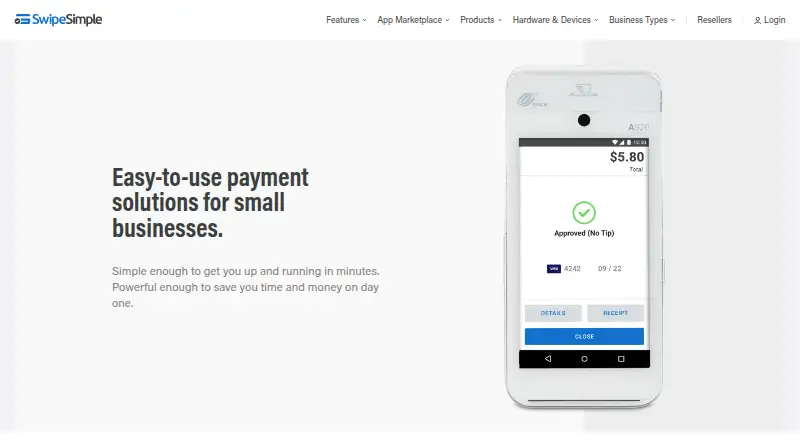
What SwipeSimple is
SwipeSimple provides payment acceptance tools for small businesses, including mobile, terminal, and computer-based processing. Its Android and iOS apps support swiped, dipped, tapped, and keyed card payments, with an optional reader for physical cards. The mobile app can accept payments offline when cell reception is poor. A dashboard lets businesses manage customers, review purchase histories and sales trends, and export transaction reports compatible with tools such as QuickBooks and Excel. Invoices can be sent by email or text, shared as links, saved as drafts, and set up with automatic payment reminders. The App Marketplace includes QuickBooks Online Sync, Appointments, and Text Loyalty & Reviews. SwipeSimple says it does not offer public APIs or third-party integrations. It is commonly sold with a merchant account and processing agreement through a provider, who handles account support and billing or fee questions. Starter permits up to three users; Standard and Premium allow unlimited users. Tap to Pay on iPhone requires iOS 17.4 or higher and is available within the 50 U.S. states, not U.S. territories.
Who it suits
SwipeSimple suits small businesses accepting payments on the go, in retail or food-and-beverage settings, or through a computer for B2B and back-office billing. It may fit merchants who need invoicing and offline mobile payments.
What it does well
- Mobile app supports swiped, dipped, tapped, and keyed payments.
- Can accept payments offline when reception is poor.
- Invoices support automatic payment reminders.
- Dashboard exports reports compatible with QuickBooks and Excel.
- Tap to Pay is available on iPhone.
What to know first
- Sold with a merchant account and processing agreement from a provider.
- Account support and billing questions go to the provider.
- No public APIs or third-party integrations.
- Tap to Pay on iPhone excludes U.S. territories.
Limits
SwipeSimple Connect Zero is listed as free for eligible businesses, with card-paying customers covering a 3.5% card fee. Starter permits up to three users. Tap to Pay on iPhone requires iOS 17.4 or higher and is available in the 50 U.S. states, not U.S. territories.
Plans
| Plan | Billed and limits | Price |
|---|---|---|
| SwipeSimple Connect Zero | processing · Eligible businesses only · card-paying customers cover a 3.5% card fee | Free |
| QuickBooks Online Sync | monthly add-on · Active SwipeSimple and QuickBooks Online accounts required · manual sync · no historical syncing | $19.95 a month |
| SwipeSimple Connect card-present processing | per transaction · Tap, dip, swipe, or contactless transactions · no setup, annual, batch, statement, or PCI fees | $2.61, paid once |
| SwipeSimple Connect — card-present processing | Per transaction when you tap, dip, or swipe a card or contactless payment device. · No setup fees · No annual fees · No batch fees · No statement fees · No PCI compliance fees | $2.61, paid once |
| Smart terminal | plus tax · All-in-one payment device with receipt printing | $299, paid once |
| SwipeSimple Appointments | monthly · cancel anytime · Additional users $14.95 per user/month · no refunds for unused subscription time | $29.95 a month |
| SwipeSimple Connect — card-not-present processing | Per transaction for keyed cards, cards on file, invoices, payment links, or online purchases. · No setup fees · No annual fees · No batch fees · No statement fees · No PCI compliance fees | $3.51, paid once |
| SwipeSimple Connect card-not-present processing | per transaction · Keyed cards, cards on file, invoices, payment links, and online purchases | $3.51, paid once |
The first 8 of 11 plans, as swipesimple.com lists them, read 15 Oct 2026. The maker's own page has the final word. Every plan
Getting started
- Visit https://swipesimple.com/.
- Arrange SwipeSimple through a merchant service provider or processor.
- Select a plan and confirm its terms with the provider.
- Use the Android or iOS app, or access SwipeSimple on the web.
- Use an optional reader for physical card payments if needed.
SwipeSimple is a payment platform for small businesses taking cards at a counter, on the road, or through computer-based billing. It is best suited to merchants that want acceptance, invoicing, and reporting together, although the merchant-service provider behind the account determines important support and processing terms.
Overview
The mobile app accepts swiped, dipped, tapped, and keyed card payments, with an optional reader for physical cards. It can keep taking payments offline when cellular coverage is unreliable, which is useful for field work, events, and other locations where a connection cannot be assumed. Computer-based processing and terminal support extend the same service to retail, food-and-beverage, and back-office B2B billing.
SwipeSimple is usually bundled with a merchant account and processing agreement supplied by an acquirer, ISO, agent, financial institution, or processor. Your provider handles account support, billing, and fee questions. That can be convenient if you already work with a provider, but it means terms and service quality are not controlled by the app alone.
Key features
Acceptance and invoicing
Payment methods include Visa, Mastercard, American Express, Discover, ACH, Apple Pay, Google Pay, and other contactless wallets. Recurring payments are supported. Invoices can be sent by email or text, shared through payment links, saved as drafts, and paired with automatic reminders, giving small teams a workable way to chase outstanding balances without a separate invoicing product.
Business records and integrations
The dashboard stores customer information, purchase histories, and sales trends. Transaction reports can be exported for tools such as QuickBooks and Excel. The App Marketplace adds QuickBooks Online Sync, Appointments, and Text Loyalty & Reviews, covering common operational needs. However, SwipeSimple says it has no public API or third-party integrations, so businesses needing custom connections or a broad integration ecosystem should look elsewhere.
Security and continuity
SwipeSimple says its processes are designed around PCI Data Security Standards and that card data is encrypted from the reader to its backend server. Tap to Pay on iPhone requires iOS 17.4 or later and works in the 50 U.S. states, not U.S. territories. Payouts are listed as next-day.
Pricing
SwipeSimple pricing is commonly tied to a merchant account and processing agreement, so confirm the complete arrangement with the provider supplying your account.
- SwipeSimple Connect Zero: free. Eligible businesses pay $0 to process, while card-paying customers cover a 3.5% card fee. Eligibility is required, making this most attractive to businesses that qualify and can clearly pass that fee to customers.
- SwipeSimple Connect — card-present processing: $2.61 per transaction. This applies when customers tap, dip, or swipe a card or contactless device. There are no setup, annual, batch, statement, or PCI-compliance fees, which makes the structure easier to budget for in-person sellers.
- SwipeSimple Connect — card-not-present processing: $3.51 per transaction. Keyed cards, cards on file, invoices, payment links, and online purchases fall into this category. It is notably more expensive per transaction than card-present acceptance, so invoice-heavy or remote businesses should model their average ticket and payment mix carefully.
The Starter plan permits up to three users. Standard and Premium permit unlimited users, with some features varying by plan. A reader is not required, and Tap to Pay is supported.
Platforms
SwipeSimple runs on Android, iOS, and the web. That combination covers mobile staff, iPhone Tap to Pay users, and office-based billing without restricting the business to one device type.
Who it's for
Choose SwipeSimple if you run a small business accepting payments while mobile, at a retail or food-and-beverage location, or from a computer for B2B and back-office work. It is particularly sensible when offline acceptance, recurring payments, textable invoices, and next-day payouts matter. It is less suitable for companies that require a public API, independently negotiated support, or highly predictable processing terms outside a merchant provider relationship.
Pros and cons
- Pros: Offline mobile payments help maintain sales during weak coverage; invoices support links, drafts, reminders, and recurring payments; exports and QuickBooks Online Sync support bookkeeping; major cards, ACH, and digital wallets are covered; no reader is required.
- Cons: Card-not-present processing costs $3.51 per transaction; provider-managed billing and support can make terms less uniform; the Starter plan is limited to three users; no public API limits custom integrations; iPhone Tap to Pay excludes U.S. territories.
Alternatives
For a wider directory of Virtual Terminal Software, compare tools focused on browser-based keyed payments. The Mobile Payment Processing Software list is better when mobile acceptance is the primary requirement.
- Dojo is worth considering if you want a freemium option, a free Essential plan at £0.00 per month/location, and Android, iOS, web, and API coverage.
- Helcim suits businesses seeking no monthly account fees and interchange-plus rates, with Android, iOS, macOS, Windows, web, and API support.
- PayPal Invoicing is a simpler choice for free invoice creation and sending, with transaction fees when customers pay.
- myPOS Virtual Terminal MO/TO offers a free virtual-terminal plan with no monthly fee, subject to approval and per-transaction charges.
- SumUp Invoices is an alternative for unlimited invoices and quotes on its free plan.
- PayPal Checkout provides web and API checkout with a free plan and transaction fees.
- NMI is another paid payment platform.
- Blackbaud Merchant Services Virtual Terminal is a paid virtual-terminal alternative with contract-based transaction pricing.
Verdict
SwipeSimple is a strong fit for small businesses that need mobile and computer-based acceptance, practical invoicing, offline continuity, and basic reporting in one service. Choose it when your merchant provider offers terms that fit your payment mix. Look elsewhere if custom integrations, direct platform support, or lower card-not-present costs are more important than having these functions together.
Verdict
SwipeSimple combines mobile payment acceptance with invoicing and business reporting tools. Buyers should confirm plan terms and processing arrangements with their merchant service provider.
Questions
How much does SwipeSimple cost?
SwipeSimple Connect Zero is listed as free for eligible businesses; card-paying customers cover a 3.5% card fee. Card-present processing is $2.61, paid once, and card-not-present processing is $3.51, paid once.
Does SwipeSimple require a card reader?
No. A reader is optional for physical card payments through the mobile app.
Can SwipeSimple take payments offline?
Yes. Its mobile app can take payments offline when cell reception is poor.
Which platforms does SwipeSimple support?
SwipeSimple lists Android, iOS, and web.
Does SwipeSimple have a public API or third-party integrations?
SwipeSimple says it does not offer public APIs or third-party integrations. Its App Marketplace includes QuickBooks Online Sync, Appointments, and Text Loyalty & Reviews.
Who handles SwipeSimple account support and billing questions?
SwipeSimple directs merchants to their merchant service provider for account support and billing or fee questions.
Facts from SwipeSimple's own pages
- API and extensibility
- SwipeSimple describes itself as a closed platform with no public API or third-party integration framework. · support.swipesimple.com, 15 Oct 2026
- Apple system requirement
- The App Store listing requires iOS 17.4 or later for iPhone and iPad. · apps.apple.com, 15 Oct 2026
- App Marketplace
- The marketplace offers QuickBooks Online Sync, Appointments, and Text Loyalty & Reviews. · support.swipesimple.com, 15 Oct 2026
- Card-data protection
- Card data is encrypted from reader to processor with TDES and DUKPT, while decryption infrastructure is separated from core services. · support.swipesimple.com, 15 Oct 2026
- Company founding
- SwipeSimple says it began as CardFlight in 2013. · home.swipesimple.com, 15 Oct 2026
- Company headquarters and size
- LinkedIn lists New York, NY headquarters, 51–200 employees, private ownership, and a 2013 founding year. · linkedin.com, 15 Oct 2026
- Company legal name
- The company changed its legal and operating name from CardFlight, Inc. to SwipeSimple, Inc. on October 6, 2026. · home.swipesimple.com, 15 Oct 2026
- Company scale
- SwipeSimple says more than 125,000 small businesses use the platform and more than 200 partners sell it. · home.swipesimple.com, 15 Oct 2026
- Dashboard
- The dashboard lets businesses manage customers, view purchase histories and sales trends, and export transaction reports compatible with tools such as QuickBooks and Excel. · home.swipesimple.com, 2 Oct 2026
- Documentation and support
- The support center provides knowledge-base articles, FAQs, setup guides, videos, email/help-desk support, and phone support. · getapp.com, 15 Oct 2026
- In-person payments
- Merchants can take payments with mobile readers, Tap to Pay on iPhone, SwipeSimple Terminal, and Register hardware. · getapp.com, 15 Oct 2026
- Integrations
- The App Marketplace includes QuickBooks Online Sync, Appointments, and Text Loyalty & Reviews. · home.swipesimple.com, 2 Oct 2026
- Inventory and POS
- Standard and Premium add item catalogs, inventory tracking, modifiers, item-level taxes, cash drawer support, and receipt printers. · support.swipesimple.com, 15 Oct 2026
- Invoices
- Invoices can be created in the app or dashboard and delivered by email or text message. · getapp.com, 15 Oct 2026
- License
- SwipeSimple is proprietary commercial software; its terms grant access to object-code software and documentation rather than open-source rights. · home.swipesimple.com, 15 Oct 2026
- Limit: Capterra workflow
- A Capterra reviewer wanted paid invoices combined with the transactions area for easier reconciliation. · capterra.com, 15 Oct 2026
- Limit: G2 hardware cost
- A G2 reviewer complained that replacement card readers must be purchased separately despite processing fees. · g2.com, 15 Oct 2026
- Limit: Google Play reliability
- Google Play reviewers report voided approved transactions, scattered deposits, weak support experiences, and missing split-payment support. · play.google.com, 15 Oct 2026
- Limit: Trustpilot fees
- Trustpilot complaints repeatedly cite unexpected monthly, cancellation, processing, or processor-related fees. · trustpilot.com, 15 Oct 2026
- Limit: Trustpilot fund holds
- Multiple Trustpilot reviewers describe approved transactions or customer funds being held, reversed, or delayed while additional documentation was requested. · trustpilot.com, 15 Oct 2026
- Mobile payments
- The mobile app supports swiped, dipped, tapped, and keyed card payments, with an optional reader for physical cards. · home.swipesimple.com, 2 Oct 2026
- Notable news: ACH
- SwipeSimple announced ACH payments for merchants on August 17, 2026. · home.swipesimple.com, 15 Oct 2026
- Notable news: App Marketplace
- The company announced the SwipeSimple App Marketplace on March 12, 2026. · home.swipesimple.com, 15 Oct 2026
- Offline mode
- The mobile application can store transactions while offline and process them after connectivity returns. · play.google.com, 15 Oct 2026
Where SwipeSimple stands on Freedom251
- Virtual Terminal Software#4 of 28
- Mobile Payment Processing Software#8 of 27