Freedom251 › Painting Contractor Software

Surfacely
What Surfacely is
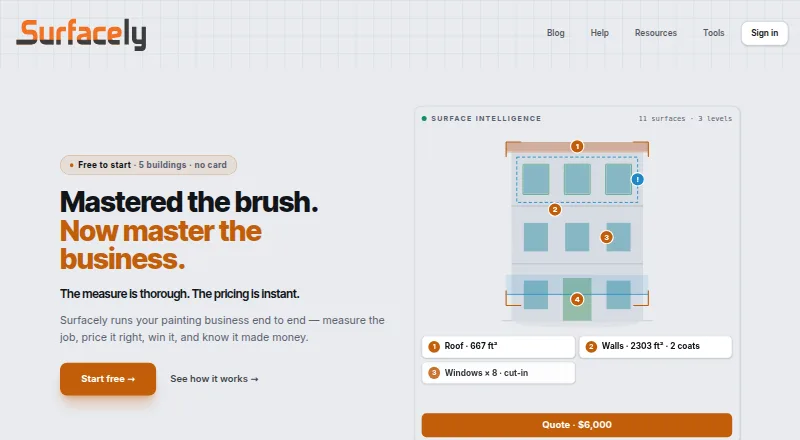
Surfacely is software for painting businesses to measure jobs, prepare quotes, invoice clients, and track job profit. Its workflow runs from measurements and quotes to proposals, invoicing, crew briefs, job costing, and profit debriefs. Painters can ask homeowners to submit project photos, surfaces, rough measurements, and notes before a site visit. Surfacely Assist analyzes site photos to highlight potentially unmeasured surfaces and defects that may warrant pricing. The product says it works offline when a signal drops and syncs data between phones, tablets, and laptops. Xero and QuickBooks Online connections support invoice and payment syncing, and CSV export is available. Stripe Connect enables card and digital-wallet payments, with funds deposited to the business's bank account. The Free plan includes two team seats, two devices per user, and five buildings to start. Starter costs $59.00 per month and Professional costs $119.00 per month; both include unlimited buildings and projects. Platforms listed are Android, iOS, macOS, web, and Windows.
Who it suits
Surfacely suits painting businesses managing estimates, crews, invoices, and job costs. It offers locale settings for Australia, New Zealand, the US, the UK, and Canada.
What it does well
- Workflow covers measuring through profit debriefs.
- Works offline when signal drops.
- Photo assistance highlights potentially missed surfaces and defects.
- Connects to Xero and QuickBooks Online.
- Stripe Connect supports card and digital-wallet invoice payments.
What to know first
- Free plan starts with a five-building limit.
- Free plan has two team seats and two devices per user.
- No free trial is offered.
Limits
Free starts with five buildings, two team seats and two devices per user. Starter costs $59 a month and includes three seats and two devices per user; Professional costs $119 a month and includes ten seats and three devices per user. Both paid plans list unlimited buildings and projects.
Plans
| Plan | Billed and limits | Price |
|---|---|---|
| Free | 2 team seats · 5 buildings to start · 2 devices per user | Free |
| Professional | Billed monthly. · 10 team seats · Unlimited buildings & projects · 3 devices per user | $119 a month |
| Starter | Billed monthly. · 3 team seats · Unlimited buildings & projects · 2 devices per user | $59 a month |
| Enterprise | Custom seats and onboarding | On request |
As surfacely.io lists them, read 29 Sept 2026. The maker's own page has the final word.
Getting started
- Open Surfacely on Android, iOS, macOS, web or Windows.
- Install it on a phone, tablet or laptop home screen.
- Start with Free, which includes two team seats, five buildings to start and two devices per user.
- Choose Starter at $59 a month for three team seats, unlimited buildings and projects, and two devices per user.
- Choose Professional at $119 a month for ten team seats, unlimited buildings and projects, and three devices per user.
Overview
Surfacely is painting-business software for contractors who want to manage estimates alongside the work and costs that follow. Its strongest case is an end-to-end painting workflow with offline access; the trade-off is a free tier capped by buildings, seats and devices.
Homeowners can send photos, surfaces, rough measurements and notes before a visit, giving painters a way to gather job details early. Surfacely Assist checks site photos for potentially missed surfaces and defects that may need pricing. Those prompts can help shape an estimate, but do not replace the contractor’s judgment about scope and price.
Key features
One workflow from quote to profit review
Surfacely brings measuring and quoting together with proposals, signatures, crew briefs, scheduling, invoicing, job costing and profit debriefs. Material cost tracking helps contractors account for an important part of job expense, while the broader workflow makes the product more relevant to businesses coordinating work than to someone who only needs a quoting tool.
Payments, accounting and access
Stripe Connect lets clients pay invoices by card or digital wallet, with funds deposited to the business’s bank account. Xero and QuickBooks Online connections support invoice and payment syncing, and CSV export offers another route for moving data. The client portal uses a long, project-specific access token, so access depends on having that project link. Photo metadata stays within the organisation’s Surfacely data under the same access controls as project data and is not shared externally.
Works across devices
Surfacely says it works offline when a signal drops. It can be installed on the home screen of a phone, tablet or laptop, and data syncs between devices. That combination suits crews who need to refer to project information away from a reliable connection, though the number of devices allowed per user depends on the plan.
Pricing
Surfacely is freemium, with no free trial. The Free plan costs nothing and includes 2 team seats, 5 buildings to start and 2 devices per user. Surfacely says it may extend the building limit to ten, but businesses that need room for more projects should compare the paid tiers rather than count on an increase.
Starter costs $59 a month, billed monthly. It raises the allowance to 3 team seats and includes unlimited buildings and projects, with 2 devices per user. It is the clearest step up for a small painting business outgrowing the free building cap, but it does not add device capacity.
Professional costs $119 a month, billed monthly. It includes 10 team seats, unlimited buildings and projects, and 3 devices per user. The extra seats and device allowance better suit a larger team working across more equipment; smaller operators may not need that higher tier. Enterprise has custom pricing, custom seats and onboarding.
Platforms
Surfacely supports Android, iOS, macOS, web and Windows. Its home-screen installation and cross-device syncing provide a way to move between mobile and desktop use, while offline operation addresses dropped signals.
Who it's for
Surfacely is aimed at painting businesses, from small operators needing estimates, invoices and job tracking in one workflow to teams coordinating crews and monitoring costs. Locale settings cover Australia, New Zealand, the US, the UK and Canada. It is not the right fit for homeowners seeking paint-colour inspiration or for a contractor who only wants a basic quote tool.
Pros and cons
- Pros: The workflow spans estimating, proposals, crew coordination, invoicing and job-profit review, reducing the need to treat each stage as a separate task.
- Pros: Photo assistance and homeowner-submitted job details can flag overlooked surfaces or price-relevant defects before a site visit.
- Pros: Offline use, device syncing and several payment and accounting connections support work across job sites and back-office tasks.
- Cons: The Free plan starts at just 5 buildings, 2 seats and 2 devices per user, so a growing operation may reach its limits quickly.
- Cons: Starter remains limited to 3 seats and 2 devices per user; teams needing broader access must pay more for Professional.
Alternatives
For a broader comparison, browse Painting Contractor Software.
- PaintQuote Pro is worth considering if the priority is a free quoting entry point: its Free plan starts with 2 professional quotes, basic customer management and no recurring free quotes.
- PaintWiser suits a solo painter who can work within 20 quotes per month; its free plan includes one user, scheduling, invoicing and mobile and web apps.
- PaintLogic offers a free trial with 3 projects, full Pro features and no time limit or credit card requirement, making it an option for evaluating a web-based tool before choosing a paid plan.
- DripJobs is another option for painting businesses comparing paid software; its listed add-ons include job costing and business texting.
- InsightPaint may suit a small team seeking a paid plan with a defined monthly allowance: its Starter tier includes 3 team members, 25 active jobs and 50 estimates per month.
- PaintClarity is a freemium, web-based alternative.
- Painter's Log is another freemium option, available on the web.
- Estimate Rocket is a paid alternative with a free trial for businesses considering a different contractor-software option.
Verdict
Choose Surfacely if you run a painting business and want estimating, project coordination, payment and cost tracking joined in one workflow, particularly when offline access and photo-assisted job preparation matter. Look elsewhere if your work fits within a basic quote tool or if the Free plan’s building, seat and device caps are too restrictive; the paid tiers raise those limits, but bring recurring monthly costs.
Verdict
Surfacely links painting estimates, project coordination, invoicing, and cost tracking, with offline use and photo assistance. The free tier has limits on buildings, seats, and devices; paid plans begin at $59.00 per month.
Questions
Is there a free plan?
Yes. Free includes two team seats, five buildings to start and two devices per user. The product says it may extend the building limit to ten.
What do the paid plans cost?
Starter is $59 a month, and Professional is $119 a month. Enterprise has custom seats and onboarding, with no price stated.
Which platforms are available?
Surfacely lists Android, iOS, macOS, web and Windows. It can be installed on a phone, tablet or laptop home screen, with data syncing between devices.
Which accounting integrations does it offer?
Surfacely says it connects to Xero and QuickBooks Online for invoice and payment syncing, and offers CSV export.
Can clients pay invoices through Surfacely?
Stripe Connect enables card and digital-wallet payments, with funds deposited to the business's bank account.
Who is Surfacely for?
The product describes its audience as painting businesses and offers locale settings for Australia, New Zealand, the US, the UK and Canada.
Facts from Surfacely's own pages
- Client portal security
- The client portal uses a long, random access token unique to each project; access requires that link. · surfacely.io, 29 Sept 2026
- Client walkthroughs
- Painters can send homeowners a link to submit photos, surfaces, rough measurements, and notes before a site visit. · surfacely.io, 29 Sept 2026
- Integrations
- Surfacely says it connects to Xero and QuickBooks Online for invoice and payment syncing, and offers CSV export. · surfacely.io, 29 Sept 2026
- Mobile and desktop
- Surfacely can be installed on a phone, tablet, or laptop home screen, with data syncing between devices. · surfacely.io, 29 Sept 2026
- Offline use
- The product says it works offline when the signal drops. · surfacely.io, 29 Sept 2026
- Payments
- Stripe Connect enables clients to pay invoices by card and digital wallets, with funds deposited to the business's bank account. · surfacely.io, 29 Sept 2026
- Photo assistance
- Surfacely Assist analyses site photos and highlights surfaces that may be unmeasured and defects worth pricing. · surfacely.io, 29 Sept 2026
- Photo privacy
- Photo metadata is stored within the organisation's Surfacely data under the same access controls as project data and is not shared externally. · surfacely.io, 29 Sept 2026
- Plan limits
- The Free plan starts with a five-building limit, and the product says it may extend that limit to ten; team seats and device limits vary by plan. · surfacely.io, 29 Sept 2026
- Purpose
- Surfacely is painting business software for measuring jobs, quoting, invoicing, and tracking job profit. · surfacely.io, 29 Sept 2026
- Who it serves
- Surfacely describes its audience as painting businesses and offers locale settings for Australia, New Zealand, the US, the UK, and Canada. · surfacely.io, 29 Sept 2026
- Workflow
- It supports a workflow from measuring and quoting through proposals, invoicing, crew briefs, job costing, and profit debriefs. · surfacely.io, 29 Sept 2026
Where Surfacely stands on Freedom251
- Painting Contractor Software#5 of 22