
Story Architect
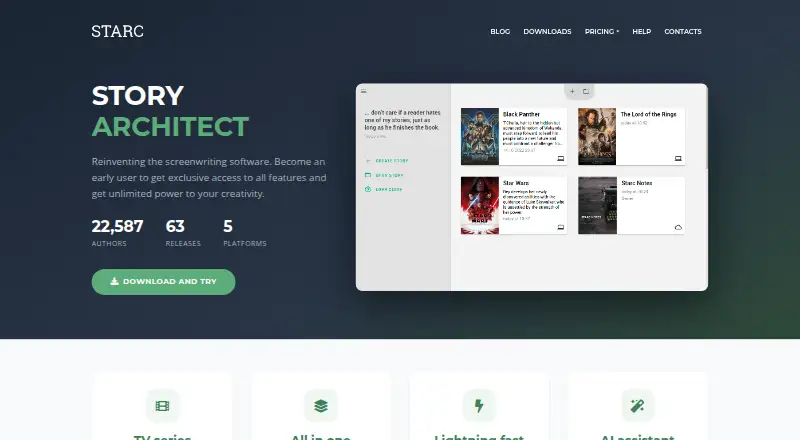
What Story Architect is
Story Architect is a writing app for screenplays, comics, plays, books, and other story forms, with projects organized around a shared project bible. Its free plan supports unlimited projects and unlimited documents per project, with basic writing and character, location, and world tools. Pro adds mind maps, a corkboard, a timeline, image gallery, presentations, and five AI credits per month when billed annually. The AI assistant can paraphrase, summarize, expand, shorten, or translate text, insert material between paragraphs, and generate text from a prompt; these actions use credits. Creator adds real-time collaboration and 5 GB of cloud storage. It works offline on Android, iOS, Linux, macOS, and Windows. It imports KIT Scenarist, Final Draft, Celtx, Trelby, TXT, ODT, DOCX, and Fountain files, and exports DOCX, PDF, FDX, and Fountain. Desktop-mobile project syncing is still being developed, so transfers between them require manual project-file handling. Pro costs $4.17 a month billed annually; Creator costs $8.34 a month billed annually.
Who it suits
It suits writers planning stories across formats who want project organization and offline access. Pro is presented for professionals, while Creator is aimed at people often on the move.
What it does well
- Free plan allows unlimited projects and documents.
- Works offline across five listed platforms.
- Imports several screenplay and document formats.
- Creator includes real-time collaboration.
- Users retain ownership of their created content.
What to know first
- Desktop and mobile synchronization is still in development.
- AI writing uses credits.
- Free plan includes no AI credits.
Limits
The Free plan has no AI credits. Pro includes five AI credits per month when billed annually, while Creator includes 10; AI actions consume credits. Desktop and mobile project synchronization is still in development, so the maker documents manual project-file transfers.
Plans
| Plan | Billed and limits | Price |
|---|---|---|
| Free | free forever · unlimited projects · unlimited documents per project · cover generator · folders · text documents · session statistics · basic character/location/world tools · screenplay, comic, audio drama, stageplay and novel editors | Free |
| Pro | billed annually · everything in Free · mind maps · image gallery · presentations · relationship editor · maps · corkboard · timeline · extended statistics · beats editor · 5 AI credits per month | $4.17 a month |
| Creator | billed annually · everything in Pro · real-time collaboration · 5 GB cloud storage · script breakdown · showrunner tools · 10 AI credits per month | $8.34 a month |
| AI credits 50 | 50 credits · credits do not expire | $10, paid once |
| AI credits 1000 | 1000 credits · credits do not expire | $100, paid once |
| Pro Lifetime | lifetime · Pro features · 120 AI credits lifetime | $150, paid once |
| AI credits 200 | 200 credits · credits do not expire | $30, paid once |
| AI credits 500 | 500 credits · credits do not expire | $60, paid once |
As starc.app lists them, read 15 Oct 2026. The maker's own page has the final word.
Getting started
- Visit https://starc.app/.
- Choose the Free plan or a paid plan; a 30-day trial is available.
- Install or use Story Architect on Windows, macOS, Linux, iOS or Android.
- Create a project and add documents to its project bible.
- Import an existing project file in a supported format if needed.
Story Architect is a writing app for people developing screenplays, comics, plays, books and other story forms in one project workspace. It is best suited to writers who want planning tools alongside drafting; the free plan is a strong place to start, while collaboration and advanced planning require paid plans.
Overview
Story Architect organizes different kinds of writing around a shared project bible, with offline mode and support for importing several established screenplay and document formats. Unlimited free projects and documents make it practical for writers juggling multiple works. The main day-to-day drawback is that desktop and mobile projects do not sync automatically: moving work between them means transferring project files manually.
Key features
Free includes basic writing, character, location and world tools. Pro adds mind maps, an image gallery, presentations, a corkboard and timeline, plus character relationship tools, location and world maps, and extended statistics. That makes Pro more useful for writers who want to develop and organize a story beyond a linear draft, but those planning tools are not part of the free tier.
The AI assistant can paraphrase, summarize, expand or shorten text, translate, insert material between paragraphs and generate text from a prompt. Each action uses credits, so AI is a metered aid rather than an unlimited writing partner. Pro includes 5 credits per month, with annual and lifetime allowances also stated in its plan; Creator includes 10 per month. Separate credit packs do not expire.
Creator adds real-time collaboration, 5 GB of cloud storage, screenplay breakdown and showrunner tools. Subscribers can give co-authors project access on any subscription tier, though editing ability depends on each collaborator’s own plan. Revision tracking is supported. Story Architect is open core: its core source code is under MIT, while some features are closed source and commercially licensed. The user agreement says users own their creations and allow the maker to use content only as needed to provide the service; the privacy policy says personal information is not sold, distributed or leased without permission or legal requirement.
Pricing
The Free plan costs nothing and is billed free forever. It includes unlimited projects and documents per project, basic writing and story tools, and no AI credits. It is a generous option for writers who do not need the advanced planning suite or AI assistance.
Pro costs $4.17 a month, billed annually, or $150 lifetime. It adds the planning tools, image gallery and presentations, with 5 AI credits per month (60 per year; 120 lifetime). It suits writers who want a deeper solo planning toolkit, but its monthly AI allowance is limited. The separately named Pro Lifetime plan is priced at $150 a month, billed lifetime, and includes 120 AI credits.
Creator costs $8.34 a month, billed annually. It includes everything in Pro, collaboration, 5 GB cloud storage, production tools and 10 AI credits per month (120 per year). It is the fit for writers working with co-authors or using its breakdown tools; solo writers may not need its higher tier.
For more AI capacity, packs cost $10 a month for 50 credits, $30 a month for 200, $60 a month for 500, or $100 a month for 1000; credits never expire. A 30-day trial is offered. For help, the pricing FAQ directs users to [email protected].
Platforms
Story Architect supports Windows, macOS, Linux, iOS and Android, and works offline. It can import KIT Scenarist, Final Draft, Celtx and Trelby files, along with TXT, ODT, DOCX and Fountain. Exports include DOCX, PDF, FDX and Fountain. The manual desktop-mobile transfer process makes it less convenient for writers who move frequently between devices.
Who it's for
Story Architect is a good match for writers building stories across formats, especially those who value a shared place for drafts and story planning or need offline access. Free is enough for basic work with many projects; Pro suits writers who need richer planning, while Creator is aimed at people often on the move and at collaborators. It is a weaker fit for anyone who expects automatic desktop-mobile syncing or wants unlimited AI use.
Pros and cons
- Pro: Unlimited projects and documents on Free remove common limits on keeping multiple works in progress.
- Pro: One workspace covers several story formats, with imports from screenplay tools and exports to common writing and script formats.
- Pro: Offline support and the MIT-licensed core offer flexibility for writers who value local work and open-source software.
- Con: Desktop and mobile work requires manual file transfers rather than automatic synchronization.
- Con: AI features consume credits, and even paid plans include set allowances.
- Con: Advanced planning and collaboration are paid features, and co-authors’ editing abilities depend on their own plans.
Alternatives
Screenwriting Software and Writing Apps are broader starting points for comparing tools by category.
Choose Celtx instead if a free cloud-based studio with one project and real-time collaboration better suits your workflow. OpenDraft is a fit for writers seeking free software with no account, subscription or feature gating. Revision Screenwriter is another free option. ScreenWeaver offers a forever-free screenwriting plan with unlimited projects and pages plus PDF and Final Draft export. Choose WriterDuet if three free projects suit your needs or you want to consider its Plus plan, which includes unlimited projects and real-time collaboration. Arc Studio Pro is an alternative for writers who want a free plan with two scripts and watermarked PDF export. DramaQueen offers a free tier with no project-number or length restriction. Scriptum is a free, open-source screenwriting application.
Verdict
Story Architect is worth choosing for writers who want to plan and draft multiple kinds of stories in one offline-capable workspace, with an unusually open free project allowance. Its strongest reasons to look elsewhere are the manual device-transfer process and credit-metered AI; choose Creator only if its collaboration, storage or production tools justify the higher annual cost.
Verdict
Story Architect combines story planning and writing tools with support for multiple formats and offline use. Consider the manual desktop-mobile transfer process and credit-based AI use when choosing a plan.
Questions
Is Story Architect free?
Yes. The Free plan is billed free forever and permits unlimited projects and documents per project. The pricing note also lists a 30-day trial.
What do Pro and Creator cost?
Pro is $4.17 a month billed annually. Creator is $8.34 a month billed annually.
Which platforms does it support?
Story Architect supports Windows, macOS, Linux, iOS and Android, and it can be used offline.
Can I collaborate with co-authors?
Creator adds real-time collaboration. Subscribers on any tier can grant co-authors project access, with editing abilities determined by each co-author’s plan.
Is Story Architect open source?
The maker describes it as open core: core source code is available under MIT, while some features are closed source and commercially licensed.
What file types can it import and export?
It imports KIT Scenarist, Final Draft, Celtx, Trelby, TXT, ODT, DOCX and Fountain files. Exports include DOCX, PDF, FDX and Fountain.
Facts from Story Architect's own pages
- AI assistant
- Built-in AI tools paraphrase, summarize, expand, shorten, insert, translate and generate text in any language. · starc.app, 15 Oct 2026
- AI writing
- Its AI assistant can paraphrase, summarize, expand or shorten text, translate, insert text between paragraphs and generate text from a prompt; AI use consumes credits. · starc.app, 30 Sept 2026
- API and SDKs
- The reviewed official download, help and repository pages describe the desktop application and build interfaces but do not publish a product API or SDK. · github.com, 15 Oct 2026
- Character tools
- Character profiles support biographies, relationships and visual references, with a relationship editor in paid tiers. · starc.app, 15 Oct 2026
- Collaboration
- Creator includes real-time collaboration and review mode allows co-authors to comment, reply, resolve and edit notes. · starc.app, 15 Oct 2026
- Company history
- SaaSHub reports that Dmitry Novikov began the precursor project in 2013, Story Architect was conceived in 2019 and released in 2021. · saashub.com, 15 Oct 2026
- Content ownership
- The user agreement says users own what they create with STARC and permit the maker to use content only as needed to provide the service. · starc.app, 30 Sept 2026
- Developer build
- The maker publishes continuously updated developer builds for macOS, Windows and Linux and warns they may contain bugs. · starc.app, 15 Oct 2026
- Documentation
- The help center contains 39 articles across seven topics covering installation, workflows, features, customization, licenses, mobile use and comparisons. · starc.app, 15 Oct 2026
- Free plan
- Yes · starc.app, 20 Sept 2026
- Import and export
- The project supports exchanges involving Final Draft, Fountain, DOCX, ODT, PDF, Celtx, Trelby and KIT Scenarist formats, with availability depending on document type. · github.com, 15 Oct 2026
- Import formats
- The help page says STARC supports importing KIT Scenarist, Final Draft, Celtx and Trelby formats, plus TXT, ODT, DOCX and Fountain files. · starc.app, 30 Sept 2026
- Independent technology listing
- SaaSHub lists C++, Qt, Flutter and WebSockets as the technologies used to build Story Architect. · saashub.com, 15 Oct 2026
- Intended users
- The maker presents Pro as a plan for professionals and Creator as a plan for people who are often on the move. · starc.app, 30 Sept 2026
- Limit: beginner usability
- A Google Play reviewer said script-format symbols were difficult for amateurs to understand and requested clearer labels. · play.google.com, 15 Oct 2026
- Limit: mobile import and export
- Google Play reviews reported problems importing desktop projects and exporting to cloud storage, while another reviewer said upload errors persisted. · play.google.com, 15 Oct 2026
- Limit: mobile synchronization
- An App Store reviewer complained that mobile users had to transfer files manually, and the developer said project syncing was still being developed. · apps.apple.com, 15 Oct 2026
- Limit: vague or low-quality tools
- A Google Play reviewer called the tools vague and lower quality than competing screenwriting software. · play.google.com, 15 Oct 2026
- Location and world tools
- Paid tiers add location maps, extended location information, world maps and extended world information. · starc.app, 15 Oct 2026
- Maker identity
- The privacy policy identifies the operating entity as Story Apps LLC. · starc.app, 15 Oct 2026
- Maker location
- Google Play lists developer Dmitry Novikov at an address in Krasnoyarsk, Krasnoyarsk Krai, Russia. · play.google.com, 15 Oct 2026
- Mobile requirements
- The download page lists iOS/iPadOS 13 or later and Android 5.0 or later for mobile versions. · starc.app, 15 Oct 2026
- Mobile sync limit
- Desktop and mobile project synchronization is still in development; the maker documents manual project-file transfers between them. · starc.app, 30 Sept 2026
- Offline mode
- Yes · starc.app, 20 Sept 2026
Where Story Architect stands on Freedom251
- Writing Apps#2 of 135
- Screenwriting Software#1 of 27
- Script Writing Software#1 of 25