Freedom251 › Cloud gaming services
Stim.io
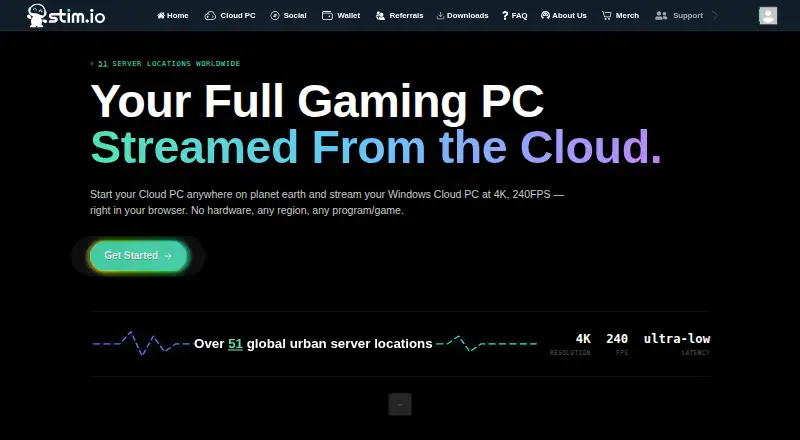
What Stim.io is
Stim.io provides a Windows Cloud PC that streams through a browser, where users can install and run PC programs and games, including games with mods and development software. The service advertises streaming up to 4K resolution and 240 FPS, accessible from a laptop, tablet, TV, or mobile phone, as well as PC, Mac, iOS, and Android devices. Users can choose an operating system and select from multiple storage and hardware options. Stim.io says it has more than 51 global urban server locations and runs on LiquidForest infrastructure. An optional storage subscription keeps installed programs and games between sessions; with an active subscription, settings and files also persist and can be started in different regions. Pay As You Go sessions have no usage limits, while subscriptions have an eight-hour session limit and a 20-minute idle timeout. Bluetooth Xbox and PlayStation controllers are supported natively by the web service, but other USB devices are not. Stim.io states its uptime is at least 99.0%, while noting it cannot guarantee a user's internet connection or device decoding performance. Its privacy policy says the service is not intended for children under 18.
Who it suits
Stim.io suits people who want to stream a Windows PC through a browser to run PC programs or games across supported devices. It is not intended for children under 18.
What it does well
- Streams at up to 4K resolution and 240 FPS.
- Supports browser access across computers, tablets, TVs, and phones.
- Optional storage keeps installed programs and games between sessions.
- Pay As You Go sessions have no usage limits.
What to know first
- Subscriptions have an eight-hour session limit.
- Subscriptions have a 20-minute idle timeout.
- Other USB devices are not natively supported.
- The service is not intended for children under 18.
Limits
Subscriptions have an eight-hour session limit and a 20-minute idle timeout. Pay As You Go sessions have no usage limits.
Getting started
- Open the Stim.io website in a browser on a supported device
- Choose an operating system and select storage and hardware options
- Choose Pay As You Go or a subscription option
- Start the Cloud PC session and install programs or games
Overview
Stim.io is a browser-streamed Windows Cloud PC for running PC software and games, including modded games and development tools. It suits people who want to bring their own game library or desktop workloads to different devices, but its session rules and optional persistence make the access mode an important choice.
The central appeal is a configurable PC that can stream at up to 4K and 240 FPS across a range of browsers and devices. The trade-off is that subscription sessions stop after eight hours and time out after 20 minutes idle, while the service cannot guarantee the quality of your connection or device decoding.
Key features
A Windows PC in the browser
Stim.io lets users install and run PC programs and games rather than limiting access to a fixed game catalog. That flexibility suits people with software or games they already use, including titles with mods. The game access model is bring-your-own-library, so this is not a service promising a bundled collection of games.
Streaming and configuration
The service advertises streams up to 4K resolution and 240 FPS, with more than 51 urban server locations globally and LiquidForest infrastructure. Users can choose an operating system and select from multiple storage and hardware options. These choices make Stim.io more adaptable than a single preset desktop, though the advertised stream ceiling does not remove the dependency on a capable connection and decoding device.
Persistence and access modes
An active storage subscription keeps installed programs, games, settings, and files between sessions, and users can start that Cloud PC in different regions. Without persistent storage, the main advantage of returning to the same configured desktop is absent. Pay As You Go sessions have no usage limits; active performance-level subscribers get a 30% discount on them. Subscription mode instead carries an eight-hour session cap and 20-minute idle timeout, and may time out when using Parsec, VR, or Steam Remote Play rather than Stim's streaming client.
Controls, safeguards, and rules
The web service natively supports Bluetooth Xbox and PlayStation controllers, but not other USB devices. Restrictions prohibit account sharing, macros, VPNs, auto-clickers, torrenting, crypto mining, and play-to-earn games; a CAPTCHA may appear if Stim suspects nonhuman use. REAL.app, Inc. says it uses technical, organizational, and physical safeguards but cannot guarantee personal-information security. Payment details go to third-party processors and are not stored on Stim's systems. The service is not intended for children under 18.
Pricing
Stim.io is a paid service. Its access options hinge on session style and storage: Pay As You Go removes usage limits, while subscriptions offer performance levels and can include persistent storage, but subscription sessions are subject to the eight-hour and idle limits. Active performance-level subscribers receive 30% off Pay As You Go sessions. Access Passes cover the selected performance level and lower levels, as well as regions in the same or lower listed price tier. Choose Pay As You Go if session length or third-party streaming integrations matter most; choose a subscription when keeping a configured desktop between visits is worth the session restrictions.
Stim.io does not publish a plan price in the facts available for this review, so its subscription and session costs are custom pricing. Before choosing, weigh storage continuity against the session cap and idle timeout, and check the applicable performance and regional tier.
Platforms
Stim.io streams through a browser on laptops, tablets, TVs, mobile phones, PCs, Macs, iOS devices, and Android devices. The listed platforms are Android, iOS, macOS, and web. Browser access broadens device choice, but actual stream quality still depends on the user's connection and device decoding performance.
Who it's for
Stim.io is best for people who want a configurable Windows environment for their own PC games, mods, or development software, and who value browser access across device types. It is a weaker fit for users who need long unattended subscription sessions, depend on unsupported USB peripherals, or want a service that includes a ready-made game catalog. The restrictions also make it unsuitable for users who need VPNs, macros, or account sharing.
Pros and cons
- Pros: Install and run PC games and programs, including mods and development software, rather than relying on a fixed game catalog.
- Pros: Optional persistent storage retains apps, games, settings, and files between sessions and can be started in different regions.
- Pros: Browser access spans laptops, tablets, TVs, and phones, with advertised streaming up to 4K and 240 FPS.
- Cons: Subscription sessions are capped at eight hours and time out after 20 idle minutes, which limits unattended or extended use.
- Cons: Persistence requires an active storage subscription, so continuity adds a paid commitment.
- Cons: Only Bluetooth Xbox and PlayStation controllers are natively supported; other USB devices are not.
- Cons: Connection and device decoding performance remain outside the stated uptime guarantee, so the advertised stream quality is not assured for every setup.
Alternatives
For more cloud PC and gaming options, browse Cloud PC Services or Cloud gaming services.
- LoLa Cloud PCs is worth considering if a free personal, non-commercial remote desktop using your own compatible PC is a better fit than a hosted Cloud PC.
- Amazon WorkSpaces offers a free plan and trial, with a Windows single-session user fee of $4.19 a month plus provisioned instance-hour charges; consider it if that metered desktop model fits your needs.
- Dizzion Cloud PC offers dedicated persistent desktops in Core or Complete tiers, with CPU and GPU workload configurations; pricing is custom.
- Workspot Cloud PCs is an enterprise service with configurable desktop resources and use-based payment; pricing is custom and the product page offers a demo.
- JioPC has a listed plan at ₹599 a month, billed ₹599 + GST for one month, with unlimited usage, 8 GB RAM, and 500 GB storage; consider it if those stated inclusions and its Linux and web platforms suit you.
- Ace Cloud Hosting Desktop as a Service has an Enterprise (Team Desktops) plan at $352.19 a month per user for 100 users, with Windows Server 2022; consider it when that team plan is relevant.
- Fantom Cloud PC offers one-time day passes, including a 199.00 INR Neo Day Pass for one day with no playtime limit; consider it if a one-day unlock better suits occasional use.
- Infosaic Cloud Virtual Desktop has a Light plan at $11.95 a month with 3 GB RAM, 4 virtual cores, an 80 GB system drive, and a 10 GB data drive; consider it if those specified desktop resources meet your needs.
Verdict
Choose Stim.io if you want a browser-accessible Windows Cloud PC for your own games or software and value configurable hardware plus optional cross-session persistence. Its strongest case is the combination of broad device access and a desktop you can tailor; look elsewhere if you need guaranteed connection performance, unrestricted subscription sessions, or support for other USB peripherals.
Verdict
Stim.io offers browser access to a configurable Windows Cloud PC, with persistent storage available through an optional subscription. Session limits differ by access mode, and the service notes that connection and device decoding performance are outside its uptime guarantee.
Questions
What does Stim.io provide?
It provides a Windows Cloud PC that streams through a browser and can run PC programs and games.
Which devices can access it?
The service lists browser access on laptops, tablets, TVs, mobile phones, PCs, Macs, iOS devices, and Android devices.
Does Stim.io offer a free plan?
The listed pricing model is paid. Pay As You Go sessions are available, but no price amount is provided here.
How long can a session last?
Pay As You Go sessions have no usage limits. Subscriptions have an eight-hour session limit and a 20-minute idle timeout.
Can I keep installed programs and files between sessions?
An optional storage subscription keeps installed programs and games between sessions. With an active subscription, settings and files also remain on the Cloud PC.
Which controllers and USB devices work natively?
The web service natively supports Bluetooth Xbox and PlayStation controllers, but not other USB devices.
Facts from Stim.io's own pages
- Access Pass coverage
- An Access Pass includes its selected performance level and lower levels, plus regions at the same or lower listed price tier. · stimsocial.zendesk.com, 9 Oct 2026
- Audience limit
- The privacy policy says the service is not intended for children under 18. · stim.io, 9 Oct 2026
- Availability
- Stim.io states that it provides uptime equal to or greater than 99.0%, while noting it cannot guarantee the user's internet connection or device decoding performance. · stimsocial.zendesk.com, 9 Oct 2026
- Cloud PC
- Stim.io provides a Windows Cloud PC that users can stream in a browser and use to install PC programs and games. · stim.io, 9 Oct 2026
- Company
- The Stim.io account page footer identifies the company as REAL.app, Inc. · stim.io, 9 Oct 2026
- Controllers and USB
- Stim.io says its web service natively supports Bluetooth Xbox and PlayStation controllers but not other USB devices. · stimsocial.zendesk.com, 9 Oct 2026
- Devices
- The site says a browser can be used to stream from a laptop, tablet, TV, or mobile phone. · stim.io, 9 Oct 2026
- Game access model
- byo_library · stim.io, 20 Sept 2026
- Global regions
- The homepage says Stim.io has more than 51 global urban server locations. · stim.io, 9 Oct 2026
- Integrations
- The help article says Parsec, VR, and Steam Remote Play can be used with Pay As You Go, while subscription mode may time out when users are not using Stim's streaming client. · stimsocial.zendesk.com, 9 Oct 2026
- Max streaming resolution
- 4k · stim.io, 20 Sept 2026
- Maximum session length
- 480 · stim.io, 20 Sept 2026
- Options
- The site says users can choose an operating system and select from multiple storage and hardware options. · stim.io, 9 Oct 2026
- Pay as you go
- Pay As You Go sessions have no usage limits, and active performance-level subscribers receive a 30% discount on them. · stimsocial.zendesk.com, 9 Oct 2026
- Payment data
- The terms say payment information is sent to and stored with third-party payment processors, and Stim does not store it on its systems. · stim.io, 9 Oct 2026
- Persistence
- An optional storage subscription keeps installed programs and games between sessions. · stim.io, 9 Oct 2026
- Persistent storage
- With an active subscription, installed programs, games, settings, and files remain on the Cloud PC between sessions and can be started in different regions. · stimsocial.zendesk.com, 9 Oct 2026
- Product
- Stim.io offers a cloud PC that streams a Windows PC through a browser. · stim.io, 9 Oct 2026
- Prohibited use
- The restrictions article prohibits account sharing, macros, VPNs, auto-clickers, torrenting, crypto mining, and play-to-earn games. · stimsocial.zendesk.com, 9 Oct 2026
- Security
- The privacy policy says REAL.app uses technical, organizational, and physical safeguards, but cannot guarantee personal information security. · stim.io, 9 Oct 2026
- Servers
- The site advertises more than 51 global urban server locations and says Stim.io runs on LiquidForest infrastructure. · stim.io, 9 Oct 2026
- Streaming
- The homepage advertises streaming at up to 4K and 240 FPS. · stim.io, 9 Oct 2026
- Subscription limits
- The restrictions article says subscriptions have an eight-hour session limit and a 20-minute idle timeout; it also says a CAPTCHA may appear if its AI suspects nonhuman use. · stimsocial.zendesk.com, 9 Oct 2026
- Support
- The support article directs users with persistent technical issues to [email protected]. · stimsocial.zendesk.com, 9 Oct 2026
Where Stim.io stands on Freedom251
- Cloud gaming services#35 of 40
- Cloud PC Services#25 of 28