Freedom251 › Desktop as a Service (DaaS) Providers

Ace Cloud Hosting Desktop as a Service
Visit Ace Cloud Hosting Desktop as a Service Alternatives Pricing
What Ace Cloud Hosting Desktop as a Service is
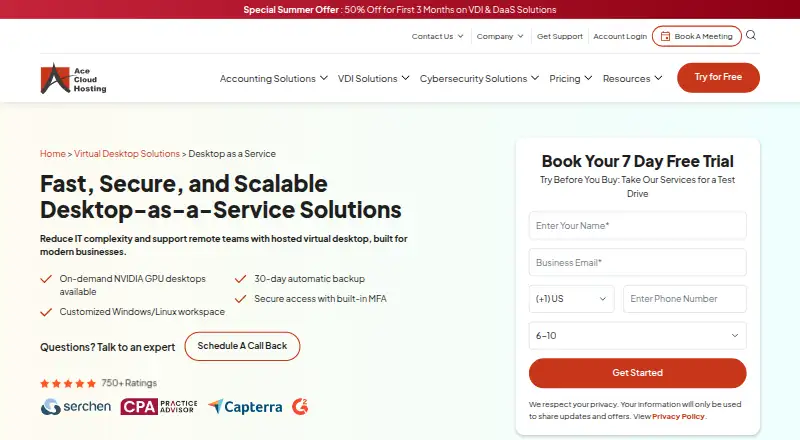
Ace Cloud Hosting Desktop as a Service provides managed, hosted virtual desktops for businesses and remote teams. It offers customized Windows and Linux workspaces that users can access from Windows, Linux or Mac devices, web browsers, iOS and Android. On-demand NVIDIA GPU desktops are available for CAD, BIM, 3D and rendering work. Listed management features include auto-scaling, centralized app management, OS and patch management, and one-click admin-rights provisioning. Security controls include SSO, MFA, Active Directory integration, role-based access, and 256-bit encryption with TLS 1.3 during transmission. The service lists automatic 30-day backups, and displayed plan costs include 30 days of rolling server backup. The pricing page identifies the offered VDI as Citrix Cloud. Listed plans start at $352.19 a month per user, with additional vRAM at USD 15/month per 1 GB and additional SSD storage at USD 40/month per 100 GB. Ace advertises 24x7 support by calls, chat and email, including weekends and holidays.
Who it suits
The service suits businesses and remote teams that need hosted Windows or Linux workspaces. Listed use cases include development and testing, CAD/CAM, remote monitoring, video editing and remote learning.
What it does well
- Access from desktop, mobile and web platforms.
- On-demand NVIDIA GPU desktops are available.
- Includes automatic 30-day backups.
- 24x7 support by calls, chat and email.
What to know first
- No free plan is listed.
- Plans start at $352.19 a month per user.
- Additional vRAM and SSD storage cost extra.
Limits
There is no free plan, and the trial lasts 7 days. Additional vRAM costs USD 15/month per 1 GB, and additional SSD storage costs USD 40/month per 100 GB.
Plans
| Plan | Billed and limits | Price |
|---|---|---|
| Light Workload (Dedicated Desktops) | Per user/month; page also shows $1119.56 struck through · 1 user · Windows 11 · 2 vCPUs · 8 GB RAM · 80 GB C: SSD + 20 GB D: SSD · unlimited bandwidth | $1,114.56 a month |
| Heavy Workload (Dedicated Desktops) | Per user/month; page also shows $1681.16 struck through · 1 user · Windows 11 · 6 vCPUs · 16 GB RAM · 80 GB C: SSD + 20 GB D: SSD · unlimited bandwidth | $1,676.16 a month |
| Enterprise (Team Desktops) | Per user/month; page also shows $357.19 struck through · 100 users · Windows Server 2022 · 40 vCPUs · 120 GB RAM · 80 GB C: SSD + 20 GB D: SSD · unlimited bandwidth | $352.19 a month |
| SMB (Team Desktops) | Per user/month; page also shows $422.85 struck through · 50 users · Windows Server 2022 · 26 vCPUs · 72 GB RAM · 80 GB C: SSD + 20 GB D: SSD · unlimited bandwidth | $417.85 a month |
| Startup (Team Desktops) | Per user/month; page also shows $674.06 struck through · 5 users · Windows Server 2022 · 2 vCPUs · 8 GB RAM · 80 GB C: SSD + 20 GB D: SSD · unlimited bandwidth | $669.06 a month |
| Custom Cloud | Request a quote · Tailored cloud setup; workflows, performance demands, and operational needs determine configuration | On request |
As acecloudhosting.com lists them, read 30 Sept 2026. The maker's own page has the final word.
Getting started
- Visit the Ace Cloud Hosting Desktop as a Service website.
- Choose a listed desktop plan or request a quote for Custom Cloud.
- Use the 7-day trial to begin access.
- Connect from a supported Windows, macOS, Linux, web, iOS, or Android device.
Ace Cloud Hosting Desktop as a Service gives businesses managed virtual desktops through Citrix Cloud, with Windows and Linux workspaces and optional NVIDIA GPU desktops. It is best suited to organizations that want centralized administration and support across a distributed team. Its broad management and security controls are appealing, but the per-user prices and capacity add-ons make careful sizing important.
Overview
Ace combines hosted desktops with centralized tools for administering applications, operating systems, and patches. Users can connect from Windows, macOS, Linux, web browsers, iOS, and Android, which gives teams flexibility across devices. Dedicated desktops and persistent or non-persistent sessions support different working arrangements, while the service’s business focus and paid-only model make it a poor fit for someone seeking a free ongoing desktop.
The offering is based on Citrix Cloud, and Ace is a Citrix partner. Its U.S.-based data center partners are SOC 2, HIPAA, and SSAE 16 certified. Those credentials may matter to organizations assessing infrastructure providers, though they do not by themselves settle whether a particular deployment meets its compliance needs.
Key features
Workspaces and administration
Customized Windows and Linux workspaces cover general business use, while on-demand NVIDIA GPU desktops extend the service to CAD, BIM, 3D, and rendering. That option is useful for visually demanding work, but a GPU is not included in every configuration by default.
Auto-scaling, centralized app management, OS and patch management, and one-click admin-rights provisioning give IT teams several controls for operating a desktop fleet. SSO, MFA, Active Directory integration, role-based access, and 256-bit encryption with TLS 1.3 during transmission provide a substantial set of access and transport-security measures.
Integrations, backup, and support
Active Directory and Microsoft 365 integrations include Outlook, Teams, and OneDrive, a practical combination for organizations already using those services. Plans include 30 days of rolling server backup, and the DaaS service also describes 30-day automatic backups. Ace advertises 24x7 support by phone, chat, and email, including weekends and holidays, which suits teams that need help outside standard business hours.
A Microsoft RDP Generator is available among Ace’s downloads, alongside client tools for printing, scanning, and USB redirection in remote desktop sessions. These tools address common peripheral and connection needs, though the service’s value still depends on selecting an appropriate desktop configuration.
Pricing
Ace offers a 7-day trial and no free plan. The listed plan prices are billed per user per month; each includes unlimited bandwidth and 100 GB of SSD storage split between an 80 GB C: drive and a 20 GB D: drive. The prices below are the displayed amounts, rather than the struck-through figures.
| Plan | Price | Configuration |
|---|---|---|
| Enterprise (Team Desktops) | $352.19 a month | 100 users; Windows Server 2022; 40 vCPUs; 120 GB RAM |
| SMB (Team Desktops) | $417.85 a month | 50 users; Windows Server 2022; 26 vCPUs; 72 GB RAM |
| Startup (Team Desktops) | $669.06 a month | 5 users; Windows Server 2022; 2 vCPUs; 8 GB RAM |
| Light Workload (Dedicated Desktops) | $1,114.56 a month | 1 user; Windows 11; 2 vCPUs; 8 GB RAM |
| Heavy Workload (Dedicated Desktops) | $1,676.16 a month | 1 user; Windows 11; 6 vCPUs; 16 GB RAM |
| Custom Cloud | Custom pricing | Tailored setup based on workflows, performance demands, and operational needs |
Enterprise and SMB are the team options for larger groups, with Enterprise offering the greater listed CPU and memory capacity and twice the seats. Startup is capped at five users and has much less listed capacity, so it suits a small team rather than a broad rollout. The dedicated plans are single-user choices: Light Workload is the lower-resource option, while Heavy Workload doubles the vCPUs and RAM at a higher price. Custom Cloud is for organizations whose needs call for a tailored setup rather than one of these defined configurations.
Additional vRAM costs USD 15/month per 1 GB, and additional SSD storage costs USD 40/month per 100 GB. Those charges can materially affect budgets for teams that outgrow the included capacity. The seven-day trial offers a short evaluation window, but there is no free plan for continued use.
Platforms
Desktop access spans Windows, macOS, Linux, web browsers, iOS, and Android. That range helps distributed teams use different endpoint devices without requiring everyone to work from the same operating system.
Who it's for
Ace is aimed at businesses of all sizes, with use cases including development and testing, CAD/CAM, remote monitoring, video editing, and remote learning. It is most compelling for organizations that want managed desktops, central IT controls, and support across a mixed-device workforce. GPU availability is a useful differentiator for visual workloads; teams with only light desktop needs may find the per-user plans and paid capacity increases harder to justify.
Pros and cons
- Pros: Windows and Linux workspaces, broad endpoint support, and on-demand NVIDIA GPU desktops cover a wide range of business workloads.
- Pros: Central app, OS, and patch management plus SSO, MFA, role-based access, and Active Directory integration give administrators meaningful control.
- Pros: Thirty days of rolling backup are included in the displayed plan costs, with round-the-clock support advertised across phone, chat, and email.
- Cons: The trial lasts seven days and there is no free plan, limiting the time to evaluate the service before paying.
- Cons: Extra vRAM and SSD storage carry separate monthly charges, so larger or changing workloads can push costs above the plan price.
- Cons: The smallest team plan is limited to five users, while the dedicated desktop options are priced for one user each; neither is a low-cost route for a larger team.
Alternatives
Cloud PC Services and Desktop as a Service Software are useful starting points for comparing this category.
Choose LoLa Cloud PCs if a free personal, non-commercial remote desktop for one person and an existing compatible PC is a better fit than managed business desktops.
Amazon WorkSpaces has a free plan and trial; its listed Windows single-session user fee is $4.19 a month, plus provisioned instance-hour charges, which may suit readers comparing a lower entry fee with usage-based costs.
Dizzion Cloud PC is another paid option with dedicated persistent desktops and Core or Complete tiers, including CPU and GPU workload configurations.
Workspot Cloud PCs is an enterprise service with configurable desktop resources and use-based payment; contact Workspot for pricing.
Fantom Cloud PC offers one-time day passes, including a 199.00 INR Neo Day Pass and a 299.00 INR Pro Day Pass, for readers looking at short-term access rather than a monthly per-user service.
Infosaic Cloud Virtual Desktop has lower-priced listed monthly plans, including Light at $11.95 a month and Basic at $18.95 a month, with specified memory, cores, and drive capacity.
MacinCloud offers pay-by-the-day access starting at US$4/day, with RDP and a static IP but no admin or root access; it may suit a reader who needs day-based access rather than a managed team fleet.
Shadow PC has monthly plans with capped hours and session lengths, including Neo Lite at $29.99 a month and Neo at $37.99 a month, for readers comparing fixed usage allowances.
Verdict
Ace Cloud Hosting Desktop as a Service is a strong fit for businesses that need centrally managed desktops across varied devices, especially when GPU workloads, security controls, and 24x7 support matter. Choose it for that managed breadth and the included 30-day backup; look elsewhere if a free option, a short-term low-cost desktop, or predictable costs without capacity add-ons are the priority.
Verdict
Ace Cloud Hosting combines managed virtual desktops with GPU options, administration tools and 30-day backups. Consider the per-user plan price and extra charges for added vRAM or SSD storage.
Questions
How much does Ace Cloud Hosting Desktop as a Service cost?
Listed plans start at $352.19/user/mo. Other plans are priced per user/month, and Custom Cloud is available by quote.
Is there a free plan or trial?
There is no free plan. A 7-day trial is available.
Which platforms can access the service?
Supported platforms include Windows, macOS, Linux, web browsers, iOS, and Android.
Does it integrate with Microsoft 365?
Yes. Listed integrations include Active Directory and Microsoft 365 applications such as Outlook, Teams, and OneDrive.
What does the service use for VDI?
The pricing page identifies the offered VDI as Citrix Cloud, and Ace says it is a Citrix partner.
Can I add resources to a plan?
Additional vRAM is listed at USD 15/month per 1 GB, and additional SSD storage at USD 40/month per 100 GB.
Facts from Ace Cloud Hosting Desktop as a Service's own pages
- Datacenter certifications
- Ace says its U.S.-based data center partners are SOC 2, HIPAA, and SSAE 16 certified. · acecloudhosting.com, 30 Sept 2026
- Data protection
- The DaaS page lists 30-day automatic backups, and its pricing page says the displayed plan costs include 30 days of rolling server backup. · acecloudhosting.com, 30 Sept 2026
- Deployment
- The pricing page identifies the offered VDI as Citrix Cloud and says Ace is a Citrix partner. · acecloudhosting.com, 30 Sept 2026
- Downloads
- The downloads page offers a Microsoft RDP Generator and describes client tools for printing, scanning, and USB redirection in remote desktop sessions. · acecloudhosting.com, 30 Sept 2026
- GPU desktops
- On-demand NVIDIA GPU desktops are available for workloads including CAD, BIM, 3D, and rendering. · acecloudhosting.com, 30 Sept 2026
- Headquarters
- Pompano Beach, Florida, United States · acecloudhosting.com, 28 Sept 2026
- Integrations
- The product FAQ says DaaS integrates with Active Directory and Microsoft 365, including Outlook, Teams, and OneDrive. · acecloudhosting.com, 30 Sept 2026
- Management features
- Listed features include auto-scaling, centralized app management, OS and patch management, and one-click admin-rights provisioning. · acecloudhosting.com, 30 Sept 2026
- Pricing limits
- The pricing page lists additional vRAM at USD 15/month per 1 GB and additional SSD storage at USD 40/month per 100 GB. · acecloudhosting.com, 30 Sept 2026
- Product
- Ace Cloud Hosting offers managed, hosted virtual desktops as a Desktop as a Service solution for businesses and remote teams. · acecloudhosting.com, 30 Sept 2026
- Security controls
- The hosted VDI page describes SSO, MFA, Active Directory integration, role-based access, and 256-bit encryption with TLS 1.3 during transmission. · acecloudhosting.com, 30 Sept 2026
- Support
- Ace advertises 24x7 support through calls, chat, and email, including weekends and holidays. · acecloudhosting.com, 30 Sept 2026
- Who it is for
- The product page describes solutions for businesses of all sizes and lists uses such as development and testing, CAD/CAM, remote monitoring, video editing, and remote learning. · acecloudhosting.com, 30 Sept 2026
- Workspaces
- The service offers customized Windows and Linux workspaces, and says users can work from Windows, Linux, or Mac devices. · acecloudhosting.com, 30 Sept 2026
Where Ace Cloud Hosting Desktop as a Service stands on Freedom251
- Desktop as a Service (DaaS) Providers#2 of 23
- Desktop as a Service Software#3 of 25
- Desk As A Service Software#3 of 19
- Cloud PC Services#5 of 28