Freedom251 › Desktop as a Service (DaaS) Providers
Shells
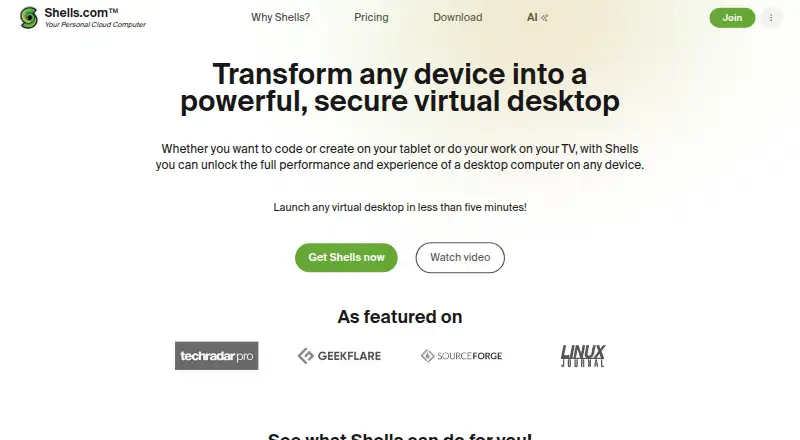
What Shells is
Shells provides a cloud virtual desktop that can be accessed from devices including phones and tablets. Users can choose from multiple Linux distributions and access desktop applications from other device operating systems. Files can be downloaded, stored, accessed, and edited across devices through the cloud desktop, and user data is backed up automatically. Shells says it uses firewalls and end-to-end encryption. The company identifies students, coders, workers, and small businesses as audiences, and says a virtual desktop can be launched in less than five minutes. Its listed access platforms are web, iOS, and Android; the “Works with” list also includes Firefox, Chrome, Safari, Android TV, PlayStation, Xbox, Oculus, and Tesla. Cloud desktop applications include LibreOffice and OnlyOffice. Shells also describes dedicated virtual desktops for AI assistants, with controlled access and persistent memory. The paid service has no free plan. Shells Basic costs $14.95 a month for 1 processor, 40 GB storage, 2 GB memory, and unlimited use. Shells Plus costs $22.95 a month for 2 processors, 80 GB storage, 4 GB memory, and unlimited use. Shells Pro costs $39.95 a month for 4 processors, 160 GB storage, 8 GB memory, and unlimited use.
Who it suits
Shells suits students, coders, workers, and small businesses who want a cloud desktop accessible across devices. It may also suit people who want to use Linux distributions or desktop applications from phones and tablets.
What it does well
- Access a cloud desktop from phones and tablets.
- Files can be accessed and edited across devices.
- User data is backed up automatically in the cloud.
- Plans include unlimited use.
What to know first
- There is no free plan.
- Basic costs $14.95 a month.
- A risk-free 7-day offer is advertised for browser-in-the-cloud.
Limits
Shells has no free plan. The lowest listed plan, Shells Basic at $14.95 a month, includes 1 processor, 40 GB storage, 2 GB memory, and unlimited use.
Plans
| Plan | Billed and limits | Price |
|---|---|---|
| Shells Basic | 1 processor · 40 GB storage · 2 GB memory · unlimited use | $14.95 a month |
| Shells Plus | 2 processors · 80 GB storage · 4 GB memory · unlimited use | $22.95 a month |
| Shells Pro | 4 processors · 160 GB storage · 8 GB memory · unlimited use | $39.95 a month |
As shells.com lists them, read 7 Oct 2026. The maker's own page has the final word.
Getting started
- Visit the Shells website.
- Choose a Shells plan: Basic, Plus, or Pro.
- Use the advertised 7-day offer.
- Access the desktop through web, iOS, or Android.
- Choose a Linux distribution and use desktop applications in the cloud.
Verdict
Shells offers persistent cloud desktops across a broad set of listed clients, with plans differentiated by processors, storage, and memory. There is no free plan, so compare the monthly tiers with the resources you need.
Questions
Does Shells have a free plan?
No. Shells is a paid service and has no free plan.
How much does Shells cost?
Shells Basic costs $14.95 a month, Shells Plus costs $22.95 a month, and Shells Pro costs $39.95 a month.
Is there a free trial?
Shells advertises a risk-free 7-day offer.
Which platforms can access Shells?
The listed access platforms are web, iOS, and Android. The “Works with” list also includes Firefox, Chrome, Safari, Android TV, PlayStation, Xbox, Oculus, and Tesla.
What does Shells Basic include?
Shells Basic includes 1 processor, 40 GB storage, 2 GB memory, and unlimited use.
Where is Shells based?
Shells is headquartered in Los Angeles, California.
Facts from Shells's own pages
- AI service
- The AI page describes dedicated virtual desktops for AI assistants, with controlled access and persistent memory. · shells.com, 7 Oct 2026
- Backup
- Shells says user data is backed up automatically in the cloud. · shells.com, 7 Oct 2026
- Company location
- A Shells company announcement identifies Shells as headquartered in Los Angeles, California. · shells.com, 7 Oct 2026
- Desktop applications
- The office software page describes using LibreOffice, OnlyOffice, or another document editor in the cloud. · shells.com, 7 Oct 2026
- Files
- Users can download, store, access, and edit files across devices through the cloud desktop. · shells.com, 7 Oct 2026
- Operating systems
- The homepage says users can choose from multiple Linux distributions and access desktop applications from other device operating systems. · shells.com, 7 Oct 2026
- Product
- Shells provides a cloud virtual desktop that can be accessed from any device, including tablets and phones. · shells.com, 7 Oct 2026
- Security
- The homepage states that Shells uses firewalls and end-to-end encryption. · shells.com, 7 Oct 2026
- Setup
- Shells says users can launch a virtual desktop in less than five minutes. · shells.com, 7 Oct 2026
- Support
- The website includes a Support link in its Community & Help section. · shells.com, 7 Oct 2026
- Supported clients
- The homepage lists iOS, Android, Firefox, Chrome, Safari, Android TV, PlayStation, Xbox, Oculus, and Tesla under “Works with.” · shells.com, 7 Oct 2026
- Trial and refund
- The browser-in-the-cloud page advertises a risk-free 7-day offer. · shells.com, 7 Oct 2026
- Use cases
- The site identifies students, coders, workers, and small businesses as audiences for Shells. · shells.com, 7 Oct 2026
Where Shells stands on Freedom251
- Desktop as a Service (DaaS) Providers#6 of 23
- Desk As A Service Software#5 of 19
- Desktop as a Service Software#7 of 25
- Cloud PC Services#10 of 28