Freedom251 › Legal Transcription Software
StillWren
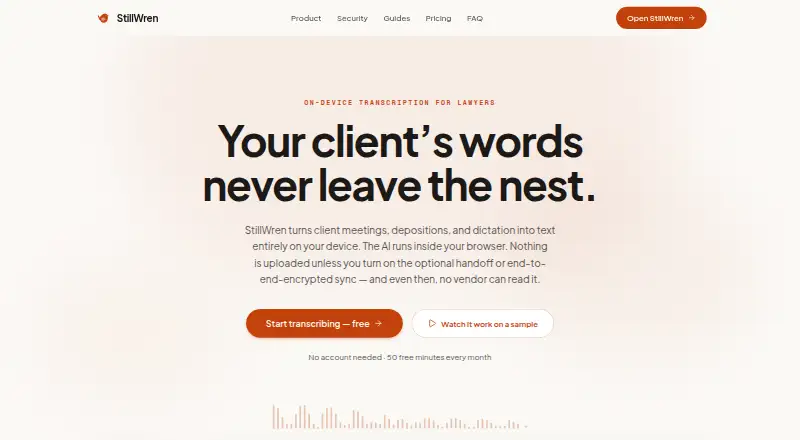
What StillWren is
StillWren transcribes client meetings, depositions, and dictation in a browser on the user's device. You can record with a microphone or upload audio and video files up to 500 MB. Transcription uses Whisper models, with word timestamps, custom vocabulary, and filler-word cleanup. On-device speaker separation identifies voices and color-codes transcript lines. The on-device AI suite can create summaries, follow-ups, key decisions, and chapter markers, and answer questions from transcripts. It supports transcription in 100+ languages and translation to 30+ languages, with search across the transcript library. Exports include DOCX, PDF, TXT, SRT, and other formats; rule-based redaction can remove names and identifiers on-device. Transcripts stay in the browser's local database. Optional sync stores ciphertext encrypted on-device with a passphrase-derived key. Transcription and dictation work offline after a one-time model download. The free plan costs nothing, with 50 minutes monthly without an account or 300 with one, plus the full editor and exports. Desktop Chrome or Edge is required; AI drafting needs a WebGPU-capable browser.
Who it suits
StillWren suits litigation, solo and small firms, in-house counsel, and immigration or family practices that need browser-based transcription and transcript tools. It may also fit users who need offline dictation or transcription after downloading a model.
What it does well
- Free plan includes full editor and all exports.
- Transcribes in 100+ languages.
- Offline transcription after one-time model download.
- Redacts names and identifiers on-device.
- Exports DOCX, PDF, TXT, SRT, and other formats.
What to know first
- Web-only, with desktop Chrome or Edge specified.
- AI drafting requires a WebGPU-capable browser.
- FTR .trm files must first be exported as MP3.
Plans
| Plan | Billed and limits | Price |
|---|---|---|
| Free | 50 minutes/month without an account · 300 minutes/month with a free account · full editor and all exports | Free |
| Pro | Unlimited minutes · on-device AI legal suite · encrypted sync · mobile handoff | On request |
As stillwren.com lists them, read 7 Oct 2026. The maker's own page has the final word.
StillWren is a browser-based transcription workspace for meetings, depositions, and dictation, with processing designed to stay on the user's device. It suits legal teams and privacy-conscious professionals who need transcript editing, AI assistance, and exports without routinely uploading audio. The strongest case is its offline, on-device workflow; the main cautions are its desktop-browser requirements, 500 MB file ceiling, and custom-priced Pro tier.
Overview
StillWren combines recording, file import, transcription, transcript search, drafting tools, redaction, and export in one web application. It is aimed at litigation, solo and small firms, in-house counsel, and immigration and family practices. Audio is not uploaded during normal transcription, and work can continue offline after the one-time model download. That makes it a sensible fit for confidential material or unreliable connectivity, provided the user works in desktop Chrome or Edge.
Key features
Recording can come from a microphone, or users can import MP3, WAV, M4A, FLAC, OGG, MP4, MOV, and WebM files up to 500 MB. FTR .trm files require conversion to MP3 first, an extra step for practices using that format. Whisper-based transcription includes word timestamps, custom vocabulary, filler-word cleanup, and both recording and upload modes. On-device diarization separates speakers and color-codes transcript lines, which helps navigate depositions and interviews.
The transcript workflow goes beyond plain text. On-device tools generate summaries, follow-ups, key decisions, and chapter markers, while transcript chat answers questions from the imported material. Rule-based redaction can target names and identifiers on-device. Exports include DOCX, PDF, TXT, SRT, and other formats, and library-wide search helps retrieve prior work. Transcription covers more than 100 languages and translation more than 30, making it practical for multilingual matters.
Privacy is central: transcripts remain in the browser's local database. Optional sync stores ciphertext encrypted on-device with a passphrase-derived key. An end-to-end encrypted mobile-to-desktop handoff is the exception to the no-upload transcription path; its relay copy is deleted after pickup. Clio interoperability is described as CSV exchange, not a native endorsed integration.
Pricing
Free: free. Without an account, the allowance is 50 minutes per month; a free account raises it to 300 minutes per month. The full editor and all exports are included, so occasional users can evaluate the complete workflow rather than a restricted viewer. The trade-off is the monthly minute cap.
Pro: custom pricing. It adds unlimited minutes, the on-device AI legal suite, encrypted sync, and mobile handoff. This is the tier for firms with sustained transcription volume or a need to move work between devices, but the unlisted price means budgeting requires a direct quote.
A 14-day trial is offered. The published plans do not state seat limits or renewal terms, so organizations should confirm those before committing.
Platforms
StillWren runs on the web, with desktop Chrome or Edge specified by the maker. Transcription and dictation work offline once models are downloaded. The AI drafting suite requires a WebGPU-capable browser, so a compatible desktop setup is necessary for summaries, chat, and related drafting features. It is not presented as a general native desktop or mobile application.
Who it's for
Choose StillWren if you handle confidential legal recordings, want local processing and optional encrypted sync, and can work within its browser and file limits. Solo practitioners and small firms can get the full editor and exports on the free plan, while higher-volume practices are the natural audience for Pro. It is less suitable when you need native mobile coverage, larger uploads, or a published per-seat price.
Pros and cons
Pros
- Offline, on-device transcription limits routine audio exposure and supports work without connectivity after setup.
- The free plan includes the full editor and exports, with up to 300 minutes monthly for an account.
- Legal-oriented AI, diarization, timestamps, redaction, and broad language support cover a complete transcript workflow.
- DOCX, PDF, TXT, SRT, and other exports make results usable in downstream document work.
Cons
- Desktop Chrome or Edge is required, and AI drafting additionally depends on WebGPU.
- Imports stop at 500 MB, and FTR .trm files need prior MP3 export.
- Pro pricing is custom, leaving the cost of unlimited use and sync unclear until quotation.
- Clio support is CSV interoperability rather than an endorsed native integration.
Alternatives
For a broader comparison, see Legal Transcription Software.
- MatterScribe suits users who prefer pay-as-you-go billing at $0.10 per minute, accept three-day file retention and a card on file, and need Android, iOS, macOS, Windows, or web access.
- HappyScribe Legal is the better match for Android or iOS users seeking a freemium mobile-and-web option with 45 minutes per recording and limited AI analysis.
- Rev fits readers wanting API access and a published $29.99 monthly Essentials plan, though its free transcription is English-only.
- SoniClear Transcriber 10 offers a Windows/web manual player and a published $360 annual Pro plan.
- WhisperAI Legal Transcription is an alternative with extension and iOS support and a $14.99 monthly Premium tier.
- Filevine is for teams seeking custom-built matter, document, billing, and optional legal packages rather than a focused local transcription tool.
- FTR Justice Cloud is an alternative for organizations whose workflow centers on its supported platform mix.
- ArcaScribe is another freemium option for macOS and Windows users.
Verdict
StillWren is a strong choice for legal professionals who prioritize private, offline transcription and want editing, redaction, AI transcript tools, and exports in one browser workspace. Look elsewhere if you require mobile-first or native coverage, imports above 500 MB, a native Clio connection, or transparent Pro pricing.
Verdict
StillWren combines transcription, transcript-based AI tools, exports, and on-device redaction in a browser. Its free plan includes the full editor and exports, but the browser requirements and file-format limits are worth checking first.
Facts from StillWren's own pages
- AI features
- The on-device AI suite includes summaries, follow-ups, key decisions, chapter markers, and chat that answers from transcripts. · stillwren.com, 7 Oct 2026
- Browser requirements
- The maker specifies desktop Chrome or Edge, and says the AI drafting suite requires a WebGPU-capable browser. · stillwren.com, 7 Oct 2026
- Clio interoperability
- The maker describes Clio compatibility as CSV interoperability and says StillWren is not affiliated with or endorsed by Clio. · stillwren.com, 7 Oct 2026
- Data storage
- Transcripts are stored in the browser's local database on the user's device; optional sync stores ciphertext encrypted on-device with a passphrase-derived key. · stillwren.com, 7 Oct 2026
- Exports and redaction
- Users can export to DOCX, PDF, TXT, SRT, and other formats, and apply rule-based redaction to names and identifiers on-device. · stillwren.com, 7 Oct 2026
- File-format limit
- The hearing-prep page lists MP3, WAV, M4A, FLAC, OGG, MP4, MOV, and WebM files up to 500 MB; FTR .trm files must first be exported as MP3. · stillwren.com, 7 Oct 2026
- Intended users
- The site describes the product for litigation, solo and small firms, in-house counsel, and immigration and family practices. · stillwren.com, 7 Oct 2026
- Languages and search
- StillWren supports transcription in 100+ languages, translation to 30+ languages, and search across the transcript library. · stillwren.com, 7 Oct 2026
- Model licensing
- The maker lists Whisper under MIT/Apache 2.0 and Gemma under Google's Gemma Terms of Use, among other model licenses. · stillwren.com, 7 Oct 2026
- Offline use
- Transcription and dictation work offline after the one-time model download. · stillwren.com, 7 Oct 2026
- Purpose
- StillWren transcribes client meetings, depositions, and dictation in the user's browser on their device. · stillwren.com, 7 Oct 2026
- Recording and uploads
- Users can record from a microphone or upload audio and video files up to 500 MB. · stillwren.com, 7 Oct 2026
- Security
- The maker says audio is not uploaded during transcription, except for the optional end-to-end encrypted mobile-to-desktop handoff, whose relay copy is deleted after pickup. · stillwren.com, 7 Oct 2026
- Speaker identification
- On-device diarization separates speakers and color-codes transcript lines. · stillwren.com, 7 Oct 2026
- Transcription
- The product uses Whisper models and supports word timestamps, custom vocabulary, and filler-word cleanup. · stillwren.com, 7 Oct 2026
Where StillWren stands on Freedom251
- Legal Transcription Software#9 of 24