Freedom251 › AI 3D Model Generators
Stable Fast 3D
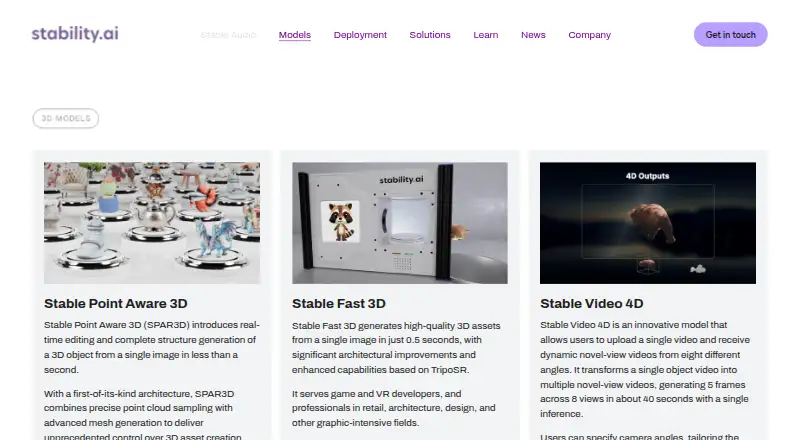
What Stable Fast 3D is
Stable Fast 3D is Stability AI’s image-to-3D model for turning one object image into a textured, UV-unwrapped 3D mesh. Its model page says it is trained to produce a model in under one second. It expects an image sized 512 × 512 pixels, applies a delighting step, and predicts roughness and metallic material settings. The official code example saves the result as a GLB file. The repository includes custom nodes and an example workflow for ComfyUI, alongside API access. Documented inference options include CUDA and CPU, plus experimental Mac MPS support; Windows support is also marked experimental. Default settings use about 6 GB of VRAM for one image. Stability AI identifies game and VR developers and professionals in retail, architecture, design, and other graphics-intensive fields as intended users. Model-file access requires accepting the license and agreeing to share contact information. The Community License is free for research and non-commercial use, and permits commercial use at annual revenue of $1 million or less; above that, an Enterprise License is required. The API plan lists 10 credits per generation, with 1 credit = $0.01.
Who it suits
It is aimed at game and VR developers and professionals in retail, architecture, design, and other graphics-intensive fields who need image-based 3D assets. Users should check the license terms and hardware requirements before choosing an inference setup.
What it does well
- Creates a textured mesh from one image
- Model page states generation is under one second
- Exports GLB files
- Includes ComfyUI nodes and an example workflow
What to know first
- Requires a 512 × 512 pixel input
- Default settings use about 6 GB of VRAM
- Windows support is experimental
- Commercial use above $1 million annual revenue requires an Enterprise License
Limits
The free Community License permits commercial use only when annual revenue is US $1 million or less; above that, an Enterprise License is required. Default settings use about 6 GB of VRAM for one image, and the model expects a 512 × 512 pixel input.
Plans
| Plan | Billed and limits | Price |
|---|---|---|
| Community License | Free for research, non-commercial and commercial use if annual revenue is $1,000,000 or less · commercial use above that revenue requires an Enterprise License | Free |
| Stable Fast 3D API | 10 credits per generation · 1 credit = $0.01 | On request |
As stability.ai lists them, read 5 Oct 2026. The maker's own page has the final word.
Getting started
- Open the Stable Fast 3D page or repository.
- Agree to share contact information and accept the license agreement to access model files.
- Prepare an object image at 512 × 512 pixels.
- Choose a documented inference route: CUDA, CPU or experimental Mac MPS; Windows support is experimental.
- Use the model or its API, or connect through the provided ComfyUI nodes and example workflow.
- Save the reconstructed model as a GLB file.
Stable Fast 3D turns a single object image into a textured 3D mesh, making it most relevant to developers and graphics professionals building image-driven asset workflows. Its appeal is speed and a focused GLB pipeline; the revenue-based license threshold, model-file access terms, and hardware demands deserve a careful check first.
Overview
The model creates a UV-unwrapped mesh from one image, with a stated generation time of under one second. That is a strong fit when a workflow needs to convert object references into 3D assets quickly. The fixed 512 × 512 input and image-only approach are constraints for teams that need text prompting or more varied source inputs.
Stable Fast 3D applies a delighting step and predicts roughness and metallic parameters per object. Those material cues make the result more useful as a graphics asset than shape alone, but the product does not provide rigging or animation. GLB is the documented output, so it suits pipelines that accept that format.
Key features
- Single-image reconstruction: Generates a textured, UV-unwrapped mesh from one object image. The narrow input method keeps the workflow focused, but rules out text-to-3D generation.
- Material handling: Delighting and per-object roughness and metallic predictions provide a material-aware starting point for graphics work.
- ComfyUI integration: Repository custom nodes and an example workflow can fit teams already using ComfyUI.
- Inference options: The repository documents CUDA, experimental Mac MPS support, and CPU inference. Default settings use about 6 GB of VRAM for one image; Windows support is experimental. These options offer flexibility, but the memory requirement and platform caveats matter for deployment planning.
- Access and safety: Accessing model files requires sharing contact information and accepting the license agreement. Stability AI recommends developers test the model and add safeguards suited to their use cases.
Pricing
The Community License is free. It covers research and non-commercial use, and commercial use for organizations or individuals with annual revenue of US $1 million or less. Above that threshold, an Enterprise License is required before commercial use of the model or its derivatives.
The Stable Fast 3D API has custom pricing: each generation costs 10 credits, and 1 credit = $0.01.
There is no free trial. The free license is therefore the entry point for eligible use, while higher-revenue commercial users need an Enterprise License. API access is the paid route for metered generation.
Platforms
Stable Fast 3D is available through API, Linux, macOS, web, and Windows. Repository support distinguishes CUDA, experimental Mac MPS, CPU inference, and experimental Windows support; users should match those caveats to their deployment environment. Support requests go through Stability AI's Knowledge Base.
Who it's for
Stability AI identifies game and VR developers, along with professionals in retail, architecture, design, and other graphics-intensive fields, as intended users. It is best for people who can feed it object images and use GLB mesh assets in their workflow. It is a poor fit for projects that require text-to-3D, rigging, or animation.
Pros and cons
- Pro: Under-one-second generation from one image can suit fast asset-conversion workflows.
- Pro: Texturing, UV unwrapping, delighting, and material parameter prediction give the output several useful graphics-oriented treatments.
- Pro: Free use includes commercial use at or below the US $1 million annual revenue threshold.
- Con: The 512 × 512 image input and image-only generation limit the range of source material and exclude text prompts.
- Con: Default inference uses about 6 GB of VRAM, and Windows support is experimental.
- Con: Commercial use above the revenue threshold requires an Enterprise License, and model-file access entails sharing contact information and accepting license terms.
- Con: GLB is the documented output, with no rigging or animation capability.
Alternatives
AI 3D Model Generators is a broader category directory for comparing tools.
Choose Polar Cloud instead if managing 3D printing is the priority: its free plan covers one printer, five print jobs per month, seven-day history, and 300 MB storage, with mesh-only files and a 30 MB file limit.
Meshy is another freemium option, with a free plan offering 100 credits and 10 monthly downloads for Meshy 6 Lite models.
Hi3D offers a lifetime free allowance of 100 credits, up to 10 asset generations, one concurrent task, and storage for up to seven public models under CC BY 4.0.
Polycam is worth comparing for capture workflows; its free plan includes limited space, object, and AI captures, GLTF exports, and public link sharing.
Unique3D is a free option with an online demo that requires a registration invitation code.
Crisp3D offers a web-based freemium option; its free plan limits users to one concurrent task and public models, with no downloads.
Hyper3D Rodin is another freemium option for readers comparing API and web platforms.
Scenario offers a free tier with 50 daily credits, no credit card requirement, and personal and evaluation use only.
Verdict
Stable Fast 3D is a sensible choice for graphics professionals and developers who need rapid, single-image-to-GLB mesh creation and can meet its hardware and license conditions. Choose it for that focused reconstruction workflow; look elsewhere if you need text-to-3D, rigging, animation, or a broader capture path.
Verdict
Stable Fast 3D provides a focused image-to-3D workflow with GLB output and several inference options. Review the revenue-based license limit, repository access requirements, and hardware needs before use.
Questions
Is Stable Fast 3D free?
The Community License is free for research and non-commercial use, and for commercial use when annual revenue is US $1 million or less.
What does commercial use above the revenue threshold require?
Organizations or individuals with annual revenue above US $1 million must obtain an Enterprise License before commercial use of the model or its derivatives.
What platforms or inference options are documented?
The listed platforms are API, Linux, macOS, web and Windows. The repository documents CUDA, CPU inference and experimental Mac MPS support; Windows support is experimental.
What file format does Stable Fast 3D export?
The official code example saves the reconstructed 3D model as a GLB file.
Who makes Stable Fast 3D?
Stability AI identifies itself as the maker of Stable Fast 3D and is headquartered in London, England, UK.
Can I use Stable Fast 3D through ComfyUI or an API?
Yes. The repository includes custom nodes and an example ComfyUI workflow, and API access is available.
Facts from Stable Fast 3D's own pages
- Access requirement
- The model repository requires users to agree to share contact information and accept the license agreement to access model files. · huggingface.co, 5 Oct 2026
- Company
- Stability AI identifies itself as the maker of Stable Fast 3D, and a company announcement describes it as headquartered in London. · stability.ai, 5 Oct 2026
- Generation speed
- The model page says it is trained to create a 3D model from one image in under one second. · huggingface.co, 5 Oct 2026
- Hardware
- The repository documents CUDA, experimental Mac MPS support, and CPU inference; Windows support is marked experimental. · github.com, 5 Oct 2026
- Headquarters
- London, England, UK · stability.ai, 28 Sept 2026
- Image-to-3D
- Stable Fast 3D takes one image of an object and generates a textured, UV-unwrapped 3D mesh asset. · huggingface.co, 5 Oct 2026
- Input requirement
- The model expects an input size of 512 × 512 pixels. · huggingface.co, 5 Oct 2026
- Integrations
- The repository provides custom nodes and an example workflow for ComfyUI. · github.com, 5 Oct 2026
- Licensing limit
- Organizations or individuals with annual revenue above US $1 million must obtain an Enterprise License before commercial use of the model or its derivatives. · huggingface.co, 5 Oct 2026
- Materials and lighting
- The model performs a delighting step and predicts per-object roughness and metallic material parameters. · huggingface.co, 5 Oct 2026
- Output format
- The official code example saves the reconstructed 3D model as a GLB file. · github.com, 5 Oct 2026
- Resource use
- The README says default settings use about 6 GB of VRAM for one image input. · github.com, 5 Oct 2026
- Safety
- Stability AI recommends that developers test the model and add safeguards appropriate to their own use cases. · huggingface.co, 5 Oct 2026
- Support
- Stability AI directs users to submit a support request through its Knowledge Base. · kb.stability.ai, 5 Oct 2026
- Who it serves
- Stability AI describes the model as serving game and VR developers and professionals in retail, architecture, design, and other graphics-intensive fields. · stability.ai, 5 Oct 2026
Where Stable Fast 3D stands on Freedom251
- AI 3D Model Generators#12 of 24