Freedom251 › Mobile Browser Software
SquareBrowser
What SquareBrowser is
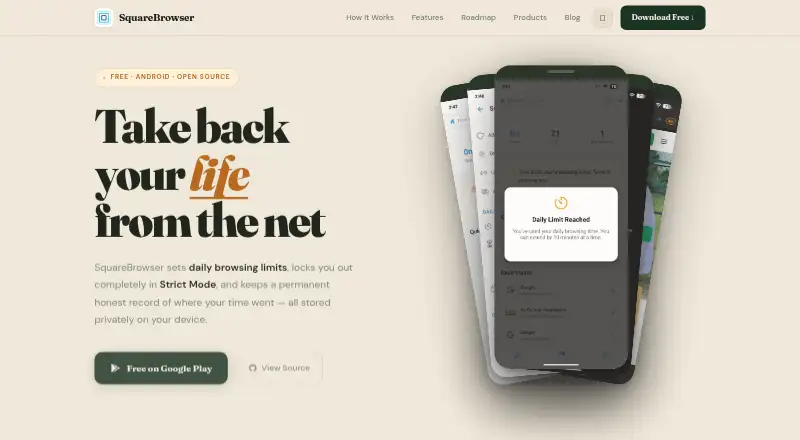
SquareBrowser is an open-source Android browser built to help users set limits on browsing time and keep themselves accountable. Users can choose a preset daily cap or adjust the cap in 15-minute increments. With Strict Mode enabled, the browser locks when the cap is reached and becomes available again at midnight. Outside Strict Mode, users who reach their cap can extend browsing once by 10 minutes. The app records browsing history permanently and provides daily time-per-domain statistics. Its maker says browsing data stays in local device storage, with no external servers, cloud sync, analytics, or tracking. SquareBrowser also includes a built-in ad blocker, dark and light themes, and bookmarks. The project says browsing history cannot be deleted within the app and that it has no incognito or private mode. The free plan costs nothing, with no in-app purchases or subscription; daily browsing limits can be set up to 6 hours. SquareBrowser is currently Android-only. The maker describes iOS as a possible future release, while an open API for integrations appears on its roadmap as a future feature.
Who it suits
SquareBrowser suits Android users who want daily browsing limits and accountability, particularly people who are privacy-conscious. It may also fit users who want local-only browsing data, an ad blocker, and domain-level time statistics, provided they are comfortable with permanent history.
What it does well
- Daily caps can be adjusted in 15-minute increments.
- Strict Mode locks browsing until midnight after the daily cap.
- Browsing data stays in local device storage, according to the maker.
- Includes a built-in ad blocker, themes, and bookmarks.
- Free to use with no in-app purchases or subscription.
What to know first
- Browsing history is permanent and cannot be deleted in the app.
- The project says it has no incognito or private mode.
- Currently available for Android only.
Limits
The free plan allows daily browsing limits up to 6 hours. With Strict Mode enabled, browsing locks at the limit until midnight; otherwise, the user can extend browsing once by 10 minutes. Browsing history is permanent and cannot be deleted within the app.
Plans
| Plan | Billed and limits | Price |
|---|---|---|
| Free | Always; no in-app purchases or subscription · Android · daily browsing limits up to 6 hours · Strict Mode locks until midnight · permanent history | Free |
As squarebrowser.com lists them, read 9 Oct 2026. The maker's own page has the final word.
Getting started
- Open the SquareBrowser website or Android listing.
- Install SquareBrowser on an Android device.
- Choose a preset daily browsing cap or adjust it in 15-minute increments.
- Enable Strict Mode if you want access to resume at midnight after reaching the cap.
Overview
SquareBrowser is an Android browser built around daily time limits and accountability tools. It suits people who want firm boundaries and local storage more than private browsing or a browser they can use across platforms. Its free plan pairs flexible daily caps with Strict Mode, but the permanent history cannot be deleted.
Key features
Daily caps can use presets or be adjusted in 15-minute increments, giving users a practical way to set a boundary that fits their routine. Strict Mode makes that boundary consequential: once the limit is reached, the browser locks until midnight. Without Strict Mode, users can extend browsing once by 10 minutes, a small cushion rather than an open-ended override.
SquareBrowser keeps permanent browsing history and shows daily time spent by domain. Those statistics can help identify where browsing time goes, but retaining an undeletable history is a serious trade-off for anyone who shares a device or expects control over stored activity. There is no incognito or private mode.
The maker says browsing data remains in local device storage, with no external servers, cloud sync, analytics, or tracking. That local approach avoids cloud syncing but also means there is no cross-device sync. A built-in ad blocker, bookmarks, and dark and light themes round out the browser; none changes its central focus on accountability.
Pricing
| Plan | Price | What it includes |
|---|---|---|
| Free | free (billed Always) | Android browser, daily limits up to 6 hours, Strict Mode locks until midnight, and permanent history |
The free plan has no in-app purchases or subscription, and there is no free trial because the product is free. Its 6-hour maximum is generous enough for users setting moderate daily boundaries, but it rules out shorter maximum caps as a way to enforce especially strict limits. There is no paid tier to unlock another platform or remove the history limitation.
Platforms
SquareBrowser is currently Android-only, for mobile use. iOS is a possible future release, not an option for users choosing a browser now. The absence of cloud sync also makes it a single-device choice rather than a shared browsing setup.
Who it's for
SquareBrowser is best for Android users who want to monitor time by domain and make a daily browsing cap hard to evade. It is a poor fit for anyone who needs to erase history, browse privately, switch between Android and other platforms, or keep activity synchronized across devices.
Pros and cons
- Pros: Adjustable daily caps, Strict Mode, and a one-time 10-minute extension create a useful balance between deliberate limits and a small allowance for overruns.
- Pros: Daily time-per-domain statistics make the accountability purpose concrete, while local storage and no cloud sync keep data on the device according to the maker.
- Pros: Free permanently, with no subscription or in-app purchases, and includes an ad blocker, bookmarks, and theme choices.
- Cons: Browsing history is permanent and cannot be deleted in the app; there is no private mode.
- Cons: Android-only availability and no cross-device sync exclude people needing broader platform coverage.
- Cons: The 6-hour daily cap ceiling may be too high for users seeking a strict low-hour maximum.
Alternatives
For a broader browser catalog, see Mobile Browser Software and Web browsers.
- Mozilla Firefox is the stronger fit if you need a free, open-source browser across desktop, web, mobile, and extension platforms rather than SquareBrowser's Android-only accountability focus.
- Bare Browser is another free, open-source Android option, currently in alpha for Android 10+ on ARM devices.
- Fulguris suits Android users who prioritize unlimited tabs without a subscription through its free Download / F-Droid plan.
- SmartCookieWeb is a free, ad-free, open-source Android browser if you do not need SquareBrowser's time-limit emphasis.
- Google Chrome is a free option across Android and several desktop, web, and extension platforms.
- Microsoft Edge is a free alternative available on Android, iOS, desktop, and web platforms.
- Opera is a free multi-platform browser whose listed features include a free VPN, ad blocker, Flow, and Opera AI.
- Ecosia Browser offers free desktop and mobile browser access across Android, iOS, and desktop platforms.
Verdict
Choose SquareBrowser if you use Android and want firm daily browsing boundaries, domain-level time statistics, and local data storage. The free plan's Strict Mode is its clearest reason to choose it. Look elsewhere if you need to delete history, use a private mode, or browse beyond Android.
Verdict
Choose SquareBrowser if you use Android and want firm daily browsing boundaries, domain-level time statistics, and local data storage. Its free plan includes limits up to 6 hours and Strict Mode. Look elsewhere if you need to delete browsing history, use a private mode, or browse on a platform other than Android.
Questions
How much does SquareBrowser cost?
The Free plan costs nothing, with no in-app purchases or subscription.
Which platforms can run SquareBrowser?
It is currently Android-only. The maker lists iOS as a possible future release.
Is SquareBrowser open source?
Yes, SquareBrowser is open source.
Does SquareBrowser sync browsing data across devices?
No. The maker says browsing data stays in local device storage and that there is no cloud sync.
Can users delete their browsing history or use private mode?
Browsing history cannot be deleted within the app, and the project says it has no incognito or private mode.
Does SquareBrowser have integrations?
An open API for integrations appears on the maker’s roadmap as a future feature.
Facts from SquareBrowser's own pages
- Additional features
- The maker lists a built-in ad blocker, dark and light themes, and the ability to save bookmarks. · github.com, 9 Oct 2026
- Availability
- The maker says the app is currently Android-only and lists iOS as a possible future release. · squarebrowser.com, 9 Oct 2026
- Built-in ad blocking
- Yes · squarebrowser.com, 19 Sept 2026
- Cross-device sync
- No · squarebrowser.com, 19 Sept 2026
- Daily limits
- Users can set a daily browsing cap, choose preset limits, or fine-tune the limit in 15-minute increments. · squarebrowser.com, 9 Oct 2026
- Free plan
- Yes · squarebrowser.com, 19 Sept 2026
- Integrations
- An open API for integrations appears on the maker's roadmap as a future feature. · squarebrowser.com, 9 Oct 2026
- Intended users
- The Google Play listing describes the app as intended for privacy-conscious users and people seeking digital accountability. · play.google.com, 9 Oct 2026
- Limit extension
- After reaching a daily limit outside Strict Mode, users can extend browsing once by 10 minutes. · squarebrowser.com, 9 Oct 2026
- Notable limit
- Browsing history cannot be deleted within the app, and the project README says it has no incognito or private mode. · github.com, 9 Oct 2026
- Open source
- The project README says SquareBrowser is open source under the MIT License. · github.com, 9 Oct 2026
- Supported platforms
- mobile · squarebrowser.com, 19 Sept 2026
- Privacy
- The maker says browsing data stays in local device storage and that the app has no external servers, cloud sync, analytics, or tracking. · squarebrowser.com, 9 Oct 2026
- Product
- SquareBrowser is an Android browser designed to help people browse more intentionally with time limits and accountability features. · squarebrowser.com, 9 Oct 2026
- Strict Mode
- When Strict Mode is enabled, the browser locks after the daily limit and access resumes at midnight. · squarebrowser.com, 9 Oct 2026
- Support
- The maker directs bug reports and feature requests to GitHub Issues and lists GitHub Discussions for discussion. · github.com, 9 Oct 2026
- Usage tracking
- The browser records permanent browsing history and provides daily time-per-domain statistics. · squarebrowser.com, 9 Oct 2026
Where SquareBrowser stands on Freedom251
- Mobile Browser Software#6 of 31
- Web browsers#60 of 154