
SpellMe
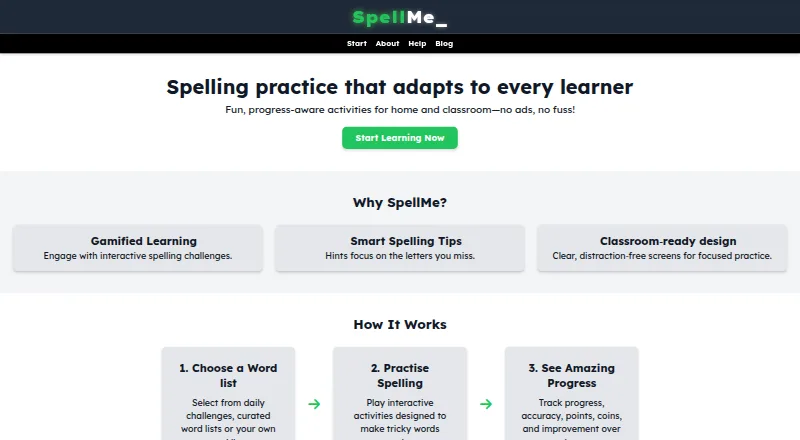
What SpellMe is
SpellMe is a web app for interactive spelling practice at home or in classrooms. Learners can use Regular, Mastery, and Story modes, although access to Mastery and Story depends on account tier. Mastery adjusts difficulty in response to performance, and hints can focus on letters a learner misses. Users can create their own word lists or choose from curated phonics and festive lists; registered users can use the curated library. A dashboard tracks accuracy and word mastery, while teacher accounts add classroom management and student progress monitoring. Premium tools include hints, image-based word-list import, generated lists, and AI progress summaries. The Basic plan is free and includes five word lists with ten words per list, more than 300 curated phonics lists, and Regular Mode. Advanced costs £12 a year, and Premium costs £20 a year; both offer a 14-day free trial. Guest users can make one list of up to five words, with progress stored locally. SpellMe requires an internet connection.
Who it suits
SpellMe suits students, parents, teachers, and homeschoolers looking for spelling practice. Its teacher dashboard and classroom tools are relevant to educators monitoring student progress.
What it does well
- Basic includes more than 300 curated phonics lists.
- Mastery Mode adapts difficulty to learner performance.
- Teacher accounts include classroom management and progress monitoring.
- Free plan includes Regular Mode.
What to know first
- The web app requires an internet connection.
- Guest users can create only one list of five words.
- Mastery and Story access depends on account tier.
Limits
Basic is limited to five word lists, ten words per list, and Regular Mode. Advanced allows 20 words per list and adds Mastery Mode; Premium allows 100 or more words per list and adds Story Mode and premium tools. Guest users are limited to one custom list of five words, with progress stored locally.
Plans
| Plan | Billed and limits | Price |
|---|---|---|
| Basic | Free · Regular Mode · 5 word lists · 10 words per list | Free |
| Advanced | £12/year; 14-day free trial · Basic features · 20 words per list · Mastery Mode · unlimited word lists · curated phonics lists · advanced progress tracking | £12 a year |
| Premium | £16 first year, then £20/year; 14-day free trial · Advanced features · Story Mode · smart spelling hints · smart progress analysis coming soon · automatic phonics list creation coming soon | £16 a year |
| Teacher Advanced | Contact us · Regular and Mastery Modes · unlimited word lists · student progress tracking · teacher dashboard · classroom login | On request |
| Teacher Premium | Contact us · Teacher Advanced features · Story Mode · smart hints · classroom progress reports coming soon | On request |
As spellme.app lists them, read 14 Oct 2026. The maker's own page has the final word.
Getting started
- Open the SpellMe web app on a supported browser-based device.
- Use the free Basic plan or select Advanced or Premium, each with a 14-day trial.
- Create a custom word list or choose from the curated library available to registered users.
- Choose an available practice mode for the account tier.
- Teachers can use a teacher account for classroom management and student progress monitoring.
Overview
SpellMe is an online spelling-practice app for learners at home and in classrooms. It suits families and teachers who want custom word lists alongside structured practice and progress tracking. Its strongest case is the range of practice and list-making tools; the free plan is narrow, and every session requires internet access.
Key features
Practice and word lists
Regular Mode is the starting point, while Mastery Mode adapts difficulty to performance and offers hints focused on missed letters. Story Mode adds another practice option on higher tiers. This progression can suit learners who benefit from repeated practice that responds to their performance, but access to Mastery and Story depends on the plan.
Learners can use custom lists or, as registered users, choose from a curated library that includes phonics and festive lists. Basic caps list-making at five lists of 10 words each; guests get just one list of up to five words, with progress saved locally on their device. Those limits make the free tier useful for a small trial, not a large or varied collection of spelling material.
Progress and classroom tools
A dashboard tracks accuracy and word mastery, and teacher accounts add classroom management and student progress monitoring through a dedicated dashboard. Teacher plans also include classroom login; Teacher Premium adds Story Mode and Smart Hints. These features make SpellMe relevant to classroom use as well as individual practice, though teacher pricing is custom pricing.
Premium tools and privacy
Premium adds Smart Spelling Hints, image-based word-list generation, automatically created lists, and AI progress summaries. These tools may reduce list-building work and add guidance beyond standard practice, but they require the most expensive listed personal plan. SpellMe also includes phonics instruction, dictation, and corrective practice.
SpellMe requires an internet connection and has no offline access, so it is a poor fit for practice where connectivity is unreliable. Its privacy policy says guest settings and game data stored locally are not sent to SpellMe servers, and Google Analytics cookies are activated only with consent.
Pricing
SpellMe uses a freemium model, with a 14-day free trial on Advanced and Premium. Basic is free and includes Regular Mode, five lists of up to 10 words each, and 300+ curated phonics word lists. It is the sensible starting point for short lists and basic practice, but has no Mastery Mode or unlimited lists.
Advanced costs £12/year and includes 20 words per list, unlimited lists, Mastery Mode, and advanced progress tracking. It fits learners who need more list capacity and adaptive practice without Premium's AI tools. Premium costs £20/year and raises list capacity to 100+ words per list, while adding Story Mode, Smart Spelling Hints, image-to-list generation, Smart Progress Summary, and automatic list creation. Choose it when those tools justify the higher annual price; otherwise Advanced covers the core step up from Basic.
Teacher Advanced and Teacher Premium both have custom pricing. Teacher Advanced includes Regular and Mastery Modes, unlimited lists, student progress tracking, a teacher dashboard, and easy classroom login. Teacher Premium adds Story Mode, Smart Hints, and full classroom progress reports, which are marked as coming soon. The listed teacher plans offer classroom tools, but without a published price it is harder to compare their cost with personal plans.
Platforms
SpellMe is a web app that works on browser-based Windows, Mac, Linux, iOS, and Android devices. It is also listed for Android, iOS, Linux, macOS, web, and Windows. Internet access is required, so supported devices do not mean offline availability.
Who it's for
SpellMe is best suited to students, parents, homeschoolers, and teachers who want spelling practice built around custom or curated lists, with progress views for individual learners or classrooms. Basic can serve a light-use learner; Advanced is the more practical choice for growing lists and adaptive practice. Look elsewhere if offline access is essential or if a teacher needs a clear price before committing.
Pros and cons
- Pros: Mastery Mode adjusts difficulty to performance, and hints can target missed letters, giving learners more responsive practice than Regular Mode alone.
- Pros: Personal plans scale from short free lists to unlimited lists and 100+ words per list, while teacher accounts add student monitoring and classroom management.
- Pros: Guest game data remains local and is not sent to SpellMe servers, according to its privacy policy; analytics cookies require consent.
- Cons: Guests are limited to one five-word list and Basic to five 10-word lists, constraining sustained use without upgrading.
- Cons: No offline access means practice depends on an internet connection.
- Cons: Teacher plans use custom pricing, and Teacher Premium's full classroom progress reports are coming soon.
Alternatives
For a broader comparison, browse Spelling Apps. Choose Spelling Shed if Android, iOS, or web access and a free plan with classroom-oriented clever rostering matter; its free plan also limits the history for tests, games, challenges, and leagues to seven days. Spelling.Live may suit readers who prefer a credit-based free sign-up: it starts with 200 credits, which expire after 90 days without a practice session.
PenPoints is a free Android and iOS alternative. Spelling Boost may suit Android users seeking free audio dictation tests, custom lists, handwriting input, and progress tracking. Spell Up is another freemium option for Android, iOS, and web. Wordshark is a paid alternative with a free trial and Android, iOS, macOS, web, and Windows support. Better Speller and SpellingJoy are freemium alternatives for their listed platforms.
Verdict
Choose SpellMe if you want spelling practice that combines custom lists, adaptive Mastery Mode, and learner or classroom progress tracking. Advanced at £12/year is the clearest fit for regular individual use; Premium makes sense when its list-generation and AI tools matter. Look elsewhere if you need offline practice or a published teacher-plan price.
Verdict
SpellMe combines spelling practice, custom lists, and progress tracking, with separate classroom features for teachers. Its free tier is limited to Regular Mode, while higher tiers add more practice and learning tools.
Questions
Is SpellMe free?
Yes. Basic is free and includes five lists of up to ten words each, 300+ curated phonics lists, and Regular Mode.
How much do the paid plans cost?
Advanced costs £12/year and Premium costs £20/year. Both include a 14-day free trial.
Which platforms does SpellMe support?
It supports web, Android, iOS, Linux, macOS, and Windows devices. The web app requires an internet connection.
Does SpellMe have teacher tools?
Yes. Teacher accounts include classroom management, student progress tracking, and a teacher dashboard. Teacher Premium also lists full classroom progress reports as coming soon.
Can guests save their progress?
Guest users can create one custom list of up to five words, and their progress is saved locally on the device.
Facts from SpellMe's own pages
- Adaptive hints
- Difficulty changes how much of a word is revealed in hints, and Mastery Mode adjusts difficulty from spelling accuracy. · spellme.app, 14 Oct 2026
- Adaptive practice
- Mastery Mode progressively changes difficulty based on performance, while hints can focus on letters the learner misses. · spellme.app, 29 Sept 2026
- AI list generation
- Premium and Teacher accounts can generate new lists matching a selected spelling pattern or theme. · spellme.app, 14 Oct 2026
- AI tools
- Premium features include hints, image-based word-list import, generated lists, and AI progress summaries. · spellme.app, 29 Sept 2026
- Analytics consent
- Google Analytics cookies are described as optional and activated only after explicit consent through the cookie banner. · spellme.app, 14 Oct 2026
- Audience
- The maker describes SpellMe as suitable for students, parents, teachers, and homeschoolers. · spellme.app, 29 Sept 2026
- Automatic spellcheck
- Saved custom lists are checked against a selected UK or US English dictionary, with an option to override warnings. · spellme.app, 14 Oct 2026
- Children's data
- SpellMe says it does not knowingly collect personal information from children under 13, or under 16 in the EU, without parental consent. · spellme.app, 14 Oct 2026
- Connectivity
- SpellMe is a web app and requires an internet connection. · spellme.app, 14 Oct 2026
- Curated content
- Registered users can practice with curated phonics and festive word-list libraries. · spellme.app, 14 Oct 2026
- Custom lists
- Users can create lists by entering words, and the lists can be used in all spelling modes. · spellme.app, 14 Oct 2026
- Device support
- The maker says it works on most browser-based devices, including Windows, Mac, Linux, iOS, and Android. · spellme.app, 29 Sept 2026
- Documentation depth
- The official help center documents setup, modes, lists, progress, settings, XP, accounts and FAQs. · spellme.app, 14 Oct 2026
- Gamification
- Registered users earn experience points for correct and incorrect answers, completed lists and daily challenges. · spellme.app, 14 Oct 2026
- Guest limit
- Guest users can create one custom word list with up to five words, and guest progress is saved locally on the device. · spellme.app, 29 Sept 2026
- Guest storage
- Guest progress and settings are stored locally and do not synchronize between computers. · spellme.app, 14 Oct 2026
- Image import
- Premium users can upload an image of a word list for automatic transcription into a list. · spellme.app, 14 Oct 2026
- Licence
- The terms reserve SpellMe's intellectual-property rights in its software, design and educational tools; no open-source licence is stated. · spellme.app, 14 Oct 2026
- Limit: age guidance
- An independent comparison says SpellMe does not state target ages on the reviewed site. · spellcrush.fun, 14 Oct 2026
- Limit: offline use
- The independent comparison lists SpellMe as browser-based and requiring a connection, so it does not provide offline play. · spellcrush.fun, 14 Oct 2026
- Limit: product maturity
- An independent comparison characterizes SpellMe as a small, young product. · spellcrush.fun, 14 Oct 2026
- Limit: spelling variant
- An independent comparison says the reviewed SpellMe site does not state which English spelling variant it follows. · spellcrush.fun, 14 Oct 2026
- Limit: teacher pricing
- Teacher Advanced and Teacher Premium pricing is not published and requires contacting SpellMe. · spellme.app, 14 Oct 2026
- Maker development date
- The maker says the first basic test version was uploaded around January 2025 and public Beta 2 launched in September 2025. · spellme.app, 14 Oct 2026
Where SpellMe stands on Freedom251
- Spelling Apps#7 of 25