Spelling.Live
What Spelling.Live is
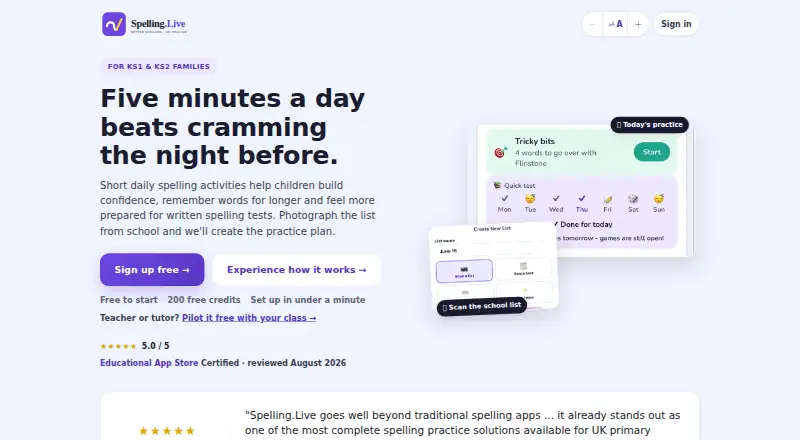
Spelling.Live turns school spelling lists into short daily practice for KS1 and KS2 children. Families can build a list from a photo, pasted text, or entered words, then choose practice through handwriting, typing, speech, answer selection, tracing, or paper activities. A weekly Learning plan schedules activities and can follow weekly, fluid, or classic rhythms. Spaced repetition revisits words a child finds difficult, and practice difficulty adjusts to the child’s stage. AI features provide spelling tips, picture hints, sentence generation, and handwriting marking. Teachers and tutors can set up classes, assign lists, review group reports, scan batches of paper tests, and import pupil rosters from Google Classroom. Per-child options include OpenDyslexic or Lexend fonts, colour overlays, adjustable spacing, and slower speech. The service is available on Android, iOS, and web. It has a free plan with 200 sign-up credits; those expire after 90 days without a practice session. Credit packs are one-time purchases: £4.00 for 400 credits or £20.00 for 5,000 credits, each valid for 12 months.
Who it suits
It suits KS1 and KS2 families practising school spelling, as well as teachers and tutors who manage lists and review group work. Its per-child accessibility settings may suit children who need font, colour, spacing, or speech adjustments.
What it does well
- Create lists from photos, pasted text, or entered words
- Six practice modes, including paper and handwriting
- Spaced repetition revisits weaker words
- Teachers can scan batches of paper tests
- Per-child font, colour, spacing, and speech settings
What to know first
- Free sign-up credits expire after 90 days without practice
- Practice uses credits
- No free trial
Limits
Free sign-up provides 200 credits, which expire after 90 days without a practice session. The 400-credit pack costs 4.00 GBP once and is valid for 12 months; the 5,000-credit pack costs 20.00 GBP once and is also valid for 12 months.
Plans
| Plan | Billed and limits | Price |
|---|---|---|
| Free sign-up credits | 200 credits · expire after 90 days without a practice session | Free |
| 5,000-credit pack | £20 once; valid 12 months · 5,000 credits · about 2,500 practice activities · no subscription | £20, paid once |
| 400-credit pack | £4 once; valid 12 months · 400 credits · about 200 practice activities · no subscription | £4, paid once |
| Family plan | £5.99 a month; renews monthly · Up to 4 children · unlimited practice · 20 new pictures per month | £5.99 a month |
As spelling.live lists them, read 30 Sept 2026. The maker's own page has the final word.
Getting started
- Open https://spelling.live/ or use the Android or iOS app.
- Sign up to receive 200 free credits.
- Create a practice list by photographing a school list, pasting text, or entering words.
- Set up the weekly Learning plan and choose a rhythm.
- Buy a one-time credit pack if you need additional credits.
Overview
Spelling.Live is a spelling-practice service for KS1 and KS2 children, with tools for both family routines and classroom list management. It is a strong fit for households following school spelling lists and teachers who also need to mark paper tests; its credit-based access means the free allocation is not an unlimited practice plan.
Families can turn a photographed school list, pasted text or manually entered words into practice. Children can respond by handwriting, typing, speaking, choosing answers, tracing or working on paper, giving the service more than one way to approach the same spelling work.
Key features
Practice and review
The weekly Learning plan schedules activities and can be edited or set to weekly, fluid or classic rhythms. That flexibility can help families fit practice to their routines, while spaced repetition revisits weaker words and difficulty adjusts to the child's stage. Phonics instruction, dictation and corrective practice add useful structure beyond simple word recall.
AI, accessibility and classrooms
AI features provide personalised spelling tips, picture hints, sentence generation and handwriting marking. Per-child options such as OpenDyslexic or Lexend fonts, colour overlays, adjustable spacing and slower speech let families adapt presentation and pace.
For teachers and tutors, classes, assigned lists, group reports and batch scanning of paper tests bring classroom management and marking into the same service. Google Classroom roster imports can reduce the need to enter pupils individually.
The maker says the service is built for UK GDPR and the Children's Code; handwriting photos and voice recordings are processed and then discarded. It also says account and practice data are stored in Ireland, hosting is set to Frankfurt, and inputs sent to AI providers are not used to train their models. Data processing agreements are maintained with those providers.
Pricing
Spelling.Live is freemium, with no free trial and no subscription or automatic renewal for its website credit packs. Practice consumes credits, so the free allocation is best treated as a way to try a limited amount of practice rather than a permanent unlimited option.
| Plan | Price | What it includes | Best suited to |
|---|---|---|---|
| Free sign-up credits | free | 200 credits; expire after 90 days without a practice session | Families wanting to try the workflow or use it occasionally while keeping practice active enough to avoid expiry |
| 400-credit pack | £4, paid once | 400 credits; valid for 12 months; no subscription or renewal | Families needing a modest top-up without a recurring bill |
| 5,000-credit pack | £20, paid once | 5,000 credits; valid for 12 months; no subscription or renewal | More frequent practice or broader use across a household, provided the credits are used within a year |
The smaller pack costs less upfront but supplies fewer credits; the larger pack makes more sense for sustained use if its one-year validity suits the expected pace. No subscription renewal means buyers do not have to cancel a recurring plan, but they must still manage credit consumption and expiry.
Platforms
Spelling.Live is available on Android, iOS and the web. The combination allows families to choose a mobile app or browser access, while the listed platform range does not include desktop-native Windows or macOS apps.
Who it's for
It is aimed at KS1 and KS2 families who want to turn school lists into regular, varied practice, especially when accessibility settings or adaptive review are useful. Teachers and tutors may value class assignments, group reports, Google Classroom roster import and paper-test marking. It is less suitable for users seeking unlimited free practice or a subscription with a predictable flat fee.
Pros and cons
- Multiple practice modes: handwriting, speech, typing, tracing, answer selection and paper work offer varied ways to practise the same lists.
- Useful learning structure: editable scheduling, spaced repetition and stage-adjusted difficulty support continued review rather than one-off testing.
- Classroom reach: roster import, group reports and batch paper-test scanning extend it beyond a family-only spelling app.
- Tailoring and privacy measures: child-specific display and speech settings address different needs, while the maker says photos and recordings are discarded after processing.
- Credit-based limits: practice draws from a finite allocation, and free credits expire after 90 days without a session.
- Pack validity: one-time purchases avoid automatic renewal, but paid credits remain valid for only 12 months.
Alternatives
For a wider comparison, browse Spelling Apps.
- SpellMe is a better fit for someone who wants a free plan with five lists, up to ten words per list and 300+ curated phonics lists, or wants its broader platform coverage including Linux, macOS and Windows.
- Spelling Shed may suit classroom users who want a free tier with tests, Hive games, challenges, custom leagues and clever rostering, though its free history is limited to seven days.
- PenPoints is an option for users seeking a free Android or iOS app with teacher homework, SpellStation credits and live class assessments on its free plan.
- Spelling Boost is a free Android alternative centered on audio dictation tests, custom lists, handwriting input and progress tracking.
- Spell Up is another freemium spelling option for Android, iOS and web.
- Better Speller may appeal to Apple-device users who want a free trial covering up to 35 words and all features, with a one-time iCloud sync and sharing option.
- Wordshark is a paid alternative with a free trial and support for Android, iOS, macOS, web and Windows.
- MySpellings is an Android freemium alternative with a one-off premium unlock.
Verdict
Spelling.Live is a good choice for KS1 and KS2 families who want flexible, adaptive practice tied to school lists, and for teachers who need list, roster and marking tools alongside it. Its varied practice modes and classroom features make it more versatile than a basic spelling drill. Choose another service if you need unlimited free use or prefer a flat recurring plan: Spelling.Live’s credits constrain practice, and the paid packs expire after 12 months.
Verdict
Spelling.Live combines family spelling practice with classroom list and marking tools. The free allocation is limited by credits and an inactivity expiry; larger one-time packs are available.
Questions
Does Spelling.Live have a free option?
Yes. Free sign-up provides 200 credits. They expire after 90 days without a practice session.
How much do the credit packs cost?
The 400-credit pack costs 4.00 GBP once, and the 5,000-credit pack costs 20.00 GBP once. Both are valid for 12 months and have no subscription or renewal.
Which platforms are available?
Spelling.Live is available on Android, iOS, and web.
Can teachers use Spelling.Live?
Yes. Teachers and tutors can create classes, assign lists, review group reports, scan batches of paper tests, and import pupil rosters from Google Classroom.
What does the maker say about children's data?
The maker says account and children's practice data are stored in the EU (Ireland), with hosting set to the EU (Frankfurt). Handwriting photos and voice recordings are processed then discarded, and inputs sent to AI providers are not used to train their models.
Does Spelling.Live offer a free trial?
No. The listed free option is a 200-credit sign-up allocation.
Facts from Spelling.Live's own pages
- Accessibility
- Per-child settings include OpenDyslexic or Lexend fonts, colour overlays, adjustable spacing, and slower speech. · spelling.live, 30 Sept 2026
- Accessibility settings
- Per-child settings include OpenDyslexic or Lexend fonts, colour overlays, adjustable spacing, slower speech and gentler handwriting feedback. · spelling.live, 15 Oct 2026
- Adaptive practice
- Spaced repetition brings weaker words back automatically, and difficulty adjusts to the child's stage. · spelling.live, 30 Sept 2026
- AI coach
- The AI Spelling Coach creates pronunciation, mnemonic, word-structure and mistake-specific advice from recorded errors. · spelling.live, 15 Oct 2026
- AI data use
- The privacy policy says user inputs sent to AI providers are not used to train their models. · spelling.live, 15 Oct 2026
- AI features
- AI features include personalised spelling tips, picture hints, sentence generation, and handwriting marking. · spelling.live, 30 Sept 2026
- API and automation
- Users can generate an API key and add words through Siri Shortcuts, Google Assistant or other automation tools. · spelling.live, 15 Oct 2026
- Apple reviewer praise
- Reviewers praise quick school-list entry, useful handwriting progress feedback, and enjoyable games. · apps.apple.com, 15 Oct 2026
- Classroom tools
- Teachers and tutors can create classes, assign spelling lists, review group reports, and scan batches of paper tests for marking. · spelling.live, 30 Sept 2026
- Company founder
- The service was built by Manoj Shah, who describes himself as an enterprise solution architect with EY and Defra experience. · spelling.live, 15 Oct 2026
- Company location
- The maker says Spelling.Live is made in the UK. · spelling.live, 15 Oct 2026
- Company size and funding
- The opened maker pages identify an individual founder but state no employee count, funding or outside owner. · spelling.live, 15 Oct 2026
- Curriculum alignment
- The service maps practice to the National Curriculum for England from Year 1 through Year 6. · spelling.live, 15 Oct 2026
- Data location
- The service says account and children's practice data are stored in the European Union, with hosting in Frankfurt. · spelling.live, 15 Oct 2026
- Data rights
- Parents can export their data or permanently delete the account and linked child data from the app. · spelling.live, 15 Oct 2026
- Data storage
- The maker says account and children's practice data are stored in the EU (Ireland), while hosting is set to the EU (Frankfurt). · spelling.live, 30 Sept 2026
- Dictation
- The app can dictate words for a paper test and mark the photographed sheet automatically. · spelling.live, 15 Oct 2026
- Google Play availability
- Google Play lists Spelling Live as a free education app by Manoj Amritlal Shah, updated 22 August 2026. · play.google.com, 15 Oct 2026
- Google Play data disclosure
- Google Play says no data is shared with third parties, data is encrypted in transit and deletion can be requested. · play.google.com, 15 Oct 2026
- Handwriting analysis
- Handwriting attempts are checked for spelling and letter formation, including stroke order, joins, spacing and reversals. · spelling.live, 15 Oct 2026
- Headquarters
- United Kingdom · spelling.live, 23 Sept 2026
- Integration
- Teachers can import pupil rosters from Google Classroom. · spelling.live, 30 Sept 2026
- Integrations
- The maker says the service is listed in Google Workspace Marketplace for Google Classroom class import. · spelling.live, 15 Oct 2026
- Learning plan
- A weekly Learning plan schedules activities and can be edited or set to weekly, fluid, or classic rhythms. · spelling.live, 30 Sept 2026
Where Spelling.Live stands on Freedom251
- Spelling Apps#2 of 25