SpellingJoy
What SpellingJoy is
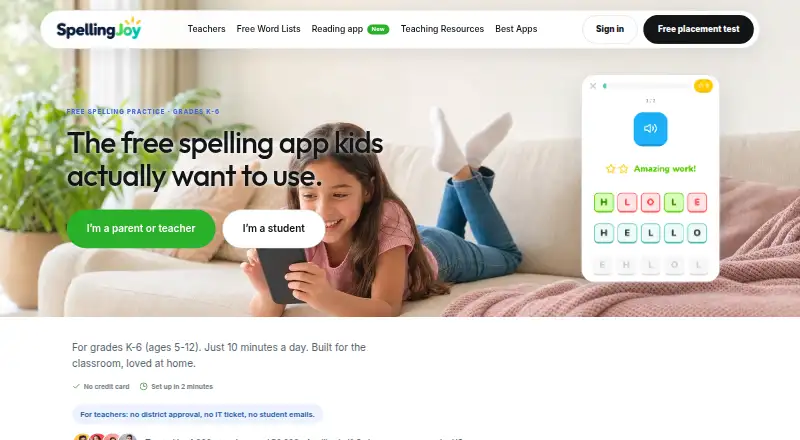
SpellingJoy is a spelling practice service for children in grades K–6, presented for teachers, parents, and homeschoolers. On the web and in its Android and iOS student apps, children can practice with spelling games and tests, hear text-to-speech pronunciations, and receive instant feedback and scores. The free service includes progress tracking, analytics, avatars, rewards, and multiple child profiles. Learners can use more than 134 curriculum-aligned word lists, including Common Core, Dolch, Fry, phonics, and seasonal lists, or use lists they create or paste themselves. Teachers and families can also use 11 kinds of printable worksheets, including bingo, flashcards, crosswords, word searches, and traceable writing pages. A free six-minute adaptive placement test suggests a starting week and can be taken without signing up. Student apps use an existing class code and sync assignments and progress with the web teacher dashboard; they are free for students and have no ads or in-app upsells. Teachers can install the Clever app to import sections and students. SpellingJoy is provided by Veloris, LLC, which identifies Yuval and Amiel as co-founders.
Who it suits
SpellingJoy suits teachers, parents, and homeschoolers looking for spelling practice for children in grades K–6. Its word lists, printable worksheets, child profiles, and teacher dashboard support both individual practice and classroom use.
What it does well
- Free plan includes unlimited spelling games and tests.
- More than 134 curriculum-aligned word lists are available.
- Users can create or paste their own word lists.
- A placement test is free and requires no signup.
- Student apps sync assignments and progress with the teacher dashboard.
What to know first
- The free plan does not include printable packs or premium packs.
- Google Classroom and Canvas roster and grade sync are unavailable.
- School cohorts under ten students are merged in reporting.
Limits
The free plan includes games, tests, 134+ word lists, custom lists, and progress tracking; printable packs and teaching resources are listed with SpellingJoy+ at $2.99 per month. School cohorts with fewer than ten students are merged in reporting, and school administrators do not see teacher-level activity or class rankings.
Plans
| Plan | Billed and limits | Price |
|---|---|---|
| Free SpellingJoy | Free forever; no subscription · Unlimited spelling games · unlimited tests · 134+ word lists · custom lists · progress tracking | Free |
| SpellingJoy+ | $2.99/month; cancel any time · Printable packs · teaching resources · premium packs | $2.99 a month |
| SpellingJoy for Schools | $990 per school per year for founding schools joining by 31 October; from 1 November it is $1,995; licence runs to 30 June · Every teacher and student in one school · shared word-list library · printable packs · school admin view · monthly report by grade · no automatic renewal | $990 a year |
As spellingjoy.com lists them, read 8 Oct 2026. The maker's own page has the final word.
Getting started
- Open https://spellingjoy.com/ in a web browser.
- Take the free six-minute placement test without signing up, if a starting week is needed.
- Choose the Free SpellingJoy plan or SpellingJoy+ at $2.99 per month.
- Create or paste a word list, or select from the available curriculum-aligned lists.
- For student app access, use the existing class code in the iPhone, iPad, or Android app.
- Teachers can install the Clever app to import sections and students.
Overview
SpellingJoy is a spelling-practice service for children in grades K–6, aimed at families, teachers, and homeschoolers. Its strongest case is free, flexible practice across curriculum-aligned and custom lists; schools that rely on Google Classroom or Canvas sync will need another fit.
Key features
Students can practise with games and tests, hear words pronounced through text-to-speech, and get immediate feedback and scores. Avatars and rewards add motivation, while progress tracking, analytics, and multiple child profiles give adults a way to follow practice across learners. Phonics instruction and dictation practice broaden it beyond straightforward word memorisation.
The library has more than 134 lists, including Common Core, Dolch, Fry, phonics, and seasonal selections. Users can also create or paste their own lists, a useful option when a class or child is working from a specific spelling sequence. Eleven worksheet types, including bingo, flashcards, crosswords, word searches, and traceable writing pages, offer offline practice, but printable packs are part of the paid SpellingJoy+ plan.
A free six-minute adaptive placement test identifies a suggested starting week and does not require signup. It is a practical way for a family to find a starting level before committing to regular use.
Student apps for iPhone, iPad, and Android use the existing class code and sync assignments and progress with the web teacher dashboard. They are free for students and have no ads or in-app upsells. Clever can import teacher sections and students when a teacher installs the app; Google Classroom and Canvas roster and grade sync are unavailable. That gap matters most to schools that depend on those systems to manage classes or pass grades back.
SpellingJoy says student accounts need only a first name, with last initial optional, and no student email address or password. Its security plan describes TLS 1.2+ encryption in transit, AES-256 encryption at rest, and database access through Supabase Row Level Security. The schools page says the service has signed the SDPC National Data Privacy Agreement and is COPPA and FERPA compliant. Email inquiries typically receive a response within 1–2 business days.
Pricing
Free SpellingJoy costs nothing, billed Free forever with no subscription. It includes unlimited spelling games and tests, 134+ word lists, custom lists, and progress tracking. This is the sensible starting point for families and teachers who need digital practice without printable packs or school-level tools.
SpellingJoy+ costs $2.99 a month, billed $2.99/month, and can be cancelled any time. It adds printable packs, teaching resources, and premium packs. It suits a family or educator who wants those materials but does not need a school licence; the free plan retains the core games, tests, lists, and tracking.
SpellingJoy for Schools is $990 a year, billed $990 per school per year for founding schools joining by 31 October; from 1 November it is $1,995. The licence runs to 30 June. It covers every teacher and student in one school and includes a shared word-list library, printable packs, a school admin view, and a monthly report by grade. Small cohorts of fewer than ten students are merged in reporting, and administrators cannot see teacher-level activity or class rankings, so schools seeking that granularity should look elsewhere.
Platforms
SpellingJoy is available on the web, Android, and iOS. The student apps connect to the web teacher dashboard through a class code, supporting assignment and progress sync across devices.
Who it's for
SpellingJoy suits K–6 families, homeschoolers, and teachers who want a broad bank of curriculum-aligned lists, custom practice, and progress visibility without paying for basic digital activities. SpellingJoy+ is for users who also want printable and teaching materials. The school plan is aimed at whole-school access, but its reporting limits and lack of Google Classroom or Canvas sync may rule it out for schools with specific integration or oversight needs.
Pros and cons
- Pro: The free plan includes unlimited games and tests, custom lists, and progress tracking, making it substantial for ongoing digital practice.
- Pro: More than 134 curriculum-aligned lists plus custom lists support both established sequences and teacher- or family-selected spelling words.
- Pro: Student apps are free, ad-free, and sync assignments and progress with the teacher dashboard.
- Pro: A no-signup placement test offers a quick starting point, while student accounts do not require email addresses or passwords.
- Con: Printable packs and teaching resources require the $2.99 a month SpellingJoy+ plan.
- Con: Google Classroom and Canvas roster and grade sync are unavailable, limiting convenience for schools organised around those platforms.
- Con: School reporting merges cohorts under ten students and omits teacher-level activity and class rankings, restricting administrator oversight.
Alternatives
Spelling Apps is the broader category directory for readers comparing spelling tools beyond this one service.
Choose SpellMe if you want a spelling option with a free trial and broad platform support, including Linux, macOS, and Windows; its free Basic plan is limited to five lists of ten words each, alongside 300+ curated phonics lists.
Spelling Notebook is an iOS and macOS alternative with a free app download and a 1.99 USD one-time premium upgrade that removes the free version’s word-list limit.
Spelling Shed is another Android, iOS, and web option; its free plan includes tests, Hive games, challenges, custom leagues, and Clever rostering, each with seven days of history.
Spelling.Live may suit users who prefer credit-based practice: its free signup credits total 200 and expire after 90 days without a practice session.
Spelvo offers an Android and web alternative with a free allowance of three lifetime snaps and one child profile, plus a free trial.
PenPoints is a free Android and iOS option for teachers who can work within its no-school-plan allowance of one homework exercise per week, 90 SpellStation credits, and up to five live class assessments.
Spelling Boost is an Android alternative whose free plan includes audio dictation tests, custom spelling lists, handwriting input, and progress tracking.
Word Club is a free Android and iOS choice for quizzes using its 450 School Level Study List words and 4,000 Words of the Champions words.
Verdict
Choose SpellingJoy for free K–6 spelling practice that combines a large, adaptable list library with games, feedback, and progress tracking across web and student apps. It is especially compelling for families and educators who want to start without a subscription. Look elsewhere if printable materials are essential but the monthly add-on does not fit, or if a school needs Google Classroom or Canvas sync or more detailed administrator reporting.
Verdict
Choose SpellingJoy for free spelling practice with curriculum-aligned lists, feedback, progress tracking, and student apps. SpellingJoy+ adds printable packs and teaching resources for $2.99 per month; schools considering roster or grade sync should note that Google Classroom and Canvas sync are unavailable.
Questions
Is SpellingJoy free?
Yes. Free SpellingJoy costs nothing and is billed free forever with no subscription. It includes unlimited spelling games and tests, 134+ word lists, custom lists, and progress tracking.
What does SpellingJoy+ cost?
SpellingJoy+ costs $2.99 per month and can be canceled at any time. It includes printable packs, teaching resources, and premium packs.
Which devices can students use?
SpellingJoy is available on the web, Android, and iOS. Its student apps for iPhone, iPad, and Android use an existing class code and sync assignments and progress with the web teacher dashboard.
Can SpellingJoy import classroom rosters?
Teachers can install the Clever app to import teacher sections and students. Google Classroom and Canvas roster and grade sync are unavailable.
Who provides SpellingJoy?
The provider is Veloris, LLC, doing business as SpellingJoy. The site names Yuval and Amiel as co-founders.
What is the school plan price?
The listed founding-school price is $990 per school per year for schools joining by 31 October; from 1 November it is $1,995. The licence runs to 30 June.
Facts from SpellingJoy's own pages
- Compliance
- The schools page states that SpellingJoy has signed the SDPC National Data Privacy Agreement and is COPPA and FERPA compliant. · spellingjoy.com, 8 Oct 2026
- Maker
- The site identifies the provider as Veloris, LLC, doing business as SpellingJoy, and names Yuval and Amiel as co-founders. · spellingjoy.com, 8 Oct 2026
- Mobile apps
- Student apps for iPhone, iPad, and Android use the existing class code, sync assignments and progress with the web teacher dashboard, and are free for students without ads or in-app upsells. · spellingjoy.com, 8 Oct 2026
- Placement test
- A free six-minute adaptive placement test identifies a starting week and requires no signup. · spellingjoy.com, 8 Oct 2026
- Practice tools
- The free service includes spelling games and tests, text-to-speech pronunciation, instant feedback and scoring, avatars and rewards, progress tracking, analytics, and multiple child profiles. · spellingjoy.com, 8 Oct 2026
- Purpose
- SpellingJoy provides spelling practice for children in grades K–6 and is presented for teachers, parents, and homeschoolers. · spellingjoy.com, 8 Oct 2026
- School integrations
- Clever is available as a teacher-installed app and imports teacher sections and students; Google Classroom and Canvas roster and grade sync are not available today. · spellingjoy.com, 8 Oct 2026
- School plan limits
- School cohorts with fewer than ten students are merged in reporting, and school administrators do not see teacher-level activity or class rankings. · spellingjoy.com, 8 Oct 2026
- Security
- The security plan states that data is encrypted in transit with TLS 1.2+ and at rest with AES-256, and that database access uses Supabase Row Level Security. · spellingjoy.com, 8 Oct 2026
- Student privacy
- Student accounts require a first name and optional last initial; the site says students do not need email addresses or passwords. · spellingjoy.com, 8 Oct 2026
- Support
- The contact page says SpellingJoy typically responds to email inquiries within 1–2 business days. · spellingjoy.com, 8 Oct 2026
- Word lists
- It offers 134+ curriculum-aligned lists, including Common Core, Dolch, Fry, phonics, and seasonal lists, and users can create or paste their own lists. · spellingjoy.com, 8 Oct 2026
- Worksheets
- The site describes 11 printable worksheet types, including bingo, flashcards, crosswords, word searches, and traceable writing pages. · spellingjoy.com, 8 Oct 2026
Where SpellingJoy stands on Freedom251
- Spelling Apps#4 of 25