Spectacle
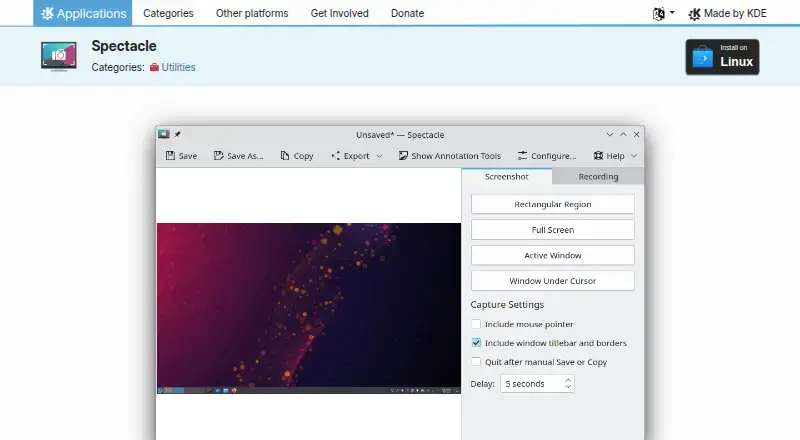
What Spectacle is
Spectacle is a free, open-source Linux application from KDE for capturing desktop screenshots. It can capture the entire desktop, a single monitor, the active window, the window under the mouse, or a rectangular region. Keyboard shortcuts are available for taking screenshots. After capture, images can be saved as-is, printed, or sent to other applications for manipulation. Screenshots can also be annotated before saving, printing, or sending them to another application. The listed export format is PNG. Spectacle is available under the GPL-2.0+ license, and its plan costs nothing. Linux users can install it through Discover, other AppStream application stores, or their distribution’s package manager. The KDE Applications page lists KIPI Plugins as an extension; those plugins add export features to Spectacle and Gwenview, with destinations such as Mediawiki, Facebook, or a local album. The Spectacle page links to its handbook and KDE community forum for help. KDE’s software privacy policy says KDE software generally does not transfer information from a user’s device except after an explicit user action. Third-party distributors may modify software, so KDE recommends checking with the distributor about its privacy behavior.
Who it suits
Spectacle suits Linux users who need to capture screenshots of a desktop, monitor, window, or selected screen region. It is also useful for people who want to annotate captures or pass them to another application, print them, or save them as PNG.
What it does well
- Captures full desktops, monitors, windows, and rectangular regions.
- Provides keyboard shortcuts for taking screenshots.
- Supports screenshot annotation.
- Can print captures or send them to other applications.
- Offers PNG as an export format.
What to know first
- Available for Linux only.
- The listed export format is PNG.
Limits
Spectacle is a Linux application, and PNG is the listed export format.
Plans
| Plan | Billed and limits | Price |
|---|---|---|
| Spectacle | Linux application · GPL-2.0+ | Free |
As apps.kde.org lists them, read 4 Oct 2026. The maker's own page has the final word.
Getting started
- Visit the Spectacle page on KDE’s website.
- Install it through Discover, another AppStream application store, or your Linux distribution’s package manager.
- Use a keyboard shortcut or choose a capture target: desktop, monitor, window, window under the mouse, or rectangular region.
- Annotate the screenshot if needed, then save it, print it, or send it to another application.
- Consult the handbook or KDE community forum for help.
Verdict
Choose Spectacle if you use Linux and need flexible desktop screenshot capture with annotation and straightforward output options. Its free GPL-2.0+ license and multiple installation routes suit Linux users. Look elsewhere if you need an application for another platform or an export format beyond PNG.
Questions
How much does Spectacle cost?
Its plan costs nothing.
Which platform does Spectacle support?
Spectacle is available for Linux.
Is Spectacle open source?
Yes. It is listed under the GPL-2.0+ license.
What can Spectacle capture?
It can capture the entire desktop, a single monitor, the active window, the window under the mouse, or a rectangular region.
Can I annotate screenshots?
Yes. Screenshots can be annotated before saving, printing, or sending them to other applications.
How can I install Spectacle?
Linux users can install it through Discover, other AppStream application stores, or their distribution’s package manager.
Facts from Spectacle's own pages
- Capture targets
- It can capture the entire desktop, a single monitor, the active window, the window under the mouse, or a rectangular screen region. · apps.kde.org, 4 Oct 2026
- Distribution
- The KDE Applications page offers installation on Linux through Discover and other AppStream application stores, and says users can also use their distribution’s package manager. · apps.kde.org, 4 Oct 2026
- Distributor caveat
- KDE’s privacy policy says third-party distributors may modify software so it no longer respects the policy, and recommends checking with the distributor. · kde.org, 4 Oct 2026
- Editing
- The handbook says screenshots can be annotated before printing, sending to other applications, or saving. · docs.kde.org, 4 Oct 2026
- Export plugins
- The page lists KIPI Plugins as an extension, and the plugin page says they add export features to Gwenview and Spectacle. · apps.kde.org, 4 Oct 2026
- Help
- The Spectacle page links to its handbook and KDE community forum for help. · apps.kde.org, 4 Oct 2026
- License
- The page lists Spectacle under the GPL-2.0+ license. · apps.kde.org, 4 Oct 2026
- Maintainer organization
- The Spectacle page identifies KDE as its maker, and KDE e.V. says it represents the KDE Community in legal and financial matters. · ev.kde.org, 4 Oct 2026
- Output
- Captured images can be printed, sent to other applications for manipulation, or quickly saved as-is. · apps.kde.org, 4 Oct 2026
- Plugin destinations
- The KIPI Plugins page says plugins export images to services such as Mediawiki or Facebook or to a local album. · apps.kde.org, 4 Oct 2026
- Privacy
- KDE’s software privacy policy says KDE software generally does not transfer information from users’ devices except as a result of an explicit user action. · kde.org, 4 Oct 2026
- Purpose
- Spectacle captures desktop screenshots. · apps.kde.org, 4 Oct 2026
- Shortcuts
- The listed features include keyboard shortcuts for taking screenshots. · apps.kde.org, 4 Oct 2026
Where Spectacle stands on Freedom251
- Screenshot tools#19 of 40
- Screen Capture Software#39 of 61
- Screenshot Software#29 of 39