SOP Rocket
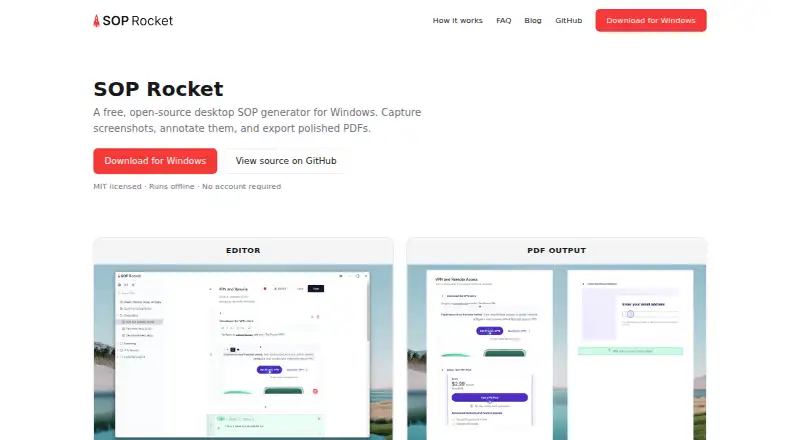
What SOP Rocket is
SOP Rocket is a Windows desktop app for making standard operating procedures from screenshots. Add images to each step by dragging them in, pasting them, or recording them. The editor lets you mark up screenshots with arrows, circles, ellipses, blur areas, and notes. Finished procedures can be exported as PDF, DOCX, HTML, or Markdown; PDF files can include brand colors and a logo.
The app works offline, needs no account or login, and saves SOP files in a folder you select on your computer rather than sending them to cloud storage. SOP Rocket is open source under the MIT license, with a Free plan at no cost and no paid tier. Pre-built installers are available for Windows, and the project also describes building from source. The maker says the Windows installer is not code-signed, so SmartScreen may display a warning. Support requests go to GitHub issues.
Who it suits
SOP Rocket suits small businesses, freelancers, and agencies that need to document processes. It is a fit for users who want local, offline procedure files without an account.
What it does well
- Screenshot capture by drag, paste, or recording
- Exports to PDF, DOCX, HTML, and Markdown
- Works offline without an account
- SOP files stay in a chosen local folder
- Open source under the MIT license
What to know first
- Available for Windows only
- Windows installer is not code-signed
- Support requests go through GitHub issues
Limits
The Free plan costs nothing and has no subscription or paid tier. The app is for Windows desktop; its installer is not code-signed and may prompt a SmartScreen warning.
Plans
| Plan | Billed and limits | Price |
|---|---|---|
| Free | Free; no subscription or paid tier · Windows desktop app · MIT licensed · No account required | Free |
As soprocket.com lists them, read 9 Oct 2026. The maker's own page has the final word.
Getting started
- Visit https://www.soprocket.com/.
- Download a pre-built Windows installer, or follow the project’s instructions to build from source.
- Install and open the desktop app; no account or login is required.
- Create procedure steps by dragging in, pasting, or recording screenshots.
- Annotate screenshots and export the procedure in a supported format.
Verdict
SOP Rocket combines screenshot-based procedure authoring with several export formats and local storage. Its Windows-only availability and unsigned installer are worth noting before downloading.
Questions
How much does SOP Rocket cost?
Its Free plan costs nothing. There is no subscription or paid tier.
Does SOP Rocket require an account or internet connection?
No account or login is required, and the app runs offline.
Which platforms does SOP Rocket support?
It is a Windows desktop app, with pre-built Windows installers available.
What file formats can I export?
Procedures can be exported to PDF, DOCX, HTML, or Markdown. PDF exports can include brand colors and a logo.
Is SOP Rocket open source?
Yes. It is open source under the MIT license.
Where are procedure files stored?
They are saved in a folder you choose on your computer, rather than uploaded to the cloud.
Facts from SOP Rocket's own pages
- Annotations
- Screenshots can be marked up with arrows, circles, ellipses, blur regions, and notes. · soprocket.com, 9 Oct 2026
- Download
- Pre-built installers are available for Windows, and the repository describes building the app from source. · github.com, 9 Oct 2026
- Exports
- SOPs can be exported to PDF, DOCX, HTML, or Markdown, with brand colors and a logo available in PDF exports. · soprocket.com, 9 Oct 2026
- Installer notice
- The maker says the Windows installer is not code-signed, so Windows SmartScreen may show a warning. · github.com, 9 Oct 2026
- Integrations
- The maker pages reviewed describe local file storage and exports but do not state any third-party product integrations. · soprocket.com, 9 Oct 2026
- Intended users
- The maker describes it as built for small businesses, freelancers, and agencies documenting processes without enterprise SOP platform costs. · soprocket.com, 9 Oct 2026
- License
- SOP Rocket is open source under the MIT license. · soprocket.com, 9 Oct 2026
- Local storage
- SOP files are stored in a folder the user chooses on their computer, and the app does not upload them to the cloud. · soprocket.com, 9 Oct 2026
- Offline and account use
- The app runs offline and requires no account or login. · soprocket.com, 9 Oct 2026
- Privacy
- The desktop app does not collect, transmit, or store SOP data on a server and has no built-in telemetry. · soprocket.com, 9 Oct 2026
- Purpose
- SOP Rocket is a desktop app for creating standard operating procedures with screenshots and annotations. · soprocket.com, 9 Oct 2026
- Support
- The maker directs support requests to GitHub issues. · soprocket.com, 9 Oct 2026
- Website analytics
- The website uses PostHog for anonymous usage events and browser metadata; the privacy policy says this analytics does not affect downloading or using the app. · soprocket.com, 9 Oct 2026
- Workflow capture
- Users can drag in, paste, or record screenshots for each step. · soprocket.com, 9 Oct 2026
Where SOP Rocket stands on Freedom251
- SOP Software#10 of 30