Freedom251 › Digital Scrapbooking Software
Smilebox
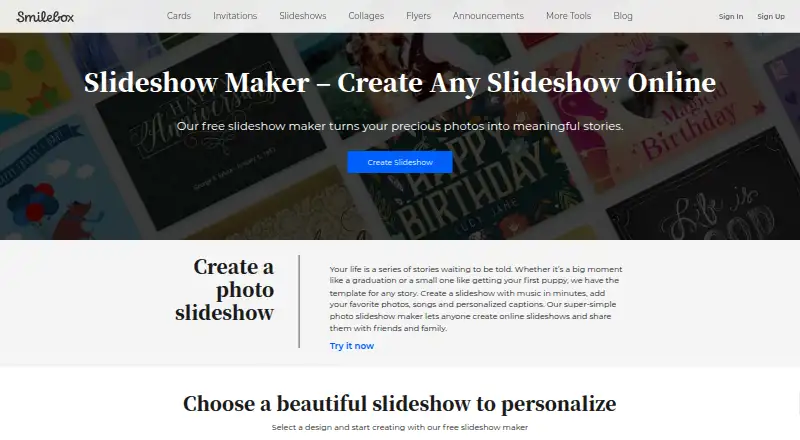
What Smilebox is
Smilebox is an online photo slideshow maker for occasions such as holidays, graduations and family events. Users can choose from dozens of template styles and layouts, then add photos, songs, captions, text, animations, fonts and color schemes. Photos can be uploaded from a computer or phone, Facebook or Instagram. Finished slideshows can be shared by email or social media, saved to a computer, or downloaded as MP4 files. Smilebox advertises unlimited storage for photos and slideshows. Its product selection also includes eCards, collages, invitations and announcements, and the company describes branded slideshow creation for business use. The service is available on Android, iOS and the web. Its pricing model is freemium, with a free plan and a 7-day trial; the listed Free plan costs nothing, with no plan limits stated on the maker page. Smilebox says it offers service-related technical support through a helpdesk or online portal.
Who it suits
It suits people making and sharing photo slideshows for family events and other occasions. Businesses may also consider it for branded slideshows, while users can access it on Android, iOS or the web.
What it does well
- Templates include dozens of styles and layouts.
- Personalization includes photos, audio, text and animations.
- Finished slideshows can be downloaded as MP4 files.
- Photos can be uploaded from Facebook and Instagram.
- Maker advertises unlimited storage for photos and slideshows.
What to know first
- The listed trial lasts 7 days.
- The maker page states no Free plan limits.
- Children under 16 are not the intended audience.
- Creative content is deleted when an account is deleted, subject to policy qualifications.
Limits
The trial lasts 7 days. The Free plan is listed as free; no plan limits are stated in the provided plan details.
Plans
| Plan | Billed and limits | Price |
|---|---|---|
| Free | Free slideshow creation is described; no price or plan limits stated on the opened maker page | Free |
As smilebox.com lists them, read 30 Sept 2026. The maker's own page has the final word.
Getting started
- Visit the Smilebox slideshow maker website.
- Use the free plan or start the 7-day trial.
- Open Smilebox on Android, iOS, or the web.
- Choose a slideshow template and add photos from a computer, phone, Facebook, or Instagram.
- Customize the slideshow and share it, save it, or download it as an MP4.
Smilebox is a template-led slideshow maker for turning personal photos into presentations for holidays, graduations, family gatherings, and similar occasions. It also has a credible business angle for branded slideshows. The main attraction is the combination of guided design, broad personalization, and several ways to share the finished result.
It is a strong fit for people who want a polished result without building every frame themselves. Users seeking highly granular production controls or a clearly tiered commercial plan may be better served elsewhere.
Overview
Smilebox has operated since 2005 and is now part of Perion Network Ltd. Its browser-based maker is supported by Android and iOS access, while the stated supported platform for the maker is web. The service is aimed at sharing life moments with family and friends, and its maker pages also describe branded slideshow creation for businesses.
Key features
Dozens of styles and layouts across template categories provide a ready-made structure for occasion-focused projects. That is useful when speed and a coordinated look matter more than designing a presentation from a blank page. The trade-off is that a template-centered workflow may feel restrictive to users who want complete control over composition.
Photos can come from a computer or phone, Facebook, or Instagram. A template can then be personalized with songs, uploaded audio, captions, text, animations, fonts, and color schemes. This gives family projects room for meaningful narration and visual variation while keeping the process approachable.
Completed slideshows can be emailed, posted to social media, saved to a computer, or downloaded as MP4 files. Those options cover immediate sharing and retaining a file for playback elsewhere. Smilebox also advertises unlimited storage for photos and slideshows, a useful proposition for users who expect to maintain a growing collection.
The wider product range includes eCards, collages, invitations, and announcements, so users creating several types of event material may prefer staying within one service. Facebook and Instagram uploads, plus email and social sharing, are the named integrations.
Smilebox says it uses SSL encryption, limits stored data, and restricts personal-data access to personnel and contractors. Creative content is processed to provide the service and deleted when an account is deleted, subject to the privacy policy's qualifications. The service is intended for people aged 16 and over. Technical support is provided through a helpdesk or online portal, including support.smilebox.com.
Pricing
The Free plan costs nothing and supports slideshow creation. Smilebox also offers a 7-day trial, giving prospective users a short period to assess the broader experience before committing. The free option suits occasional family projects and anyone who wants to create without an upfront payment; users planning regular business production should evaluate whether the available plan terms meet their publishing needs.
Platforms
Smilebox supports Android, iOS, and the web. The maker itself is identified as web-supported, while mobile apps extend access for users who keep photos on a phone or tablet.
Who it's for
Choose Smilebox for family memories, milestone celebrations, and other occasion-led slideshows where templates, music, captions, and simple sharing are priorities. It can also suit small businesses producing branded slideshow material. It is less compelling for advanced creators who need a fully bespoke timeline or a detailed multi-seat pricing structure.
Pros and cons
Pros
- Dozens of templates and layouts reduce the work required to create a coherent slideshow.
- Uploads from devices, Facebook, and Instagram make existing photo libraries easy to use.
- Songs, audio uploads, captions, animation, typography, and color controls support meaningful personalization.
- Email, social, computer saving, and MP4 export cover both sharing and offline retention.
- Unlimited advertised storage is useful for maintaining multiple projects.
Cons
- The template-first approach may not satisfy users who want unrestricted visual control.
- The product is centered on slideshows and occasion content rather than a broader professional video-production workflow.
- Business users should assess whether the available plan arrangement fits ongoing branded output.
Alternatives
For invitation-focused work, see Invitation Maker Software. For a wider comparison of slideshow tools, browse Photo Slideshow Makers. Users creating printed event material can compare Print Design Template Libraries.
Evite is the better choice when the priority is sending and managing invitations, with Android, iOS, and web support and freemium plans. Paperless Post suits event hosts who want invitation delivery with a free option for the first 50 invitations and paid per-guest cards. Apple Invites is aimed at iOS and web users already invested in iCloud, rather than slideshow creation. InvitiApp, Partiful, AInviter, InviteDrop, and Invity Cards are alternatives for invitation-led event planning.
Verdict
Smilebox is a sensible recommendation for individuals and families who want template-guided slideshows with music, captions, flexible photo sources, and straightforward sharing. Its strongest reason to choose it is the balance between personalization and convenience, reinforced by free creation and a 7-day trial. Look elsewhere if your work demands a deeply customized production workflow or invitation-management features rather than slideshow making.
Verdict
Smilebox brings slideshow templates, personalization and sharing options together, with a free plan and a 7-day trial. It also lists related creative products and describes branded slideshow creation for business use.
Questions
Does Smilebox have a free plan?
Yes. Its listed Free plan costs nothing.
How long is the trial?
Smilebox lists a 7-day trial.
Which platforms can I use Smilebox on?
Smilebox lists Android, iOS, and web.
Where can I get photos for a slideshow?
The maker page says photos can be uploaded from a computer or phone, Facebook, and Instagram.
How can I share or export a slideshow?
You can share by email or social media, save it to a computer, or download it as an MP4 file.
Does Smilebox offer other products?
Its selection also includes eCards, collages, invitations, and announcements.
Facts from Smilebox's own pages
- Age eligibility
- Smilebox says its services are not intended for children under 16 and that it does not knowingly process children's information. · smilebox.com, 30 Sept 2026
- Audience
- Smilebox describes its service as a way to share life's special moments with family and friends, and its maker pages also describe branded slideshows for business use. · smilebox.com, 30 Sept 2026
- Company history
- Smilebox says it was founded in 2005 and later became part of Perion Network Ltd. · smilebox.com, 30 Sept 2026
- Founded
- 2005 · smilebox.com, 28 Sept 2026
- Integrations
- Smilebox names Facebook and Instagram as photo upload sources, and email and social media as sharing options. · smilebox.com, 30 Sept 2026
- Other products
- Smilebox says its product selection also includes eCards, collages, invitations, and announcements. · smilebox.com, 30 Sept 2026
- Personalization
- Users can add photos, songs, captions, text, animations, fonts, and color schemes to slideshow templates. · smilebox.com, 30 Sept 2026
- Photo sources
- The maker page says users can upload photos from a computer or phone, Facebook, and Instagram. · smilebox.com, 30 Sept 2026
- Privacy and data
- Smilebox's privacy policy says creative content is processed to provide the service and deleted when the account is deleted, subject to the policy's stated qualifications. · smilebox.com, 30 Sept 2026
- Purpose
- Smilebox lets users create online photo slideshows for occasions such as holidays, graduations, and family events. · smilebox.com, 30 Sept 2026
- Security
- Smilebox says it uses security measures including SSL encryption, limits stored data, and restricts access to personal data to its personnel and contractors. · smilebox.com, 30 Sept 2026
- Sharing and export
- Users can share slideshows by email or social media, save them to a computer, or download them as MP4 files. · smilebox.com, 30 Sept 2026
- Storage
- The slideshow maker page advertises unlimited storage for photos and slideshows. · smilebox.com, 30 Sept 2026
- Support
- Smilebox says it provides service-related technical support through a helpdesk or online portal, including support.smilebox.com. · smilebox.com, 30 Sept 2026
- Templates
- Smilebox says its slideshow maker includes dozens of styles and layouts across its template categories. · smilebox.com, 30 Sept 2026
Where Smilebox stands on Freedom251
- Digital Scrapbooking Software#6 of 26
- Photo Slideshow Makers#8 of 24
- Invitation Maker Software#12 of 24
- Print Design Template Libraries#17 of 28