Freedom251 › Invitation Maker Software

AInviter
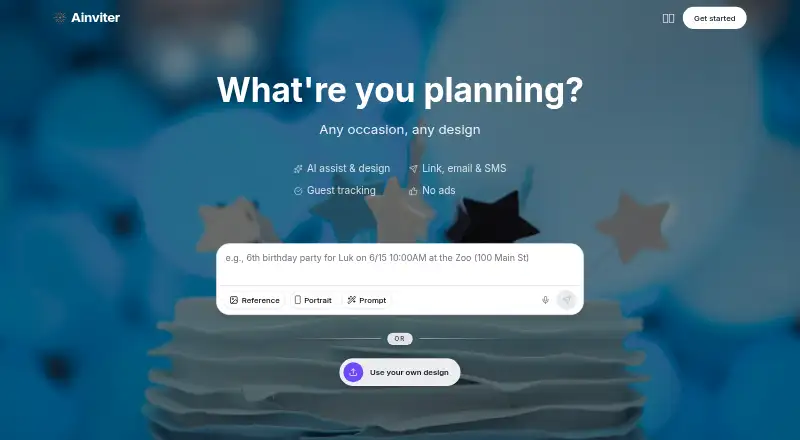
What AInviter is
AInviter is a web-based invitation maker for birthdays, weddings, baby showers, graduations, and other events. Hosts describe the occasion in plain language, and its AI generates invitation designs that can be adjusted with event details and an uploaded photo. Invitations can be shared by link, email, SMS, or QR code; a QR code can connect a printed invitation to an online RSVP page. Guests respond in a browser without downloading an app or creating an account. Hosts can track replies, send reminders to guests who have not responded, export guest lists as CSV, and add custom RSVP questions such as meal choices or dietary restrictions. The Free plan costs nothing and is billed at $0 per event; it includes about four AI-generated designs and up to about 12 RSVPs per event. Pro costs $6.99, paid once, with about 10 designs and up to about 50 RSVPs. Premium costs $12.99, paid once and includes about 20 designs and unlimited RSVPs. AInviter says Google sign-in data supports core service functions, not advertising or AI training. The service is not intended for children under 13.
Who it suits
AInviter suits hosts who want to create and share event invitations online, collect RSVPs, and manage guest responses. It may be useful when guests should be able to respond without an app or account.
What it does well
- AI creates designs from plain-language event descriptions.
- Guests can RSVP in a browser without an account.
- Invitations can be shared by email, SMS, link, or QR code.
- Hosts can send reminders and export guest lists as CSV.
- Custom RSVP questions can cover meals and dietary restrictions.
What to know first
- Free plan allows up to about 12 RSVPs per event.
- Pro allows up to about 50 RSVPs per event.
- Not intended for children under 13.
- Online transmission and storage security cannot be guaranteed absolutely.
Limits
The Free plan includes about four AI-generated designs and up to about 12 RSVPs per event. Pro includes about 10 designs and up to about 50 RSVPs; Premium includes about 20 designs and unlimited RSVPs.
Plans
| Plan | Billed and limits | Price |
|---|---|---|
| Free | per event · AI assistant, rewrite & summary · ~4 AI-generated designs · up to ~12 RSVPs per event · shareable link & QR code · email delivery | Free |
| Premium | per event · Everything in Pro · ~20 AI-generated designs · unlimited RSVPs · remove AInviter watermark · AI video invitations | $12.99, paid once |
| Pro | per event · Everything in Free · ~10 AI-generated designs · up to ~50 RSVPs per event · ad-free invitation page · remove QR-code watermark | $6.99, paid once |
As ainviter.com lists them, read 14 Oct 2026. The maker's own page has the final word.
Getting started
- Visit https://www.ainviter.com/.
- Use the web service to describe your event and generate invitation designs.
- Choose Free, Pro at $6.99 per event, or Premium at $12.99 per event.
- Add event details, upload a photo, and adjust the invitation.
- Share the invitation by link, email, SMS, or QR code.
AInviter is a web-based invitation maker for hosts who want AI-assisted visual design and built-in guest coordination. It is best suited to small celebrations where invitees should respond without installing an app. The deciding issue is how many responses your event needs, since allowances are tied to each event plan.
Overview
Describe a birthday, wedding, baby shower, graduation or another occasion in ordinary language and AInviter produces several invitation concepts. You can add event information, upload a photo, adjust the result and use a custom design upload before sending it. Invitations can go out through a link, email, SMS or QR code; the QR option can connect a printed invitation to the online RSVP page.
Guests RSVP in a browser without an account or app download. The event page and dashboard show responses in real time, support reminders to people who have not replied and export guest lists as CSV. Custom questions cover practical requirements such as meal selections and dietary restrictions, making the service more useful than a static digital card.
Key features
- AI design generation: A plain-language description creates multiple alternatives. Free provides about four designs, Pro about 10 and Premium about 20, so paying mainly buys broader design choice as well as higher RSVP capacity.
- Editing and uploads: Hosts can add event details, upload a photo and modify the invitation before distribution. Support for custom design uploads helps when a generated starting point is not the right visual fit.
- Browser RSVPs: No guest account or installation is required, reducing friction for recipients using different devices.
- Coordination tools: Real-time tracking, non-responder reminders, CSV export and custom questions support the follow-up work behind an event.
- Sharing options: Link, email, SMS, print and QR delivery cover both digital-only and paper-assisted invitations.
- Privacy and security: Google sign-in data is used for core service functions and not for advertising, third-party marketing, data-broker sales or AI-model training. The privacy policy describes encryption in transit and at rest, access controls, monitoring, updates and vulnerability assessments for Google user data. AInviter does not intend the service for children under 13 and does not promise absolute security for online transmission or electronic storage.
Pricing
| Plan | Price and allowance | Best fit |
|---|---|---|
| Free | free, billed $0 per event; about four AI-generated designs, up to about 12 RSVPs per event, shareable link and QR code, and email delivery. | A small gathering testing the workflow, provided roughly 12 replies are enough. |
| Pro | $6.99, paid once, billed $6.99 per event; about 10 designs, up to about 50 RSVPs per event, an ad-free invitation page and removal of the QR-code watermark. | Events near the stated 50-guest scale where presentation and capacity matter. |
| Premium | $12.99, paid once, billed $12.99 per event; about 20 designs, unlimited RSVPs per event, an AI video invitation and removal of the AInviter watermark. | Hosts who want the widest creative selection, video and no branding. |
The service also states a 50-guest limit, so Premium's unlimited RSVP allowance should not automatically be read as unlimited invitees. Free gives up design variety, capacity and branding controls; Pro removes the QR watermark and ads but still caps responses at about 50. All paid amounts are one-time charges per event rather than subscriptions.
Platforms
AInviter runs on the web. Guests can respond through a browser, while delivery supports email, links, SMS and printed invitations via QR code.
Who it's for
AInviter fits hosts organizing small personal events who want a generated design and a single place to manage replies. Free is sensible for a short guest list; Pro is the practical step for events approaching 50 responses; Premium is for hosts who value AI video, more design options and removal of the AInviter watermark. It is less suitable when an event needs substantially more than the stated 50-guest limit or when guests must use a native mobile experience.
Pros and cons
Pros
- Guests can reply without an account or download, which removes a common participation barrier.
- Reminders, custom questions and CSV export turn RSVPs into a workable guest-management process.
- QR links bridge printed invitations and online responses.
- Paid plans are charged per event, avoiding an ongoing subscription commitment.
Cons
- Free's approximately 12-response allowance is restrictive for many celebrations.
- Pro costs $6.99 per event and still limits responses to about 50.
- A stated 50-guest limit constrains larger events even though Premium advertises unlimited RSVPs.
- The Free plan includes fewer designs and retains branding or watermark trade-offs addressed by paid tiers.
Alternatives
For a broader comparison, see Invitation Maker Software and AI Invitation Generators.
- Evite is the better choice if Android and iOS apps matter alongside web access; its listed Silver and Gold packages are single-event products priced at $17.99 for 12 guests and $36.99 for 30 guests.
- Paperless Post suits hosts wanting mobile apps and a pay-per-guest card model; its free feature set covers the first 50 invitations, while Basic is $0.50 per guest.
- Apple Invites is for users already in Apple's ecosystem who prefer iOS and web access rather than a freemium invitation service.
- InvitiApp is an option for Android, iOS and web users; its free tier allows five invitations per account and 10 unique views per invitation, with an InvitiApp watermark.
- Partiful is worth considering when a free core platform and optional paid designs are preferable; ticket purchases carry a fee.
- Smilebox is an alternative for free slideshow creation.
- InviteDrop offers web-only event invitations with five invitations per event, RSVP tracking and email or text delivery on its free plan; Event Pass is $15.99 per event.
- Invity Cards is another web option with a free allowance of two invitations per day and five-hour links.
Verdict
Choose AInviter for small events when AI-generated designs, account-free browser RSVPs and practical follow-up tools belong in one workflow. Its per-event pricing is straightforward, but the Free cap and the stated 50-guest ceiling make it a poor fit for larger gatherings; look elsewhere if you need broader capacity or a dedicated mobile-app experience.
Verdict
AInviter combines invitation design with browser-based RSVPs and guest-list tools. The free plan has a limited RSVP allowance, while paid event plans offer higher limits and additional design features.
Questions
How much does AInviter cost?
The Free plan is $0 per event. Pro costs $6.99 per event, and Premium costs $12.99 per event.
What does the free plan include?
It includes about four AI-generated designs, up to about 12 RSVPs per event, a shareable link and QR code, and email delivery.
Which platforms does AInviter support?
AInviter is available on the web. Guests can RSVP in a browser without downloading an app.
Can guests RSVP without an account?
Yes. Guests can use a browser link without creating an account or downloading an app.
Can hosts collect meal preferences?
Yes. Hosts can add custom RSVP questions, including questions about meal choices and dietary restrictions.
What does AInviter say about Google sign-in data?
Its privacy policy says the data supports core service functions and is not used for advertising, third-party marketing, data-broker sales, or AI-model training.
Facts from AInviter's own pages
- AI design
- The service generates unique invitation designs from an event description instead of requiring template browsing. · ainviter.com, 14 Oct 2026
- AI editing
- Users can ask the AI to change invitation wording, colors, styles, photos, and other details. · ainviter.com, 14 Oct 2026
- Co-hosts
- Events can display co-host profiles with photos, biographies, and contact details. · ainviter.com, 14 Oct 2026
- Customization
- Hosts can add event details, upload a photo, and adjust the invitation before sharing it. · ainviter.com, 2 Oct 2026
- Custom RSVP questions
- Hosts can add questions covering meal choices, dietary restrictions, plus-ones, or other information. · ainviter.com, 14 Oct 2026
- Data retention
- The policy says Google user data is deleted within 30 days after account deletion, with backups deleted within 60 days. · ainviter.com, 14 Oct 2026
- Edits after sending
- Hosts can change event details, text, photos, or reminders after sharing, and the same link shows the latest version. · ainviter.com, 14 Oct 2026
- Google data
- The privacy policy says Google sign-in data is used for core service functions and is not used for advertising, third-party marketing, data-broker sales, or AI-model training. · ainviter.com, 2 Oct 2026
- Google data use
- Google sign-in data is described as being used for account access, notifications, personalization, and support, not advertising or AI-model training. · ainviter.com, 14 Oct 2026
- Guest access
- Guests RSVP in a browser without installing an app or creating an account. · ainviter.com, 14 Oct 2026
- Guest account requirement
- A first invitation can be created without signing up, while an account saves invitations and event history. · ainviter.com, 14 Oct 2026
- Guest export
- The event dashboard can export guest and RSVP data as CSV. · ainviter.com, 14 Oct 2026
- Guest Wall
- Guests can post messages, photos, videos, and GIFs and react with emoji on the event page. · ainviter.com, 14 Oct 2026
- Independent listing: category
- Product Hunt tags Ainviter under Design Tools, Events, and SaaS. · producthunt.com, 14 Oct 2026
- Independent listing: community score
- The Product Hunt listing displayed two upvotes/points. · producthunt.com, 14 Oct 2026
- Independent listing: followers
- The Product Hunt listing displayed four followers. · producthunt.com, 14 Oct 2026
- Independent listing: launch
- Product Hunt lists Ainviter as launched in 2026 and says the page was launched 10 days before its crawl. · producthunt.com, 14 Oct 2026
- Independent listing: maker statement
- The Product Hunt maker post identifies Li Sun as the builder and says the product was created to avoid template browsing by generating invitations from descriptions. · producthunt.com, 14 Oct 2026
- Independent listing: pricing signal
- Product Hunt displayed Ainviter as free and showed a 30% OFF launch promotion. · producthunt.com, 14 Oct 2026
- Independent listing: product description
- Product Hunt describes Ainviter as an AI invitation and RSVP platform with link, email, SMS, QR-code sharing, guest tracking, and reminders. · producthunt.com, 14 Oct 2026
- Independent listing: reviews
- Product Hunt displayed no written reviews for Ainviter at the time of capture. · producthunt.com, 14 Oct 2026
- Language support
- The maker says invitations can be created in languages including Spanish, French, Portuguese, German, Italian, and Dutch. · ainviter.com, 14 Oct 2026
- Licence
- The terms say Ainviter and its licensors retain exclusive ownership of the service, original content, features, and functionality, indicating proprietary software. · ainviter.com, 14 Oct 2026
- Limit: age
- The service is not intended for children younger than 13. · ainviter.com, 14 Oct 2026
Where AInviter stands on Freedom251
- Invitation Maker Software#3 of 24
- AI Invitation Generators#6 of 26