Freedom251 › Invitation Maker Software
InvitiApp
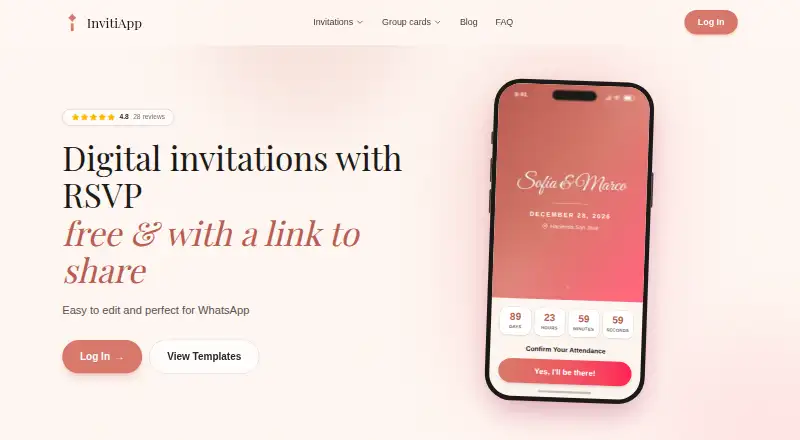
What InvitiApp is
InvitiApp creates digital invitations as interactive web pages guests can open in a browser to view event details and RSVP. Templates cover weddings, birthdays, baby showers, graduations, anniversaries, first communions, Christmas parties, dinners and other occasions. Hosts can customize invitations with photos, text, fonts, music, background video and interactive maps without design skills, then share a link through WhatsApp, email or social networks. Guest tools include custom RSVP questions and CSV or Excel list import and export. Each guest receives a unique QR code for phone-based check-in, and hosts can view live arrival statistics. Guests can save invitations and their QR codes to Apple Wallet or Google Wallet. Hosts can include store-linked or cash gifts, while InvitiApp says it does not handle the money. Guests can suggest songs without an account; hosts can moderate and copy suggestions for a DJ. InvitiApp is available on Android, iOS and the web. Its free plan allows five invitations per account and ten unique guest views per invitation; paid invitations start at $19.99, paid once.
Who it suits
InvitiApp suits people organizing events, including parents planning birthdays and couples preparing wedding invitations. It is designed for hosts who want to create invitations without design or technical skills.
What it does well
- Templates cover a range of event types.
- Custom RSVP questions and guest-list import and export.
- QR check-in includes live arrival statistics.
- Guests can save passes to Apple or Google Wallet.
- Song suggestions do not require a guest account.
What to know first
- Free plan is limited to five invitations per account.
- Free invitations allow ten unique guest views each.
- Custom design upload is not available.
Limits
The Free plan costs nothing and permits up to five invitations per account, ten unique guest views per invitation, and includes an InvitiApp watermark. After an invitation reaches its view limit, it is blocked until unlocked with a one-time payment.
Plans
| Plan | Billed and limits | Price |
|---|---|---|
| Free | Up to 5 invitations per account · 10 unique views per invitation · InvitiApp watermark | Free |
| Premium | Paiement unique, sans abonnement · Unlimited views · No watermark · WhatsApp notification when available · AI support and founder team · Activated per invitation | $19.99, paid once |
| Premium Plus | Paiement unique, sans abonnement · Premium features · Remove InvitiApp branding or use your own brand · Activated per invitation | $29.99, paid once |
| Max | Paiement unique. Même prix dans tous les pays. · Premium Plus features · Custom domain included for one year · Activated per invitation | $99, paid once |
As invitiapp.com lists them, read 5 Oct 2026. The maker's own page has the final word.
Getting started
- Open https://invitiapp.com/.
- Choose the web, Android or iOS platform.
- Create an invitation using an event template and customize its content.
- Share the invitation link through WhatsApp, email or social networks.
- Choose a plan for the invitation: Free, Premium, Premium Plus or Max.
InvitiApp is a digital invitation and event-management service for hosts who want to handle guest replies and arrivals alongside invitation design. It is best suited to organized events with a defined guest list; the free plan’s ten-view limit makes it a risky choice for invitations likely to spread widely.
Its strongest case is the combination of RSVP management, QR check-in and useful event extras, with paid upgrades charged once per invitation rather than by subscription.
Overview
Hosts create interactive web invitations for occasions including weddings, birthdays, baby showers, graduations, anniversaries and dinners. Guests open a shared link in a browser to RSVP, while hosts can monitor confirmations in real time. Guest-list tools and event-day check-in make InvitiApp more useful than a digital card alone, though the per-invitation pricing means costs can grow when several events need upgraded features.
The free tier is constrained in a way that matters for sharing: each account can create up to five invitations, but each invitation allows only ten unique guest views. Once that threshold is reached, the invitation is blocked until unlocked with a one-time payment. Hosts expecting a larger audience should budget for an upgrade rather than rely on the free plan.
Key features
Invitation design and sharing
Templates span a broad range of celebrations, and hosts can customize pages with photos, text, fonts, music, background video and interactive maps without design skills. Shareable links can be sent through WhatsApp, email and social networks. This built-in toolkit suits people who want a personalized page without design software, but custom design upload is not supported, which limits hosts who already have a finished invitation file.
RSVPs and guest management
Hosts can add custom questions to RSVP forms and import or export guest lists in CSV or Excel formats. That flexibility helps with collecting event-specific details and moving guest data between tools. Confirmations appear in real time, so hosts can keep track as responses arrive.
Check-in and guest extras
Each guest receives a unique QR code that hosts can scan with a phone to record arrivals and see live arrival statistics. Guests can also save an invitation and its check-in code to Apple Wallet or Google Wallet. These tools make the service a better fit for hosts who need to manage attendance at the door, not just collect replies.
Invitations can include store gift links, a cash-gift link or a bank account, and guests can reserve listed gifts. InvitiApp says it does not handle the money, so this is a way to point guests toward gifts rather than a payment-processing service. A collaborative playlist lets guests suggest songs without an account; hosts can moderate and copy suggestions for a DJ, with no Spotify requirement.
Pricing
InvitiApp uses a freemium model, with paid upgrades activated per invitation rather than through a recurring subscription.
| Plan | Price | What it includes |
|---|---|---|
| Free | free | Up to five invitations per account, ten unique views per invitation and an InvitiApp watermark. |
| Premium | $19.99, paid once | Unlimited views, no watermark, WhatsApp notification when available, and AI support and the founder team. |
| Premium Plus | $29.99, paid once | Premium features plus the option to remove InvitiApp branding or use your own brand. |
| Max | $99, paid once | Premium Plus features and a custom domain included for one year; the same price in all countries. |
Free is suitable for a small gathering that will stay under ten unique views per invitation, provided the watermark is acceptable. Premium removes the view ceiling and watermark for an event, making it the practical step up for a larger guest list. Premium Plus adds branding control, while Max is for hosts who also want a custom domain; its domain inclusion lasts one year. All three paid plans are per-invitation purchases, so multiple upgraded events require separate payments.
Platforms
InvitiApp is available on Android, iOS and the web. Its invitations open in a browser, and hosts can scan check-in QR codes with a phone.
Who it's for
InvitiApp suits parents planning birthdays, couples preparing wedding invitations and other hosts who want guest responses, list management and arrival tracking in the same service. The design options and browser-based invitations reduce the need for specialist design or technical skills. It is less suitable for a very simple, broadly shared invitation if the host wants to avoid paying after the free view cap, or for anyone who needs to upload a custom invitation design.
Pros and cons
- Pros: Custom RSVP questions and CSV or Excel guest-list exchange help hosts gather details and manage attendance.
- Pros: Unique QR codes, live arrival statistics and wallet passes support check-in as well as invitation sharing.
- Pros: One-time, per-invitation upgrades avoid ongoing subscription charges.
- Cons: The free plan blocks an invitation after ten unique guest views until it is unlocked, making it unsuitable for many larger guest lists.
- Cons: Paid features are purchased per invitation, so hosting several events can require repeated payments.
- Cons: Custom design upload is not supported, and the free plan carries InvitiApp branding.
Alternatives
For a broader comparison, see Invitation Maker Software.
- Evite is worth comparing for hosts who prefer event-specific packages, including a Silver plan at $17.99 a month for 12 guests and a Gold plan at $36.99 a month for 30 guests; those packages are for single-event use.
- Paperless Post offers a free feature set for the first 50 invitations sent by email or phone, which may suit hosts prioritizing a defined free invitation allowance.
- Apple Invites is an option for readers looking for an Apple-oriented service on iOS and the web, with no free plan for the invitation service.
- Partiful keeps its core platform free, while optional premium invite designs cost extra and ticket purchases carry a fee.
- Smilebox is an alternative for readers whose priority is free slideshow creation.
- AInviter may suit hosts looking for AI-generated designs, with its free plan offering about four designs and up to about 12 RSVPs per event.
- InviteDrop offers a free plan with five invitations per event, RSVP tracking and delivery by email or text without ads or watermarks.
- Invity Cards has a free option limited to two invitations per day, five-hour links and eight designs.
Verdict
Choose InvitiApp when an event needs more than an invitation: its combination of customizable RSVP pages, guest-list tools and QR check-in makes it a strong fit for hosts coordinating attendance through event day. The main reason to look elsewhere is the free plan’s sharp view cap, followed by per-invitation charges when several events need premium features.
Verdict
InvitiApp combines invitation design, RSVP tracking and event-day check-in in one web-based service. Check the free-plan view limit and per-invitation paid options against the size of your guest list.
Questions
Is InvitiApp free?
Yes. The Free plan costs nothing and includes up to five invitations per account, ten unique guest views per invitation and an InvitiApp watermark.
How much do the paid plans cost?
Premium is $19.99, paid once, Premium Plus is $29.99, paid once, and Max is $99, paid once. Each is billed as a one-time payment and activated per invitation.
Which platforms can I use?
InvitiApp is available on Android, iOS and the web. Guests open invitations in a browser.
Can I manage RSVPs and guest lists?
Yes. Hosts can see confirmations in real time, add custom RSVP questions, and import or export guest lists in CSV or Excel formats.
Does InvitiApp handle gift payments?
Invitations can include store gift links, a cash gift link or a bank account, and guests can reserve gifts. InvitiApp says it does not handle the money.
Who operates InvitiApp?
The terms identify Duribe Tech as the platform operator.
Facts from InvitiApp's own pages
- Check-in
- Each guest receives a unique QR code that hosts can scan with a phone to record arrivals and view live arrival statistics. · invitiapp.com, 5 Oct 2026
- Collaborative playlist
- Guests can suggest songs on the invitation without an account, and hosts can moderate and copy the suggestions for a DJ; Spotify is not required. · invitiapp.com, 5 Oct 2026
- Design
- Users can customize invitations with photos, text, fonts, music, background video and interactive maps, without design skills. · invitiapp.com, 5 Oct 2026
- Event types
- Templates cover weddings, birthdays, baby showers, graduations, anniversaries, first communions, Christmas parties, dinners and other events. · invitiapp.com, 5 Oct 2026
- Gift registry
- Invitations can include gifts from store links or a cash gift link or bank account; guests can reserve gifts, and InvitiApp says it does not handle the money. · invitiapp.com, 5 Oct 2026
- Guest management
- Hosts can add custom RSVP questions and import or export guest lists in CSV or Excel formats. · invitiapp.com, 5 Oct 2026
- Integrations
- The privacy policy lists Auth0 for account authentication, Meta Platforms for WhatsApp Business, Google Maps Platform for geocoding, Lemon Squeezy and Stripe for payment processing, and OpenAI for internal administrative content generation. · invitiapp.com, 5 Oct 2026
- Notable limits
- The free plan permits up to five invitations per account and ten unique guest views per invitation; after the view limit, an invitation is blocked until unlocked with a one-time payment. · invitiapp.com, 5 Oct 2026
- Operator
- The terms say the platform is operated by Duribe Tech. · invitiapp.com, 5 Oct 2026
- Security and privacy
- InvitiApp says it uses TLS encryption in transit, Auth0-managed authentication, role-based access controls, backups and production error monitoring; it says it does not sell user data. · invitiapp.com, 5 Oct 2026
- Sharing and RSVP
- Invitations use a shareable link, and hosts can view guest confirmations in real time; sharing is described for WhatsApp, email and social networks. · invitiapp.com, 5 Oct 2026
- Support
- The site lists [email protected] for general support and says Premium includes AI support and the founder team. · invitiapp.com, 5 Oct 2026
- Wallet passes
- Guests can save an invitation with its check-in QR code to Apple Wallet or Google Wallet. · invitiapp.com, 5 Oct 2026
- What it does
- InvitiApp creates digital invitations as interactive web pages that guests open in a browser and use to RSVP. · invitiapp.com, 5 Oct 2026
- Who it is for
- InvitiApp describes itself as for anyone planning an event, including parents organizing birthdays and couples preparing wedding invitations, with no design or technical skills required. · invitiapp.com, 5 Oct 2026
Where InvitiApp stands on Freedom251
- Invitation Maker Software#4 of 24