Freedom251 › Tattoo Studio Software
Smagle
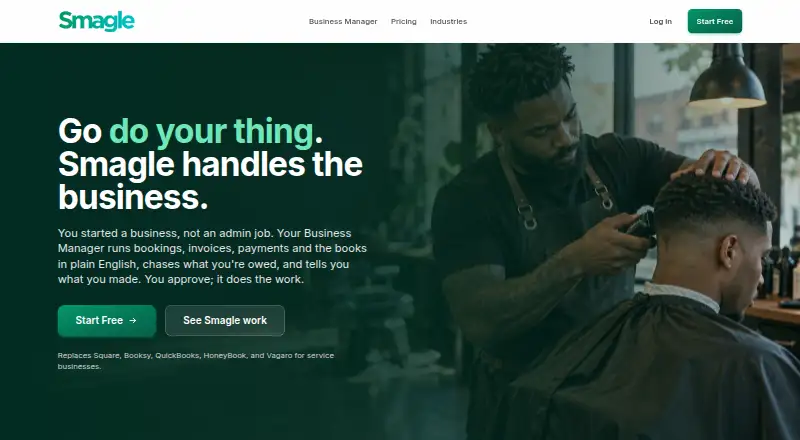
What Smagle is
Smagle is a business management platform with 11 modules and an AI Business Manager for bookings, invoices, payments, and bookkeeping. The modules cover customers, invoicing, payments, accounting, POS, estimates, appointments, projects, inventory, time tracking, and team management. The Business Manager can flag overdue invoices, low stock, and scheduling conflicts, then take actions with user approval. Users can request a business-specific tool, review a preview, and approve it for private use. Smagle says it comes pre-configured for more than 20 industries. Branded client portals let customers pay invoices, book appointments, check project status, and message the Business Manager. It is a mobile-first web app that works in a phone browser without an app-store download. The Free plan has one user and 25 AI Business Manager messages per month; late invoices collected by card carry a 2% charge, while on-time payments are free. The Flat plan is $29/month and includes unlimited users and 0% on collected payments. Smagle offers free migration, with a stated 24–48 hour import timeline after receiving an export.
Who it suits
Smagle suits businesses looking to manage invoicing, payments, appointments, projects, inventory, and related work in one platform. Its client portal may also suit businesses whose customers need to pay, book, or check project status.
What it does well
- 11 modules cover a broad range of business tasks.
- AI actions require user approval.
- Branded portals support payments, bookings, and project status.
- Free migration has a stated 24–48 hour timeline.
- The web app works in a phone browser.
What to know first
- Free plan is limited to one user.
- Free plan includes 25 AI messages per month.
- Late invoices collected by card carry a 2% charge.
- Smagle does not currently hold SOC 2 or ISO 27001 certification.
Limits
The Free plan allows one user and 25 AI Business Manager messages per month. It charges 2% on late invoices collected by card; on-time payments are free. Specialist plugins cost $5/month each on both plans.
Plans
| Plan | Billed and limits | Price |
|---|---|---|
| Free | Free; 2% of late invoices we collect by card, on-time payments are free · 1 user · AI business manager (25 messages/month) · unlimited invoices and customers · all 11 modules + industry plugins · card payments require Stripe connected · specialist plugins $5/month each | Free |
| Flat | $29/month; or $290/year (save $58) · Unlimited users · 0% on payments you collect · AI business manager · all 11 modules + industry plugins · API access · priority email support · specialist plugins $5/month each | $29 a month |
As smagle.com lists them, read 5 Oct 2026. The maker's own page has the final word.
Getting started
- Visit https://smagle.com/.
- Choose the Free or Flat plan.
- Connect Stripe if you want to collect card payments.
- Use the modules for your business, or ask the Business Manager to build a tailored tool and approve its preview.
- For migration, provide an export from your other tool.
Smagle is an all-in-one business platform for operators who want bookings, billing, bookkeeping, and client communication together. It suits solo businesses and small teams that value an AI assistant whose actions require approval. Its breadth is compelling, but the Free plan’s one-user limit and 25 AI messages per month make it a constrained long-term choice for teams.
Overview
Smagle brings customer management, invoicing, payments, accounting, point of sale, estimates, appointments, projects, inventory, time tracking, and team management into one platform. That range can keep routine operations in one place rather than spread across separate services. Its more than 20 industry configurations offer a tailored starting point, though businesses should still judge whether the modules fit their own workflows.
The AI Business Manager can flag overdue invoices, low stock, and scheduling conflicts, then take action only after a user approves it. That balances useful assistance with human oversight; it is not a fit for businesses seeking an assistant that acts autonomously. Users can also request a business-specific tool, review a preview, and approve it for private use.
Clients get a branded portal for paying invoices, booking appointments, checking project status, and messaging the Business Manager. Smagle offers free migration from other tools, with imports stated to take 24–48 hours after it receives an export. That can ease a switch for businesses with exportable data. The product is a mobile-first web app, so it works in a phone browser without an app-store download.
Key features
The client portal gives customers a self-service route for common tasks, which can be useful for service businesses handling bookings and project updates. Smagle also supports online booking, online payments, estimates, and customer follow-up. Its AI workflow is more measured than full automation: users remain responsible for approving actions.
Security practices include TLS 1.2 or higher for data in transit, AES-256 encryption for sensitive credentials at rest with AWS KMS-managed keys, and application-layer tenant isolation. Smagle says it does not sell personal information, share it with advertisers, or use individual customer data to train third-party AI models. It does not currently hold SOC 2 or ISO 27001 certification, a drawback for buyers whose procurement process requires either certification.
Pricing
The Free plan costs nothing. It includes one user, 25 AI Business Manager messages per month, unlimited invoices and customers, all 11 modules, and industry plugins. On-time card payments are free, but Smagle charges 2% of late invoices it collects by card. Card payments require a connected Stripe account, and specialist plugins cost $5/month each. This is a useful way for a solo operator to explore the core system, but the user and AI-message caps limit its suitability for sustained use.
Flat costs $29 a month, or $290/year (save $58). It adds unlimited users, 0% on payments collected, the AI Business Manager, all 11 modules, industry plugins, API access, and priority email support; specialist plugins remain $5/month each. The annual price is $58 less than paying monthly for 12 months. Flat is the more practical choice for a team or a business that wants to avoid the Free plan’s 2% charge on late card invoices. The pricing information does not state a trial period.
Platforms
Smagle lists Android, iOS, web, and API platforms. Its mobile-first web app works in a phone browser and does not require an app-store download; a mobile app is not offered. Web chat and the client portal are listed channels. WhatsApp and Telegram are marked as coming soon on the homepage, while a Smagle guide says the AI Business Manager is also available on Telegram.
Who it's for
Smagle is best suited to service businesses that want client booking and payment tools alongside operational modules, especially those willing to keep a person in the approval loop for AI actions. The Free plan fits a single user evaluating the platform or operating within its limits. Flat is aimed at businesses that need multiple users, API access, or a 0% payment charge. Buyers that require SOC 2 or ISO 27001 certification should look elsewhere.
Pros and cons
- Pros: Eleven operational modules, industry configurations, and a client portal cover a broad set of business and customer workflows in one platform.
- Pros: AI actions require approval, and custom tools can be previewed before private use.
- Pros: Free migration with a stated 24–48 hour import timeline can reduce the effort of switching from another tool.
- Cons: Free allows only one user and 25 AI messages per month, limiting its usefulness for growing teams or regular AI use.
- Cons: The Free plan charges 2% on late invoices collected by card, and card payments require Stripe to be connected.
- Cons: Specialist plugins cost $5/month each on both plans, and the company does not currently hold SOC 2 or ISO 27001 certification.
Alternatives
For pressure-washing businesses comparing tools by category, browse Pressure Washing Software.
PowerWashOffice is another freemium option with Android, iOS, web, and API platforms; its Owner Operator plan is free for one user, while Teams costs $30 a month. Consider it if a pressure-washing-specific option and a stated free trial matter more than Smagle’s broader module set.
Fieldified has a free plan covering scheduling, invoicing, CRM, and reporting, with certain usage limits; its Basic plan costs $49 a month for five users. It may suit buyers prioritizing those core field-service functions and a free trial.
FieldVibe offers a free Solo plan for one user, with unlimited jobs and clients, manual reminders, a single device, a business website, and a price book; Solo Pro costs $20 a month. Choose it if those solo-business tools are a closer match than Smagle’s broader operations and client portal.
PathPilo has a free Solo plan in GBP covering unlimited jobs and tasks, scheduling, clients, invoicing, recurring jobs, and route planning with live ETA. It is a relevant alternative for buyers focused on those scheduling and routing needs.
ResponsiBid has a free Startup plan and a Scaling plan at $179 a month, but the plan features vary. Consider it as another freemium option when comparing business software.
Call Monkey AI is a web-based freemium alternative with a free trial; its Essentials plan costs $29 a month and includes 12 content pages and five core pages. It may fit buyers comparing an AI-focused web tool rather than an all-in-one operations platform.
Zuper is a paid option whose Zuper Connect plan costs $299 a month, requires a Zuper Connect license, and is available in the United States and Canada.
HiveSuite is a paid alternative with a free trial. Its Solo plan costs £34.99 per month including VAT, or £349 per year including VAT, for one admin and two crew with all features.
Verdict
Choose Smagle if your business wants a wide set of operational modules, a branded client portal, and AI assistance that waits for approval. The Free plan is a sensible starting point for a solo user, but its AI cap and card-payment charge matter; Flat is the stronger fit for teams that need unlimited users and no payment fee. Look elsewhere if formal security certifications are a requirement or you need AI to act without approval.
Verdict
Smagle brings operational modules and an approval-based AI Business Manager together with client portals and migration assistance. Its Free plan has user and AI-message limits, while Flat costs $29/month.
Questions
Is Smagle free?
Yes. The Free plan costs nothing and includes one user and 25 AI Business Manager messages per month.
What does the Flat plan cost?
Flat costs $29/month or $290/year, with the yearly option listed as saving $58.
Which platforms does Smagle support?
Smagle lists Android, iOS, web, and API. Its mobile-first web app works in a phone browser and does not require an app-store download.
Can clients book appointments and pay invoices?
Yes. Branded client portals let clients book appointments and pay invoices, as well as view project status and message the Business Manager.
What integrations does Smagle name?
Its privacy policy names Stripe Connect for payments, AWS for hosting and storage, Meta WhatsApp Business, Telegram, Amazon SES and Resend for email, and Anthropic's Claude API for AI processing.
Does Smagle offer migration from other tools?
Yes. Migration is free, with a stated 24–48 hour import timeline after Smagle receives an export.
Facts from Smagle's own pages
- AI actions
- The Business Manager can surface overdue invoices, low stock, and scheduling conflicts, and take actions after the user approves them. · smagle.com, 5 Oct 2026
- Certifications
- Smagle states that it does not currently hold SOC 2 or ISO 27001 certification. · smagle.com, 5 Oct 2026
- Channels
- The homepage lists web chat and client portal, with WhatsApp and Telegram marked as coming soon; a Smagle guide says the AI Business Manager is also available on Telegram. · smagle.com, 5 Oct 2026
- Client portal
- Each client can use a branded portal to pay invoices, book appointments, view project status, and message the Business Manager. · smagle.com, 5 Oct 2026
- Customization
- Users can ask the Business Manager to build a business-specific tool, review a preview, and approve it for private use in their business. · smagle.com, 5 Oct 2026
- Data use
- Smagle says it does not sell personal information, share it with advertisers, or use individual customer data to train third-party AI models. · smagle.com, 5 Oct 2026
- Industries
- Smagle says it comes pre-configured for more than 20 industries. · smagle.com, 5 Oct 2026
- Integrations
- The privacy policy names Stripe Connect for payments, AWS for hosting and storage, Meta WhatsApp Business, Telegram, Amazon SES and Resend for email, and Anthropic's Claude API for AI processing. · smagle.com, 5 Oct 2026
- Migration
- Smagle offers free migration from other tools, with a stated 24–48 hour import timeline after it receives an export. · smagle.com, 5 Oct 2026
- Mobile access
- Smagle says it is a mobile-first web app that works in a phone browser and does not require an app-store download. · smagle.com, 5 Oct 2026
- Modules
- Its 11 modules cover customers, invoicing, payments, accounting, POS, estimates, appointments, projects, inventory, time tracking, and team management. · smagle.com, 5 Oct 2026
- Product
- Smagle describes itself as a business management platform with an AI Business Manager for bookings, invoices, payments, and bookkeeping. · smagle.com, 5 Oct 2026
- Security
- The privacy policy says data in transit uses TLS 1.2 or higher, sensitive credentials are encrypted at rest with AES-256 and AWS KMS-managed keys, and tenant data is isolated at the application layer. · smagle.com, 5 Oct 2026
- Support
- The homepage lists email support and priority email support on the Flat plan; its migration instructions say support replies the same day. · smagle.com, 5 Oct 2026
Where Smagle stands on Freedom251
- Tattoo Studio Software#2 of 15
- Pressure Washing Software#6 of 29