Freedom251 › Pressure Washing Software

FieldVibe
What FieldVibe is
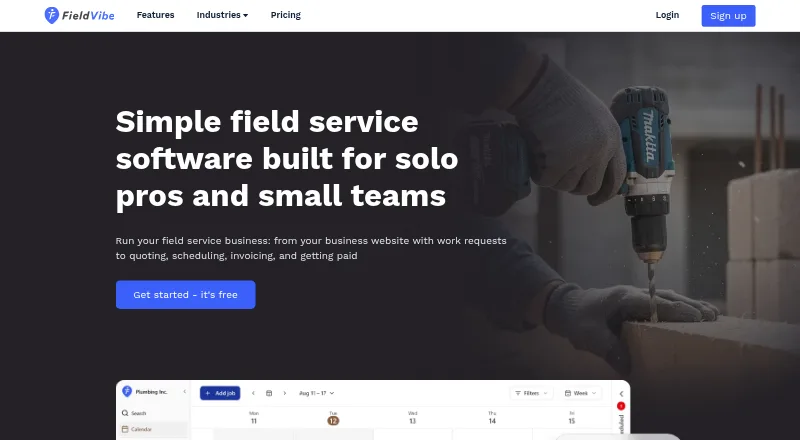
FieldVibe is field service software for solo professionals, owner-operators, and small service businesses, including home service trades such as HVAC, plumbing, electrical, lawn care, cleaning, pest control, and handyman work. It brings business websites and work requests together with quotes, scheduling, reminders, invoicing, payments, and reviews. Users can schedule one-time or recurring jobs, track visit status, and access past jobs and client details offline; offline editing requires an internet connection. Client profiles can hold contact details, notes, job-site photos, signatures, quotes, invoices, and visit history. Customers can pay invoices online by credit card, Apple Pay, Google Pay, or bank transfer. FieldVibe syncs with Google Calendar and is available on Android, iOS, and web. Its free Solo plan supports one user, unlimited jobs and clients, manual reminders, a single device, a business website, and a price book. Solo Pro costs $20/month; Crews costs $50/month. Paid plans add automated reminders, and Crews supports unlimited users.
Who it suits
It suits solo operators and small service businesses that want scheduling, client records, quotes, invoicing, and payments in one app. Crews is described for teams needing unlimited users and staff management.
What it does well
- Free Solo includes unlimited jobs and clients.
- Supports one-time and recurring jobs.
- Customers can pay by card or bank transfer.
- Google Calendar sync is available.
What to know first
- No free trial is listed.
- Offline editing requires an internet connection.
- Free Solo is limited to one device.
- Solo Pro costs $20/month.
Limits
Solo is free for one user and one device, with manual reminders. Solo Pro includes 400 automated reminders per month in the US and Canada or 150 globally; Crews includes 1,000 per month in the US and Canada or 400 globally.
Plans
| Plan | Billed and limits | Price |
|---|---|---|
| Solo | Free forever · 1 user · single device · unlimited jobs and clients · manual reminders · business website · price book | Free |
| Solo Pro | Monthly; annual billing is 25% cheaper · 1 user · 400 automated reminders/month US and Canada or 150 globally · multiple devices · quotes · invoices · payments · reports | $20 a month |
| Crews | Monthly; annual billing is 25% cheaper · Unlimited users · 1,000 automated reminders/month US and Canada or 400 globally · roles and permissions · everything in Solo Pro | $50 a month |
As fieldvibe.com lists them, read 14 Oct 2026. The maker's own page has the final word.
Getting started
- Visit the FieldVibe website and sign up yourself; a sales call or onboarding demo is not required.
- Choose the free Solo plan, Solo Pro at $20 a month, or Crews at $50 a month.
- Use FieldVibe on Android, iOS, or the web.
- Connect Google Calendar if you want to sync existing appointments and manage schedules.
Overview
FieldVibe is field-service software for solo operators and small service businesses that want job administration and customer records in one app. Its appeal is a free starting point with a clear route to quotes, payments, automated reminders, and team management; the trade-off is that offline access does not extend to editing.
Key features
Jobs, schedules, and client records
One-time and recurring jobs, visit-status tracking, and access to past jobs and client details offline cover the everyday coordination needs of service work. The offline caveat matters for crews working with patchy connectivity: records can be viewed, but editing requires an internet connection. Google Calendar sync can help keep appointments and schedules together.
Client profiles can hold contact details, notes, job-site photos, signatures, quotes, invoices, and visit history. That gives solo professionals a useful record of prior work without separating customer context from job administration.
Payments and reminders
Customers can pay invoices online by credit card, Apple Pay, Google Pay, or bank transfer. Paid plans add automated reminders sent from a dedicated FieldVibe number, while replies go to the user's own number. Reminder quotas differ by plan and region, so businesses with frequent follow-ups should check the applicable monthly allowance before upgrading.
Privacy and setup
FieldVibe says it encrypts data in transit using SSL/TLS and HTTPS, hashes passwords one way, and restricts access to databases and backups. Stripe processes payment data under PCI-DSS Level 1 standards. Personal data is stored on servers in Germany, with backups in Google Cloud data centers; FieldVibe says it does not sell personal data or use cookies for advertising or profiling. Self-sign-up requires no sales call or onboarding demo, and email support is provided.
Pricing
FieldVibe has a free plan and paid plans starting at $20/month. There is no free trial, so the free Solo plan is the way to try the product before paying.
| Plan | Price | What it includes |
|---|---|---|
| Solo | free | One user, unlimited jobs and clients, manual reminders, one device, a business website, and a price book. |
| Solo Pro | $20 a month | One user, multiple devices, quotes, invoices, time tracking, reports, payments, and 400 automated reminders/month in the US and Canada or 150/month globally. |
| Crews | $50 a month | Unlimited users, staff management, roles and permissions, and 1,000 automated reminders/month in the US and Canada or 400/month globally. |
Solo suits a single operator who can work on one device and send reminders manually. Solo Pro removes the device restriction and adds the core quoting, invoicing, and payment tools, but remains limited to one user. Crews is the fit for businesses sharing the workload and needing staff permissions; it costs more but includes unlimited users and a larger reminder allowance.
Platforms
FieldVibe is available on Android, iOS, and the web. Solo is limited to a single device, while Solo Pro and Crews support multiple devices.
Who it's for
The maker positions FieldVibe for home-service trades including HVAC, plumbing, electrical, lawn care, cleaning, pest control, and handyman businesses. Its mix of job scheduling, customer records, quotes, invoicing, and payments is best suited to small operators who want those workflows under one roof. Businesses that need offline editing should look elsewhere.
Pros and cons
Pros
- Useful free entry point: Solo includes unlimited jobs and clients, a business website, and a price book at no charge.
- End-to-end service workflow: Quotes, scheduling, invoices, online payments, and customer records sit alongside job management.
- Clear team upgrade: Crews supports unlimited users and roles and permissions, avoiding a fixed seat ceiling for growing teams.
Cons
- Offline editing is unavailable: Access to past records offline does not help users who need to update jobs without a connection.
- Free plan is constrained: Solo allows one device and manual reminders, and omits the paid plans' quotes, invoices, and payments.
- Reminder quotas vary by region: The monthly allowance is lower globally than in the US and Canada on both paid plans.
Alternatives
For businesses comparing options, Pressure Washing Software, Junk Removal Software, and Handyman Software are relevant category lists. PowerWashOffice is another freemium option, with a free one-user job-management plan and a $30 per month Teams plan; consider it if that plan structure better fits your operation. Fieldified offers a free plan with scheduling, invoicing, CRM, and reporting, plus a $49 per month Basic plan billed for five users; it may suit a reader weighing a larger included seat count against FieldVibe's team-focused option.
ResponsiBid has a free Startup plan and a $179 per month Scaling plan, with features varying by plan. PathPilo, Smagle, and Call Monkey AI are other freemium alternatives. Zuper is a paid option available on web, iOS, and Android. BlueSuite is a paid alternative with a free trial and an Essential plan at $20.95 a month billed annually, including one user and allowing up to 10 users.
Verdict
FieldVibe is a strong fit for solo home-service operators who want a free way to manage jobs and clients, with paid upgrades for online payments, automated reminders, and team coordination. Its clearest reason to choose it is the progression from unlimited free job and client records to a team plan with unlimited users. Look elsewhere if your work depends on editing schedules or records offline, or if Solo's one-device and manual-reminder limits do not fit.
Verdict
FieldVibe covers core job, client, and payment workflows, with a free Solo plan and paid options for automated reminders and teams. Consider its offline-editing requirement and device limits when choosing a plan.
Questions
Is there a free plan?
Yes. Solo is free and includes one user, unlimited jobs and clients, manual reminders, one device, a business website, and a price book.
What do the paid plans cost?
Solo Pro costs $20 a month. Crews costs $50 a month.
Which platforms does FieldVibe support?
FieldVibe is available on Android, iOS, and the web.
Does FieldVibe connect to Google Calendar?
Yes. It can sync with Google Calendar to display existing appointments and manage schedules.
Who operates FieldVibe?
FieldVibe is operated by FieldVibe SRL, a company registered in Romania, with a listed office in Oradea, Bihor.
Facts from FieldVibe's own pages
- Android update
- Google Play records an October 6, 2026 update adding Android quotes, invoices and online payments for Solo Pro and Crews. · play.google.com, 14 Oct 2026
- API catalog evidence
- GetApp's feature catalog includes an API entry but shows zero user votes for it. · getapp.com, 14 Oct 2026
- Audience
- The maker describes FieldVibe as built for home service trades including HVAC, plumbing, electrical, lawn care, cleaning, pest control, and handyman businesses. · fieldvibe.com, 28 Sept 2026
- Business website
- Every account includes a mobile-optimized business website with services, photos, reviews and work-request intake without hosting fees. · fieldvibe.com, 14 Oct 2026
- Client records
- Client profiles can store contact details, notes, photos, signatures, quotes, invoices and prior visit history. · fieldvibe.com, 14 Oct 2026
- Company
- FieldVibe is operated by FieldVibe SRL, registered in Romania, with a listed office in Oradea, Bihor. · fieldvibe.com, 28 Sept 2026
- Company legal name
- The legal provider is FieldVibe SRL, registered in Romania under registration number 49298369. · fieldvibe.com, 14 Oct 2026
- Company size
- LinkedIn lists FieldVibe as a privately held company with 2–10 employees. · linkedin.com, 14 Oct 2026
- Data collected
- The privacy policy lists identity, contact, hashed-password, payment, KYC, invoice, device, approximate-location, cookie and usage data collection. · fieldvibe.com, 14 Oct 2026
- Data handling
- FieldVibe says it does not sell personal data and does not use cookies for advertising or profiling. · fieldvibe.com, 28 Sept 2026
- Data location
- The maker says personal data is stored on servers in Germany, with backups in Google Cloud data centers. · fieldvibe.com, 28 Sept 2026
- Early development news
- A Mobiversal CEO interview published December 20, 2018 said Mobiversal was investing in FieldVibe and expected its first public release soon. · blog.mobiversal.com, 14 Oct 2026
- Founded
- LinkedIn lists FieldVibe's founding year as 2023. · linkedin.com, 14 Oct 2026
- Google Play data safety
- Google Play says the app shares no data with third parties, may collect personal information, photos/videos and device IDs, encrypts data in transit and supports deletion requests. · play.google.com, 14 Oct 2026
- Headquarters
- The registered office is Thurzo Sandor 40, Oradea, Bihor, Romania. · fieldvibe.com, 14 Oct 2026
- Integration
- GetApp lists Google Calendar as FieldVibe's integration. · getapp.com, 14 Oct 2026
- Invoicing
- Completed jobs or approved quotes can be converted into invoices and shared by text, email or PDF. · fieldvibe.com, 14 Oct 2026
- Job scheduling
- Users can schedule one-time or recurring visits and manage them from phone or desktop. · fieldvibe.com, 14 Oct 2026
- Limit: bugs
- A GetApp reviewer reported bugs, although they said fixes arrived quickly. · getapp.com, 14 Oct 2026
- Limit: pricing complaint
- A Google Play reviewer complained that the former 50-job free allowance led to a $20 monthly upgrade and judged the price excessive for the basic service. · play.google.com, 14 Oct 2026
- Marketing
- Paid plans include ready-made Facebook and Instagram posts tailored to service trades. · fieldvibe.com, 14 Oct 2026
- Messaging
- Paid plans send automated reminders from a dedicated FieldVibe number, while client replies go to the user's own number. · fieldvibe.com, 28 Sept 2026
- Offline access
- The app allows viewing current jobs and client details offline, but editing requires an internet connection. · fieldvibe.com, 14 Oct 2026
- Online payments
- Customers can pay invoices by card, Apple Pay, Google Pay or bank transfer through Stripe. · fieldvibe.com, 14 Oct 2026
Where FieldVibe stands on Freedom251
- Pressure Washing Software#2 of 29
- Handyman Software#3 of 27
- Junk Removal Software#6 of 29