Freedom251 › Minecraft Skin Editors

SkinMC
What SkinMC is
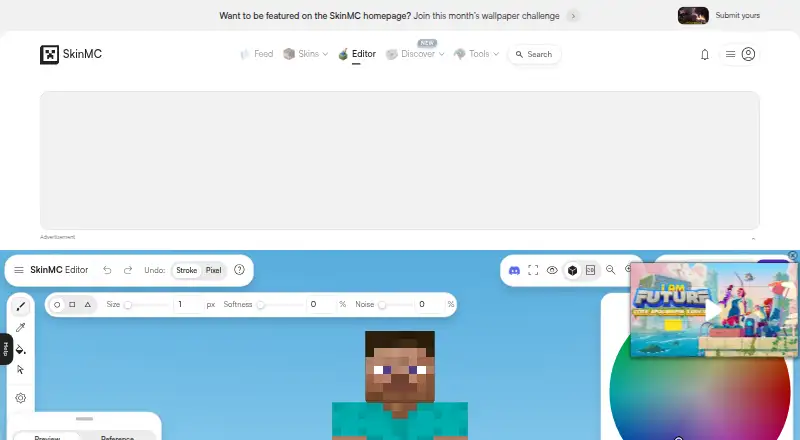
SkinMC is a free browser-based Minecraft skin editor for adjusting skin textures. Its preview sits alongside tools for drawing with a pen, sampling colour with an eyedropper, filling areas, changing brightness, and erasing. Undo and redo, a grid option, and controls for body, overlay, model, and position give you ways to review and adjust a skin. The editor lists options to import, save, and download skins. SkinMC also lists a skin viewer, avatar maker, and achievement tool. Its broader community features include skins, totems, heads, avatars, capes, banners, servers, and a leaderboard. Separately, SkinMC offers a Fabric mod for custom capes, with support stated for Minecraft versions 1.18.1 through 1.20.x. Setting up that mod requires signing in and connecting a Minecraft account to SkinMC before uploading a cape. The mod page says uploaded capes are visible in game to people using the mod. SkinMC’s GitHub organization lists [email protected] as a contact address.
Who it suits
SkinMC suits people who want to edit Minecraft skin textures in a browser using basic drawing and adjustment tools. Its separate cape mod is relevant to users of Fabric and the listed Minecraft versions who can connect a Minecraft account to SkinMC.
What it does well
- Free to use in a browser.
- Includes pen, eyedropper, fill, brightness, and erase tools.
- Supports importing, saving, and downloading skins.
- Lists skin, avatar, and achievement tools.
What to know first
- The custom-cape mod requires Fabric.
- The stated mod support range ends at Minecraft 1.20.x.
- Uploading a cape requires connecting a Minecraft account to SkinMC.
Getting started
- Open the SkinMC skin editor website in a browser.
- Import a skin or begin editing with the available tools.
- Choose a model and position, and adjust the body or overlay as needed.
- Use the editor controls to review changes; the editor auto saves.
- Download the finished skin.
- For custom capes, install Fabric for a listed Minecraft version, sign in or sign up to SkinMC, and connect a Minecraft account before uploading.
SkinMC is a browser toolkit for Minecraft skin work, profile management, and related community resources. It is best suited to players who want to edit or exchange skins without installing software, especially if they also want a viewer, avatar tools, or a custom-cape option. The editor is a capable free starting point; the cape feature is a separate commitment with account and mod compatibility considerations.
Overview
SkinMC’s main workspace is a web-based editor that displays the skin texture while you work. A typical session can begin with importing an existing skin, selecting a model and viewing position, making changes, and downloading the finished file. Automatic saving reduces the risk of losing an in-progress design and makes the browser workflow practical for occasional edits or shared computers.
The editor is part of a larger Minecraft-focused service. Alongside it are a skin viewer, avatar maker, and achievement tool, plus community sections for skins, totems, heads, avatars, capes, banners, servers, and a leaderboard. Profile controls let users claim a profile and hide username history. FAQs and Contact links provide support routes, and the SkinMC GitHub organization publishes [email protected].
Key features
Drawing and adjustment tools
Pen, eyedropper, fill, brightness, and erase tools cover the core jobs of skin editing. The pen is appropriate for individual pixel work, while fill handles larger uniform areas; eyedropper helps match an existing color, brightness changes tone, and erase removes unwanted marks. This is enough for corrections, recoloring, and straightforward original designs, though the listed toolset is focused on direct texture editing rather than a full 3D modelling suite.
Controls and workflow
Undo and redo make experimentation safer. A grid option helps with pixel alignment, and controls for body, overlay, model, and position provide more control over how the texture is viewed and adjusted. Import, save, and download commands support a complete edit-to-export cycle in one place. The model and position choices are useful when checking how details sit on different parts of a Minecraft character.
Custom-cape mod
The SkinMC Mod adds custom capes that can be seen in game by other players who also use the mod. It requires Fabric and is stated to support Minecraft 1.18.1 through 1.20.x. Setup requires signing in or signing up, then connecting a Minecraft account to SkinMC before uploading a cape. That makes the feature appealing to players seeking shared cape visibility, but it is not a universal client-side option: users outside the supported versions or unwilling to link an account should stay with the editor and other site tools.
Pricing
SkinMC is free to use, with a free plan and no paid tiers described. The browser editor, its listed editing controls, import and export workflow, and the surrounding site tools therefore suit players who want to avoid subscriptions or downloads. The custom-cape mod is also presented as part of the service, but its practical requirements are Fabric support, a compatible Minecraft version, and a connected Minecraft account rather than a separate paid upgrade.
Platforms
SkinMC runs in a web browser, so it works across desktop operating systems and other devices that can load the site. The custom-cape mod is tied to Fabric-based Minecraft installations and the stated 1.18.1–1.20.x range, making it a narrower option than the browser editor.
Who it's for
Choose SkinMC if you want a no-cost browser editor with texture preview, basic pixel tools, and direct import and download options. It is also a good fit for players who value adjacent profile and community features, or who want to browse skins, capes, banners, and servers in the same service. It is less suitable for users seeking a dedicated modelling application, a non-browser editor, or custom capes without Fabric and account connection.
Pros and cons
Pros
- Complete browser workflow: Import, edit, auto-save, and download functions keep routine skin work in one place.
- Useful core tools: Pen, eyedropper, fill, brightness, erase, grid, and undo/redo cover common pixel-editing tasks.
- Broad Minecraft hub: Viewer, avatar, achievement, community, and profile-privacy tools extend its use beyond a single editor.
- Shared cape visibility: The Fabric mod can show uploaded capes to other players using the mod.
Cons
- Browser-only editor: Users wanting an installed, specialized modelling workflow should look elsewhere.
- Cape compatibility limits: The mod depends on Fabric and Minecraft 1.18.1–1.20.x.
- Account linking required for capes: Uploading a custom cape requires connecting a Minecraft account to SkinMC.
- Visibility is conditional: Other players see the cape only when they use the mod too.
Alternatives
Minecraft Skin Editors is the broader category list to consult when comparing editors. Pick Blockbench instead if you need a free tool that runs on Android, iOS, Linux, macOS, web, and Windows and supports any type of project. Laby Skin Studio is a better fit for a browser editor requiring no account and exporting 64×64 PNG files for Minecraft: Java Edition. Choose MCTools for a collection of free browser-based Minecraft tools. The Skindex is an alternative with Android, iOS, and web availability. mcskins.top is another free web option. PMCSkin3D and Nova Skin are free alternatives when you want to compare other skin-editing services.
Verdict
SkinMC is a strong choice for Minecraft players who want free, browser-based skin editing plus profile and community tools in one destination. Its main advantage is the convenient editor workflow and broad surrounding toolkit. Look elsewhere if you need a desktop-grade modelling environment or a custom-cape system that works without Fabric, supported versions, and Minecraft-account linking.
Verdict
SkinMC provides a free browser editor with texture controls and import and export options. The custom-cape mod is a separate offering with stated Fabric, version, and account requirements.
Questions
How much does SkinMC cost?
SkinMC is free to use.
What platforms does the skin editor support?
The editor runs in a web browser.
What tools does the editor include?
It lists pen, eyedropper, fill, brightness, and erase tools, along with undo, redo, a grid, and body, overlay, model, and position controls.
Can SkinMC add custom capes in Minecraft?
SkinMC offers a Fabric mod for custom capes. Its page lists Minecraft versions 1.18.1 through 1.20.x, and uploading requires signing in and connecting a Minecraft account to SkinMC.
Who can see a custom cape uploaded through the mod?
The mod page says uploaded capes are visible in game to anyone using the mod.
Is SkinMC associated with Mojang or Microsoft?
SkinMC states that it is not approved by or associated with Mojang or Microsoft.
Facts from SkinMC's own pages
- Account connection
- The mod setup instructions say to sign in and connect a Minecraft account to SkinMC before uploading a custom cape. · skinmc.net, 4 Oct 2026
- Account integration
- Using the mod involves signing in or signing up and connecting a Minecraft account to SkinMC. · skinmc.net, 7 Oct 2026
- Cape visibility
- The mod page says uploaded custom capes are visible in game to anyone using the mod. · skinmc.net, 4 Oct 2026
- Community channels
- The site lists Discord, Bluesky, and Instagram under Community. · skinmc.net, 7 Oct 2026
- Community features
- The site navigation also lists skins, totems, heads, avatars, capes, banners, servers, and a leaderboard. · skinmc.net, 7 Oct 2026
- Custom capes
- The SkinMC Mod enables custom capes visible to other players using the mod. · skinmc.net, 7 Oct 2026
- Editing tools
- The editor lists pen, eyedropper, fill, brightness, and erase tools. · skinmc.net, 4 Oct 2026
- Editor workflow
- The editor auto saves and provides options to import a skin, choose a model and position, and download the skin. · skinmc.net, 7 Oct 2026
- Fabric mod
- SkinMC offers a mod for custom capes that requires Fabric and supports Minecraft versions 1.18.1 through 1.20.x as stated on the page. · skinmc.net, 4 Oct 2026
- Import and export
- The editor lists options to import, save, and download a skin. · skinmc.net, 4 Oct 2026
- Intended audience
- The site offers Minecraft skin tools and a mod for players who want custom in-game capes. · skinmc.net, 7 Oct 2026
- Mod platform
- The SkinMC Mod requires Fabric and is listed for Minecraft versions 1.20.x through 1.18.1. · skinmc.net, 7 Oct 2026
- Other site tools
- SkinMC lists a skin viewer, avatar maker, and achievement tool alongside its editor. · skinmc.net, 4 Oct 2026
- Other tools
- SkinMC lists a skin viewer, avatar maker, and achievement tool alongside the editor. · skinmc.net, 7 Oct 2026
- Privacy control
- SkinMC says users can claim their profile and make their username history private in settings. · skinmc.net, 7 Oct 2026
- Skin controls
- The editor provides undo and redo, a grid option, and controls for body, overlay, model, and position. · skinmc.net, 4 Oct 2026
- Skin editor
- The browser based editor provides tools to paint, erase, fill, sample colors, adjust brightness, undo, and redo Minecraft skins. · skinmc.net, 7 Oct 2026
- Support
- The site's navigation links to FAQs and Contact. · skinmc.net, 7 Oct 2026
- Support contact
- SkinMC’s GitHub organization lists [email protected] as its contact email. · github.com, 4 Oct 2026
- Third party status
- SkinMC states it is not approved by or associated with Mojang or Microsoft. · skinmc.net, 7 Oct 2026
Where SkinMC stands on Freedom251
- Minecraft Skin Editors#8 of 10