Freedom251 › Minecraft Skin Editors
mcskins.top
What mcskins.top is
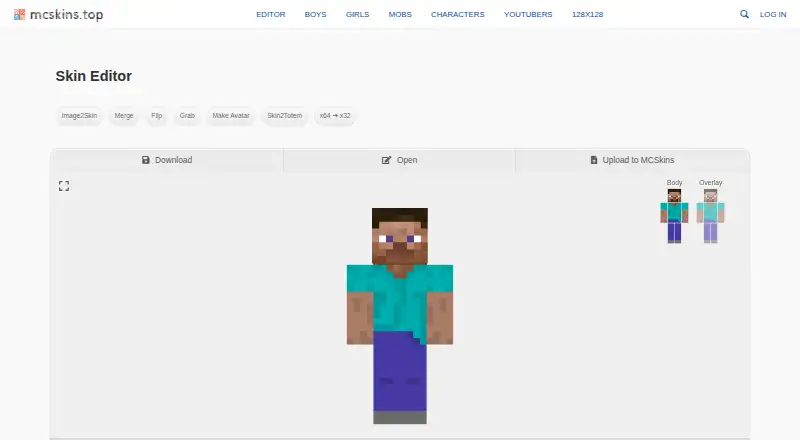
mcskins.top is a free browser platform for discovering, creating, sharing, and customizing Minecraft skins. Its editor lets users modify skins in the browser and download them for Minecraft. Listed tools include Image2Skin, Merge, Flip, Grab, Make Avatar, Skin2Totem, and a 64-to-32 conversion tool. The image converter accepts GIF, JPG, or PNG files and offers 64×64 output for Java Minecraft and 128×128 for PE and Bedrock Edition. The editor guide says x64 works in any Minecraft version, while x128 is supported only in PE and Bedrock Edition. The avatar maker creates six images of 3D heads and bodies from a Minecraft username or an uploaded skin; uploads for this tool are limited to 200 kB. Skin to Totem generates a resource pack that replaces the standard Totem of Undying texture. The site also lists HD skins, the Slim (Alex) model, posing, and animation. An account can save custom skins to a profile, comment, and send direct messages to other creators. The About page reports 200,000+ monthly users and a collection of 89637+ skins. The site uses cookies, Google Analytics, and third-party ads, which may collect usage data and identifiers such as IP address and browser type. MCSkins describes itself as independent and not affiliated with or endorsed by Mojang Studios or Microsoft.
Who it suits
mcskins.top suits Minecraft players who want to browse a skin collection, edit skins in a browser, or create related images and a Totem of Undying resource pack. Its account features are relevant to users who want to save skins to a profile, comment, or contact other creators.
What it does well
- Free browser-based skin editing and downloads.
- Accepts GIF, JPG, and PNG for image conversion.
- Offers 64×64 and 128×128 output formats.
- Avatar maker creates six images from a username or uploaded skin.
- Accounts can save skins, comment, and message creators.
What to know first
- Avatar maker uploads are limited to 200 kB.
- Converting x64 skins to x32 removes overlay details.
- x128 skins are supported only in PE and Bedrock Edition.
- Cookies, analytics, and third-party ads may collect usage data and identifiers.
Limits
The avatar maker allows uploads up to 200 kB. Converting x64 to x32 cuts overlay details, and the site says an identical match is impossible. The x128 format is supported only in Minecraft PE and Bedrock Edition.
Getting started
- Open the editor website in a browser.
- Choose a listed editor tool, such as Image2Skin, Merge, Flip, or Grab.
- For image conversion, provide a GIF, JPG, or PNG and choose an output size for your edition.
- For avatar creation, enter a Minecraft username or upload a skin within the 200 kB limit.
- Download finished skins for Minecraft; sign in to save skins to a profile, comment, or message creators.
mcskins.top is a free web platform for finding, editing, and sharing Minecraft skins, with conversion and avatar tools alongside its community features. It suits players who want these utilities in a browser and creators who want a profile for saving and discussing skins. Its breadth is useful, but the x64-to-x32 converter sacrifices overlay detail and x128 skins are limited to PE and Bedrock Edition.
Overview
MCSkins pairs a skin collection with a browser editor and tools for turning images and skins into other assets. The About page reports 200,000+ monthly users and 89637+ skins in the collection, giving skin discovery a substantial community context. Accounts let users save custom skins to a profile, comment, and message other creators; those features make it more than a one-off editor, though they require an account and involve sharing profile information.
The site uses cookies, Google Analytics, and third-party advertising, which may collect usage data and identifiers such as IP addresses and browser type. Google sign-in requests basic profile information, including email and public name or avatar, for account creation and identity verification. MCSkins says it is independent and is not affiliated with or endorsed by Mojang Studios or Microsoft.
Key features
Editing and image conversion
The editor lists Image2Skin, Merge, Flip, Grab, Make Avatar, Skin2Totem, and a 64-to-32 conversion tool. Its image converter accepts GIF, JPG, and PNG files and outputs 64×64 skins for Java Minecraft or 128×128 for PE and Bedrock Edition. The guide says x64 works in any Minecraft version, while x128 is supported only in PE and Bedrock, so Java players should use the 64×64 option.
The x64-to-x32 converter cuts overlay details, and an identical match is impossible. That makes it a compromise for users who need a smaller-format skin, not a dependable way to preserve every element of the original.
Avatars and totems
The avatar maker generates six images of 3D heads and bodies from a Minecraft username or uploaded skin; uploads are capped at 200 kB. This is a focused way to create several avatar images, but the upload limit may rule out larger source files. Skin to Totem creates a resource pack that replaces the standard Totem of Undying texture, a useful extra for players who want a skin-based in-game item.
Community and upload rules
Users can save custom skins to a profile, comment, and contact creators through direct messages. Uploaders must own the skins they submit or have explicit permission, and the terms prohibit pornographic, illegal, racist, or hateful content. Sign-in options include email, Facebook, Google, and VK. Support is available at [email protected].
Pricing
MCSkins is free to use, with a free plan and no paid plan described. That makes it an accessible option for casual skin editing and discovery, though the free offering should not be mistaken for a conversion workflow that preserves overlay details when reducing x64 skins to x32.
Platforms
MCSkins runs in a web browser. The editor guide says x64 skins work in any Minecraft version, while x128 skins are supported only in PE and Bedrock Edition. The image converter’s 64×64 output is the appropriate choice for Java Minecraft.
Who it's for
MCSkins fits Minecraft players who want a free browser editor, a collection to browse, and image, avatar, or totem tools in one place. It is also a reasonable fit for creators who value profile saves and community interaction. Look elsewhere if preserving overlay details through x64-to-x32 conversion is essential, or if you need x128 skins for Java Minecraft.
Pros and cons
- Pro: A broad set of browser tools combines skin editing, image conversion, avatar creation, and totem resource-pack generation.
- Pro: Accounts support profile saves, comments, and direct messages, extending the service beyond solo editing.
- Pro: The collection and reported monthly audience give users a sizable community setting for discovering skins.
- Con: The x64-to-x32 tool cuts overlay details, so it cannot preserve an identical skin in that conversion.
- Con: x128 is limited to PE and Bedrock Edition, leaving Java users with the 64×64 option.
- Con: Avatar uploads cannot exceed 200 kB, which constrains the source files users can submit.
- Con: Cookies, analytics, advertising, and Google profile-data requests are relevant privacy considerations for users who create an account.
Alternatives
Compare Minecraft skin editors if you want to consider the wider category. Choose Blockbench instead if you want a free tool available across Android, iOS, Linux, macOS, web, and Windows, with its plan covering any type of project. Laby Skin Studio is a better fit for someone who wants a browser editor without an account and exports 64×64 PNGs for Minecraft: Java Edition. Consider MCTools for free browser-based Minecraft tools.
The Skindex, SkinMC, PMCSkin3D, and Nova Skin are also free alternatives; choose among them if you want to consider other options.
Verdict
Choose mcskins.top if you want a free browser editor joined to skin discovery, image conversion, avatar and totem utilities, and community account features. Its all-in-one scope is the main reason to use it; the overlay loss in x64-to-x32 conversion and x128’s edition restriction are the main reasons to look elsewhere.
Verdict
Choose mcskins.top if you want a free browser editor alongside skin discovery, image conversion, avatar creation, and community account features. Look elsewhere if your workflow depends on preserving overlay details in x64-to-x32 conversion or using x128 skins outside PE and Bedrock Edition.
Questions
Is mcskins.top free?
Yes. The site is listed as free to use, with a free plan.
Which image files and output sizes does the converter support?
It accepts GIF, JPG, or PNG files and offers 64×64 output for Java Minecraft and 128×128 for PE and Bedrock Edition.
What can an account do?
An account lets users save custom skins to a profile, comment, and use direct messages to contact other creators. Sign-in options include email, Facebook, Google, and VK.
What is the avatar maker’s upload limit?
It can create six images of 3D heads and bodies from a Minecraft username or uploaded skin. The stated maximum upload size is 200 kB.
What happens when converting x64 skins to x32?
The conversion removes overlay details, and the site says an identical match cannot be made in this format conversion.
Who makes mcskins.top?
MCSkins describes itself as an independent website and says it is not affiliated with or endorsed by Mojang Studios or Microsoft.
Facts from mcskins.top's own pages
- Account features
- An account allows users to save custom skins to a profile, comment, and use direct messages to contact other creators. · mcskins.top, 7 Oct 2026
- Avatar creation
- The avatar maker creates six images of 3D heads and bodies from a Minecraft username or uploaded skin, with a stated 200 kB maximum upload size. · mcskins.top, 7 Oct 2026
- Avatar maker
- The avatar generator creates six images of 3D heads and bodies from a Minecraft username or uploaded skin, with a 200 kB maximum upload size. · mcskins.top, 7 Oct 2026
- Browser editor
- The site provides a browser based skin editor with drawing tools, body and overlay controls, model positioning, import, export, and download. · mcskins.top, 7 Oct 2026
- Community size
- The About page states that MCSkins has 200,000+ monthly users and 89637+ skins in its collection. · mcskins.top, 7 Oct 2026
- Content rules
- The terms require uploaders to own a skin or have explicit permission and prohibit pornographic, illegal, racist, or hateful content. · mcskins.top, 7 Oct 2026
- Editor tools
- The editor lists Image2Skin, Merge, Flip, Grab, Make Avatar, Skin2Totem, and a 64-to-32 conversion tool. · mcskins.top, 7 Oct 2026
- Google account data
- The privacy policy says Google OAuth requests basic profile information such as email and public name or avatar, and says this data is used to create an account and verify identity. · mcskins.top, 7 Oct 2026
- Google sign-in
- The privacy policy says Google OAuth 2.0 sign-in requests basic profile information, such as email and public name/avatar, for account creation and identity verification. · mcskins.top, 7 Oct 2026
- Image conversion
- The image converter accepts GIF, JPG, or PNG and offers 64×64 for Java Minecraft and 128×128 for PE and Bedrock Edition. · mcskins.top, 7 Oct 2026
- Image converter
- The image converter accepts GIF, JPG, or PNG and offers 64x64 and 128x128 output formats. · mcskins.top, 7 Oct 2026
- Maker
- The About page describes MCSkins as an independent website and says it is not affiliated with or endorsed by Mojang Studios or Microsoft. · mcskins.top, 7 Oct 2026
- Maker and affiliation
- MCSkins describes itself as an independent website and says it is not affiliated with or endorsed by Mojang Studios or Microsoft. · mcskins.top, 7 Oct 2026
- Privacy and analytics
- The privacy policy says the site uses cookies, Google Analytics, and third-party advertisements, which may collect usage data and identifiers such as IP address and browser type. · mcskins.top, 7 Oct 2026
- Product
- MCSkins is a community platform for discovering, creating, sharing, and customizing Minecraft skins. · mcskins.top, 7 Oct 2026
- Purpose
- MCSkins describes itself as a community platform for discovering, creating, sharing, and customizing Minecraft skins. · mcskins.top, 7 Oct 2026
- Sign-in options
- The sign-in page lists email, Facebook, Google, and VK sign-in options. · mcskins.top, 7 Oct 2026
- Skin conversion limit
- The x64 to x32 converter cuts overlay details, and the site says an identical match is impossible in this format conversion. · mcskins.top, 7 Oct 2026
- Skin formats
- The editor’s guide says x64 works in any Minecraft version, while x128 is supported only in Minecraft PE and Bedrock Edition. · mcskins.top, 7 Oct 2026
- Support
- The site lists [email protected] as its contact address. · mcskins.top, 7 Oct 2026
- Totem creation
- The Skin to Totem tool generates a resource pack that replaces the standard Totem of Undying texture. · mcskins.top, 7 Oct 2026
- Upload rules
- The terms say users may upload only skins they own or have explicit permission to upload, and prohibit pornographic, illegal, racist, or hateful content. · mcskins.top, 7 Oct 2026
Where mcskins.top stands on Freedom251
- Minecraft Skin Editors#6 of 10