Freedom251 › Minecraft Skin Editors

MCTools
What MCTools is
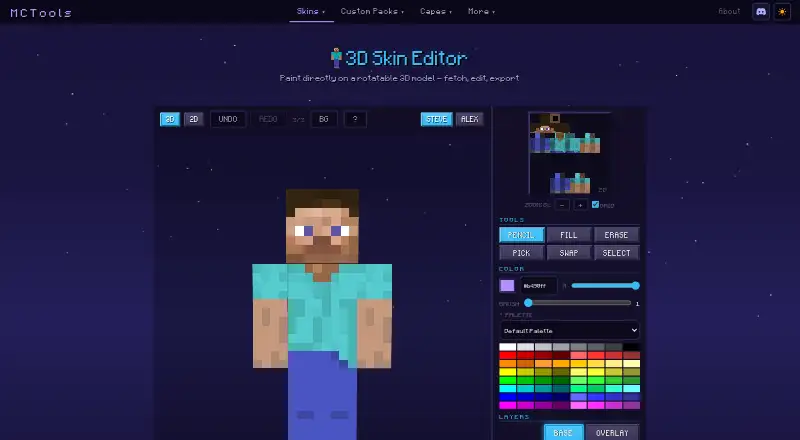
MCTools is a free collection of Minecraft tools that runs in a web browser without an account. Its 3D Skin Editor lets users paint on a rotatable character model, switch between 3D and 2D views, and work with Steve or Alex models. Editing controls include undo and redo, pencil, fill, erase, color-pick, swap, selection, gradient, palette, layers and mirroring. Users can download skins or use Java and Bedrock username lookup options. Other tools cover skin packs, avatars, custom packs, capes, coordinates and color codes. The Pack Converter handles Java-to-Bedrock and Bedrock-to-Java conversions, with optional conversion of sounds, language files, animated textures, models and PBR textures. Some Java features, including custom models and shaders, may not convert to Bedrock. MCTools says files are processed in the browser and stay on the device. Its privacy policy says it does not store files or other user data on its infrastructure; a username used for skin lookup is sent to a public lookup service. The terms describe the tools as-is and advise keeping backups.
Who it suits
MCTools suits Minecraft players who want browser-based skin editing, pack conversion and related utilities without an account. It is for users comfortable keeping their own backups and checking whether a Java feature will convert.
What it does well
- Free to use with no account needed
- Paint on rotatable models in 2D or 3D
- Includes layers, undo and redo
- Converts packs in both Java-Bedrock directions
- Files are processed in the browser
What to know first
- Some Java features may not convert to Bedrock
- Username lookups send the name to a public service
- Tools are provided as-is; users are advised to keep backups
Limits
Some Java features, including custom models and shaders, may not convert to Bedrock. The terms describe the tools as-is and advise users to keep their own backups.
Plans
| Plan | Billed and limits | Price |
|---|---|---|
| MCTools | Free browser-based Minecraft tools | Free |
As mc-tools.net lists them, read 4 Oct 2026. The maker's own page has the final word.
Getting started
- Open MCTools in a web browser; no account is needed.
- Choose the Skin Editor or another available tool.
- Paint on a Steve or Alex model, or switch between 3D and 2D views.
- Download the finished skin, or use the available Java or Bedrock username lookup option.
- For pack conversion, select the Java-to-Bedrock or Bedrock-to-Java direction and optional conversion types.
Overview
MCTools brings Minecraft skin editing, pack conversion, and a range of smaller utilities together in a web browser. It suits players who want to make skin edits or handle related Minecraft tasks without installing software. Its breadth is useful at no cost, but pack conversion has compatibility limits.
Key features
The Skin Editor pairs a rotatable character model with 3D and 2D views, undo and redo, and Steve and Alex models. Pencil, fill, erase, color-pick, swap, selection, gradient, palette, layers, and mirror controls support more involved edits than simple pixel painting. Layers and mirroring are practical for coordinating changes across a skin, while the 3D view helps users inspect the result from different angles.
Users can upload or download skins, or look up a player's skin using Java and Bedrock options. A username lookup sends that username to a public Minecraft skin-lookup service; MCTools says it does not store the username. The broader collection includes skin-pack creation, avatar generation, custom pack and cape tools, a coordinate calculator, and color codes, making it useful to players who want several Minecraft utilities in one browser-based collection.
The Pack Converter supports Java-to-Bedrock and Bedrock-to-Java conversion, with optional conversion for sounds, language files, animated textures, models, and PBR textures. That range helps when moving packs between editions, but it does not ensure feature parity: custom models, shaders, and other advanced Java features may not convert to Bedrock. Treat conversion as a starting point when a pack depends on those features.
MCTools says its tools process files in the browser and files do not leave the user's device. Its privacy policy also says it does not store files, IP addresses, usernames, or other user data on its infrastructure, while noting the use of Google Analytics 4 and Cloudflare. The tools are provided as-is, and the maker advises users to keep their own backups. MCTools is not an official Minecraft service and is not approved by or associated with Mojang or Microsoft.
Pricing
MCTools is free: its MCTools plan costs nothing, requires no account, and has no free trial. There are no paid tiers to weigh against the free collection, so the main trade-off is capability rather than price: the browser tools are convenient, but conversion limits matter for advanced packs. The as-is terms and backup advice also make it a poor sole home for valuable project files.
Platforms
MCTools runs in a browser. That suits users who want to avoid installing a dedicated app, but it is not the right fit for someone whose workflow requires a desktop application.
Who it's for
MCTools is a good fit for Minecraft players who want to edit skins with both 2D and 3D views, look up skins, or reach several pack and coordinate utilities from one place. It is less suitable for users who need dependable conversion of advanced Java features or want an official Minecraft service.
Pros and cons
- Pro: The skin editor combines layers, mirroring, a rotatable model, and both 2D and 3D views, giving skin makers useful control without an installed editor.
- Pro: Skin, cape, pack, avatar, coordinate, and color-code tools make the site more useful than a single-purpose skin editor for players with varied small tasks.
- Pro: The tools run in the browser, and MCTools says working files stay on the user's device.
- Con: Advanced Java pack features such as custom models and shaders may not survive conversion to Bedrock, limiting the converter for feature-heavy packs.
- Con: The tools are provided as-is, with users responsible for keeping backups.
- Con: Username lookups involve sending the username to a public third-party service.
Alternatives
Minecraft Skin Editors is a useful place to compare more options. Choose Blockbench instead if you want a free tool that supports Android, iOS, Linux, macOS, web, and Windows rather than a browser-only collection. Laby Skin Studio is another free, account-free browser option, with exports as 64×64 PNG for Minecraft: Java Edition. The Skindex is a free alternative spanning Android, iOS, and web. mcskins.top, SkinMC, PMCSkin3D, and Nova Skin are also free alternatives.
Verdict
Choose MCTools if you want a free browser-based collection with a capable skin editor and related Minecraft utilities in one place. Its main advantage is that breadth without an account or installation; look elsewhere if your pack work depends on advanced Java features converting reliably, or if you need a desktop workflow.
Verdict
MCTools combines skin editing with pack conversion and other Minecraft utilities in a browser-based collection. Conversion limits and the as-is terms are worth noting before relying on it.
Questions
Is MCTools free?
Yes. The MCTools plan is listed as free, and no account is needed.
What does the Skin Editor include?
It offers 3D and 2D views, rotatable Steve and Alex models, layers, and editing controls such as pencil, fill, erase, color-pick, selection, gradients, and mirroring. Users can download a skin.
Can it convert packs between Java and Bedrock?
Yes. The Pack Converter supports Java-to-Bedrock and Bedrock-to-Java conversion, with optional handling for sounds, language files, animated textures, models, and PBR textures. Some Java features may not convert to Bedrock.
Do files leave my device?
MCTools says its tools process files in the browser and files being worked on stay on the device. Its policy says it does not store user files or other user data on its infrastructure.
What happens when I look up a skin by username?
The username is sent to a public Minecraft skin-lookup service and is not stored by MCTools.
Is MCTools an official Minecraft service?
No. MCTools says it is not official and is not approved by or associated with Mojang or Microsoft.
Facts from MCTools's own pages
- Affiliation
- MCTools states that it is not an official Minecraft service and is not approved by or associated with Mojang or Microsoft. · mc-tools.net, 4 Oct 2026
- Browser processing
- The maker says its tools run in the browser and files users work with do not leave their device. · mc-tools.net, 4 Oct 2026
- Conversion limits
- MCTools says some Java features, including custom models, shaders, and other advanced features, may not convert to Bedrock. · mc-tools.net, 4 Oct 2026
- Export
- The Skin Editor offers skin download and upload controls and Java and Bedrock options for username lookup. · mc-tools.net, 4 Oct 2026
- Other tools
- The site also offers skin pack creation, avatar generation, custom pack tools, cape tools, a coordinate calculator, and color codes. · mc-tools.net, 4 Oct 2026
- Pack conversion
- The Pack Converter supports Java-to-Bedrock and Bedrock-to-Java conversion, with optional conversions for sounds, language files, animated textures, models, and PBR textures. · mc-tools.net, 4 Oct 2026
- Privacy
- The privacy policy says MCTools does not store user files, IP addresses, usernames, or other user data on its infrastructure, and uses Google Analytics 4 and Cloudflare. · mc-tools.net, 4 Oct 2026
- Product
- MCTools is a free, browser-based collection of Minecraft tools. · mc-tools.net, 4 Oct 2026
- Skin editor
- The 3D Skin Editor lets users paint on a rotatable model and includes 3D and 2D views, undo and redo, and Steve and Alex models. · mc-tools.net, 4 Oct 2026
- Skin editor tools
- The editor includes pencil, fill, erase, color-pick, swap, selection, gradient, palette, layers, and mirror controls. · mc-tools.net, 4 Oct 2026
- Support
- The About page links to Ko-fi for supporting the maker. · mc-tools.net, 4 Oct 2026
- Terms
- The Terms describe the tools as provided as-is and advise users to keep their own backups. · mc-tools.net, 4 Oct 2026
- Third-party lookups
- When a user fetches a player skin by username, the username is sent to a public Minecraft skin-lookup service and is not stored by MCTools. · mc-tools.net, 4 Oct 2026
Where MCTools stands on Freedom251
- Minecraft Skin Editors#5 of 10