Freedom251 › Presentation Recording Software
ShowCam
What ShowCam is
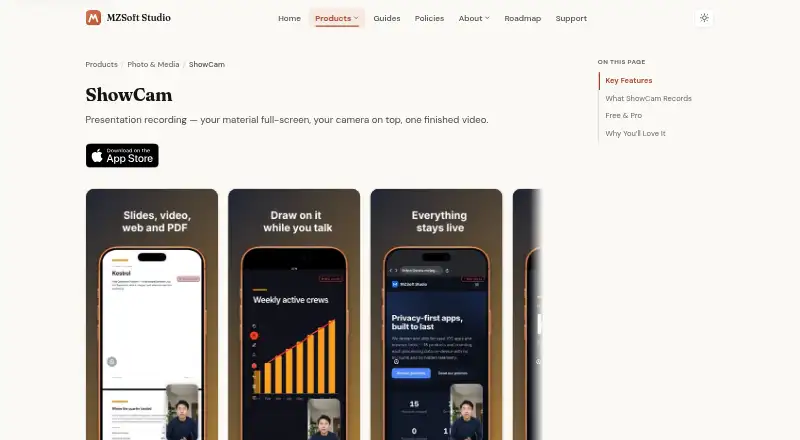
ShowCam is an iOS app that records presentation material, a camera bubble, and narration together as one video. Presentation material can be a photo slideshow, video, interactive web page, PDF, Markdown file, or text file. During recording, users can move between slides, scrub through videos, tap links, scroll web pages, and use a laser pointer. The camera bubble can use either the front or rear camera, and narration is mixed in sync with the app’s audio. Recordings are kept in the app library, can be saved automatically to Photos, and can be shared. The free plan allows 30 minutes of recording per day, with the time resetting at midnight, and includes all four presentation sources, both cameras, a laser pointer, saving and sharing, and no watermark. Pro adds unlimited recording, pen and highlighter markup, background effects, camera styling, and no ads. The maker says recordings are stored on-device and are not uploaded to its servers; they leave the device only when exported or shared. ShowCam records material opened inside the app, not other apps, and cannot draw over other apps. The App Store listing requires iOS 17 or later and also lists iPad, Mac with Apple M1 or later, and Apple Vision compatibility.
Who it suits
ShowCam suits people who want to narrate and appear on camera while presenting slides, videos, web pages, PDFs, or text files. It may fit users who need more than 30 minutes of daily recording or markup and camera effects, since Pro adds those features.
What it does well
- Combines presentation material, camera video, and narration in one recording.
- Supports slideshows, videos, web pages, PDFs, Markdown, and text files.
- Allows in-app interaction with slides, videos, links, and web pages while recording.
- Free plan includes both cameras, laser pointer, saving and sharing, and no watermark.
- The maker says recordings stay on-device unless exported or shared.
What to know first
- The free plan limits recording to 30 minutes per day.
- Cannot capture or draw over other apps.
- Pro subscriptions renew automatically for weekly and yearly options.
Limits
The Free plan allows 30 minutes of recording per day, resetting at midnight. Pro removes the recording limit and adds pen and highlighter markup, background effects, camera styling, and ad-free use.
Plans
| Plan | Billed and limits | Price |
|---|---|---|
| Free | Free; 30 minutes of recording per day · All four presentation sources · both cameras · laser pointer · saving and sharing · no watermark | Free |
| ShowCam Pro Yearly | $24.99 yearly; auto-renewing subscription · Unlimited recording · pen and highlighter · background effects · camera styling · no ads | $24.99 a year |
| ShowCam Pro Lifetime | $29.99 one-time purchase · Unlimited recording · pen and highlighter · background effects · camera styling · no ads | $29.99, paid once |
| ShowCam Pro Weekly | $4.99 weekly; auto-renewing subscription · Unlimited recording · pen and highlighter · background effects · camera styling · no ads | $4.99 a month |
As mzjpg.com lists them, read 9 Oct 2026. The maker's own page has the final word.
Getting started
- Visit https://mzjpg.com/products/showcam/.
- Use a supported device with iOS 17 or later; the listing also names iPad, Mac with Apple M1 or later, and Apple Vision.
- Open presentation material in ShowCam, such as a slideshow, video, web page, PDF, Markdown file, or text file.
- Record with the front or rear camera and narration, then save to the app library, Photos, or share the recording.
- Use the Free plan or choose a Pro option; yearly trial availability and eligibility appear on the purchase screen.
Verdict
Choose ShowCam if your presentation materials can be opened inside the app and you want camera and narration recorded alongside them. Look elsewhere if you need to capture other apps, or choose Pro if the free daily recording limit is too short.
Questions
What does ShowCam cost?
The Free plan costs nothing. Pro Weekly is $4.99 a month, billed $4.99 weekly; Pro Yearly is $24.99 a year; Pro Lifetime is $29.99, paid once, billed as a one-time purchase.
Does ShowCam have a free plan?
Yes. It allows 30 minutes of recording per day, resetting at midnight, and includes all four presentation sources, both cameras, a laser pointer, saving and sharing, and no watermark.
Is there a free trial?
The App Store listing says the yearly subscription may include a free trial. Eligibility appears on the purchase screen.
Which devices does ShowCam support?
The listing requires iOS 17 or later and also names iPad, Mac with Apple M1 or later, and Apple Vision compatibility.
Can ShowCam record other apps?
No. It records material opened inside ShowCam and cannot capture other apps or draw over them.
Where are recordings stored?
The maker says recordings are stored on-device and are not uploaded to its servers. They leave the device only when exported or shared.
Facts from ShowCam's own pages
- Camera and audio
- The camera bubble can use the front or rear camera, and narration is mixed with the app’s audio in sync. · mzjpg.com, 9 Oct 2026
- Data collection
- The privacy policy says ShowCam does not collect names, email addresses, contacts, or location and uses no analytics or crash-reporting SDK. · mzjpg.com, 9 Oct 2026
- Live controls
- While recording, users can swipe through slides, scrub videos, tap links, scroll web pages, and use a laser pointer. · mzjpg.com, 9 Oct 2026
- On-device effects
- Camera background blur, virtual backgrounds, and cutout effects run on-device using Apple machine learning. · mzjpg.com, 9 Oct 2026
- Presentation sources
- It supports photo slideshows, videos, interactive web pages, PDFs, Markdown files, and text files. · mzjpg.com, 9 Oct 2026
- Privacy and storage
- The maker says recordings are stored on-device, are not uploaded to its servers, and leave the device only when users export or share them. · mzjpg.com, 9 Oct 2026
- Pro features
- Pro adds unlimited recording, pen and highlighter markup, background effects, camera styling, and ad-free use. · mzjpg.com, 9 Oct 2026
- Recording limit
- The free tier allows 30 minutes of recording per day, with the allowance resetting at midnight. · mzjpg.com, 9 Oct 2026
- Recording scope
- ShowCam records material opened inside the app and cannot capture other apps or draw over them. · mzjpg.com, 9 Oct 2026
- Saving and sharing
- Recordings are saved in the app library, can be saved automatically to Photos, and can be shared out. · mzjpg.com, 9 Oct 2026
- Supported device
- The App Store listing requires iOS 17 or later and also lists iPad, Mac with Apple M1 or later, and Apple Vision compatibility. · apps.apple.com, 9 Oct 2026
- Third-party services
- Google AdMob serves ads in the free version, while Apple App Store and StoreKit handle purchases and subscriptions. · mzjpg.com, 9 Oct 2026
- Trial availability
- The App Store listing says the yearly subscription may include a free trial and eligibility appears on the purchase screen. · apps.apple.com, 9 Oct 2026
- What it does
- ShowCam records your presentation material, camera bubble, and narration together into one video. · mzjpg.com, 9 Oct 2026
Where ShowCam stands on Freedom251
- Presentation Recording Software#17 of 26