Freedom251 › Presentation Recording Software
ScreenDub Slides
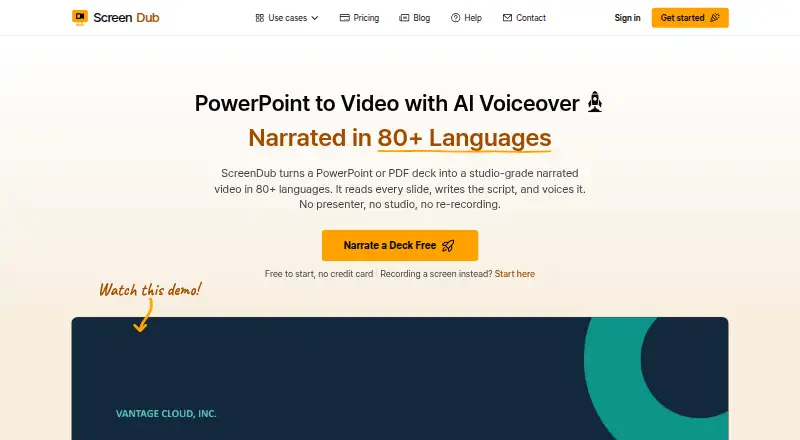
What ScreenDub Slides is
ScreenDub Slides turns PowerPoint and PDF presentations into narrated videos and written handouts. It analyzes slides to create an editable narration script for each slide, and decks can be narrated in 80+ languages. Narrated decks export as MP4 video, while handouts export as PDF. The editor includes backgrounds, slide transitions, captions, title cards, background music and saved brand styling.
Uploads support PPT, PPTX and PDF files, including Keynote exports, and can contain up to 100 slides. Google Slides presentations can be exported to PowerPoint or PDF before upload. Educators and trainers, sales and marketing teams, founders and global teams are among the use cases described. ScreenDub offers a free plan and a free trial, alongside paid plans starting at $14.99 a month. The free plan includes 8 minutes once, recordings up to 6 minutes, three exports per video and five guides per month; exports have a watermark and custom branding is unavailable. ScreenDub says projects are not published publicly, files are served through expiring signed links, and uploaded content is not used to train AI models. Google Gemini is its script-generation provider.
Who it suits
ScreenDub Slides suits educators, trainers and teams that want to turn slide decks into narrated videos and PDF handouts. It may also suit global teams that need narration in a range of languages or groups that want shared branding and team access on a paid plan.
What it does well
- Creates an editable narration script slide by slide.
- Supports narration in 80+ languages.
- Exports narrated decks as MP4 video and handouts as PDF.
- Accepts PPT, PPTX and PDF files, including Keynote exports.
- Offers backgrounds, transitions, captions, title cards and music.
What to know first
- The free plan's 8 minutes are included once.
- Free exports carry a watermark and lack custom branding.
- The free plan limits recording length to 6 minutes.
Limits
The free plan includes 8 minutes once, recordings up to 6 minutes, three exports per video and five guides per month. Its exports have a watermark and it does not include custom branding.
Plans
| Plan | Billed and limits | Price |
|---|---|---|
| Free | 8 mins included once · Recording up to 6 minutes · 3 exports per video · 5 guides/month · Watermark on exports · No custom branding | Free |
| Creator | US$14.99 per month · 50 mins/month · Up to 3 team members · Recording up to 10 minutes · Unlimited exports and guides · No watermark · Custom branding | $14.99 a month |
| Pro | US$29.99 per month · 120 mins/month · Up to 6 team members · Recording up to 12 minutes · Unlimited exports and guides · No watermark · Custom branding | $29.99 a month |
| Teams | US$59.99 per month · 250 mins/month · Up to 10 team members · Recording up to 15 minutes · Unlimited exports and guides · No watermark · Custom branding | $59.99 a month |
As screendub.io lists them, read 10 Oct 2026. The maker's own page has the final word.
Getting started
- Open the ScreenDub Slides website.
- Start with the free plan or free trial, or choose a paid plan.
- Upload a PPT, PPTX or PDF deck of up to 100 slides; export Google Slides to one of those formats first.
- Edit the slide-by-slide narration script and presentation styling.
- Export the narrated deck as MP4 or the written handout as PDF.
Verdict
Choose ScreenDub Slides if you want to convert presentations into narrated MP4s and written PDF handouts, with slide-level script editing and language options. Look elsewhere if you need longer free recordings, watermark-free exports or custom branding without a paid plan.
Questions
How much does ScreenDub Slides cost?
The free plan costs nothing. Paid plans are Creator at $14.99 a month, Pro at $29.99 a month and Teams at $59.99 a month.
What does the free plan include?
It includes 8 minutes once, recordings up to 6 minutes, three exports per video and five guides per month. Exports carry a watermark, and custom branding is not included.
Which file types and platforms does it support?
ScreenDub Slides is available as an extension and on the web. Uploads can be PPT, PPTX or PDF, including Keynote exports; Google Slides decks can be exported to PowerPoint or PDF before uploading.
What does it export?
Narrated decks export as MP4 video, and written handouts export as PDF.
Does ScreenDub use uploaded content to train AI models?
ScreenDub says uploaded content is not used to train AI models. Google Gemini is identified as the script-generation provider.
How are projects and files handled?
ScreenDub says projects are not published publicly and files are served through expiring signed links. Its privacy policy says connections use HTTPS/TLS and recordings and audio are encrypted at rest with AES-256.
Facts from ScreenDub Slides's own pages
- AI data use
- ScreenDub says uploaded content is not used to train AI models and identifies Google Gemini as its script-generation provider. · screendub.io, 10 Oct 2026
- Audience
- The slides page describes use cases including educators and trainers, sales and marketing teams, founders, and global teams. · screendub.io, 10 Oct 2026
- Deck limit
- The upload workflow supports decks of up to 100 slides. · screendub.io, 10 Oct 2026
- Exports
- A narrated deck exports as an MP4, and its written handout can be exported as a PDF. · screendub.io, 10 Oct 2026
- Founder and location
- The About page names Omprakash Sah Kanu as founder and says he is based in Parker, Colorado. · screendub.io, 10 Oct 2026
- Google Slides workflow
- Google Slides decks can be exported as PowerPoint or PDF files and then uploaded to ScreenDub. · screendub.io, 10 Oct 2026
- Input formats
- It accepts PPT, PPTX, and PDF files, including Keynote exports. · screendub.io, 10 Oct 2026
- Languages
- The site says decks can be narrated in 80+ languages. · screendub.io, 10 Oct 2026
- Presentation styling
- The editor offers backgrounds, slide transitions, captions, title cards, background music, and saved brand styling. · screendub.io, 10 Oct 2026
- Privacy
- The privacy policy says projects are not published publicly and files are served through expiring signed links. · screendub.io, 10 Oct 2026
- Security
- The privacy policy says connections use HTTPS/TLS and recordings and audio are encrypted at rest with AES-256. · screendub.io, 10 Oct 2026
- Slide analysis
- It reads each slide and creates an editable, slide-by-slide narration script. · screendub.io, 10 Oct 2026
- Support
- The Help Center says users can email support and usually receive a reply within one business day. · screendub.io, 10 Oct 2026
- What it does
- ScreenDub turns PowerPoint or PDF decks into narrated videos and written handouts. · screendub.io, 10 Oct 2026
Where ScreenDub Slides stands on Freedom251
- Presentation Recording Software#13 of 26