Freedom251 › Presentation Recording Software
SlideNarrator
What SlideNarrator is
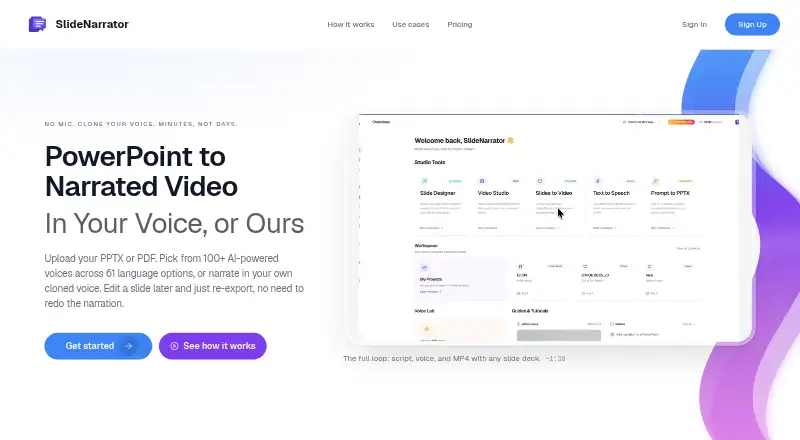
SlideNarrator turns PowerPoint and PDF presentations into narrated MP4 videos, generating scripts and slide-synced voiceover from existing decks. Users can review and edit scripts for individual slides, ask AI to redraft them, and regenerate audio after changes. The service advertises more than 100 AI voices across 61 audio language options, with custom voice cloning available. When a revised deck is uploaded to the same project, pages can be matched by content so existing narration stays with the corresponding slides where possible. PPTX and PDF files are supported up to 300 slides or pages according to the FAQ, while Starter uploads allow 50 slides. Exported videos and scripts can be used with an LMS, course platform, Udemy, Teachable, email, or a share link. Starter is free with 20 credits monthly, 720p MP4 export, and three saved projects. Premium costs $9.99 a month. Voice cloning is opt-in, and the service is not SOC 2, ISO 27001, or HIPAA-covered.
Who it suits
SlideNarrator suits course creators, educators, corporate training and L&D teams, HR onboarding groups, and sales teams with existing slide decks.
What it does well
- Generates scripts and slide-synced voiceover
- 100+ voices across 61 language options
- Editable scripts with AI redrafting
- MP4 export for courses and sharing
- Free Starter plan available
What to know first
- Starter uploads are limited to 50 slides
- Unsaved files are removed after about seven days
- Not SOC 2 or ISO 27001 certified
- Not offered as a HIPAA-covered service
Limits
Starter provides 20 credits per month, 720p MP4 export, 50 slides per upload, and up to three saved projects. Premium provides 300 credits monthly and up to ten saved projects; higher plans increase credits, upload sizes, or output quality.
Plans
| Plan | Billed and limits | Price |
|---|---|---|
| Team | Up to 10,000 credits per month | $199.99 a month |
| Professional Plus | 1,000 credits per month · 4K export · 100 slides per upload · Unlimited script regeneration · Team workspaces | $29.99 a month |
| Elite | 2,000 credits per month · 4K export · 200 slides per upload · Unlimited voice clones · Priority support | $49.99 a month |
| Premium | 300 credits per month · All voice types (Standard, Neural, Studio, Next-Gen) · MP4 export (720p) · Save up to 10 projects | $9.99 a month |
| Ultimate | Up to 10,000 credits per month | $99.99 a month |
| Starter | 20 credits per month · MP4 export (720p) · 50 slides per upload · Save up to 3 projects | On request |
As slidenarrator.com lists them, read 9 Oct 2026. The maker's own page has the final word.
Getting started
- Open the SlideNarrator website
- Upload a PPTX or PDF presentation
- Review or edit the generated script for each slide
- Choose a voice and language, or use an opt-in voice clone
- Generate the narrated MP4
- Share the MP4 or script through an LMS, course platform, email, or link
Verdict
SlideNarrator provides a direct way to turn presentation files into narrated videos, with script editing and many voice options. Storage windows, plan-specific upload limits, and stated compliance exclusions matter for organizational use.
Questions
What does Premium cost?
Premium costs $9.99 a month and includes 300 credits, all listed voice types, 720p MP4 export, and up to ten saved projects.
Which platforms does it support?
SlideNarrator is available on the web.
Can I edit generated narration?
Yes. Scripts can be edited per slide, AI can redraft them, and audio can be regenerated for changed slides.
Are voice samples used for model training?
Voice cloning is opt-in. You can delete the sample and model, and the maker says samples are not used to train its own models.
How long are files retained?
Unsaved files are removed after about seven days. Saved projects remain until deleted; generated audio lasts about 30 days and videos about 15 days.
Facts from SlideNarrator's own pages
- Compliance limits
- SlideNarrator says it is not currently SOC 2 or ISO 27001 certified, is not offered as a HIPAA-covered service, and does not sign BAAs. · slidenarrator.com, 9 Oct 2026
- File limits
- The FAQ says PPTX and PDF files are supported up to 300 slides or pages, while the Starter plan allows 50 slides per upload. · slidenarrator.com, 9 Oct 2026
- Integrations and sharing
- The site says exported MP4s and scripts can be used with an LMS, course platform, Udemy, Teachable, email, or a share link. · slidenarrator.com, 9 Oct 2026
- Intended users
- The maker describes the product for course creators, educators, corporate training and L&D teams, HR onboarding, and sales teams with existing slide decks. · slidenarrator.com, 9 Oct 2026
- Retention
- Unsaved files are removed after about seven days; saved project files remain until deleted, while generated audio is retained about 30 days and videos about 15 days. · slidenarrator.com, 9 Oct 2026
- Script editing
- Users can review and edit scripts per slide, ask AI to redraft them, and regenerate audio for slides they change. · slidenarrator.com, 9 Oct 2026
- Security controls
- The security page lists TLS in transit, cloud-provider encryption at rest, workspace access controls, and database row-level security. · slidenarrator.com, 9 Oct 2026
- Support and billing
- The Elite plan includes priority support; the pricing page says subscriptions can be changed or canceled anytime and one-time credit packs never expire. · slidenarrator.com, 9 Oct 2026
- Updating decks
- When a revised deck is uploaded to the same project, SlideNarrator matches pages by content when possible so existing narration can stay with the right slides. · slidenarrator.com, 9 Oct 2026
- Voice data
- Voice cloning is opt-in; users can delete their sample and model, and the maker says it does not use voice samples to train its own models. · slidenarrator.com, 9 Oct 2026
- Voices and languages
- The site advertises more than 100 AI voices across 61 audio language options, with custom voice cloning available. · slidenarrator.com, 9 Oct 2026
- What it does
- SlideNarrator turns PowerPoint and PDF presentations into narrated MP4 videos with generated scripts and slide-synced voiceover. · slidenarrator.com, 9 Oct 2026
Where SlideNarrator stands on Freedom251
- Presentation Recording Software#18 of 26