Freedom251 › Employee Scheduling Software

Shiftura
What Shiftura is
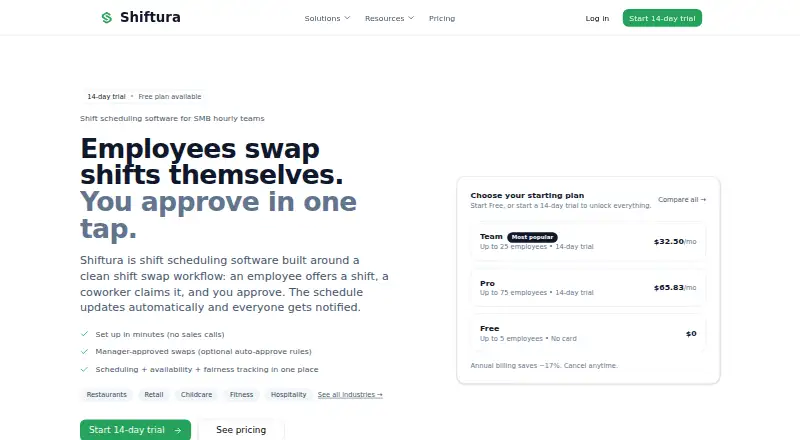
Shiftura is shift scheduling software for small and midsize businesses with hourly teams. Managers can build and publish schedules, review employee availability, and notify the team automatically. Employees can offer shifts to coworkers, who claim them for manager approval; managers can also set rules to auto-approve qualifying swaps. Shiftura tracks how hours, weekends, and nights are distributed, and sends email notifications about new schedules and approved swaps. The service lists restaurants, retail, childcare, fitness, and hospitality among its industries. It is available on the web, Android, and iOS, and employees can use it on their phones without downloading an app. The Free plan costs nothing for up to five employees. Team costs $32.50 a month for up to 25 employees, while Pro is $65.83 a month for up to 75. Team and Pro include a 14-day trial requiring a card; Shiftura says there is no charge until the trial ends and users can cancel anytime. The product focuses on scheduling and manager-approved swaps, not a full workforce suite such as time tracking or a time clock.
Who it suits
Shiftura suits hourly teams in restaurants, retail, childcare, fitness, and hospitality that need scheduling, availability collection, and shift swaps. Managers can use it to review swaps individually or set approval rules.
What it does well
- Employees submit availability for scheduling
- Managers can auto-approve qualifying swaps
- Tracks distribution of hours, weekends, and nights
- Employees can use phones without downloading an app
- Free plan supports up to five employees
What to know first
- No time tracking or time clock
- Team and Pro trials require a card
- Team supports up to 25 employees
- Support hours are weekdays, 9:00 AM–5:00 PM Pacific
Limits
The Free plan covers up to five employees. Team supports up to 25 employees, and Pro supports up to 75; the 14-day trials for Team and Pro require a payment card. Shiftura does not include time tracking or a time clock.
Plans
| Plan | Billed and limits | Price |
|---|---|---|
| Free | Free forever · Up to 5 employees · All core features · Email support | Free |
| Team | $390/year • Save $78 · Up to 25 employees · All core features · Priority support | $32.50 a month |
| Pro | $790/year • Save $158 · Up to 75 employees · All core features · Priority support · Advanced analytics | $65.83 a month |
As shiftura.com lists them, read 10 Oct 2026. The maker's own page has the final word.
Getting started
- Open the Shiftura website.
- Choose the Free plan, or select Team or Pro for a 14-day trial.
- For the Team or Pro trial, provide a payment card; no charge is made until the trial ends, and you can cancel anytime.
- Use Shiftura on the web, Android, or iOS; employees can also use it on their phones without downloading an app.
Shiftura is shift-scheduling software for small and midsize hourly teams. It is a strong fit for managers who need availability-aware rosters, controlled shift exchanges, and a way to monitor whether unpopular hours are shared fairly. Choose it when scheduling is the priority; look elsewhere if attendance capture or a built-in time clock is essential.
Overview
Managers build and publish schedules, and employees are notified automatically when a new roster is released. Staff submit their availability for managers to review while assigning shifts, helping prevent avoidable conflicts before publication. Employees can offer shifts, coworkers can claim them, and managers can approve each swap or create rules that automatically approve qualifying requests.
Fairness tracking adds a useful management check: Shiftura records how hours, weekends, and night shifts are distributed. That can expose an uneven burden across a recurring rota instead of relying on memory. Email alerts cover new schedules and approved swaps.
The scope is intentionally focused. Shiftura does not include a full workforce suite, time tracking, or a time clock, so businesses that need clock-in records or attendance data must add another tool or select a broader platform.
Key features
Scheduling, availability, and swaps
Availability collection and auto-scheduling sit inside the roster workflow. This is practical for restaurants, retail, childcare, fitness, and hospitality teams whose staffing changes frequently. The swap process balances employee flexibility with manager control: workers can exchange shifts, while approval rules can reduce routine administrative work when the conditions are predictable.
Fairness and notifications
Tracking hours, weekends, and nights gives managers concrete information for balancing assignments. Automatic notifications keep employees informed about published schedules and approved changes by email. Teams wanting richer attendance or payroll workflows will find the feature set incomplete rather than all-purpose.
Security and support
Shiftura's privacy policy describes HTTPS/TLS encryption in transit, encryption of sensitive data at rest, secure authentication and access controls, regular security assessments, and employee training. It says personal information is not sold and identifies Stripe for payments, Supabase for hosting, database, and authentication, and Resend for email delivery. Support runs Monday through Friday, 9:00 AM–5:00 PM Pacific Time, with replies typically within 24 hours on business days.
Pricing
| Plan | Price | Includes |
|---|---|---|
| Free | free, free forever | Up to 5 employees, all core features, email support |
| Team | $32.50 a month, billed $390/year (save $78) | Up to 25 employees, all core features, priority support |
| Pro | $65.83 a month, billed $790/year (save $158) | Up to 75 employees, all core features, priority support, advanced analytics |
The Free plan is a credible starting point for a very small team, but its five-employee cap quickly forces an upgrade. Team suits growing SMBs that need priority support without advanced analytics. Pro is the choice for teams of up to 75 that will use deeper reporting. Team and Pro include a 14-day trial requiring a card; billing starts only after the trial and cancellation is allowed at any time. Plans do not solve the time-clock gap.
Platforms
Shiftura runs on the web and supports Android and iOS access. Employees can use a mobile-friendly interface from their phones without downloading an app. There are no dedicated mobile apps, so organizations expecting app-store installations should account for that distinction.
Who it's for
Shiftura is aimed at SMB hourly teams in restaurants, retail, childcare, fitness, and hospitality. It fits managers who want one place for availability, schedule publication, shift offers, claims, approvals, and fairness checks. It is a poor fit for employers that require integrated time tracking, clock-in controls, or a broader workforce-management suite.
Pros and cons
Pros
- Availability is visible during scheduling, helping managers avoid conflicts.
- Rule-based swap approvals can reduce repetitive manager work while retaining control.
- Fairness tracking covers hours, weekends, and nights, supporting more balanced rosters.
- A free-forever plan includes all core features for teams of up to five employees.
- Web-based phone access avoids requiring employees to install an app.
Cons
- No time tracking or time clock, so attendance workflows require another product.
- The free plan supports only five employees.
- Team and Pro require annual billing for the stated prices and a card for the trial.
- Dedicated mobile apps are not provided.
Alternatives
See the Employee Scheduling Software guide for a wider shortlist.
- ClockOn is the better direction for businesses that also need payroll-oriented functionality and Windows access.
- Connecteam suits teams seeking a broader platform with Android, iOS, web, and API access.
- Findmyshift is an alternative for teams comparing a free plan with explicit member and planning-history limits.
- 7shifts is worth considering for restaurant operators wanting a plan built around one location and up to 15 employees.
- PagarBook is aimed at businesses prioritizing attendance and payroll-related workflows.
- Shiftbase offers a free tier for up to 15 employees and broader team structures.
- Sling is an alternative with a free plan for up to 30 users and additional team communication features.
- Zoho Shifts is a candidate for teams wanting scheduling alongside multiple locations, messaging, breaks, and time-off requests.
Verdict
Shiftura is a sensible choice for small hourly teams that want availability-aware scheduling, governed swaps, and fairness tracking without paying for a larger workforce suite. Its free tier makes it easy for up to five employees to start, while Team and Pro add capacity and support. Look elsewhere when a time clock, attendance records, or dedicated mobile apps are central requirements.
Verdict
Shiftura covers schedule building, availability, and manager-approved shift swaps, with rules for automating qualifying approvals. Teams needing time tracking or a time clock will need a separate workforce tool.
Questions
Is there a free plan?
Yes. The Free plan costs nothing, is billed free forever, and supports up to five employees with core features and email support.
How much do the paid plans cost?
Team is $32.50 per month, billed at $390 per year, for up to 25 employees. Pro is $65.83 per month, billed at $790 per year, for up to 75 employees and advanced analytics.
Is there a free trial?
Team and Pro include a 14-day free trial that requires a payment card. Shiftura says it does not charge until the trial ends and users can cancel anytime.
Which platforms can I use?
Shiftura is available on the web, Android, and iOS. Employees can use it on their phones without downloading an app.
Does Shiftura include a time clock?
No. Shiftura focuses on shift scheduling and manager-approved swaps and does not include time tracking or a time clock.
Who operates Shiftura?
The privacy policy identifies Kids Go Out LLC as the company operating Shiftura.
Facts from Shiftura's own pages
- Availability
- Employees submit availability, which managers can see while building schedules. · shiftura.com, 10 Oct 2026
- Data handling
- The privacy policy says Shiftura does not sell personal information and names Stripe for payments, Supabase for hosting/database and authentication, and Resend for email delivery. · shiftura.com, 10 Oct 2026
- Fairness tracking
- Shiftura tracks distribution of hours, weekends, and nights. · shiftura.com, 10 Oct 2026
- Industries
- The site lists restaurants, retail, childcare, fitness, and hospitality as industries it serves. · shiftura.com, 10 Oct 2026
- Maker
- The privacy policy identifies Kids Go Out LLC as the company operating Shiftura. · shiftura.com, 10 Oct 2026
- Notifications
- Shiftura sends email notifications for new schedules and approved swaps. · shiftura.com, 10 Oct 2026
- Platform access
- The site says Shiftura is mobile-friendly and employees can use it on their phones without downloading an app. · shiftura.com, 10 Oct 2026
- Purpose
- Shiftura is shift scheduling software for SMB hourly teams, with employee shift offers, coworker claims, and manager approval. · shiftura.com, 10 Oct 2026
- Scheduling
- Managers can build and publish schedules, and the team is notified automatically. · shiftura.com, 10 Oct 2026
- Security
- The privacy policy describes HTTPS/TLS encryption in transit, encryption of sensitive data at rest, secure authentication and access controls, regular security assessments, and employee training. · shiftura.com, 10 Oct 2026
- Support
- Support is available Monday through Friday, 9:00 AM–5:00 PM Pacific Time, with replies typically within 24 hours on business days. · shiftura.com, 10 Oct 2026
- Swap workflow
- Managers can approve swaps themselves or set rules to auto-approve qualifying swaps. · shiftura.com, 10 Oct 2026
- Time clock
- Shiftura focuses on shift scheduling and manager-approved swaps; the site says it does not include a full workforce suite such as time tracking or a time clock. · shiftura.com, 10 Oct 2026
- Trial terms
- Team and Pro include a 14-day free trial that requires a card; the site says users are not charged until the trial ends and can cancel anytime. · shiftura.com, 10 Oct 2026
Where Shiftura stands on Freedom251
- Employee Scheduling Software#12 of 43