Freedom251 › Event Catering Software
SendOrder
What SendOrder is
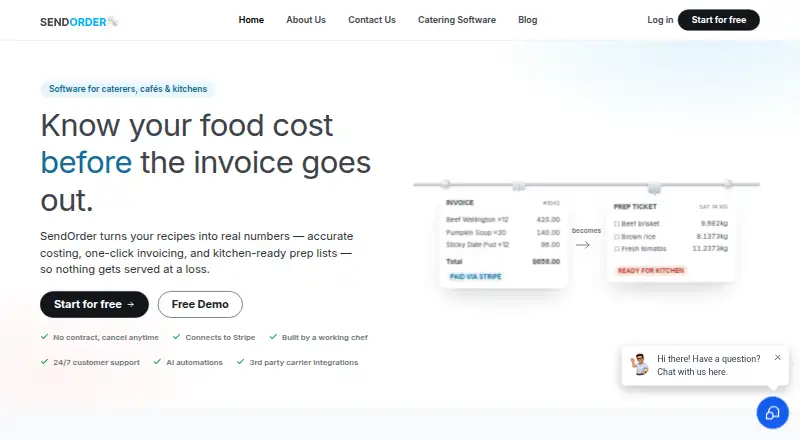
SendOrder is a web-based platform for food businesses that brings together food costing, catering orders, invoicing, and kitchen preparation workflows. It calculates ingredient, recipe, and dish costs, and updates recipe and package costs when ingredient prices change. Once invoices are paid, they can become printable kitchen prep lists organized by dish and quantity. A dashboard tracks profit, expenses, and waste across jobs. The platform also includes menu and recipe management, inventory, order workflows, event execution tools, and staff scheduling. SendOrder lists Stripe and Square integrations, with Square described as available on paid plans. Its Diamond + Ai plan includes a custom online ordering website, QR code ordering, and an AI agent. The product is presented for caterers, restaurants, cafés, bakeries, food trucks, pop-ups, and corporate or event caterers. Starter is free; Pro yearly costs $299 a year. A 30-day free trial is listed. The company is based in Sydney, Australia. Customers retain ownership of uploaded data, menus, and recipes, and may request an export after termination.
Who it suits
SendOrder suits food businesses handling recipe costing, orders, invoices, and kitchen preparation, from cafés and bakeries to caterers and food trucks. Businesses seeking custom online ordering or QR code ordering should note those are listed with Diamond + Ai.
What it does well
- Updates recipe and package costs when ingredient prices change.
- Paid invoices can create printable, organized prep lists.
- Dashboard tracks profit, expenses, and waste.
- Customers retain ownership of uploaded data and recipes.
What to know first
- Square integration is listed as available on paid plans.
- Diamond + Ai includes a $499.00 one time charge plus $99.00 / month.
- Fees are billed in advance and are non-refundable.
Limits
Starter includes food costing, a preparation converter, inventory, recipes, orders, and expenses. The listed Pro yearly plan adds an invoice converter and Stripe integration; Square is described as available on paid plans. Diamond + Ai is billed at $499.00 one time plus $99.00 per month.
Plans
| Plan | Billed and limits | Price |
|---|---|---|
| Starter | Setup · food costing calculator · preparation converter · inventory · recipes · orders · expenses | Free |
| Pro yearly | / year · Setup · food costing · invoice converter · Stripe integration · inventory · recipes · orders · expenses | $299 a year |
| Diamond + Ai | $499.00 one time + $99.00 / month · All features · custom online ordering website · QR code ordering · Square integration · team scheduling · CRM · AI agent | On request |
As sendorder.com.au lists them, read 30 Sept 2026. The maker's own page has the final word.
Getting started
- Visit https://www.sendorder.com.au/.
- Start with the Starter plan or begin the 30-day free trial.
- Set up food costing, inventory, recipes, and orders.
- Use Stripe integration on Pro yearly, or Square on paid plans.
- Convert paid invoices into printable prep lists for kitchen work.
SendOrder is a web-based operations system for caterers, restaurants, cafés, bakeries, food trucks, pop-ups, and corporate or event caterers. It suits food businesses that want costing, sales administration, and kitchen preparation connected in one workflow. The strongest reason to choose it is the way ingredient price changes can flow through recipes and packages; the main reason to look elsewhere is that online ordering, Square, and several broader management tools are reserved for its top tier.
Overview
SendOrder brings food costing, recipe and menu management, orders, invoicing, inventory, expenses, and event execution into one platform. Its job-focused design is more relevant to businesses producing food for confirmed work than to a company seeking only a general customer relationship or event database. A web-only platform makes it accessible from a browser, while the Sydney-based team says it aims to answer support enquiries within one business day during weekday Sydney hours.
Key features
Costing that follows ingredient changes
The system costs ingredients, recipes, and dishes, then updates recipe and package costs when an ingredient price changes. That is a meaningful operational advantage for menus and catering packages exposed to changing food prices: related cost figures can be kept current instead of being revised separately. Inventory, recipes, menu management, and a preparation converter support the same workflow.
From invoice to kitchen prep
When an invoice is paid, SendOrder automatically creates printable preparation lists organized by dish and quantity. For caterers and other teams cooking against confirmed orders, this provides a direct handoff from billing to production. Order workflows and event execution tools make the product more than a costing calculator, although the published feature set does not establish how deeply those workflows can be customized.
Job reporting and payments
The dashboard tracks profit, expenses, and waste across jobs, giving operators a way to review the financial result of individual work. Stripe integration is included in Pro yearly. Square is identified as a paid-plan integration and appears in Diamond + Ai, so Square-dependent businesses need the higher tier. SendOrder also describes optional AI-agent and SEO tools; the AI agent is included in Diamond + Ai.
Ordering and ownership
Diamond + Ai adds a custom online ordering website and QR-code ordering, alongside team scheduling and CRM. Customers retain ownership of uploaded data, menus, and recipes, and may request a data export after termination. Payments are processed through Stripe and Square, and the terms state that SendOrder aims for 99.9% uptime.
Pricing
SendOrder uses a freemium structure with a 30-day free trial. Fees are billed in advance and are non-refundable; subscriptions can be cancelled through account settings. The free option is useful for trying the core workflow, but its narrower scope matters if payment integrations or online ordering are essential.
Starter
free. Starter includes setup, the food costing calculator, preparation converter, inventory, recipes, orders, and expenses. It is the sensible entry point for a small operator needing costing and basic operational records without a subscription. It does not include the published Stripe integration, Square integration, custom ordering website, QR ordering, team scheduling, CRM, or AI agent.
Pro yearly
$299 a year, billed per year. Pro adds food costing, an invoice converter, and Stripe integration while retaining inventory, recipes, orders, and expenses. It fits businesses ready to connect invoicing and card payments to their existing food-costing process. It is less suitable for a Square-first operation or one needing the custom ordering site and QR codes.
Diamond + Ai
499.00 USD one time + $99 a month. This tier includes all features, a custom online ordering website, QR code ordering, Square integration, team scheduling, CRM, and an AI agent. It is aimed at businesses that need customer, staff, payment, and direct-ordering capabilities together. The combination of an upfront charge and monthly fee makes it a materially larger commitment than Pro yearly, particularly under non-refundable advance billing.
Platforms
SendOrder runs on the web. No mobile or desktop application is identified.
Who it's for
Choose SendOrder if you run catering, restaurant, café, bakery, food-truck, pop-up, corporate-catering, or event-catering work and need ingredient costing tied to orders and kitchen preparation. Starter suits a small operation validating the process; Pro yearly is the practical fit when Stripe invoicing is required; Diamond + Ai is for teams that also need Square, direct online ordering, scheduling, CRM, and an AI agent. It is a weaker fit if you need a native mobile app or only a lightweight event CRM.
Pros and cons
Pros
- Cost changes can flow through recipes and packages, reducing the risk of working from stale menu costs.
- Paid invoices become dish-and-quantity prep lists, linking commercial confirmation to kitchen production.
- Reporting covers profit, expenses, and waste by job, useful for reviewing catering and event performance.
- Data, menus, and recipes remain customer-owned, with export requests possible after termination.
- One top tier combines ordering, payments, scheduling, CRM, and AI for businesses that need a broader operating system.
Cons
- Square integration and online ordering require Diamond + Ai, limiting the lower-cost path for those requirements.
- Diamond + Ai has a 499.00 USD upfront charge plus 99.00 USD monthly, a substantial commitment compared with the free and annual plans.
- Fees are billed in advance and non-refundable, reducing flexibility after subscribing.
- The platform is web-only, so businesses wanting native mobile or desktop software should consider alternatives.
Alternatives
For a wider selection of event-focused tools, see Event Catering Software.
- Eventifood is the better choice if you need broad Android, iOS, Linux, macOS, web, and Windows coverage and accept a 3.0% platform fee plus Stripe processing on its free plan.
- BanquetsCRM suits users prioritizing event CRM, leads, customers, invoices, venues, menus, and team management on a free-forever core plan.
- CartFlow is preferable for tightly capped, low-volume event tracking, with its free plan limiting events, sales records, products, recipes, stock items, venues, and tasks.
- Catertoo is a stronger fit when up to three monthly events, unlimited users and clients, proposals, e-signatures, and a menu builder matter most.
- Mobistro is worth considering for a web-based product with a free beta and a published smallest post-beta plan of $22.99 a month.
- Traqly fits businesses centered on client and proposal limits, with a free Essentials plan for up to eight clients and four proposals per month.
- FoodStorm is an alternative order-management system with pricing set by demo and business requirements.
- Spoonfed is an alternative paid platform using monthly SaaS pricing with hosting and usage or feature charges tailored to the business.
Verdict
SendOrder is a good choice for food operators whose daily work runs from changing ingredient costs to confirmed orders, invoices, and kitchen preparation. Its standout value is that connected costing and prep workflow, with useful job-level profit, expense, and waste reporting. Look elsewhere if you require native apps, a lower-commitment route to Square or online ordering, or a product primarily designed as a general event CRM.
Verdict
SendOrder links costing, ordering, invoicing, and preparation tasks for food businesses. Review the billing terms and the listed plan charges before subscribing.
Questions
Does SendOrder have a free plan?
Yes. Starter is listed as free and includes setup, food costing, a preparation converter, inventory, recipes, orders, and expenses.
What does Pro yearly cost?
Pro yearly costs $299 a year, billed yearly.
Is there a free trial?
Yes. SendOrder invites new users to start a 30-day free trial.
Which payment integrations are listed?
SendOrder lists Stripe and Square. Stripe is included with Pro yearly, and Square is described as available on paid plans.
What is included with Diamond + Ai?
The plan lists all features, a custom online ordering website, QR code ordering, Square integration, team scheduling, CRM, and an AI agent. Its billing is $499.00 one time plus $99.00 per month.
Can customers request their data after ending a subscription?
Customers retain ownership of uploaded data, menus, and recipes, and may request a data export after termination.
Facts from SendOrder's own pages
- AI tools
- The site describes optional AI agent and SEO tools, and lists an AI agent on the Diamond + Ai plan. · sendorder.com.au, 30 Sept 2026
- Audience
- SendOrder is presented for caterers, restaurants, cafés, bakeries, food trucks, pop-ups, and corporate or event caterers. · sendorder.com.au, 30 Sept 2026
- Data ownership
- The terms say customers retain ownership of uploaded data, menus, and recipes, and may request a data export after termination. · sendorder.com.au, 30 Sept 2026
- Food costing
- It costs ingredients, recipes, and dishes, and updates recipe and package costs when an ingredient price changes. · sendorder.com.au, 30 Sept 2026
- Headquarters
- Sydney, Australia · sendorder.com.au, 28 Sept 2026
- Integrations
- The site lists Stripe and Square integrations, with Square described as available on paid plans. · sendorder.com.au, 30 Sept 2026
- Notable terms
- The terms state that fees are billed in advance and are non-refundable, and that subscriptions may be cancelled through account settings. · sendorder.com.au, 30 Sept 2026
- Online ordering
- The Diamond + Ai plan includes a custom online ordering website and QR code ordering. · sendorder.com.au, 30 Sept 2026
- Prep lists
- Paid invoices automatically become printable kitchen prep lists organized by dish and quantity. · sendorder.com.au, 30 Sept 2026
- Purpose
- SendOrder combines food costing, catering orders, invoicing, and kitchen preparation workflows for food businesses. · sendorder.com.au, 30 Sept 2026
- Reporting
- The dashboard tracks profit, expenses, and waste across jobs. · sendorder.com.au, 30 Sept 2026
- Security and availability
- The terms say payments are processed via Stripe and Square and that SendOrder aims for 99.9% uptime. · sendorder.com.au, 30 Sept 2026
- Support
- The contact page says the team aims to reply within one business day and lists weekday Sydney business hours. · sendorder.com.au, 30 Sept 2026
- Trial
- The login page invites new users to start a 30-day free trial. · sendorder.com.au, 30 Sept 2026
Where SendOrder stands on Freedom251
- Event Catering Software#8 of 28