Freedom251 › Authenticator apps
SelfHostAuth
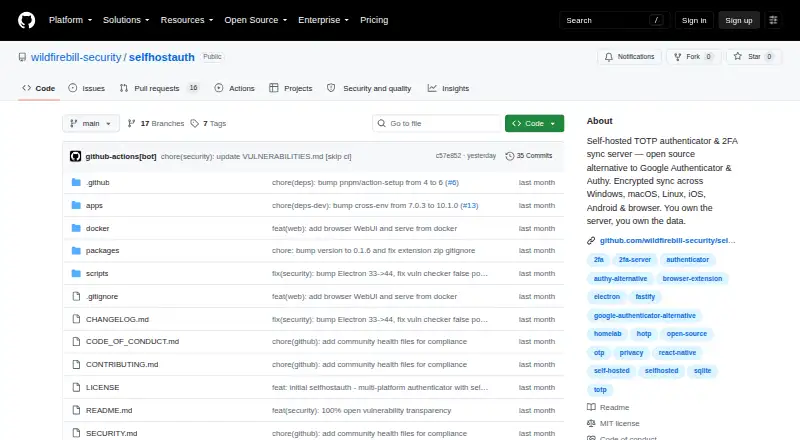
What SelfHostAuth is
SelfHostAuth is an open-source authenticator and sync server that you host yourself. It generates TOTP and HOTP codes, with support for RFC 4226 and RFC 6238, SHA-1, SHA-256 and SHA-512, 6–8 digit codes, and configurable periods. You can add accounts by scanning or entering a QR code, an otpauth:// URI, or a raw base32 secret. Its web, desktop, mobile and browser extension clients synchronize through revision-based push and pull; deletions propagate across devices. Clients keep a local vault and can calculate TOTP codes offline. The server encrypts vault items at rest with AES-256-GCM, hashes passwords with scrypt and session tokens with SHA-256, and supports optional TOTP account authentication. It runs on Node.js 22+ with SQLite and can be deployed using Docker Compose, systemd or directly on a server you manage. Clients are listed for Windows, macOS, Linux, iOS, Android and web, plus Chrome, Edge and Firefox extensions. It is free under the MIT license, with no hosted version.
Who it suits
It suits homelabbers, privacy advocates, teams that want a self-hosted OTP server, and people seeking an alternative to Google Authenticator or Authy. You must manage its server yourself.
What it does well
- Generates TOTP and HOTP codes across multiple standards.
- Clients support offline TOTP generation.
- Syncs account changes and deletions across devices.
- Free and MIT-licensed.
What to know first
- No hosted version is available.
- Requires managing a self-hosted server.
- No push approvals.
Limits
The free SelfHostAuth plan is open source and self-hosted only, with no hosted version. You must run and maintain the server yourself.
Plans
| Plan | Billed and limits | Price |
|---|---|---|
| SelfHostAuth | Open source · self-hosted only · no hosted version | Free |
As github.com lists them, read 9 Oct 2026. The maker's own page has the final word.
Getting started
- Open the SelfHostAuth GitHub website
- Prepare a server, NAS, Raspberry Pi, VPS, or other host with Node.js 22+ and SQLite
- Deploy the server with Docker Compose, systemd, or bare metal
- Put TLS behind a reverse proxy; HTTPS is required for mobile and browser-extension connections outside localhost
- Install or open a listed web, desktop, mobile, or browser-extension client
- Add accounts by scanning or pasting a QR code, otpauth:// URI, or base32 secret
Verdict
SelfHostAuth brings authenticator codes and cross-device sync to infrastructure you control, with offline code generation and several client options. It is a fit for people prepared to operate the server; there is no hosted option.
Questions
How much does SelfHostAuth cost?
The SelfHostAuth plan is free. It is an open-source, self-hosted-only plan.
Which platforms have clients?
Clients are listed for web, Windows, macOS, Linux, iOS, Android, Chrome, Edge, and Firefox extensions.
Can it work offline?
Clients cache the vault locally and can calculate TOTP codes without connecting to the server.
How is the server deployed?
The server uses Node.js 22+ and SQLite and can run with Docker Compose, systemd, or bare metal on a home server, NAS, Raspberry Pi, or VPS.
Is SelfHostAuth open source?
Yes. The repository is licensed under MIT.
Does it provide push approvals?
No. Push approvals are not supported.
Facts from SelfHostAuth's own pages
- Audience
- The README identifies homelabbers, privacy advocates, teams needing a self-hosted OTP server, and people seeking alternatives to Google Authenticator or Authy as its intended users. · github.com, 9 Oct 2026
- Availability limit
- The project says there is no hosted version and it is self-hosted only by design. · github.com, 9 Oct 2026
- Clients
- The project lists a web vault, Windows/macOS/Linux Electron desktop apps, iOS and Android apps, and Chrome/Edge/Firefox browser extensions. · github.com, 9 Oct 2026
- Code standards
- It supports RFC 4226 and RFC 6238, SHA-1, SHA-256, and SHA-512, 6–8 digits, and configurable periods. · github.com, 9 Oct 2026
- Code type
- totp and hotp · github.com, 21 Sept 2026
- Deployment
- The server uses Node.js 22+ and SQLite and can run with Docker Compose, systemd, or bare metal on a home server, NAS, Raspberry Pi, or VPS. · github.com, 9 Oct 2026
- Free plan
- Yes · github.com, 21 Sept 2026
- Imports
- Users can add accounts by scanning or pasting a QR code, an otpauth:// URI, or a raw base32 secret. · github.com, 9 Oct 2026
- Integrations
- It accepts otpauth:// imports and provides a typed TypeScript API client for its sync server. · github.com, 9 Oct 2026
- License
- The repository is licensed under MIT. · github.com, 9 Oct 2026
- Multi-device sync
- Yes · github.com, 21 Sept 2026
- Offline use
- Clients cache the vault locally and compute TOTP codes without connecting to the server. · github.com, 9 Oct 2026
- Purpose
- SelfHostAuth is an open-source, self-hosted TOTP/HOTP authenticator and sync server. · github.com, 9 Oct 2026
- Push approvals
- No · github.com, 21 Sept 2026
- Security
- The server encrypts vault items at rest with AES-256-GCM, hashes passwords with scrypt and session tokens with SHA-256, and supports optional account TOTP authentication. · github.com, 9 Oct 2026
- Security disclosures
- The vulnerability report last checked on 2026-09-28 lists one high and one medium finding, including a pnpm audit summary of 24 vulnerabilities. · github.com, 9 Oct 2026
- Supported platforms
- web,windows,macos,linux,ios,android,chrome_extension · github.com, 21 Sept 2026
- Support policy
- The security policy says maintainers aim to acknowledge vulnerability reports within three business days and ship a fix or mitigation within 30 days for high-severity issues. · github.com, 9 Oct 2026
- Sync
- Revision-based push/pull sync uses last-write-wins and tombstones so deleting a code on one device deletes it across devices. · github.com, 9 Oct 2026
- Transport
- The project says to use TLS through a reverse proxy; HTTPS is required for mobile apps and browser extensions when connecting outside localhost. · github.com, 9 Oct 2026
Where SelfHostAuth stands on Freedom251
- Authenticator apps#21 of 111