Freedom251 › Authenticator apps
TwoFac
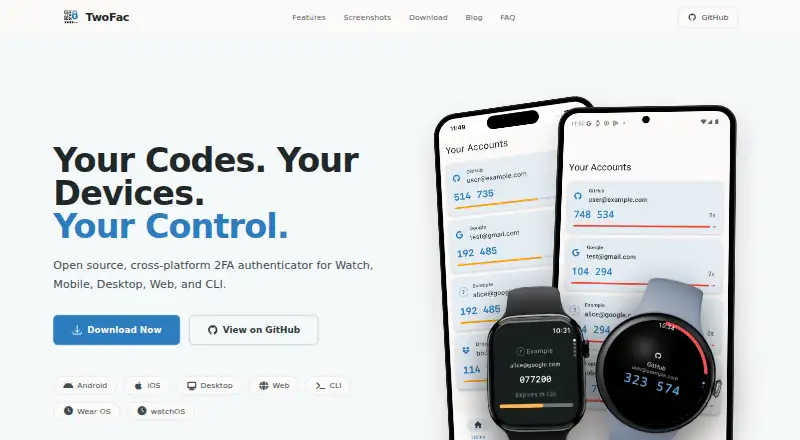
What TwoFac is
TwoFac is an open-source authenticator for generating one-time passwords for online accounts. It supports TOTP and HOTP, with TOTP codes generated on the device without an internet connection. Apps and tools are available for Android, iOS, macOS, Windows, Linux, the web, Chrome and Firefox, Wear OS, watchOS, and the command line. The source code is released under the MIT license and available on GitHub. TwoFac supports encrypted backups and multi-device sync; its maker says a passkey encrypts secrets and backups before storage or transfer. The app says it does not send personal data, usage statistics, or crash reports to a central server. Android and iOS apps support biometric authentication, while browser extensions support WebAuthn or passkeys. Wearable apps cache codes offline and sync accounts when connected. The CLI manages accounts, shows auto-refreshing codes, creates encrypted backups, and can pipe OTP codes into scripts. A free plan is listed as free, with no premium tiers or ads.
Who it suits
TwoFac suits people who want an authenticator across mobile, desktop, browser, web, wearable, or command-line environments. It may also suit users who want local TOTP generation, encrypted backups, or account imports from supported formats.
What it does well
- Generates both TOTP and HOTP codes.
- TOTP generation works offline on the device.
- Encrypted backups and multi-device sync are supported.
- Free plan with no ads or premium tiers.
- Imports accounts from several supported authenticator exports.
What to know first
- Hosted CLI installer supports macOS and Linux x86_64.
- Windows CLI binaries are separate direct downloads.
Limits
The free plan has no premium tiers. The hosted CLI installer supports macOS and Linux x86_64; Windows CLI binaries are provided separately as direct executable downloads.
Plans
| Plan | Billed and limits | Price |
|---|---|---|
| Free | No premium tiers · no ads · no tracking · use on as many devices as you like | Free |
As twofac.app lists them, read 9 Oct 2026. The maker's own page has the final word.
Getting started
- Visit https://twofac.app/.
- Choose an app or tool for a supported platform: Android, iOS, macOS, Windows, Linux, web, Chrome, Firefox, Wear OS, watchOS, or CLI.
- Import accounts from a supported Authy, 2FAS, Ente Auth, or Google Authenticator export if needed.
- Set up a passkey for encrypted secrets and backups.
Verdict
TwoFac combines offline code generation with broad platform support, encrypted backups, and a free plan. Check the CLI installation details if you use Windows.
Questions
How much does TwoFac cost?
The Free plan costs nothing.
Is there a free plan or trial?
TwoFac has a free plan and no free trial.
Which platforms does TwoFac support?
It supports Android, iOS, macOS, Windows, Linux, web, Chrome, Firefox, Wear OS, watchOS, and CLI.
Is TwoFac open source?
Yes. It is released under the MIT license, and its source code is available on GitHub.
Can TwoFac generate codes offline?
TOTP codes are generated locally on the device without an internet connection.
Can I import accounts from another authenticator?
TwoFac imports Authy and 2FAS JSON exports, Ente Auth otpauth URIs, and Google Authenticator QR exports.
Facts from TwoFac's own pages
- CLI
- The command-line tool can manage accounts, display auto-refreshing codes, create encrypted backups, and pipe OTP codes into scripts. · twofac.app, 9 Oct 2026
- Code type
- totp and hotp · twofac.app, 21 Sept 2026
- Cross-platform
- It offers native apps for mobile and desktop, a web app, browser extensions, command-line tools, and wearable companions. · twofac.app, 9 Oct 2026
- Device security
- Android and iOS apps support biometric authentication, and browser extensions support WebAuthn or passkeys. · twofac.app, 9 Oct 2026
- Encrypted backup
- Yes · twofac.app, 21 Sept 2026
- Encryption
- The maker says secrets and backups are encrypted with a passkey before storage or transmission, so only devices with that passkey can decrypt them. · twofac.app, 9 Oct 2026
- Free plan
- Yes · twofac.app, 21 Sept 2026
- Migration
- It imports accounts from Authy and 2FAS JSON exports, Ente Auth otpauth URIs, and Google Authenticator QR exports. · twofac.app, 9 Oct 2026
- Multi-device sync
- Yes · twofac.app, 21 Sept 2026
- Notable limit
- The hosted CLI installer supports macOS and Linux x86_64; Windows CLI binaries are provided separately as direct executable downloads. · twofac.app, 9 Oct 2026
- Offline codes
- TOTP code generation happens locally on the device and does not require an internet connection. · twofac.app, 9 Oct 2026
- Open source
- TwoFac is released under the MIT license, and its source code is available for review on GitHub. · twofac.app, 9 Oct 2026
- Privacy
- The app does not collect, store, or transmit personal data, usage statistics, or crash reports to a central server. · twofac.app, 9 Oct 2026
- Purpose
- TwoFac is an open-source authenticator that generates time-based one-time passwords (TOTP) for online accounts. · twofac.app, 9 Oct 2026
- Support
- The FAQ directs users to GitHub Discussions for questions, and the maker invites bug reports and contributions through GitHub. · twofac.app, 9 Oct 2026
- Supported platforms
- Android,iOS,macOS,Windows,Linux,Web,Chrome,Firefox,Wear OS,watchOS,CLI · twofac.app, 21 Sept 2026
- Wearables
- Wear OS and watchOS companion apps cache codes offline and sync accounts when the watch is connected. · twofac.app, 9 Oct 2026
Where TwoFac stands on Freedom251
- Authenticator apps#17 of 111