Freedom251 › Authenticator apps

2FAS Auth
What 2FAS Auth is
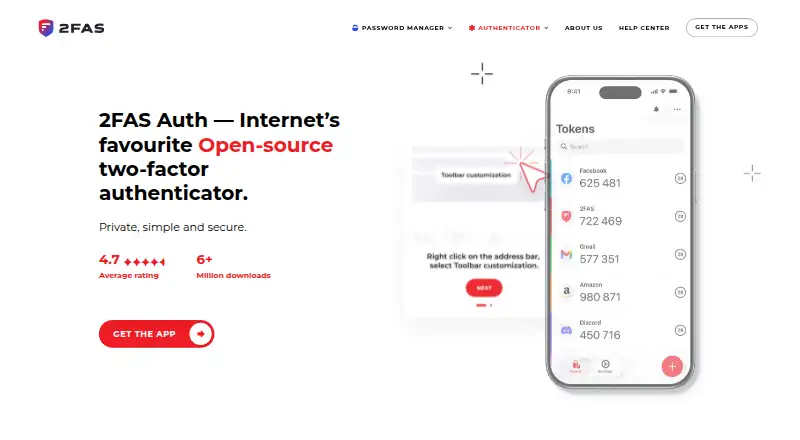
2FAS Auth is a free authenticator that generates two-factor authentication tokens for verifying identity when signing in to online accounts. It supports TOTP and HOTP codes, works offline, and can send push approval requests. Mobile apps are available for iOS and Android, and browser extensions are offered for Chrome, Brave, Firefox, Edge, Opera, and Safari. To connect an extension, pair it with the mobile app by scanning a QR code; token requests are confirmed in the app. Communication between the phone and browser extension is end-to-end encrypted, with no fallback to an unencrypted connection. Users can synchronize tokens with 2FAS export files, iCloud, or Google Drive, and encrypted backup is available. The app does not require an account, describes itself as anonymous, and says it does not use tracking codes. Its source code is open-source and can be reviewed by independent security experts. Support includes a Help Center and a dedicated Discord channel, and the app supports 16 languages. The download page lists iOS 18.6 or later and Android 9.0 or later. The maker is Two Factor Authentication Service, Inc., which lists an address in Henderson, Nevada. The free plan is supported by donations.
Who it suits
2FAS Auth suits people who want a free authenticator for online account sign-ins across a phone and supported browser extensions. It may also suit users who value offline access, open-source code, and token synchronization through export files, iCloud, or Google Drive.
What it does well
- Supports TOTP and HOTP codes and works offline.
- Mobile apps and extensions cover iOS, Android, Chrome, Brave, Firefox, Edge, Opera, and Safari.
- Extension communication is end-to-end encrypted with no unencrypted fallback.
- Encrypted backup and token synchronization are available.
- Open-source code can be reviewed by independent security experts.
- No account is required, and the app says it does not use tracking codes.
What to know first
- The mobile apps require iOS 18.6 or later, or Android 9.0 or later.
- Browser extensions must be paired with the mobile app using a QR code.
- The free project is supported by donations.
Plans
| Plan | Billed and limits | Price |
|---|---|---|
| 2FAS Auth | Free to use; donations support the project. · Open-source authenticator · works offline | Free |
As 2fas.com lists them, read 3 Oct 2026. The maker's own page has the final word.
Getting started
- Visit https://2fas.com/auth/.
- Download the mobile app for iOS 18.6 or later, or Android 9.0 or later.
- Install the browser extension for Chrome, Brave, Firefox, Edge, Opera, or Safari if needed.
- Pair the extension with the mobile app by scanning its QR code.
- Confirm token requests in the app.
- Synchronize tokens with 2FAS export files, iCloud, or Google Drive if desired.
Verdict
Choose 2FAS Auth if you want a free, open-source authenticator that works offline and connects to supported browser extensions. Its setup depends on a compatible mobile app for pairing and confirming extension token requests.
Questions
How much does 2FAS Auth cost?
The 2FAS Auth plan is listed as free. Donations support the project.
Does it offer a free trial?
No. The listing says there is no free trial; the app itself is free to use.
Which platforms does it support?
Mobile apps are available for iOS and Android. Browser extensions are available for Chrome, Brave, Firefox, Edge, Opera, and Safari.
Does it work offline?
Yes. 2FAS Auth works offline.
Is 2FAS Auth open-source?
Yes. Its source code is open-source and can be reviewed by independent security experts.
Who makes 2FAS Auth?
The maker is Two Factor Authentication Service, Inc., which lists an address in Henderson, Nevada.
Facts from 2FAS Auth's own pages
- Browser support
- The browser extension is offered for Chrome, Brave, Firefox, Edge, Opera, and Safari. · 2fas.com, 3 Oct 2026
- Code type
- totp and hotp · 2fas.com, 21 Sept 2026
- Encrypted backup
- Yes · 2fas.com, 21 Sept 2026
- Encryption
- Communication between the mobile device and browser extension is end-to-end encrypted, with no fallback to unencrypted connections. · 2fas.com, 3 Oct 2026
- Extension workflow
- Users pair the extension with the mobile app by scanning a QR code, then confirm token requests in the app. · 2fas.com, 3 Oct 2026
- Free plan
- Yes · 2fas.com, 21 Sept 2026
- History
- The about page says Mark founded 2FAS in 2015 and 2FAS Auth launched in 2017. · 2fas.com, 3 Oct 2026
- Languages
- The app supports 16 languages. · 2fas.com, 3 Oct 2026
- Maker
- The maker is Two Factor Authentication Service, Inc., which lists an address in Henderson, Nevada. · 2fas.com, 3 Oct 2026
- Mobile requirements
- The download page lists iOS 18.6 or later and Android 9.0 or later for the authenticator mobile apps. · 2fas.com, 3 Oct 2026
- Multi-device sync
- Yes · 2fas.com, 21 Sept 2026
- Offline use
- The app works offline. · 2fas.com, 3 Oct 2026
- Privacy
- The app is anonymous and does not require an account to use. · 2fas.com, 3 Oct 2026
- Purpose
- 2FAS Auth generates two-factor authentication tokens to help users verify their identity when signing in to online accounts. · 2fas.com, 3 Oct 2026
- Push approvals
- Yes · 2fas.com, 21 Sept 2026
- Source code
- 2FAS Auth is open-source, and its security features can be reviewed by independent security experts. · 2fas.com, 3 Oct 2026
- Support
- 2FAS Auth offers a Help Center and a dedicated support channel on Discord. · 2fas.com, 3 Oct 2026
- Supported platforms
- iOS,Android,Chrome,Brave,Firefox,Edge,Opera,Safari · 2fas.com, 21 Sept 2026
- Token sync
- Users can synchronize tokens with 2FAS export files, iCloud, or Google Drive. · 2fas.com, 3 Oct 2026
- Tracking
- 2FAS says it does not use tracking codes. · 2fas.com, 3 Oct 2026
Where 2FAS Auth stands on Freedom251
- Authenticator apps#16 of 111