Freedom251 › Authenticator apps

Open Authenticator
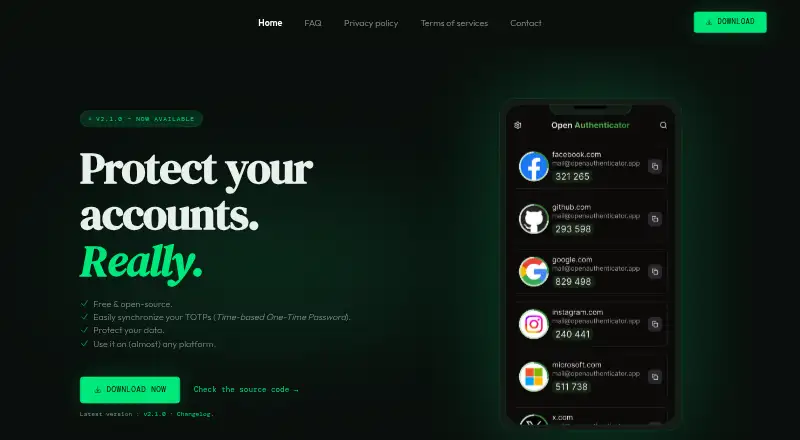
What Open Authenticator is
Open Authenticator is a TOTP manager for adding two-factor authentication to accounts. It works with services that support this method, including Google, GitHub, and Discord. The app synchronizes codes across Android, iOS, macOS, Windows, and Linux, and encrypted backups are supported. Data is encrypted before transmission with a key derived from a master password.
The app is free and open source under the GNU GPL v3 license. Its maker says there are no ads, tracking, or data collection, and translations are contributed by the community. The backend can be self-hosted; doing so requires a Node.js environment, pnpm, a compatible database, and compatible storage. Email and key-value storage are optional. The backend repository says that component is still in development.
The Free plan costs nothing and covers five supported platforms. Backend configuration documents Google, Apple, GitHub, Microsoft, and email as configurable sign-in providers. Its default settings allow six TOTPs for regular users and 100 for contributor users.
Who it suits
Open Authenticator suits people who want a free, open-source TOTP manager across desktop and mobile platforms. It may also suit technically equipped users who want to self-host its backend, provided they can meet the stated environment and storage requirements.
What it does well
- Works with two-factor services including Google, GitHub, and Discord.
- Synchronizes TOTPs across five supported platforms.
- Encrypts data before transmission using a master-password-derived key.
- Source code is public under the GNU GPL v3 license.
- Maker says it has no ads, tracking, or data collection.
- Community contributors provide translations.
What to know first
- The backend is still in development.
- Self-hosting requires Node.js, pnpm, a compatible database, and compatible storage.
- The default regular-user configuration limits regular users to six TOTPs.
Limits
The default backend configuration allows six TOTPs for regular users and 100 for contributor users. Self-hosting requires Node.js, pnpm, a compatible database, and compatible storage; email and key-value storage are optional.
Plans
| Plan | Billed and limits | Price |
|---|---|---|
| Free | Free and open-source · five supported platforms | Free |
As openauthenticator.app lists them, read 9 Oct 2026. The maker's own page has the final word.
Getting started
- Visit https://openauthenticator.app/.
- Choose a supported platform: Android, iOS, macOS, Windows, or Linux.
- For self-hosting, prepare a Node.js environment, pnpm, a compatible database, and compatible storage.
Verdict
Choose Open Authenticator if you want a free, open-source TOTP manager with syncing across mobile and desktop platforms. Look elsewhere if you need a backend that is not still in development or more than six TOTPs under the default regular-user configuration.
Questions
Is Open Authenticator free?
Yes. Its Free plan costs nothing and is described as free and open source.
Which platforms does it support?
The app supports Android, iOS, macOS, Windows, and Linux.
Is Open Authenticator open source?
Yes. Its source code is public under the GNU GPL v3 license.
Can I self-host its backend?
Yes. Self-hosting requires Node.js, pnpm, a compatible database, and compatible storage. Email and key-value storage are optional, and the backend is still in development.
Which sign-in providers can the backend be configured to use?
Its backend configuration documents Google, Apple, GitHub, Microsoft, and email as configurable providers.
What are the default TOTP limits?
The backend configuration sets a default limit of six TOTPs for regular users and 100 for contributor users.
Facts from Open Authenticator's own pages
- Backend development
- The backend repository says the backend is still in development. · github.com, 9 Oct 2026
- Backend sign-in
- The backend documents Google, Apple, GitHub, Microsoft, and email as configurable authentication providers. · github.com, 9 Oct 2026
- Code type
- totp · openauthenticator.app, 21 Sept 2026
- Compatibility
- It works with services that support two-factor authentication, including Google, GitHub, and Discord. · openauthenticator.app, 9 Oct 2026
- Encrypted backup
- Yes · openauthenticator.app, 21 Sept 2026
- Encryption
- Data is encrypted before transmission using a key derived from a master password. · openauthenticator.app, 9 Oct 2026
- Free plan
- Yes · openauthenticator.app, 21 Sept 2026
- License
- The source code is public under the GNU GPL v3 license. · openauthenticator.app, 9 Oct 2026
- Multi-device sync
- Yes · openauthenticator.app, 21 Sept 2026
- Platforms
- The maker lists Android, iOS, macOS, Windows, and Linux as supported platforms. · openauthenticator.app, 9 Oct 2026
- Privacy
- The maker says the app has no ads, tracking, or data collection. · openauthenticator.app, 9 Oct 2026
- Purpose
- Open Authenticator is a cross-platform TOTP manager for protecting accounts with two-factor authentication. · openauthenticator.app, 9 Oct 2026
- Self-hosting requirements
- Self-hosting requires a Node.js environment, pnpm, a compatible database, and compatible storage; email and key-value storage are optional. · github.com, 9 Oct 2026
- Supported platforms
- Android,iOS,macOS,Windows,Linux · openauthenticator.app, 21 Sept 2026
- Sync
- The app synchronizes TOTPs across devices, and its backend can be self-hosted. · openauthenticator.app, 9 Oct 2026
- TOTP limit
- The backend configuration documents a default limit of six TOTPs for regular users and 100 for contributor users. · github.com, 9 Oct 2026
- Translations
- The app is multilingual, with translations contributed by the community. · openauthenticator.app, 9 Oct 2026
Where Open Authenticator stands on Freedom251
- Authenticator apps#18 of 111