Freedom251 › Screen Recording Software
Screen Record
What Screen Record is
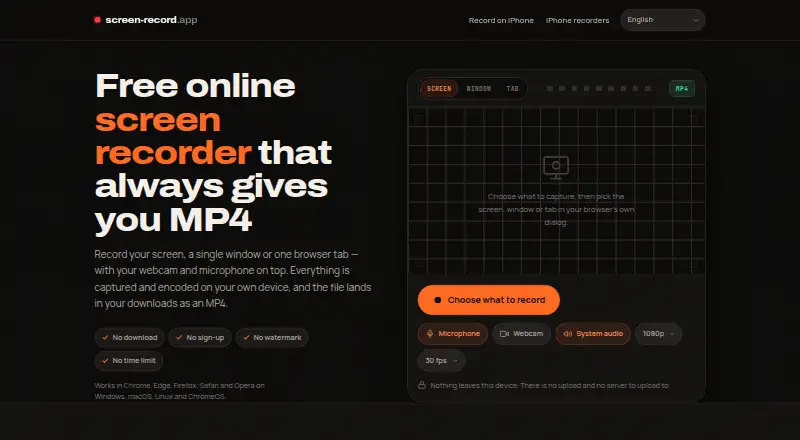
Screen Record captures a screen, app window, or browser tab on the web, Windows, macOS, and Linux. Recordings can include a webcam and microphone, and supported browsers can also capture system audio. Video quality reaches 1440p at 60 fps. Users can pause and resume; the paused interval is removed from the finished recording. Capture and encoding happen in the browser, and the maker says recordings are not uploaded to a server. After the page loads, the recorder works offline. It produces H.264 MP4 with AAC audio where supported, while desktop Firefox produces WebM. Chrome, Edge, and Opera can capture system audio; Safari and Firefox can record microphone audio but not system audio. The optional circular webcam bubble is composited into the video and cannot be moved afterward. There is no imposed time or export limit, although recording length can depend on available RAM and disk. The tool has no video editor, and the web recorder cannot capture iOS or Android device screens. The plan is free.
Who it suits
It may suit people recording tutorials, bug reports, product demos, study notes, or support answers on a desktop or in a browser. It is less suitable for recording mobile-device screens or editing videos within the recorder.
What it does well
- Free plan with no signup or watermark.
- Records up to 1440p at 60 fps.
- Can pause and resume recordings.
- Browser capture works offline after the page loads.
- No imposed recording-time or export limit.
What to know first
- Recording length depends on available memory and disk.
- Safari and Firefox cannot capture system audio.
- Web recorder cannot capture iOS or Android screens.
- Video editing is not included.
Limits
There is no imposed recording-time or export limit, but recordings are held in memory and available RAM and disk can constrain length. The tool has no video-editing functions, and the web recorder cannot capture iOS or Android screens.
Plans
| Plan | Billed and limits | Price |
|---|---|---|
| Free online screen recorder | No signup · no watermark · no imposed time limit or export limit · recording length depends on device memory and disk | Free |
As screen-record.app lists them, read 11 Oct 2026. The maker's own page has the final word.
Getting started
- Open https://screen-record.app/ in a supported browser or use Linux, macOS, or Windows
- Load the page before recording if you need offline use afterward
- Choose a screen, application window, or browser tab to capture
- Enable webcam, microphone, or supported system-audio capture as needed
- Start recording and pause or resume when required
- Save the finished recording locally as the available output format
Verdict
Screen Record offers free browser and desktop capture with webcam and audio options, subject to browser support. Consider its memory limits, lack of editing, and mobile-screen restriction before choosing it.
Questions
How much does Screen Record cost?
Screen Record has a free plan priced at $0. The plan requires no signup and has no watermark.
Which platforms are supported?
It is available on the web, Linux, macOS, and Windows.
Can it record system audio?
Chrome, Edge, and Opera can capture system audio. Safari and Firefox can record microphone audio but not system audio.
What file formats does it create?
It produces H.264 MP4 with AAC audio where supported. Desktop Firefox produces WebM.
Can I edit recordings in Screen Record?
No. The tool does not include video editing; exported MP4 files can be edited in another editor.
Can it record a phone screen?
The web recorder cannot capture iOS or Android device screens.
Facts from Screen Record's own pages
- Audio support
- Chrome, Edge, and Opera can capture system audio; Safari and Firefox can record microphone audio but not system audio. · screen-record.app, 11 Oct 2026
- Free plan
- Yes · screen-record.app, 21 Sept 2026
- Integrations
- The maker says the MP4 can be uploaded to YouTube, Slack, WhatsApp, and Google Drive without conversion. · screen-record.app, 11 Oct 2026
- Local processing
- The site says capture and encoding happen in the browser and the recording is not uploaded to a server. · screen-record.app, 11 Oct 2026
- Microphone recording
- Yes · screen-record.app, 21 Sept 2026
- Mobile limitation
- The web recorder cannot capture an iOS or Android device screen; the page points users to the built-in mobile screen recorders. · screen-record.app, 11 Oct 2026
- No editing
- The tool does not include video editing; the maker suggests editing the exported MP4 in another editor. · screen-record.app, 11 Oct 2026
- Offline use
- The recorder works offline after the page has loaded. · screen-record.app, 11 Oct 2026
- Output format
- The recorder produces H.264 MP4 with AAC audio where supported, while desktop Firefox produces WebM. · screen-record.app, 11 Oct 2026
- Pause and resume
- Recordings can be paused and resumed, with the paused span removed from the finished video. · screen-record.app, 11 Oct 2026
- Supported platforms
- web,windows,macos,linux · screen-record.app, 21 Sept 2026
- Recording length limit
- There is no imposed time limit, but recordings are held in memory and may be constrained by available RAM and disk. · screen-record.app, 11 Oct 2026
- System audio
- Yes · screen-record.app, 21 Sept 2026
- Video quality
- Offers recording up to 1440p at 60 fps. · screen-record.app, 11 Oct 2026
- Webcam overlay
- An optional circular webcam bubble is composited into the video and cannot be moved afterward. · screen-record.app, 11 Oct 2026
- Webcam recording
- Yes · screen-record.app, 21 Sept 2026
- What it does
- Records a screen, app window, or browser tab with optional webcam and microphone, then saves the recording locally. · screen-record.app, 11 Oct 2026
- Who it is for
- The maker describes use for bug reports, tutorials, product demos, design feedback, study notes, browser gameplay, onboarding, and support answers. · screen-record.app, 11 Oct 2026
Where Screen Record stands on Freedom251
- Screen Recording Software#23 of 131