Freedom251 › Screen Recording Software
Free Screen Recorder
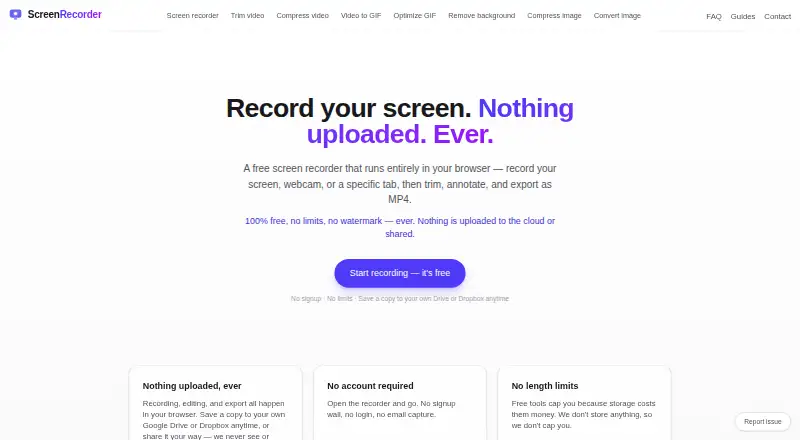
What Free Screen Recorder is
Free Screen Recorder records a screen, webcam, or browser tab in the browser, then provides tools to trim, annotate, and export the recording. Capture options include the full screen, a window, a tab, a selected area, or webcam-only video. Users can combine microphone narration with tab or system audio, and the recorder includes noise reduction and a mute control. Editing tools cut clips, remove mistakes, and add titles, callout boxes, annotations, or emoji. Exports are MP4 up to 1440p, with a vertical 9:16 option; Chrome and Edge support MP4 output, while Firefox works with WebM. Recording, editing, and exporting happen in the browser, and recordings are not uploaded to or stored on the maker’s servers. Optional live captions use browser speech recognition for microphone audio and start turned off. The free plan costs nothing, with no stated recording time limit and no paid tier listed. The service runs on web, Windows, macOS, and Linux, but is desktop-only; recording duration depends on device memory.
Who it suits
It suits desktop users who want browser-based screen or webcam capture, editing, and export, particularly those who want recordings kept off the maker’s servers. It is not for mobile-browser recording.
What it does well
- Captures screens, browser tabs, windows, areas, or webcams.
- Combines microphone audio with tab or system audio.
- Exports up to 1440p with a vertical 9:16 option.
- Recordings stay off the maker’s servers.
What to know first
- Mobile browsers are not supported for recording.
- Recording duration depends on device memory.
- Firefox output is WebM rather than MP4.
Limits
The service is desktop-only because mobile browsers lack the required screen-capture APIs. Recording length depends on device memory, and Firefox uses WebM output instead of MP4.
Plans
| Plan | Billed and limits | Price |
|---|---|---|
| Free | No signup · no recording time limit · no watermark · MP4 export up to 1440p | Free |
As thefreescreenrecorder.com lists them, read 11 Oct 2026. The maker's own page has the final word.
Getting started
- Open the Free Screen Recorder website in a desktop browser.
- Choose the screen, window, tab, area, or webcam capture mode.
- Select microphone and system or tab audio options.
- Record and edit the clip in the browser.
- Export as MP4 or vertical 9:16 video, or save to Google Drive or Dropbox.
Verdict
Free Screen Recorder combines browser capture with basic editing and export, and its recordings remain on the user’s device rather than the maker’s servers. Desktop-only use and device-memory limits are important constraints to consider.
Questions
What does the free plan cost?
The Free plan costs nothing and has no stated recording time limit. No paid tier is stated.
Which platforms and browsers are supported?
It supports web, Windows, macOS, and Linux on desktop. Chrome and Edge support MP4 output, while Firefox supports WebM.
Can it record webcam and audio?
Yes. It can capture webcam video and mix microphone narration with tab or system audio, with noise reduction and mute controls.
Are recordings stored on the maker’s servers?
No. Recording, editing, and export occur in the browser, and recordings are not uploaded to or stored on the maker’s servers.
Can I save recordings to cloud storage?
You can save a copy directly from the browser to your own Google Drive or Dropbox account.
Does it provide captions?
Opt-in live captions use browser speech recognition to process microphone audio, and the feature is off by default.
Facts from Free Screen Recorder's own pages
- Analytics and ads
- Google Analytics runs only after consent, and the site may show Google AdSense ads that use cookies. · thefreescreenrecorder.com, 11 Oct 2026
- Audio
- The recorder can mix microphone narration with tab or system audio and includes noise reduction and a mute button. · thefreescreenrecorder.com, 11 Oct 2026
- Browser support
- Chrome and Edge support MP4 output, while Firefox works with WebM output. · thefreescreenrecorder.com, 11 Oct 2026
- Caption privacy
- Opt-in live captions use browser speech recognition to process microphone audio, and this feature is off by default. · thefreescreenrecorder.com, 11 Oct 2026
- Capture options
- Users can capture the entire screen, a window, a browser tab, a selected area, or webcam only. · thefreescreenrecorder.com, 11 Oct 2026
- Device limits
- It is desktop-only because mobile browsers do not provide the screen capture APIs it needs; recording duration is limited by device memory. · thefreescreenrecorder.com, 11 Oct 2026
- Editing
- The editor supports cutting clips, deleting mistakes, and adding titles, callout boxes, annotations, and emoji. · thefreescreenrecorder.com, 11 Oct 2026
- Export
- It exports MP4 at up to 1440p and can create a vertical 9:16 video for Shorts, Reels, or TikTok. · thefreescreenrecorder.com, 11 Oct 2026
- Free plan
- Yes · thefreescreenrecorder.com, 22 Sept 2026
- Integrations
- Users can save a copy directly from the browser to their own Google Drive or Dropbox account. · thefreescreenrecorder.com, 11 Oct 2026
- Intended users
- The maker describes it as an alternative to Loom or Screencastify for people who want recordings to stay off third-party servers. · thefreescreenrecorder.com, 11 Oct 2026
- Microphone recording
- Yes · thefreescreenrecorder.com, 22 Sept 2026
- Supported platforms
- web,Windows,macOS,Linux · thefreescreenrecorder.com, 22 Sept 2026
- Recording privacy
- Recording, editing, and export happen in the browser, and recordings are not uploaded to or stored on the maker’s servers. · thefreescreenrecorder.com, 11 Oct 2026
- Support
- The maker accepts questions and feedback at [email protected], and bug reports may attach diagnostics but not recordings. · thefreescreenrecorder.com, 11 Oct 2026
- System audio
- Yes · thefreescreenrecorder.com, 22 Sept 2026
- Maximum video quality
- 1440p · thefreescreenrecorder.com, 22 Sept 2026
- Webcam recording
- Yes · thefreescreenrecorder.com, 22 Sept 2026
- What it does
- Records a screen, webcam, or browser tab in the browser, then lets users trim, annotate, and export recordings. · thefreescreenrecorder.com, 11 Oct 2026
Where Free Screen Recorder stands on Freedom251
- Screen Recording Software#22 of 132